


If you have ever opened PowerPoint, stared at a blank slide, and then lost the next two hours nudging text boxes and re-aligning arrows instead of actually sharpening your message, you already understand the problem Beautiful.ai was built to solve. Beautiful.ai is an AI-powered presentation maker whose core idea is deceptively simple: the software handles the design while you focus on the story. Its patented Smart Slides automatically adjust spacing, alignment, typography, and layout the moment you add or remove content, so every slide stays presentation-ready without a single manual tweak — and its newer “Create with AI” workflow can take you from a rough prompt to a structured, on-brand draft in minutes. With paid plans starting around $12 per month on annual billing, AI tools powered by Anthropic running natively inside the platform, and a presentation-software market that analysts size at roughly $8.6 billion in 2026 and project to reach over $21 billion by 2033 — with the AI-presentation slice alone growing from about $2 billion in 2025 toward an estimated $10 billion by 2033 — Beautiful.ai sits squarely in one of the fastest-moving corners of the productivity world.
For consultants, freelancers, sales and marketing teams, founders building pitch decks, and any non-designer who simply needs professional slides without learning design, the value proposition is immediate: most users report cutting deck-creation time by 50–75% compared to building the same thing by hand. But it is not the right tool for everyone, and the cons are real. This 2026 review walks through Beautiful.ai’s entire offering — Smart Slides and the Create with AI engine, the full feature set, current pricing across every tier, honest head-to-head comparisons with Gamma, Canva and PowerPoint, the limitations worth knowing before you pay, and exactly who should (and shouldn’t) sign up.
Beautiful.ai Review 2026: The Smart-Slides Presentation Maker That Designs Professional Decks While You Focus on the Story
Overview and Background

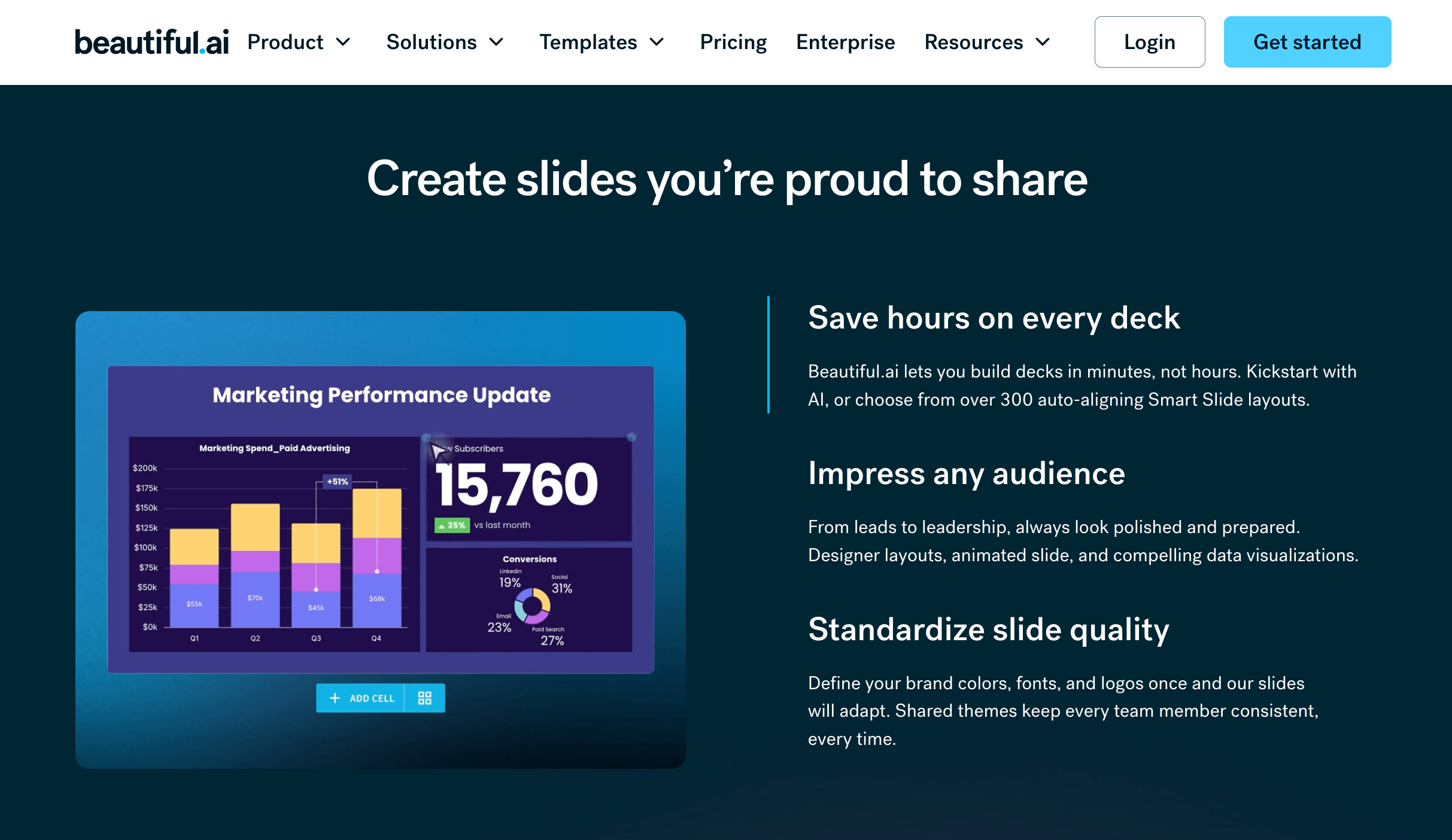
Beautiful.ai is a cloud-based presentation platform built around a single insight: most people are not designers, and they should not have to be to produce a clean, professional deck. Rather than starting you on an empty canvas, the app starts you on Smart Slides — intelligent layouts that automatically align, resize, space, and animate themselves as you edit. Add a sixth team photo and the grid reflows on its own; add a fourth bullet and the type resizes to keep everything readable. The result is a deck that is faster to build, easier to keep updated, and reliably on-brand even without a design hand on the project.
The company has been a recognizable name in the AI-presentation category for years and is consistently listed alongside the major players in the space — Canva, Prezi, Microsoft, Google, Gamma and Tome among them. Its AI tools run natively inside the editor (the platform notes they are powered by Anthropic), so there is no app-hopping between a writing tool and a design tool. The most significant development in the company’s history landed in March 2026: a context-aware “Create with AI” workflow that generates a written outline before it designs any slides — a direct answer to the most common frustration with one-shot AI generators, where the AI races ahead and flattens your narrative. Beautiful.ai has also raised growth capital (a reported $45M round led by General Catalyst) and in 2026 added a developer API, expanded to 15 languages, and shipped a custom ChatGPT integration, signaling continued investment rather than a tool coasting on an early lead.
It is worth being clear about what kind of tool this is. Beautiful.ai is, at its heart, a design-automation platform with AI layered on top — not a research engine that writes a polished, strategically sharp script for you. That distinction shapes everything below, including who will love it and who will feel constrained.
Why Beautiful.ai Stands Out in 2026
The best auto-layout engine in the category: Smart Slides is Beautiful.ai’s patented technology, and on the single job of keeping a deck consistently formatted it remains the strongest in the market — reviewers repeatedly say nothing else produces this level of polished output with so little manual effort. Every slide type, from timelines to comparisons to team grids, carries built-in layout intelligence that repositions and resizes elements as content changes, eliminating the tedious box-nudging that eats hours in PowerPoint.
Create with AI keeps you in control of the narrative: The 2026 context-aware workflow is the headline upgrade. You begin by picking a theme so everything is on-brand from the start, then prompt a topic, paste an outline, or add source material; the AI builds a slide-by-slide outline you can review and refine before any design happens. A chat-style interface lets you iterate without losing context, which solves the “the AI ran ahead and ruined my story” problem that plagues most one-shot generators.
No credits, no caps: Unlike credit-metered rivals, Beautiful.ai does not use an AI credit system. All paid plans include unlimited AI content generation — the writing assistant, DesignerBot deck generation, AI image creation, and language tools — so you never have to ration prompts or watch a meter while you build.
Brand control that scales: Set your colors, fonts, logos, and layout rules once with Themes and Brand Control, and every new deck inherits them automatically. On Team and Enterprise tiers you can lock design elements, share branded templates, and manage editing permissions so a 50-person organization still ships slides that look like they came from one designer.
Built-in viewer analytics: Share a deck by secure link and Beautiful.ai tracks who opened it, which slides they lingered on, and how long they spent — a genuinely useful feedback loop for sales and marketing teams that traditional tools simply do not offer, and a signal of when to follow up.
Native AI, no app-hopping: Because the AI tools live inside the editor (powered by Anthropic) rather than in a separate window, drafting, rewriting, summarizing, and generating images all happen without breaking your flow — and a custom ChatGPT GPT lets you ideate content and push it straight into a deck.
Real, measurable time savings: The whole platform is engineered to remove friction from deck creation, and the payoff is consistent across user reviews: most report cutting design time by 50–75%, and many cut total deck-creation time by 70% or more versus building the same slides manually. For anyone who makes presentations regularly, that compounds fast.
Key Features and Technology
Beautiful.ai’s catalog of features maps cleanly onto the journey from blank idea to delivered, tracked presentation. Here is how the platform breaks down.
Smart Slides — Design Intelligence That Automates Polish
This is the feature that justifies the product. Smart Slides automatically handle spacing, alignment, typography, and visual hierarchy as you add, edit, or remove content, so you can skip formatting entirely and stay focused on the message. There is a library of several hundred Smart Slide layouts covering virtually every business need — pitch decks, QBRs, marketing campaigns, product roadmaps, training modules, lectures — and you can click between layouts for the same copy to find the version that tells your story with the most clarity, all while your exact text and numbers are preserved. Built-in chart and data visualizations match your deck’s design automatically. The trade-off of this opinionated system is covered honestly in the limitations below.
Create with AI and DesignerBot — From Prompt to Draft
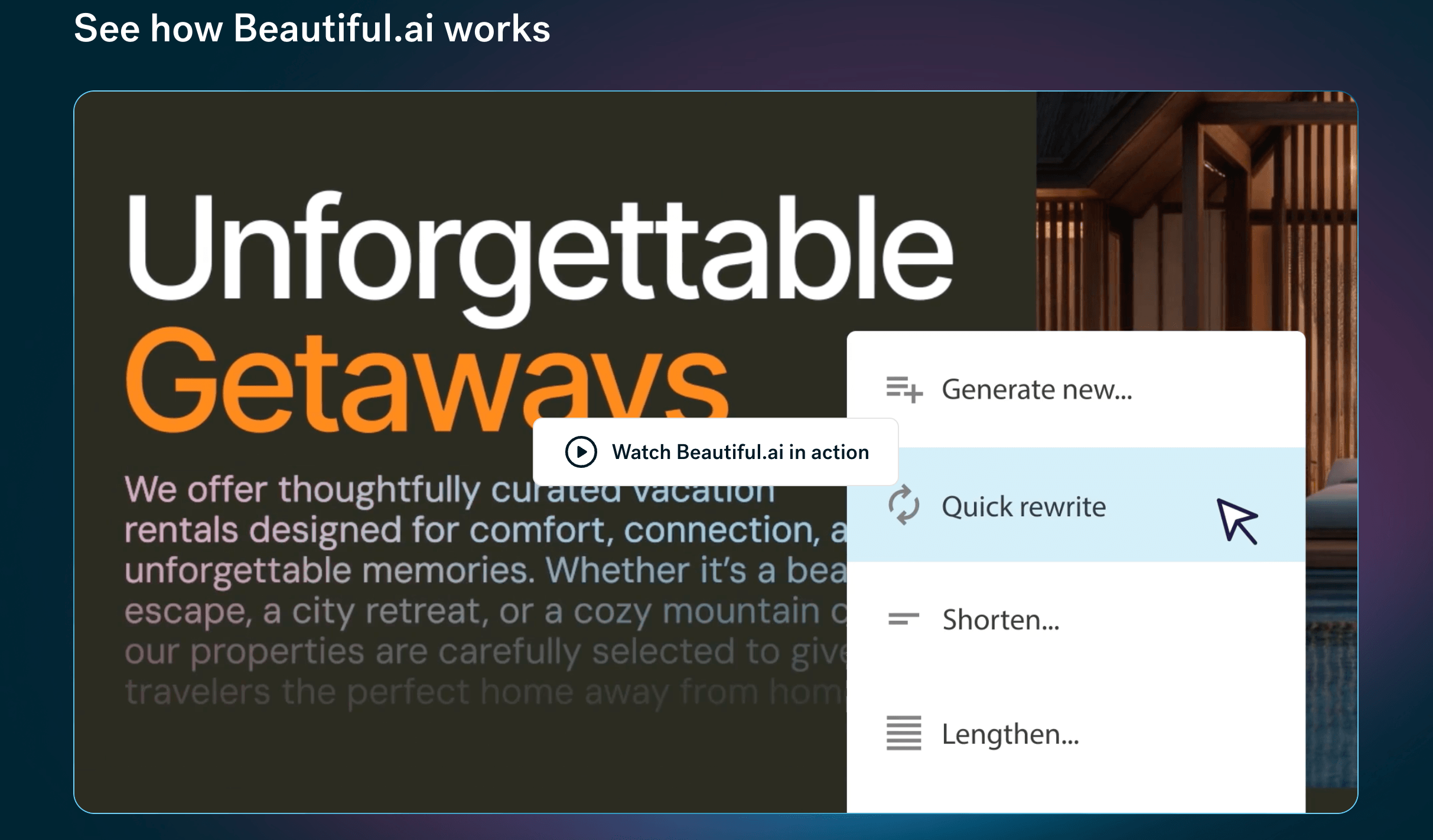
Create with AI is the guided 2026 workflow: choose a theme, image source, language, and a consistent AI image style up front, then review and refine an outline before generating slides, then explore multiple Smart Slide layouts for each section. DesignerBot, the underlying generator, can build a full deck from a text prompt, an uploaded document, or a URL. The honest take from testers: the design output is excellent, but the written content tends to be generic — DesignerBot structures slides well but does not produce strategically sharp messaging, so plan to bring your own copy and let Beautiful.ai make it beautiful.
Brand Control, Themes & Collaboration
Themes let you define brand fonts, colors, logos, icons, and backgrounds once and apply them everywhere. On Team and Enterprise plans you unlock the collaboration layer: real-time co-editing, slide-level comments, progress tracking, shared content libraries, version history, locked themes, and user permissions — the controls that keep large teams consistent at scale. Note that collaboration is genuinely a team-tier feature; the individual Pro plan is built for solo use.
Sharing, Analytics, Export & Integrations
You can present live in-browser, share a secure link for async viewing, or embed a deck on a website, with Viewer Analytics tracking engagement throughout. Exports cover PowerPoint (PPT and PPTX), PDF, Google Slides, and JPEG, and a desktop player lets you present downloaded decks offline. Integrations are deliberately focused: Slack for notifications and comments, a PowerPoint add-in, Webex for presenting, Salesforce for per-slide sales analytics, Monday.com embedding, and the ChatGPT custom GPT. The new developer API opens up custom automation. The gaps are worth flagging — there is no native Zoom, Google Drive, Dropbox, OneDrive, Figma, or Notion integration.
Pricing, Plans, and Package Structure
Beautiful.ai is a subscription product, and the pricing has one quirk you must understand before committing: the gap between annual and monthly billing is steep. The headline $12/month Pro rate is an annual price; the same plan billed monthly is roughly $45/month — close to four times as much. Every path in begins with a 14-day free trial that requires a credit card and renews automatically. Plans below are current 2026 figures, but promotions and plan structures change, so confirm the live price on Beautiful.ai’s pricing page before you buy.
| Plan | Approx. Price | What You Get | Best For |
|---|---|---|---|
| Pro | $12/mo annual (~$45/mo monthly) |
Unlimited AI decks, Smart Slides, AI text & image, stock media, PPT/PDF export — individual use | Consultants, freelancers, and solo professionals |
| Team | $40/user/mo annual (~$50/user/mo monthly) |
Everything in Pro plus real-time collaboration, shared libraries, brand control, analytics, admin tools (2–20 seats) | Small businesses and growing teams |
| Single Presentation | ~$45 (one-off) | Full access to build one deck, cancel anytime — no ongoing subscription | One-time projects (a single pitch or interview deck) |
| SMB Flat Plans | ~$6,000–$12,000/yr flat | Flat-rate company-wide access (reported ~50 or ~100 seats) without per-seat math | Smaller organizations wanting whole-team access |
| Enterprise | Custom | Everything in Team plus SSO, user provisioning, audit logs, configurable guardrails, priority support, dedicated onboarding | Organizations of 20+ needing security and governance |
How Beautiful.ai Compares to Alternatives
| Factor | Beautiful.ai | Gamma | Canva | PowerPoint + Copilot |
|---|---|---|---|---|
| Core strength | Auto-layout design polish | Fast one-shot generation | Template & asset breadth | Native .pptx + enterprise standard |
| AI deck generation | Outline-first, design-led | Strongest first draft | Good, template-driven | Native in-app (M365) |
| Free plan | No (14-day trial only) | Yes (credit-limited) | Yes (generous) | No (M365 required) |
| Brand consistency | Excellent (locked themes) | Good | Good (Brand Kit) | Manual |
| PPTX export fidelity | Works; known quirks | Works; imperfect | Works; imperfect | Native (perfect) |
| Entry price | $12/mo annual | Free; ~$10/mo Plus | Free; ~$15/mo Pro | M365 subscription |
| Best for | On-brand business decks, fast | Speed and content drafts | Marketers, visual variety | Microsoft-bound enterprises |
vs. Gamma: Gamma is the speed champion — describe a topic and you get a complete first draft, layout and images included, in roughly 30 seconds, and it offers a real free tier. But that speed comes with a consistency trade-off: the generated copy can feel formulaic and the AI sometimes picks images that miss the slide’s point. Beautiful.ai is the opposite philosophy — slower and more deliberate, but with stronger design discipline and brand control. If you want the AI to write your deck for you, Gamma (or Tome) is the better starting point; if you already know what to say and want it to look unmistakably professional and on-brand, Beautiful.ai pulls ahead.
vs. Canva: Canva wins on sheer breadth — thousands of templates, a vast asset and stock library, basic AI features, and a strong free plan make it the most flexible option for creative and marketing visuals. Beautiful.ai trades that breadth for guardrails: its smaller, opinionated layout system is what guarantees a clean, consistent result without design skill. Choose Canva when you want maximum visual freedom and variety; choose Beautiful.ai when you want a deck that is hard to make look bad, with brand rules enforced automatically.
vs. PowerPoint + Copilot: For organizations already standardized on Microsoft 365, PowerPoint with Copilot is the path of least resistance — native .pptx with no export step, deep formatting precision, offline editing, and AI generation inside the familiar app. Its weaknesses are the flip side of its power: it demands more manual design work and does not enforce consistency the way Smart Slides do. Beautiful.ai achieves a polished, on-brand result with far less effort, and even integrates back into PowerPoint via an add-in — but if your stakeholders live in .pptx and demand pixel control, the incumbent still has the edge.
Pros and Cons
What Users Love
Effortless, consistently polished slides: Smart Slides do the formatting so non-designers get professional output every time — the single most praised aspect, and the reason teams stick with it.
Serious time savings: A reported 50–75% reduction in design time, with many users cutting total deck-creation time by 70% or more versus PowerPoint. For frequent presenters, that is hours back every week.
Unlimited AI with no credit anxiety: Every paid plan includes unlimited AI generation — no meters, no caps, no rationing prompts mid-project.
Brand consistency at scale: Locked themes, shared libraries, and permissions keep an entire team’s decks visually aligned — a standout for sales, marketing, and enterprise governance.
Useful viewer analytics: Knowing who viewed a deck, which slides held attention, and for how long turns a static presentation into a measurable sales and follow-up tool.
Limitations Worth Knowing
No free plan, and a trial that auto-charges: The 14-day trial requires a credit card and bills automatically if you forget to cancel — the most common complaint in user reviews. Competitors like Gamma and Canva offer free tiers with no card required.
Steep pricing jumps: Pro is ~$45/month if billed monthly versus $12 annual, and the leap from Pro to the $40/user/month Team plan is significant — and collaboration, analytics, and brand control all live on Team and above, so most teams will need the higher tier.
PowerPoint export isn’t always clean: PPTX export works, but complex slides can suffer font, image, and layout issues on conversion. If you frequently deliver editable .pptx files, factor in cleanup time.
The AI designs better than it writes: DesignerBot structures and styles decks superbly but generates generic copy — you’ll usually rewrite the words. It’s a design accelerator, not a ghostwriter.
An opinionated, constrained system: The same guardrails that protect non-designers frustrate power users. There’s no pixel-precise control, no AI-generated diagrams (Venn, flowchart, quadrant), no offline editing, and a smaller template library than Canva or Prezi.
Mixed support experiences: While many users rate the product highly on G2, Beautiful.ai carries a low Trustpilot score driven largely by billing, refund, and account-access frustrations — worth weighing if responsive support matters to you.
Who Should Use Beautiful.ai
Consultants, freelancers, and solo professionals: If you build decks regularly and want a designed result without the design work, this is the sweet spot. The Pro plan on annual billing ($12/month) is the obvious starting point.
Sales and marketing teams: Repeatable pitch decks, proposals, and reports that must stay on-brand — plus per-slide viewer analytics and Salesforce integration — make the Team plan a strong fit for revenue teams that present constantly.
Non-designers in business roles: Founders, operators, analysts, and educators who need professional output but have zero design training get the most obvious lift here. Start on Pro and lean on Create with AI for the first draft.
Enterprises that need brand governance: Organizations of 20+ with multiple presenters who must stay visually aligned will want the Enterprise tier for SSO, audit logs, configurable guardrails, and locked branding at scale.
One-off deck builders: Preparing a single investor pitch or interview presentation? Skip the subscription entirely and use the ~$45 Single Presentation purchase, then cancel. Conversely, if you need a permanent free tool, pixel-perfect custom layouts, AI-generated diagrams, or flawless .pptx exports, a different tool (Gamma, Canva, or PowerPoint) will serve you better.
Getting Started: Step by Step
- Start the 14-day trial — and set a reminder. Sign up for the Pro or Team trial (a credit card is required) and immediately add a calendar reminder a day before it ends, since it renews automatically.
- Set your theme and brand first. Define your colors, fonts, and logo up front so every slide — and every AI generation — stays on-brand from the start.
- Build your first deck with Create with AI. Enter a topic, paste an outline, or upload a document, then review and refine the text outline before generating slides so the narrative is right.
- Refine with Smart Slides. Swap between layout options for the same copy, add content, and let the design auto-adjust. Bring your own sharpened messaging — let the tool handle the polish.
- Add data and media. Insert charts that match your theme automatically, and pull images, icons, and video from the built-in libraries without leaving the editor.
- Share and track. Present live, send a secure link, or export to PPTX/PDF — then use Viewer Analytics to see who engaged and follow up at the right moment.
- Decide before renewal. If it fits, switch to annual billing for the real value; if it was a one-off, cancel and consider the Single Presentation purchase next time.
Tips for Getting Maximum Value
Always choose annual billing if you’ll use Beautiful.ai for more than a month — the $12 annual rate versus ~$45 monthly is the single biggest money lever, and the monthly option only makes sense for genuinely one-time projects (for which the Single Presentation purchase is usually cheaper still). Treat the AI as a design accelerator, not a copywriter: bring your own sharp messaging and let Smart Slides make it beautiful, rather than shipping DesignerBot’s generic first-draft text. Set up your theme and brand kit before you build anything so every deck inherits it automatically. If your work depends on editable PowerPoint files, test an export early and budget cleanup time, or keep a competitor like Plus AI in mind for export-critical workflows. Students should grab the free year with a .edu email. And above all, set a reminder before the trial ends — the auto-charge is the most common regret in user reviews, and it’s entirely avoidable.
Future Outlook and Final Assessment
The tailwinds favor Beautiful.ai’s category. The presentation-software market is on track to roughly double to over $21 billion by 2033, and AI is the defining force reshaping it — every major app now generates slides from a prompt, and AI tooling is credited with cutting slide-creation time by 60–80%. Beautiful.ai’s 2026 moves — the context-aware Create with AI workflow, a developer API, 15-language support, and continued investment — suggest a company working to stay ahead rather than resting on the auto-layout lead it helped pioneer. Its bet on design discipline and brand governance, rather than raw one-shot generation, aligns well with where serious business communication is heading: tools that strengthen the message, not just spit out slides.
The honest caveats remain. There’s no free plan, the trial auto-charges, the monthly-to-annual and Pro-to-Team jumps are steep, PPTX exports need watching, the AI writes generic copy, and the opinionated system constrains power users and diagram-heavy decks. But within those boundaries, Beautiful.ai delivers one of the most reliable, lowest-effort routes from idea to a polished, on-brand presentation available in 2026 — and for the right user, the time it gives back makes the subscription an easy call.
Conclusion
Beautiful.ai set out to do one thing exceptionally well — take the design burden off the person making the slides — and on that promise it still delivers better than almost anything else in the category. Smart Slides keep every deck clean and consistent, Create with AI gives you a fast, narrative-first starting point, and brand controls plus analytics make it a real platform rather than a novelty generator. It isn’t the cheapest, the most flexible, or the best at writing your words for you, and the no-free-plan, auto-charging trial deserves a clear-eyed approach. But for consultants, teams, and non-designers who simply need professional presentations without the hours of fiddling, Beautiful.ai turns one of the most dreaded tasks in business into something genuinely fast and painless — making everything easy, one polished slide at a time.
Ready to build a beautiful, on-brand deck in minutes instead of hours?
Explore more honest reviews, tutorials and tool comparisons to find the right tech for the way you work and live — at AI Solutes, where we make everything easy.
👉 Open Free Account: https://www.beautiful.ai/
👉 Our YouTube Channel: youtube.com/@ai-solutes
👉 Our Facebook Fanpage: Facebook
👉 Our X (Twitter): @AISolutes















