If you have ever tried to turn a character sketch into a moving 3D model, you know the expensive part is not the idea. It is the pipeline. One animated character traditionally means modeling, retopology, UVs, texturing, rigging, and then keyframing by hand or booking a motion capture studio: several licenses, several specialists, and days or weeks of work. V2Fun was built to collapse that chain into a single browser tab. Developed by Shanghai-based Vertex Lab, it takes you from a text prompt or one reference image to a textured, rigged, and animated 3D character, with AI motion capture that pulls movement from an ordinary phone video instead of a mocap suit. With a free plan that refreshes 200 credits every month, paid plans starting at $15 per month, a #1 Product of the Day finish on Product Hunt in July 2026, and a generative AI 3D asset market that analysts expect to grow from roughly $2.47 billion in 2025 to about $9.4 billion by 2030, V2Fun arrives at exactly the moment creators are asking a simple question: why does 3D still take so long?
For indie game developers, short-video creators, VTubers and virtual idol teams, 3D printing hobbyists, e-commerce marketers, and educators, the appeal is immediate. This 2026 review walks through everything V2Fun offers, including its image, modeling, texturing, rigging, animation, and motion capture tools, the full pricing and credit math, how it compares with Meshy and Tripo, the honest limitations, and exactly who should (and should not) sign up.
V2Fun Review 2026: The All-in-One AI 3D Studio That Turns One Image Into a Rigged, Animated Character in Minutes
Overview and Background
V2Fun is a browser-based AI 3D creation platform running on its developer’s own 3D generation and motion capture models. Under the tagline “See it, Make it,” it is organized around four connected modules: AI image generation, AI 3D modeling, AI animation, and AI video motion capture. Heavy processing happens in the cloud, so you need neither a high-end graphics card nor local 3D software, and everything from the first reference image to the final export happens in one workspace with a built-in 3D viewer.
The company behind it is Vertex Lab (registered as Jiding Shuchuang (Shanghai) Technology Co., Ltd.), founded in April 2025 in Shanghai by Dr. Ji Pan, a former head of Tencent’s XR Vision Labs who completed doctoral research overseas in 3D vision and spatial computing. His founding insight was that large language models still lack strong 3D perception and reasoning, and Vertex Lab’s broader goal is to give AI genuine 3D awareness. The team includes PhD-level researchers in 3D vision, deep learning, and computer graphics, and the stated mission is to “empower everyone to create worlds.”
Traction has come quickly. The global version lives at v2fun.ai, with a Chinese version at v2fun.art. V2Fun finished as the #1 Product of the Day on Product Hunt on July 15, 2026, and by August readers on ToolDirectory had rated it 4.81 out of 5 across 103 ratings. In June 2026, a native HarmonyOS app debuted at Huawei’s HDC 2026 conference and was listed on Huawei AppGallery, syncing accounts with the web platform. Parts of the service were invite-gated earlier in the year, but today the pricing page lists an open Free plan alongside paid tiers and an enterprise API.
Why V2Fun Stands Out in 2026
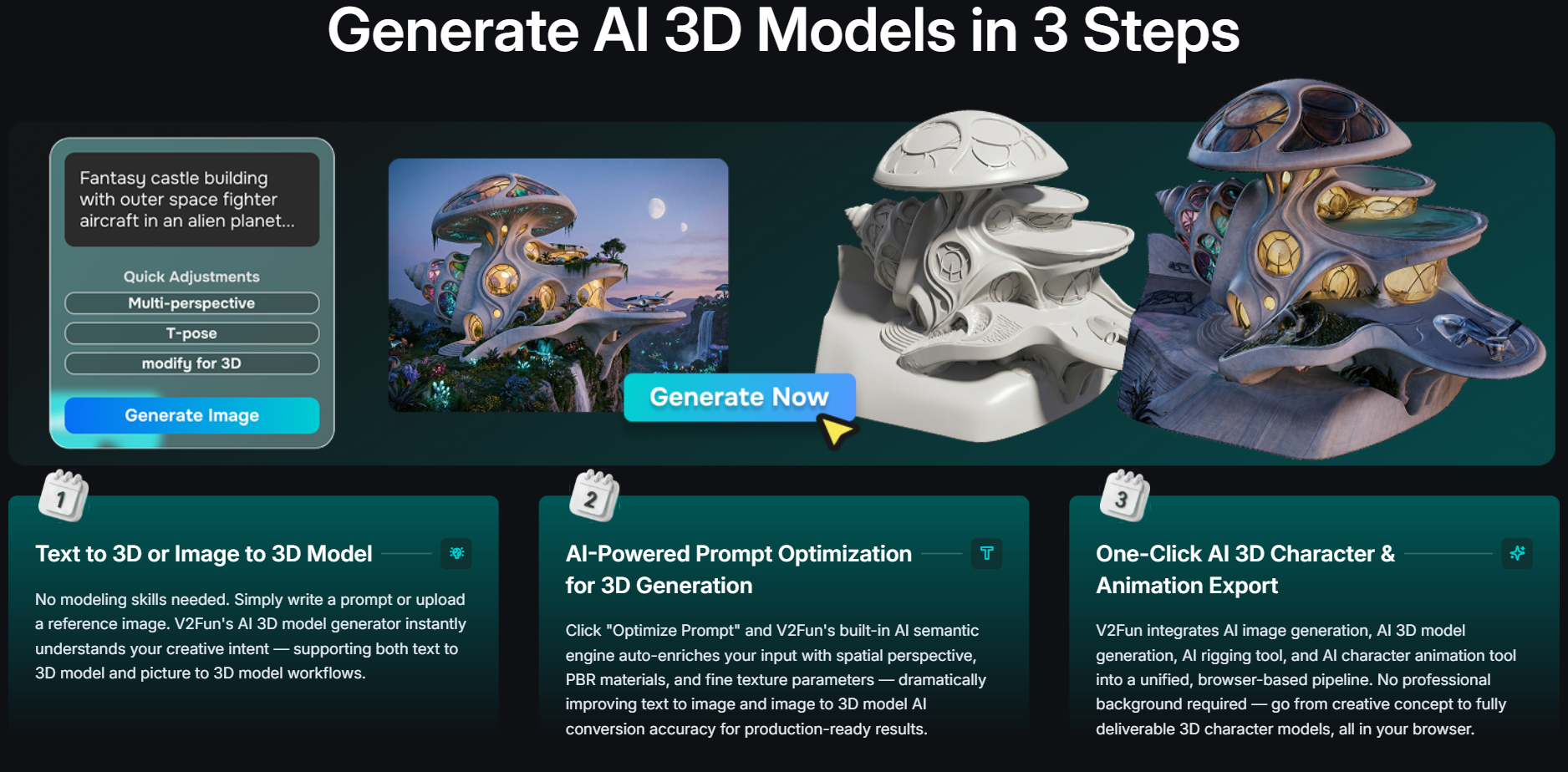
One continuous pipeline from image to motion: Most AI 3D tools do one step well and hand you a file to finish elsewhere. V2Fun’s core advantage is workflow continuity: generate a concept image, convert it to 3D, texture it, rig it, and apply motion without exporting between apps. V2Fun says a first-time user can reach a basic animated character in about ten minutes under good conditions, a remarkable compression of work that used to span several specialists.
Motion capture without a suit: This is the feature that most clearly separates V2Fun from popular rivals. Upload a short MP4 of a person moving, and V2Fun’s monocular vision model extracts the body motion, saves it to your private library, and retargets it onto your rigged character. Meshy and Tripo focus on preset animation libraries, and Meshy’s own documentation points users to a separate service for video mocap, so having capture built in saves money and a round of file juggling.
Auto-rigging you can actually correct: V2Fun’s rigging uses AI keypoint recognition to place a skeleton on a T-pose character in seconds, but it does not stop there. A built-in visual editor lets you move joint nodes, mirror markers with a symmetry mode, and add side-view markers for characters with hair, capes, or costumes. That manual calibration step is what keeps elbows and knees bending where they should once motion is applied.
Topology and materials built for real pipelines: Instead of the dense, triangulated meshes early AI generators were known for, V2Fun’s Smart Retopology outputs clean quad meshes, and independent coverage describes typical characters at roughly 40,000 to 50,000 quad faces. AI Texturing generates full PBR channels, V2Fun markets textures up to 8K, and press coverage highlights textures staying aligned during animation rather than stretching or tearing.
Aggressive entry pricing with transparent credit math: At $15 per month, the Pro plan undercuts the roughly $20 entry tiers of Meshy and Tripo, and V2Fun publishes sample credit costs for each step of the workflow. You can see in advance that an image costs about 1 credit, a 3D model about 20, a texture pass about 20, and applying an animation about 5, which makes budgeting far easier than with tools that hide their per-task costs.
Outputs for games, the web, and 3D printing: V2Fun exports FBX with skeleton and weight data for Unreal Engine, Unity, and Blender, GLB for web and AR, and its 3D printing guide covers STL, 3MF, and OBJ. The HarmonyOS app turns a phone photo into a printable model with styles such as toy blind box, block art, and papercraft.
Research-led and developer-ready: V2Fun is building beyond the web app. An API in Developer Preview lets apps, scripts, and AI agents call its 3D generation programmatically, and the company has published agentic case studies in which a language model plans a scene, V2Fun generates the characters and props, and code assembles everything into a complete GLB file.
Key Features and Technology
V2Fun’s toolset maps neatly onto the stages of a traditional 3D character pipeline. Here is how each stage works in practice.
AI Image and Prompt Optimization: The Concept Stage
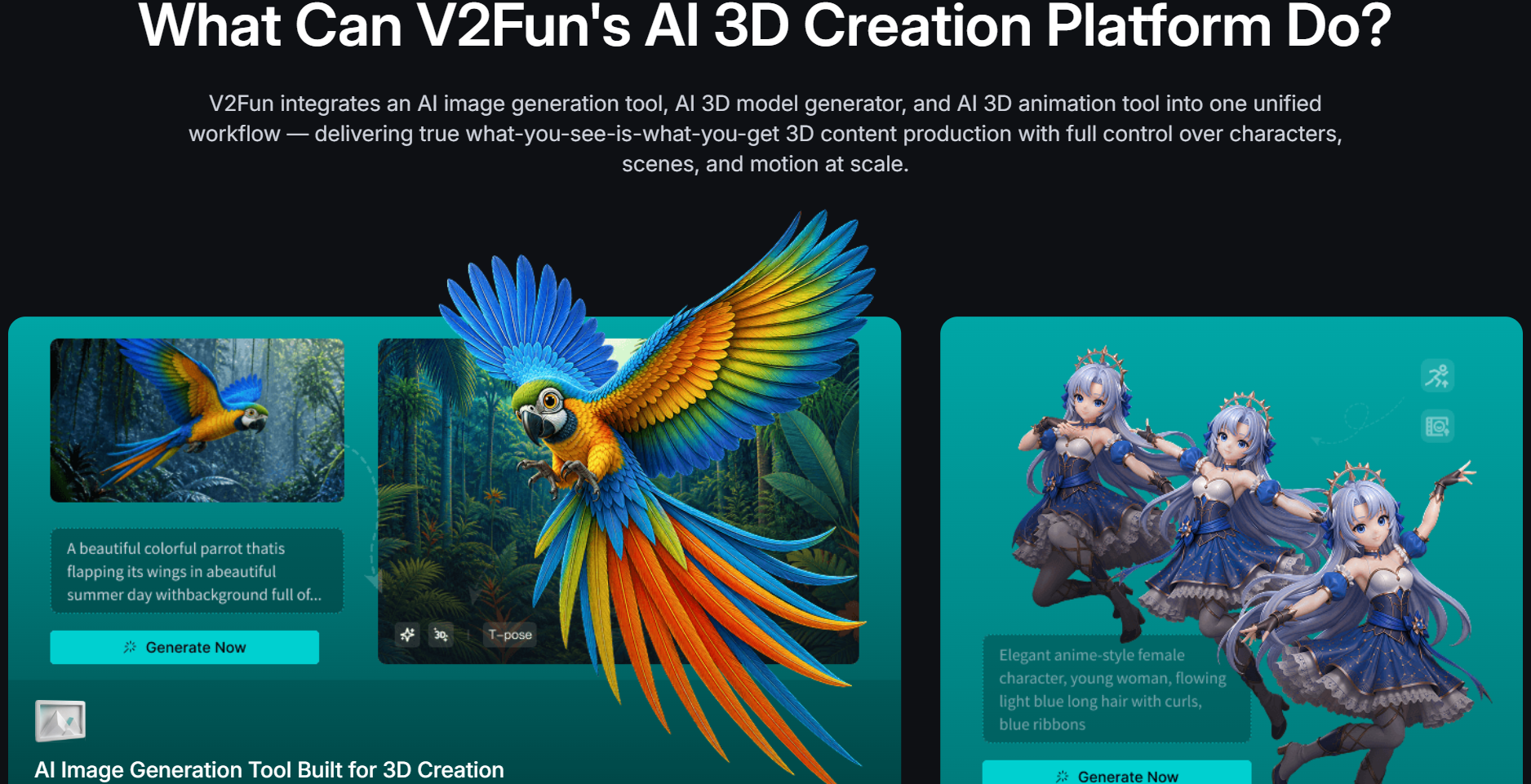
Every good 3D model starts with a good reference, so V2Fun includes an image generator built on leading third-party models, with Nano Banana 2, Nano Banana Pro, Nano Banana 2 Lite, and GPT Image 2 listed on the pricing page and realistic, stylized, and character design modes. Optimize Prompt enriches your description with details 3D generation needs, such as viewing angle and PBR material cues, and you can generate front, side, and back views to feed the multi-view modeler. At around 1 credit per basic image, this is the place to iterate freely before spending on 3D.
Text-to-3D, Image-to-3D, and Multi-View Modeling
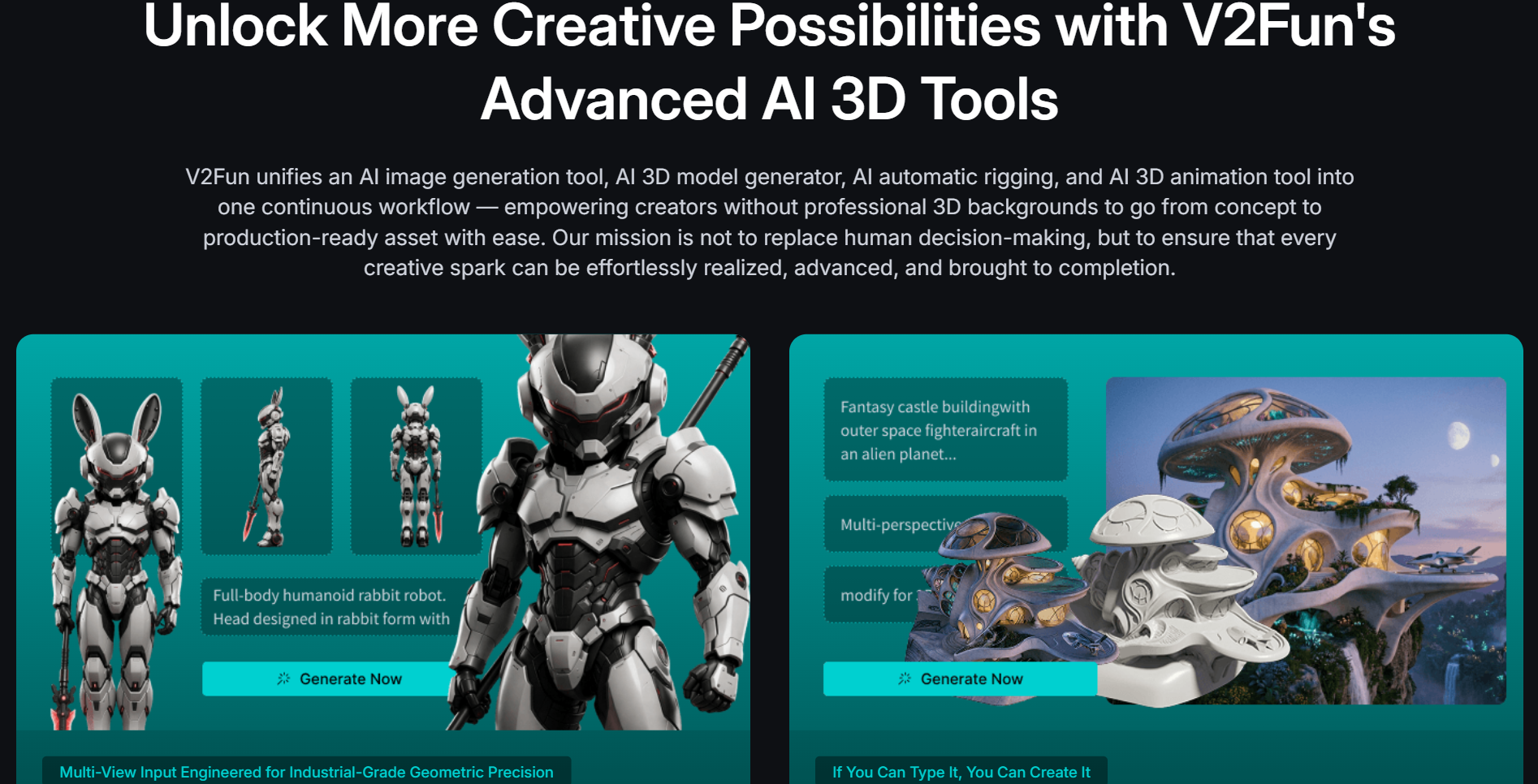
You can create a model from a text prompt, a single image, or a multi-view set. Single-image generation is fastest: the homepage promises models in under 60 seconds, while V2Fun’s own workflow guide more conservatively cites about two minutes. The catch is that the AI must guess what it cannot see, such as the back of a jacket. Multi-View 3D Modeling solves this by rebuilding the model from front, side, and back references, giving noticeably higher fidelity for characters you plan to keep. Every result opens in the built-in 3D viewer before you move on to texturing, rigging, or animation.
AI Texturing and Smart Retopology
AI Texturing generates physically based materials with Albedo, Normal, Roughness, and Metalness channels, so models light correctly in Blender, Unity, or Unreal. You can drive it with a text prompt, a reference photo, or several images from different angles, and an HD upscaling option sharpens normal and detail layers. Model Retexturing swaps the whole surface style while leaving geometry untouched, ideal for color variants or skins, and the tool also accepts your own FBX, OBJ, or GLB files. Smart Retopology then converts generated geometry into cleaner, lighter quad meshes that are easier to edit and animate.
AI Auto-Rigging
Rigging is usually where beginners give up on 3D. V2Fun asks you to center your character in a T-pose with limbs clearly separated, then place markers on key joints such as the head, shoulders, elbows, and knees. AI keypoint recognition builds a standard skeleton, and you can fine-tune every node in a visual editor. Rigged characters export as FBX, preserving skeleton and weight data for Unreal Engine, Unity, and Blender, or as GLB for web and AR. The key limitation is scope: rigging is designed for humanoids, and quadrupeds or other non-standard bodies are not currently supported.
AI Animation and Video Motion Capture
Once a character is rigged, you have three ways to make it move. The built-in motion library covers showcase poses, everyday interactions, and trending dances. You can upload motion files in BVH or VMD format, so animations made in MikuMikuDance (MMD), a favorite of the anime and VTuber community, can be reused directly. The standout is AI Video Motion Capture: upload a short MP4 of a person moving, and V2Fun extracts the motion and retargets it to characters of different proportions, with real-time preview in the browser and claimed protection against limb penetration and distortion. Applying an animation costs around 5 credits, so experimenting is inexpensive.
Export, Mobile App, and Developer API
Export is one click, with FBX recommended for games and animation and GLB for the web and AR. For 3D printing, V2Fun’s published workflow covers STL or 3MF for slicers, with OBJ as an intermediate format when a mesh needs repair. The HarmonyOS app brings photo-to-3D generation to Huawei phones in tens of seconds, with 3MF and OBJ downloads. For developers, the API is in Developer Preview: your first API key grants 100 free API credits (billed separately from web credits), and documentation lives at doc.v2fun.ai. Enterprise customers add batch generation, texturing, retopology, and format conversion via API, plus callbacks, a dedicated queue, and a processing SLA.
Pricing, Plans, and Package Structure
V2Fun uses a credit-based subscription model. Every plan, including Free, receives a monthly allowance, and each action deducts credits based on the model and settings you choose, with the exact cost shown before you confirm. V2Fun’s own example workflow (one image, one 3D model, one texture pass, one animation) totals roughly 46 credits, so Free covers about four complete characters a month, Pro about 26, and Premium about 78. Subscriptions auto-renew, and monthly credits expire at the end of each period rather than rolling over.
Licensing is the other key difference. Free plan assets fall under CC BY 4.0, which generally allows reuse by others with attribution, while Pro and Premium grant a private license for all assets. Free users can earn extra credits through daily check-ins, onboarding tasks, and referrals. The yearly toggle advertises discounts of up to 52 percent, but annual amounts were not clearly displayed at the time of writing, so treat the monthly figures below as the baseline.
| Plan | Approx. Price | What You Get | Best For |
|---|---|---|---|
| Free | $0 | 200 credits/month (expire monthly), limited AI models, 3 concurrent tasks, low queue priority, 50 asset storage, CC BY 4.0 license | Testing the workflow, students, personal experiments |
| Pro | $15/month | 1,200 credits/month, all AI models, unlimited model downloads, 10 concurrent tasks, high queue priority, 200 asset storage, private license | Best value for most creators, freelancers, and indie developers |
| Premium | $45/month | 3,600 credits/month, all AI models, unlimited downloads, 15 concurrent tasks, higher queue priority, 500 asset storage, private license | Small studios, agencies, and high-volume content teams |
| Enterprise | Custom (usage-based) | Full 3D API with text, image, and video inputs, batch generation, texturing, retopology, format conversion, callbacks, dedicated API queue, processing SLA | Platforms, game studios, and apps integrating 3D at scale |
| Credit packs (subscribers only) | $15 to $110 one-time | 500 credits ($15), 1,200 ($25), 3,000 ($50), or 8,000 ($110); 20% off for new users; no auto-renewal | Topping up during busy months without changing plans |
How V2Fun Compares to Alternatives
| Factor | V2Fun | Meshy | Tripo | Traditional Pipeline |
|---|---|---|---|---|
| Core strength | Image-to-motion character pipeline in one workspace | Broad text/image-to-3D with texturing and a large animation library | Fast, high-volume model generation | Maximum control and final polish |
| Entry paid plan | ~$15/month (1,200 credits) | ~$20/month (1,000 credits) | ~$20/month (3,000 credits) | Free tools such as Blender, but many artist hours |
| Free tier | 200 credits/month, CC BY 4.0 | 100 credits/month, CC BY 4.0 | 200 credits/month, public, non-commercial | Free software, paid time |
| Auto-rigging | Humanoid, with manual joint calibration | Humanoids, bipeds, quadrupeds, stylized figures | Included, with library animation | Manual rigging or a separate auto-rigger |
| Video motion capture | Built in (single person, 5 to 30 second clips) | Not built in; preset motion library instead | Not advertised; library-based animation | Mocap suit, studio time, or a separate video-mocap tool |
| Best for | Animated humanoid characters on a budget | General assets and non-human characters | Bulk props and rapid prototyping | Hero assets and film-grade work |
vs. Meshy: Meshy is the most established all-round AI 3D generator and is broader in two ways: its auto-rigger handles quadrupeds and stylized creatures, and its paid plans include a preset motion library of several hundred clips. V2Fun counters with a lower entry price, more credits at the entry tier, and built-in video motion capture, so your animation is not limited to existing presets. For animals or monsters, Meshy is the safer choice. For human characters performing specific, custom movements, V2Fun is the more complete tool.
vs. Tripo: Tripo is built for speed and volume. Its Pro plan includes 3,000 monthly credits, which Tripo estimates at roughly 200 models, so on raw model output per dollar it is hard to beat for props, blockouts, and large asset libraries. V2Fun is less about generating hundreds of static meshes and more about carrying a small number of characters all the way to motion. Many teams could reasonably use both: Tripo for environment props and V2Fun for the characters that need to move.
vs. a traditional pipeline: Modeling in Blender or Maya, rigging by hand, and capturing motion in a studio still produces the most controllable results, and V2Fun openly says AI 3D tools are not yet at film-industry quality. But that route costs days or weeks per character and specialist skills. V2Fun delivers a usable animated first version in minutes, perfect for prototypes, previz, pitches, and social content. For many teams the smartest approach is hybrid: get most of the way in V2Fun, then polish hero assets in traditional tools.
Pros and Cons
What Creators Love
The whole pipeline in one tab: Going from concept image to animated character without switching apps or managing files between steps is the feature that defines V2Fun, and it removes the biggest barrier beginners face in 3D.
Motion capture from a phone video: Recording a short clip and seeing a character perform the same moves minutes later is genuinely impressive, and it replaces hardware that most independent creators could never justify buying.
Affordable and predictable: A $15 Pro plan, a free tier that refreshes every month, and published per-step credit costs make it easy to know what a project will cost before you start.
Production-friendly output: Quad-based retopology, full PBR material channels, and FBX export with skeleton and weights mean assets drop into Unity, Unreal, and Blender far more cleanly than early AI meshes did.
Flexible inputs and outputs: Text, single images, multi-view sets, your own FBX/OBJ/GLB models, BVH and VMD motion files, and video all work as inputs, while outputs cover game engines, the web, AR, and 3D printing.
Limitations Worth Knowing
Humanoid-only rigging: Auto-rigging is designed for standard humanoid characters in a T-pose. Quadrupeds, creatures, and unusual body structures are not supported, which rules V2Fun out as the main tool for many fantasy and animal projects.
Single-person, body-only motion capture: Video mocap currently handles one person per clip, works best on 5 to 30 second videos, and does not advertise finger or facial tracking. Group choreography and expressive dialogue scenes still need other tools.
Not a zero-cleanup solution: V2Fun itself lists common issues such as model drift between attempts, broken UVs, foot sliding, incorrect export scale, and missing textures as things to test for. Single images also force the AI to guess hidden sides, so hero assets will often need touch-ups.
Free assets are not private: Anything created on the Free plan is released under CC BY 4.0. That is fine for learning, but commercial and client work belongs on a paid plan, and monthly credits do not roll over.
A young company under PRC jurisdiction: Vertex Lab was founded in 2025, so the product is still evolving fast, and its terms are governed by the laws of the People’s Republic of China. Businesses with strict data residency rules should review the terms and privacy policy before uploading sensitive references.
Limited independent reviews so far: Beyond launch-platform ratings and press coverage, there are few long-term, third-party user reviews yet, and quality claims such as 8K textures and “100x faster” delivery come from the company itself. Test with your own assets before committing to a large project.
Who Should Use V2Fun
Indie game developers and solo creators: If you need playable characters for a prototype and cannot afford a character artist plus a mocap session, V2Fun gets you there in an afternoon. Start with Pro for its private license and higher concurrency.
Short-video creators, VTubers, and virtual idol teams: Turning an original character into a dancing 3D avatar for TikTok, Reels, or Shorts is exactly what V2Fun’s motion library and video mocap were built for. Test on Free, then move to Pro for regular posting.
3D printing hobbyists and collectible designers: Photo-to-3D generation with STL and 3MF export workflows makes V2Fun a fast route to figurines and custom toys. Just remember that STL carries geometry only, so color will need painting after printing. The Free plan is enough for occasional personal prints.
Marketers, agencies, and e-commerce teams: Product mockups, mascots, and animated brand characters for ads are quick to produce and iterate. Teams publishing weekly will get the most from Premium’s 3,600 credits and higher queue priority.
Educators, students, and XR/VR developers: V2Fun is an approachable way to teach the full 3D pipeline without expensive software, and its GLB output suits web and AR experiences. The Free plan works well for classrooms and personal learning.
Developers and platforms building 3D into products: To generate 3D assets inside your own app or AI agent, try the Developer Preview API with its 100 free credits, then talk to V2Fun about Enterprise. Teams that need precise CAD geometry, non-human rigs, or film-grade output should look elsewhere.
Getting Started: Step by Step
- Create a free account. Sign up at V2Fun to receive the Free plan’s 200 monthly credits, and complete the onboarding tasks and daily check-ins for a few extra credits while you learn.
- Prepare a clean reference. Upload an image or generate one with AI Image and Optimize Prompt. Use a clean background, even lighting, and a complete, unobstructed subject, and for characters choose a front-facing pose, ideally a T-pose.
- Generate the 3D model. Run image-to-3D for speed, or generate front, side, and back views first and use Multi-View 3D Modeling for higher accuracy. Inspect the result from every angle in the built-in viewer.
- Texture and clean up. Apply AI Texturing to generate PBR materials, try Model Retexturing for alternate looks, and run Smart Retopology if you plan to edit or animate the mesh.
- Rig the character. Center the model in a T-pose, place markers on the head, shoulders, elbows, knees, and other key joints (use symmetry mode to save time), then fine-tune joint positions in the visual editor.
- Add motion. Pick a clip from the motion library, upload a BVH or VMD file, or record a 5 to 30 second MP4 of one person moving and let AI Motion Capture apply it. Preview the result in your browser.
- Export and upgrade when it matters. Export FBX for Unity, Unreal, or Blender, GLB for web and AR, or STL/3MF for printing. Before creating anything for commercial use, move to a paid plan so your assets carry a private license instead of CC BY 4.0.
Tips for Getting Maximum Value
Do your creative exploration at the cheapest stage: images cost about one credit while a 3D model or texture pass costs about twenty, so perfect the reference image before spending on geometry. For characters you plan to keep, generate multi-view references first to avoid strange backs and missing details. Pose characters in a clean T-pose from the start, and if joints twist after applying motion, recalibrate the rig markers rather than regenerating the model. When filming motion capture, keep the camera still and level, wear clothing that contrasts with the background, and stay fully in frame. On billing, claim the daily check-in credits on Free, spend monthly subscription credits before they expire, and use subscriber-only credit packs (with the 20 percent new-user discount) for busy months rather than jumping a tier. Once you are sure V2Fun fits, check the yearly toggle for the deepest discount, and always glance at the credit cost shown before each operation.
Future Outlook and Final Assessment
The tailwinds behind V2Fun are strong. Analysts at The Business Research Company estimate the generative AI market for 3D assets at about $2.47 billion in 2025 and project it to reach roughly $9.4 billion by 2030, a compound annual growth rate of around 30 percent. Demand is coming from games, short-form video, virtual creators, XR, e-commerce, and 3D printing at once, and many of those buyers want animated characters, not just static meshes. V2Fun’s research-heavy team, full-pipeline focus, API, and mobile expansion position it well for that shift, and the company has signaled that finished video rendering is on its roadmap, which would close the gap between a rigged character and a publishable clip.
The honest caveats remain: humanoid-only rigging, single-person body-only mocap, outputs that still benefit from cleanup, CC BY 4.0 licensing on Free, and a young company governed by PRC law. Within those boundaries, V2Fun delivers one of the most complete and affordable image-to-motion character workflows of 2026, in a browser, at a price that makes experimenting an easy decision.
Conclusion
V2Fun brings something genuinely useful to the crowded AI 3D space: a single, continuous workflow that takes a character from a reference image to textured geometry, a working skeleton, and real human motion captured from an ordinary video. It is affordable, transparent about credit costs, and built by a team rooted in 3D vision research. It is not yet a replacement for specialist tools on hero assets, quadruped rigs, or film-grade animation, and commercial users should work on a paid plan. But for game prototypes, social content, virtual creators, printable collectibles, and anyone who wants to see their character move without learning five programs, V2Fun is one of the most exciting platforms to try this year. Start with the free plan, test it on your own characters, and let V2Fun do what AI Solutes always looks for in a great tool: make everything easy.
Ready to turn your ideas into animated 3D characters?
Explore more honest reviews, tutorials and tool comparisons to find the right tech for the way you work and live — at AI Solutes, where we make everything easy.
👉 Open Free Account: https://ai-solutes.com/v2fun
👉 Our YouTube Channel: youtube.com/@ai-solutes
👉 Our Facebook Fanpage: Facebook
👉 Our X (Twitter): @AISolutes
- Code chèn Hotline và chat Facebook vào chân trang trên giao diện mobile cho website
- Master Weebly in 2026: Features, Pricing, Pros, Cons, and SEO Strategies
- Can AI Image Generation Feel Truly Effortless? Finding Your Creative Flow with RunDiffusion
- Boost Energy with Vitamin B12 in 2025: Top Foods, Symptoms, and Supplements
- CreativeLive Online Courses 2025: Master Skills to Futureproof Your Creative Career