If you manage more than a handful of websites, you already know the hidden cost of doing it the hard way: an SSH session for every small change, SSL certificates that expire at the worst possible moment, WordPress plugins updated one site at a time, and a nagging feeling that something on the server still needs patching. Plesk was built to take that weight off your shoulders. It is a web hosting and server management platform that you install on your own VPS, dedicated or cloud server, turning it into a single browser-based control center for domains, email, databases, security, backups and WordPress. Plesk is one of the very few major control panels that runs on both Linux and Windows Server, and by its own count it now powers more than 384,000 servers and over 11 million websites across 140 countries. Licenses start at about $16.99 per month, and a fully functional two-week trial needs no credit card, which makes Plesk one of the most established answers to a question every freelancer, agency and growing business eventually asks: how do I run my servers like a professional without becoming a full-time sysadmin?
For web designers, agencies juggling client sites, developers shipping PHP, Node.js or Laravel apps, Windows and .NET teams, and small hosting businesses, the appeal is immediate. Plesk has also moved quickly into AI during 2026, adding a built-in AI Support Assistant and Model Context Protocol (MCP) support that lets AI agents work with your server under strict, scoped permissions. This 2026 review walks through everything that matters: what Plesk is and who makes it, the core features and new AI tools, the three editions and what they really cost (including the price rise already announced for January 2027), how Plesk compares with cPanel, DirectAdmin and free panels, its honest limitations, and exactly who should and should not buy a license.
Plesk Review 2026: The Cross-Platform Control Panel That Puts Your Servers, WordPress Sites and AI-Assisted Management in One Dashboard
Overview and Background
Plesk is server management software, usually described as a hosting control panel. You install it on a server you control, and it gives you a clean graphical dashboard for everything that server hosts: domains, DNS, mailboxes, databases, SSL certificates, backups, firewall rules and PHP versions. Hosting providers use it as a self-service panel for customers, while agencies, developers and IT teams use it to run their own sites without living in the command line, keeping full root SSH access whenever they need it.
The product has served system administrators and small businesses since the early 2000s. Plesk was once part of the Parallels group of companies and became a separate business in January 2016. Today it is headquartered in Schaffhausen, Switzerland, and belongs to the WebPros family, which also includes cPanel, WHMCS, SolusVM, Sitejet, WP Toolkit, WP Guardian, XOVI and SocialBee. That shared ownership means tools like Sitejet Builder, WP Toolkit and WP Guardian plug directly into Plesk.
The current product generation is Plesk Obsidian, which ships frequent point releases; version 18.0.80, released on August 24, 2026, brought MCP support, made the AI Support Assistant a default feature and added DNS diagnostics. By Plesk’s own figures, the platform also automates more than 15 million mailboxes, is available in over 32 languages, and counts half of the world’s top 100 service providers as partners. Users rate it well: 4.3 out of 5 on G2 from 277 reviews and 4.7 out of 5 on Capterra from 148 verified reviews.
Why Plesk Stands Out in 2026
Genuine Linux and Windows support: This is the headline differentiator. Plesk runs on Ubuntu, Debian, AlmaLinux, Rocky Linux, Red Hat Enterprise Linux and CloudLinux, and also on Windows Server 2016 through 2025 with IIS and Microsoft SQL Server. cPanel, DirectAdmin and most free panels are Linux only, so if your business runs ASP.NET applications or needs MSSQL, Plesk is one of the few polished control panels that fits.
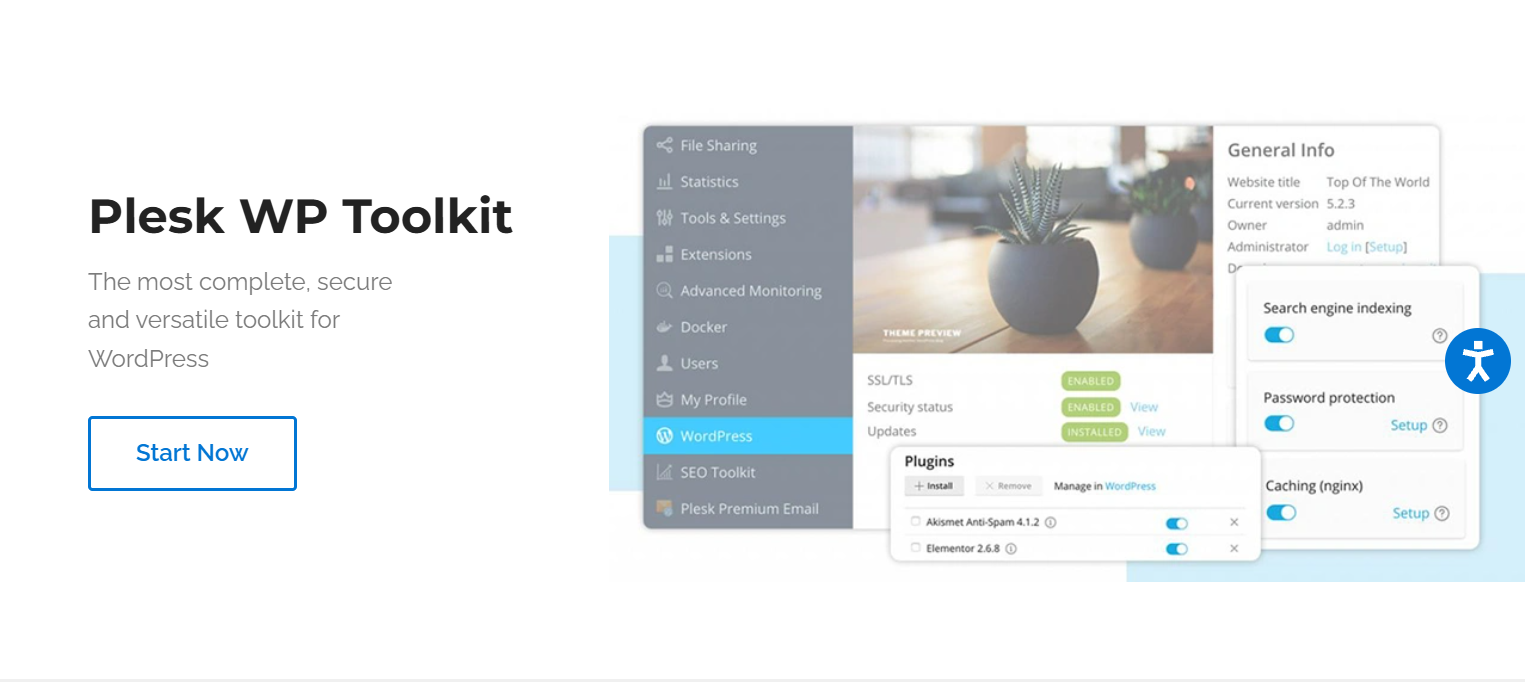
WordPress management at real scale: WP Toolkit gives you one dashboard for every WordPress install on the server. You can install new sites in one click, push core, theme and plugin updates across many sites at once, clone a live site to staging, sync changes back, and apply security hardening in bulk. For agencies running dozens of client sites, that alone can save hours every week.
AI built into the panel: The AI Support Assistant answers questions about Plesk features, configuration and troubleshooting, drawing on the official knowledge base and documentation. After a beta that began in version 18.0.78, it is now switched on by default for server administrators on new retail-licensed servers deployed after August 4, 2026.
Ready for AI agents through MCP: Model Context Protocol support lets AI agents discover and use your server’s management capabilities, for example provisioning a subscription, investigating a mail delivery problem, tracing a 500 error or handing a website bug to an AI coding agent. Crucially, it comes with guardrails: access keys can be scoped to a single subscription or the whole server, each tool can be disabled or set to read-only, and every tool call is logged.
Security baked into the core: Plesk ships with ModSecurity web application firewall rules from Atomicorp, Fail2Ban intrusion prevention, a server firewall, free Let’s Encrypt certificates, DNSSEC, email antivirus and ImunifyAV malware scanning, and WP Guardian adds centralized WordPress security. For most small businesses, that is a stronger security baseline than they would ever configure by hand.
A developer-friendly stack: Git deployment, Docker, Node.js, a dedicated Laravel Toolkit, multiple PHP versions side by side (from legacy 5.x up to PHP 8.5), nginx in front of Apache, plus a REST API, CLI and full root SSH access. Developers get convenience without losing control.
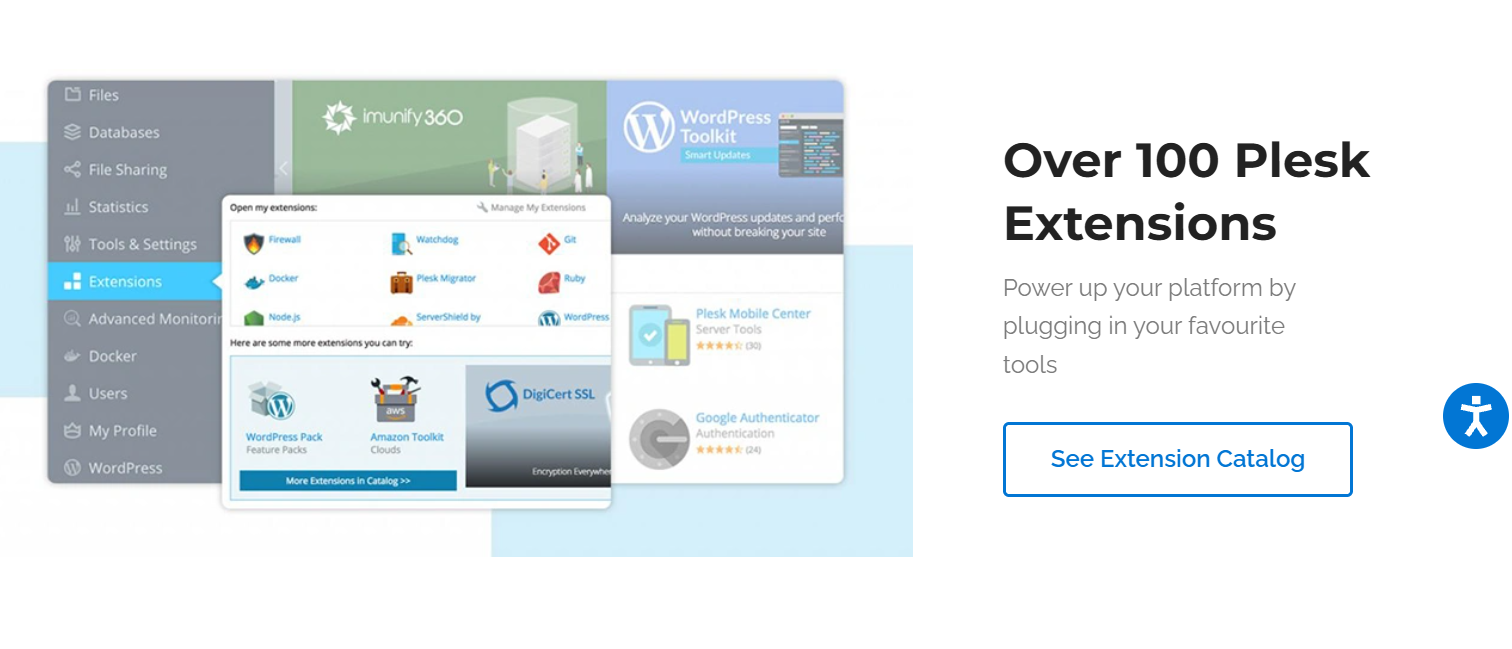
A large extension marketplace and cloud reach: More than 100 extensions cover Cloudflare, DigiCert SSL, CloudLinux, cloud backups, SEO Toolkit, premium email and social scheduling with SocialBee. Plesk is also available on AWS (including Lightsail), Microsoft Azure, Google Cloud, Alibaba Cloud, DigitalOcean, Vultr, Linode, UpCloud, IBM Cloud and OVH.
Painless migration from other panels: The free Plesk Migrator can move service plans, subscriptions, websites, files, mail and databases from cPanel 11.5 and later, DirectAdmin 1.51, older Plesk servers and several legacy panels, so switching does not have to mean rebuilding every site by hand.
Key Features and Technology
Plesk packs a lot into one interface. Here is how its capabilities break down in practice.
Server, Domain and Email Management
The heart of Plesk is a central dashboard where you add domains, manage DNS, create mailboxes and databases, and set PHP or Node.js versions per site. Two interface modes keep it approachable: the Power User view suits people managing their own sites, while the Service Provider view organizes work around service plans and subscriptions for anyone hosting sites for others. Built-in monitoring covers website uptime, processes and server health, and the Cgroups Manager caps CPU, memory and disk I/O so one busy site cannot drag down the rest. Email gets antivirus scanning, DKIM signing and a new beta DNS Diagnostics tool that checks DNS resolution plus SPF, DKIM and DMARC records in one pass, a common fix for mail landing in spam.
WP Toolkit and Sitejet Builder
WP Toolkit comes in three levels, and knowing them avoids disappointment. WP Toolkit SE, included with Web Admin, covers one-click installs, mass updates and a read-only security check, but leaves out cloning, staging, sync, automatic updates and full hardening. The full WP Toolkit, included with Web Pro and Web Host, adds all of those for every WordPress instance on the server. WP Toolkit Deluxe is a paid upgrade available on all three editions, and it unlocks Smart Updates: Plesk clones your site, simulates the update, runs automated AI-powered tests, and only updates the live site if nothing breaks. Deluxe also includes Smart PHP Updates for safer PHP version changes. Alongside WordPress, every edition includes Sitejet Builder, a drag-and-drop site builder that since version 18.0.72 also offers an AI Website Generator, which creates a clean, responsive starter site from a description of your business that you can then edit and publish.
AI Support Assistant and MCP
The AI layer in Plesk has two parts. The AI Support Assistant is a chat helper inside the panel, grounded in Plesk’s documentation and knowledge base, so you can ask how to configure something or troubleshoot an error and get Plesk-specific guidance; older servers can enable it through a configuration setting. The second part, MCP support, is for teams already using AI agents. You connect the server to the WebPros Dashboard, create an MCP key, and decide exactly what an agent may touch: one subscription or the whole server, with individual tools switched off or set to read-only, and every tool call logged with its time. It is a thoughtful approach that treats permissions and auditing as first-class features.
Security, Backups and Compliance
Security tools sit in the core rather than in an add-on store. ModSecurity rules from Atomicorp filter malicious web requests, Fail2Ban blocks brute-force logins, and the SSL It! extension issues and renews Let’s Encrypt certificates automatically, now with TLS settings based on current Mozilla recommendations. ImunifyAV provides malware scanning, while the more powerful Imunify360 is a paid extension. Backups run on a schedule, and the Backup to Cloud Pro extension can send them to Amazon S3, Google Drive, Microsoft OneDrive or Dropbox, so a server failure never takes your only copy with it.
Developer Tools and Platform Support
On Linux, Plesk uses nginx with Apache 2.4 and supports PHP 5.2 through 8.5, MySQL, MariaDB (including 12.3) and PostgreSQL up to version 18; on Windows, it works with IIS and Microsoft SQL Server. Developers get Git integration, a Docker extension, Node.js hosting and a Laravel Toolkit that now handles multiple named queues, all scriptable through the REST API or CLI. Minimum hardware is modest: 1 GB of RAM plus 1 GB of swap and 20 GB of disk on Linux, or 2 GB of RAM and 32 GB on Windows, though real workloads will want more.
Pricing, Plans, and Package Structure
Plesk is a recurring per-server license, and the edition you need depends mainly on how many domains you host and whether you resell hosting. Licenses renew automatically, are billed monthly or yearly (a yearly license costs eleven times the monthly price, a saving of roughly 8%), and can be paid by card or PayPal. Prices exclude VAT, and buyers in Europe see euro pricing. Costs have climbed steadily: industry reports put the January 2026 rise at around 26% on average, and Plesk has announced another increase of 11.8% to 17.5% on VPS licenses from January 1, 2027, when Web Host also moves to a single price for VPS and dedicated servers. Remember that the server itself is billed separately by your host.
| Edition | Approx. Price (2026) | Announced from Jan 2027 | What You Get | Best For |
|---|---|---|---|---|
| Free Trial | $0 for 2 weeks | $0 for 2 weeks | Fully functional Plesk, no credit card required | Testing on your own server before you commit |
| Web Admin | About $16.99/mo | About $18.99/mo | Up to 10 domains, WP Toolkit SE, Sitejet Builder | Solo developers and businesses running their own few sites |
| Web Pro | About $29.99/mo | About $33.99/mo | Up to 30 domains, full WP Toolkit (cloning, staging, sync), Sitejet Builder | Freelancers and small studios managing client sites |
| Web Host (VPS) | About $62.99/mo | About $73.99/mo | Unlimited domains, full WP Toolkit, reseller management, customer accounts | Hosting businesses and larger agencies |
| Web Host (Dedicated) | About $69.99/mo | About $73.99/mo (same as VPS) | Everything in Web Host, licensed for bare-metal servers | High-volume hosts on dedicated hardware |
| Yearly Billing | 11x the monthly price | e.g. Web Host about $813.89/yr | Same features, roughly one month free | Teams certain they will keep the server a full year |
| Common Add-ons | Imunify360 roughly $12 to $45+/mo; WP Toolkit Deluxe on request | Varies by extension | Advanced malware protection, AI Smart Updates, cloud backup, premium email | Agencies that need extra security or safer automated updates |
A few licensing details are worth knowing. A VPS license runs only on a virtual server, while a dedicated license runs on either, with no feature difference. Direct purchases from the Plesk Online Store can be refunded within 14 days; licenses bought through a host or cloud marketplace follow that seller’s policy. There is no long-term contract, and you can change editions at any time. Volume buyers can join the partner program, which has a monthly minimum commitment and discounts of up to 45%. One regional note: the Plesk Online Store does not accept payments from Russia.
How Plesk Compares to Alternatives
| Factor | Plesk | cPanel & WHM | DirectAdmin | Free Panels (HestiaCP, CyberPanel) |
|---|---|---|---|---|
| Operating systems | Linux and Windows Server | Linux only | Linux only | Linux only |
| License model | Per server, tiered by domains | Per server, tiered by accounts | Tiered by accounts and domains | Free, open source |
| Entry price (2026) | About $16.99/mo (10 domains) | About $29.99/mo (Solo, 1 account) | About $5/mo (Personal Plus, 2 accounts) | $0 |
| Large or unlimited tier | About $62.99 to $69.99/mo, unlimited domains | About $69.99/mo for 100 accounts, then per account | About $29/mo, unlimited | $0 |
| WordPress tooling | WP Toolkit built in (full on Web Pro and up) | WP Toolkit available | Mostly third-party add-ons | Basic app installers |
| Built-in AI and agent access | AI Support Assistant, server-wide MCP with scoped keys, Sitejet AI generator | AI Assistant and account-level MCP (version 138, Meridian theme) | No official AI tools; community MCP projects only | Community add-ons only |
| Best for | Agencies, mixed Linux and Windows teams, AI-forward admins | Shared hosting providers and cPanel-trained teams | Cost-conscious hosts wanting a lightweight panel | Hobbyists and confident sysadmins |
vs. cPanel & WHM: cPanel is the most familiar name in shared hosting and, like Plesk, is owned by WebPros. The two differ mainly in licensing and platform. cPanel prices by hosted account, so even its Solo tier for a single account is around $29.99 per month in 2026, rising to about $32.99 from December 16, 2026, while Plesk Web Admin covers up to 10 domains for less. cPanel is Linux only, whereas Plesk also runs on Windows Server. AI is no longer a clear dividing line between the two siblings: cPanel added its own AI Assistant and MCP support with version 138 in September 2026, although its MCP access is aimed at individual accounts, while Plesk’s keys can be scoped up to full server administration. If you host many small accounts or your team already knows cPanel inside out, cPanel can still make sense; for agencies with a modest number of sites, a WordPress-heavy portfolio or any Windows requirement, Plesk usually offers better value and a more modern interface.
vs. DirectAdmin: DirectAdmin is the lean, low-cost option. Its Personal Plus license costs about $5 per month for 2 accounts and 20 domains, Lite about $15 for 10 accounts and 50 domains, and Standard about $29 for unlimited accounts. It is fast and light on server resources, and it has gained attention as Plesk and cPanel prices have climbed. The trade-off is depth: DirectAdmin relies more on third-party add-ons for WordPress management and security, has no Windows version, and lacks Plesk’s AI and MCP features. Budget-focused hosts may prefer it; teams that value an all-in-one toolkit will feel the gaps.
vs. free open-source panels or managing servers by hand: Panels like HestiaCP and CyberPanel cost nothing to license, and an experienced Linux administrator can run a server entirely from the command line. Both routes save money but shift the burden back to you: fewer integrated security tools, less polished WordPress management, community-only support and no Windows option. For most professionals, Plesk pays for itself by removing hours of routine maintenance every month.
Pros and Cons
What Admins and Agencies Love
One clean dashboard for everything: Domains, email, databases, SSL, backups and security all live in one interface, and reviewers consistently describe it as intuitive enough for newer users while still giving professionals full root access.
Best-in-class WordPress management: WP Toolkit’s mass updates, staging, cloning and hardening turn what used to be a weekly chore across dozens of sites into a few clicks, and Smart Updates adds an AI-tested safety net for agencies that cannot afford a broken client site.
Windows support that rivals rarely match: Running IIS, ASP.NET and Microsoft SQL Server from the same kind of panel used for Linux sites is a real advantage for businesses with mixed environments.
Strong security out of the box: ModSecurity, Fail2Ban, free SSL, DNSSEC, malware scanning and WordPress hardening come ready to use, giving small teams a professional security baseline without a dedicated security engineer.
A genuinely forward-looking AI angle: The AI Support Assistant, Sitejet AI Website Generator and permission-scoped MCP access place Plesk among the first control panels ready for a world where AI agents help run infrastructure.
Limitations Worth Knowing
Prices keep rising: This is the biggest complaint. After a large jump in 2025 and an average increase of about 26% in 2026, Plesk has announced another rise of 11.8% to 17.5% on VPS licenses for 2027. On Plesk’s community forum, users have voiced frustration, and some say they are evaluating alternatives such as DirectAdmin, Enhance, CloudPanel and HestiaCP. Budget for further increases rather than assuming today’s price is permanent.
Extras add up: Many of the most useful capabilities, such as Imunify360, WP Toolkit Deluxe with Smart Updates, cloud backup and premium email, cost extra. Independent reviewers estimate that add-ons can push the real bill 20% to 50% above the base license.
Web Admin is quite limited: The entry edition caps you at 10 domains and only includes WP Toolkit SE, without staging, cloning or automatic updates. Many buyers find they need Web Pro sooner than expected.
Support quality depends on where you buy: Capterra reviewers report mixed experiences, with some praising responsiveness and others describing slow or limited help, especially when the license comes through a hosting reseller who acts as the first line of support.
A learning curve for newcomers: The sheer number of features can feel overwhelming, and the split between server-wide and per-domain settings confuses some first-time users. You also remain responsible for the server’s operating system and its end-of-life planning.
Who Should Use Plesk
Freelance web designers and small studios: If you build and maintain WordPress sites for clients, Plesk lets you host them on one server, update them in bulk and spin up staging copies for client reviews. Web Pro is the natural starting point.
Growing agencies with large client portfolios: Once you pass 30 domains or want to give clients their own logins, step up to Web Host, and consider WP Toolkit Deluxe so Smart Updates can test plugin updates before they reach live client sites.
Developers and DevOps-minded teams: Git, Docker, Node.js, Laravel Toolkit, the REST API and MCP access make Plesk a productive home for app hosting on a cloud VPS. Web Admin works for a few projects, while Web Pro gives more headroom.
Windows and .NET businesses: If you run ASP.NET apps or rely on Microsoft SQL Server, Plesk on Windows Server is one of the few mature panel options available. Choose Web Pro for most internal or client workloads.
Small hosting providers and resellers: Service plans, subscriptions, customer accounts and reseller management are exactly what a hosting business needs, which makes Web Host the right edition, with the partner program worth exploring once volume grows.
Who should look elsewhere: If you run a single website and are happy on managed hosting, you probably do not need a control panel license at all. And if you host hundreds of low-revenue accounts on Linux and price is your main concern, a lighter panel such as DirectAdmin may protect your margins better.
Getting Started: Step by Step
- Choose your server. Rent a VPS, cloud instance or dedicated server with at least 1 GB of RAM plus swap for Linux (2 GB for Windows), and pick a recommended OS such as Ubuntu 26.04, AlmaLinux 10, Debian 13 or Windows Server 2025. Many cloud providers offer ready-made Plesk images.
- Start the free trial. Request the two-week, fully functional trial from Plesk’s website. No credit card is needed, so you can test everything on your real workload before paying.
- Install Plesk. Run Plesk’s web installer or one-click installation script on a fresh server, or launch a marketplace image. On a clean server, installation typically completes in minutes.
- Complete the initial setup. Log in through your browser, set the administrator password and contact email, apply your trial or license key, and choose the Power User or Service Provider view depending on whether you host sites for others.
- Add your first domain. Create the domain or subscription, point DNS to the server, issue a free Let’s Encrypt certificate with SSL It!, and set up mailboxes. Run the DNS Diagnostics check to confirm SPF, DKIM and DMARC are correct.
- Bring in your sites. Install WordPress with WP Toolkit, deploy apps through Git or Docker, or use Plesk Migrator to move existing sites from cPanel, DirectAdmin or another Plesk server.
- Lock it down and back it up. Review the security settings, confirm ModSecurity and Fail2Ban are active, schedule backups to remote cloud storage, and keep Plesk and the OS updated.
Tips for Getting Maximum Value
Before buying direct, compare Plesk’s price with what your hosting provider charges, since many hosts bundle or resell licenses. Use the two-week trial on your real sites, not a demo, so you know which edition you need. Count your domains honestly: if you are near 10, skip Web Admin and go straight to Web Pro, because the SE toolkit lacks staging. If you are committing for a year, the yearly license effectively gives you one month free, and buying before January 1, 2027 may let you pay current rates until renewal, but confirm the terms with Plesk first. Lean on the free tools first: Let’s Encrypt, ImunifyAV, Fail2Ban and ModSecurity cover a lot of ground, so add Imunify360 or WP Toolkit Deluxe only when you have a clear need. Buy the right license type from the start, since a VPS license will not run on a dedicated server, and start new servers on a recommended operating system to avoid extended support fees later.
Future Outlook and Final Assessment
Plesk’s product direction is clear and impressive: frequent Obsidian releases, AI where it genuinely helps administrators, and agent access through MCP with the scoped permissions and audit logs responsible teams need. As more businesses let AI agents handle routine operations, a control panel that can safely expose server actions to those agents will become more valuable, and Plesk is among the earliest panels to offer this with server-level controls. Its cross-platform reach, strong WordPress tooling and deep integration with the wider WebPros ecosystem give it a durable position with agencies, developers and hosting providers alike.
The honest caveats remain: Plesk is a license on top of your server cost, the price has risen for several years running with another increase coming in 2027, the most powerful extras cost more, and support quality depends partly on where you buy. Those concerns are real and have pushed some price-sensitive hosts toward lighter panels. But for professionals who value their time, Plesk still delivers one of the most complete, secure and genuinely modern server management experiences available in 2026.
Conclusion
Plesk has earned its place as one of the leading server management platforms by doing the unglamorous work well: keeping sites secure, keeping WordPress updated, keeping email deliverable and keeping administrators in control, on Linux or Windows. Its new AI Support Assistant and MCP support show a company preparing for the next era of infrastructure, while WP Toolkit and Sitejet Builder keep everyday site work fast for freelancers and agencies. Watch the rising license costs, choose the edition that matches your real domain count, and make full use of the free trial. Do that, and Plesk turns server management from a constant chore into a calm, organized routine, the kind of tool that helps you make everything easy across every site you run.
Ready to run every site and server from one smart dashboard?
Explore more honest reviews, tutorials and tool comparisons to find the right tech for the way you work and live — at AI Solutes, where we make everything easy.
👉 Start Your Free Trial: https://ai-solutes.com/plesk
👉 Our YouTube Channel: youtube.com/@ai-solutes
👉 Our Facebook Fanpage: Facebook
👉 Our X (Twitter): @AISolutes
- Can App Development Feel Truly Intuitive and Collaborative? Finding Your Flow with MeDo
- Best AI Chatbot Platforms in 2026: Why Chatbase Ranks #1 Against Manychat, Tidio, UChat, Botpress, Freshchat and Intercom
- Binance 2025: Unlock Pro-Level Crypto Trading, Security and Passive Income
- Master FreeTaxUSA for Free Federal Tax Filing in 2026: Maximize Refunds with OBBBA and 1099 Crypto Updates
- Transform Your Identity with FaceApp AI: Aging Filter, Makeup Editor, and Viral Photo Trends Revealed