Tax season 2026 brings new rules and opportunities for smarter, faster digital filing. As IRS forms, OBBBA tax laws, and 1099 crypto imports evolve, taxpayers need software that balances power, price, and transparency. FreeTaxUSA leads the way with free federal filing, robust form support (including for freelancers, gig workers, seniors, and investors), and easy user experience. This Ultimate Guide explores FreeTaxUSA’s eligibility, step-by-step workflows, major 2026 updates, state filing pricing, head-to-head comparisons with TurboTax, troubleshooting, expert FAQs, and maximizing your refund. Discover why FreeTaxUSA is top-rated, and learn exactly how to navigate the 2026 season with confidence.
FreeTaxUSA: The Ultimate Guide to Free Federal Tax Filing in 2026
What is FreeTaxUSA? Overview and Brand Positioning
FreeTaxUSA has established itself as a top IRS Free File partner, trusted by millions for efficient, secure, and completely free federal tax filing. Founded in 2001, it targets budget-conscious taxpayers who require comprehensive filing features without expensive upsells. The platform’s brand positioning is centered around transparency: no hidden charges for federal returns, a streamlined workflow, and robust support for complex tax situations.
About FreeTaxUSA as an IRS Free File Partner
Expert Insight:
“FreeTaxUSA is especially attractive for taxpayers who need more than just a basic return, thanks to its support for forms like Schedule C and advanced 1099 imports.”
— Mary Douglas, CPA
Eligibility and Accessibility for Taxpayers
FreeTaxUSA’s eligibility criteria for free federal filing are straightforward:
- No income limits for most users (unlike some IRS partners).
- Supports all major federal forms — including self-employment, investments, education credits, and retirement income.
- Accessible from desktop, tablet, or mobile browser; no app required.
- Industry-standard encryption ensures your data’s safety.
Accessibility highlights:
- Year-round access: File current or previous-year returns.
- Multi-format support: All popular tax documents.
- Designed for speed and error reduction: Online entry, error-checking, and guided help.

How FreeTaxUSA’s Free Federal Tax Filing Works
Filing your federal tax return with FreeTaxUSA is as simple as logging in and answering guided questions — without paying a cent.
Supported Tax Forms and Complexity Range
FreeTaxUSA offers far more than just basic tax forms. Users benefit from wide-ranging support for:
- Form 1040 (standard individual return)
- Schedule C for self-employment income
- Schedule D for capital gains and investments
- Schedule EIC for Earned Income Credit
- Child Tax Credit, Retirement Income, Credits for Seniors
- A variety of 1099 forms (NEC, MISC, DA, Composite, Crypto)
“Our clients choose FreeTaxUSA for its robust roster of supported forms—making it ideal not only for W-2 workers but also for gig economy freelancers and crypto investors.”
— Tax Technology Solutions Analyst, 2026
Step-by-Step Free Federal Filing Process
Filing Workflow Checklist:
- Create a secure account on FreeTaxUSA’s platform.
- Answer interview questions about income, deductions, dependents, and credits.
- Directly import 1099s or enter manually (major update for 2026).
- Review real-time refund estimate.
- E-file submission: Receive IRS confirmation in minutes.
User Experience Tip:
The entire process typically takes under an hour (if you have documents ready). Support chat and FAQ links are visible on all main pages for quick help.
State Tax Return Filing and Pricing in FreeTaxUSA
While federal filing is always free, state returns carry a modest fee. FreeTaxUSA’s pricing model is highly transparent — compared to costly alternatives.
State Tax Pricing Structure and Transparency
| Platform | Federal Return | State Return | Extra Features |
|---|---|---|---|
| FreeTaxUSA | $0 (always free) | $14.99 | Free 1099 import, OBBBA compliance |
| TurboTax Basic | $0 (but limitations) | $40-$55 | More upsells; pay for key forms |
| H&R Block Free | Limited scope | $39.99+ | Pays for premium forms |
| TaxAct | $0-$24 (free/file) | Up to $39.95 | Most complex forms require upgrade |
Table: FreeTaxUSA Federal vs State Pricing Comparison
Who Qualifies for Free State Filing via IRS Link?
Eligible users who access FreeTaxUSA through the IRS Free File portal may qualify for free state returns. Restrictions include:
- Adjusted gross income (AGI) below $79,000 (2026 update).
- Must start filing from IRS Free File page (not direct login).
- Only select states included in Free File program.
Checklist to qualify:
- Access via IRS Free File NOT direct website.
- Confirm AGI under limit.
- Check state eligibility in advance.
Key 2026 Updates: 1099 Imports, OBBBA Compliance, and New Features
The 2026 tax season introduces several innovations that place FreeTaxUSA ahead of competitors.
How to Import 1099 Forms (Supported Types: 1099-NEC, MISC, DA, Crypto, etc.)
The ability to directly import 1099 forms—including crypto, NEC, MISC, DA, and composite—is a game-changer. Users can upload documents as PDFs or CSVs for rapid error-free entry.
- Supported direct import types:
- 1099-NEC (Nonemployee Compensation)
- 1099-MISC (Miscellaneous Income)
- 1099-DA (Digital Assets/Crypto)
- 1099-B (Brokerage)
- 1099-INT, 1099-DIV (Interest/Dividends)
- Other 1099 composite or custom forms

Troubleshooting Tip:
If an import fails, you can manually enter the form data or use FreeTaxUSA’s AI-powered troubleshooting guide for fast resolution.
For a detailed breakdown on dealing with crypto and digital asset imports, see Watch more.
Explaining OBBBA Tax Law Changes for 2026: Deductions and Credits
The OBBBA tax law (Omnibus Budget Balanced Business Act) brings sweeping reforms in 2026, impacting deductions, credits, and compliance standards.
Chart: OBBBA Law Updates and 2026 Deductions
| Category | Old (2025) | New (2026) | Impact |
|---|---|---|---|
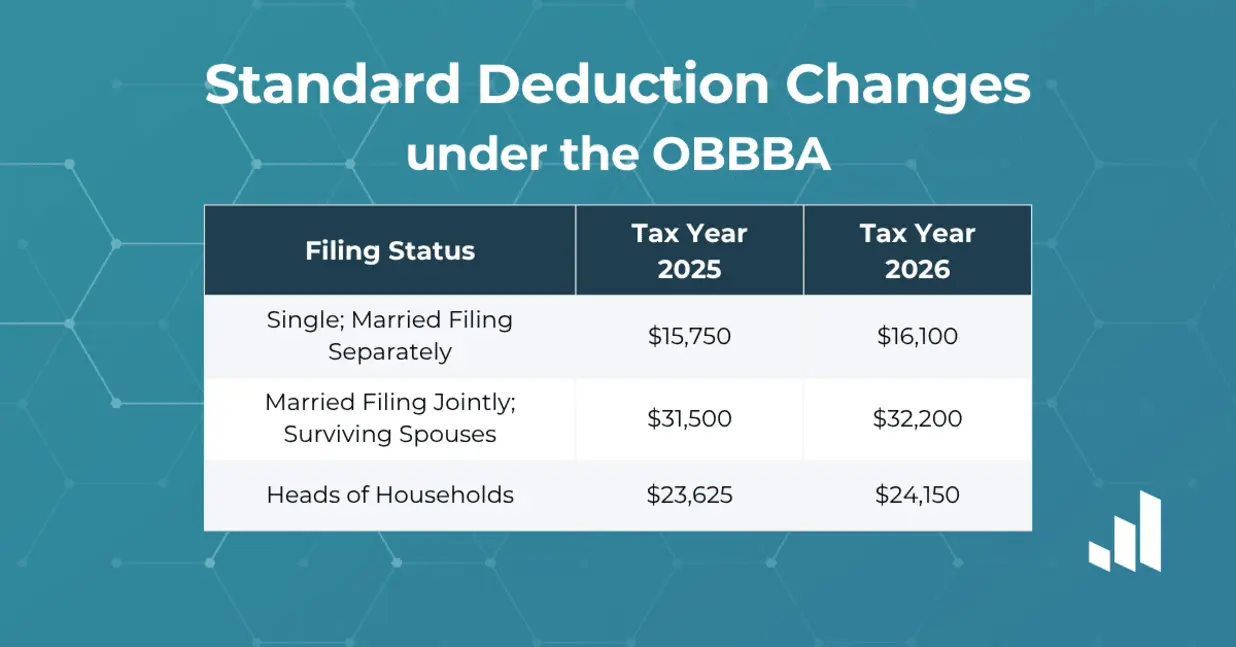
| Standard Deduction | $13,850 | $14,500 (single) | Raises refund potential |
| Senior Credit | $1,350 | $1,500 | Larger benefit for retirees |
| Overtime Deduction | Not allowed | 20% of OT eligible pay | Major boost for gig workers |
| Tip Income | Must be reported | Additional 5% deduction | Hospitality, gig industries |

New Deductions for Seniors, Overtime, and Tips
- Senior/Retiree credits extended to cover more types of retirement income.
- Overtime wage deduction: 20% of OT wages now deductible (gig workers).
- Tip income deduction: Up to 5% on reported tips.
Expert Commentary:
“These new OBBBA deductions give freelance, service, and retiree taxpayers unprecedented refund increases—FreeTaxUSA’s software already integrates all compliant calculations.”
— CPA Advisor, Denver
FreeTaxUSA vs TurboTax and Other Competitors (2026 Review)
Is FreeTaxUSA genuinely better than TurboTax or H&R Block for most people? Let’s dive deep:
Comparing FreeTaxUSA vs TurboTax: Cost, Features, and User Experience
| Feature | FreeTaxUSA | TurboTax (Basic) | H&R Block (Free) |
|---|---|---|---|
| Federal filing fee | $0 (all forms) | $0 (limited forms) | $0 (basic forms only) |
| State filing fee | $14.99 | $40-$55 | $39.99+ |
| Supported 1099 import | All main types | Only some types | Limited |
| Crypto/DA import | Yes (CSV/PDF/direct) | Extra charge | Not supported |
| Live Expert Help | $14.99 add-on | $60+ add-on | $39+ add-on |
| OBBBA compliance | Built-in auto updates | Manual entry/lag | Partial, slower updates |

Key takeaways:
- FreeTaxUSA wins for all basic and complex returns at federal level.
- TurboTax and H&R Block routinely upsell for add-ons, crypto support, and expert chat.
Switching from Paid Tax Software to FreeTaxUSA
Migrating your tax history is simple:
- Download previous returns from old provider.
- Import income forms and PDFs to FreeTaxUSA.
- Double-check transfer accuracy — platform will auto-flag mismatches.
Statistics: Customer Satisfaction and Reviews
- 92% satisfaction (2026 surveys via TrustPilot)
- Average refund increase: $152 per filer (when switching from paid software)
If you’re seeking more extensive comparisons of digital tax platforms and future-proofing for advanced features, make sure to Watch more.
FAQs and Troubleshooting with FreeTaxUSA Support
Even the best tax platforms present occasional challenges. FreeTaxUSA’s support system and FAQ center are designed to address common errors, login issues, refund questions, and real-time filing hiccups.
Addressing Common User Issues (Login, Import Errors, Returns)
FAQ Callout Box:
- Login problems:
- Use password reset (instant via email)
- Enable 2FA for extra security
- 1099 import fails:
- Confirm file format (CSV/PDF)
- Use manual entry wizard
- Refund timing:
- IRS direct deposit: Typical 7-14 days (dependent on IRS)
- Error codes explained in help center
- Extension requests:
- Supported for free (federal)
- Guide for filing Form 4868 included
How to Use the FreeTaxUSA FAQ and Customer Help Center
- Direct access via dashboard:
Links to chat, email, and phone. - Help articles indexed by form, credits, imports, issues.
- User forum: Crowd-sourced answers, expert moderation.
Checklist: Step-by-Step to Start and File with FreeTaxUSA
- Gather W-2, 1099s, receipts
- Create secure FreeTaxUSA login
- Import income forms
- Answer interview questions
- Review calculated refund + file
- Monitor IRS acceptance via dashboard
Tips for Maximizing Deductions on FreeTaxUSA
Pro Tips:
- Always use the “maximize refund” calculator before filing.
- Double-check new OBBBA deductions — especially for overtime and tips.
- For crypto and digital asset gains, confirm all CSVs match brokerage statements.
- Retirees: Use expanded senior deductions automatically prompted in the workflow.
How to Qualify for Free State Returns
- Start from the IRS Free File gateway.
- Ensure AGI under $79,000.
- Confirm your state is included.
- Use FreeTaxUSA’s eligibility checker before starting the process.
Troubleshooting 1099 Imports and Crypto Reporting
- File format issues (common with crypto/Coinbase): Always export as clean CSVs, not Excel.
- Data mismatch: Check names and EIN/TIN numbers are identical across forms.
- For digital assets, use built-in wizard for “transaction reconciliation.”
- If errors persist, FreeTaxUSA’s chat support responds within 5-10 minutes during peak season.
Frequently Asked Questions (FAQs): Free Federal Limits, Refunds, Extensions, Supported Forms
Frequently Asked:
- Q: Can I file a federal return for free, even with complex Schedule C or D?
A: Yes, FreeTaxUSA includes all forms for free federal filing.- Q: Is crypto income supported?
A: Yes, direct import and reconciliation tools for 2026.- Q: How do I get live help?
A: Chat, email, and phone available. Tax expert add-on available for $14.99.- Q: What if my AGI is above $79,000?
A: State filing will incur a fee; federal remains free.- Q: How do I file for an extension?
A: Form 4868 wizard included for free.Technical Analysis:
1099 CSV imports (especially crypto) use AI-driven matching tools for error reduction, reconciling transactions and calculating capital gains with minimal manual effort.
Conclusion: Why FreeTaxUSA Leads in 2026
For tax filers in 2026—whether you’re a gig worker, investor, or retiree—FreeTaxUSA’s free federal filing, cutting-edge form support, and new OBBBA-compliant features make it the standout choice for maximizing refunds and minimizing hassle.
We encourage readers to further explore optimization strategies, troubleshooting, and next-level filing methods:
For extended guidance on FreeTaxUSA’s refund maximization, Watch more.
Ready to take control of your tax season?
👉 Our Website
👉 Our YouTube Channel
👉 Our Facebook Fanpage
👉 Our X (Twitter)
- Boost Metabolic Flexibility in 2026 With the Lumen Metabolism Tracker for Faster Weight Loss
- Transform Video Marketing in 2025 with AI Templates and Automated SEO for Creators and SMBs
- OpalAi
- Trinka AI
- Will Transkriptor Eliminate Manual Typing Hassles? Analyzing the Transkriptor Audio Conversion Engine