

Most small business owners don’t want to learn a website builder — they want a finished website. That gap is exactly what Readdy is built to close: instead of dragging blocks around a canvas, you describe your business in plain language and Readdy’s AI generates a complete, mobile-responsive site — layout, copy, images, and SEO settings included — in minutes. Since launching in 2025 and hitting #1 Product of the Day on Product Hunt, Readdy has grown to more than 500,000 users worldwide, and it differentiates itself from the crowded AI-website-builder field with a feature few competitors offer: the ability to export your finished site as clean code or a Figma file, so you’re never locked into the platform.
For freelancers, consultants, small business owners, and agencies who need a professional web presence without hiring a developer, that combination of speed and portability is a real draw. This 2026 review walks through how Readdy actually works, what its credit-based pricing gets you, how it stacks up against Wix, Framer, and traditional WordPress builds, and who should — and shouldn’t — trust it with their next website.
Readdy Review 2026: AI Website Builder That Turns a Prompt Into a Live Site
Overview and Background
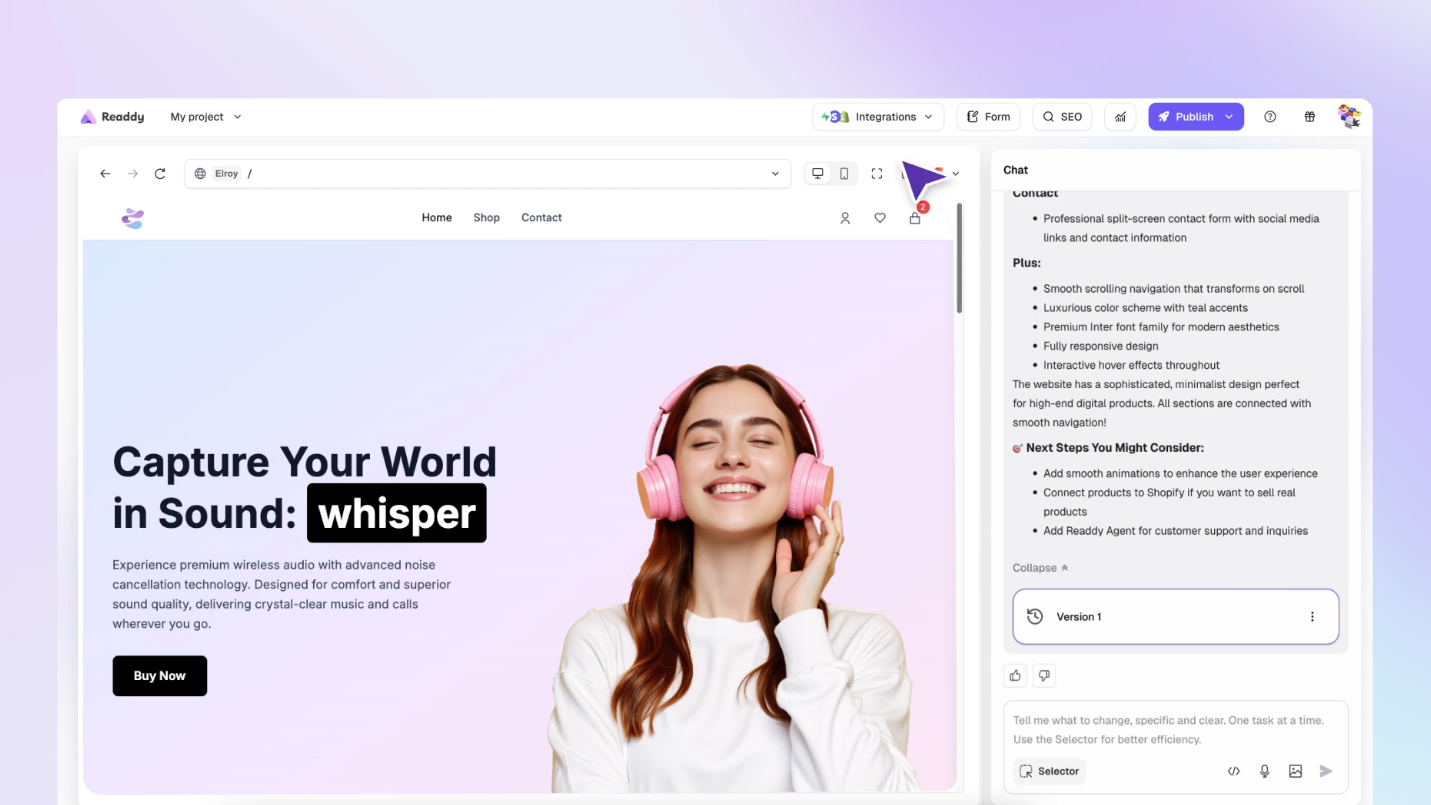
Readdy is an AI-powered, no-code website builder founded by Frank, a developer-turned-founder with more than a decade of product experience. The core idea is simple: rather than manually assembling pages, you type a description of your business, upload a screenshot, or paste a reference URL, and Readdy’s AI analyzes the structure and design patterns to generate a full multi-page website — copy, imagery, layout, and SEO metadata included. From there, everything is editable through a visual drag-and-drop editor or a chat-style “terminal” where you describe changes in plain language.
The platform covers the essentials most small businesses need beyond page generation: one-click publishing with hosting and SSL included, custom domain support, a built-in backend (Readdy Backend) for databases, forms, and app logic, and an embeddable AI chatbot (Readdy Agent) that can answer visitor questions and capture leads around the clock.
Why Readdy Stands Out in 2026
True code and Figma export: unlike most AI website builders that keep your site locked inside their editor, Readdy lets you export the finished project as clean HTML/CSS, React, or Vue code, or hand it straight to a designer as a Figma file — a genuine escape hatch most competitors don’t offer.
Multiple ways to start: you can generate a site from a text prompt, a screenshot of a design you like, a reference URL to recreate, or one of 5,000+ pre-built templates — useful whether you’re starting from a blank page or trying to replicate an existing look.
Built-in backend, no external setup: Readdy Backend gives paid plans a working databases-and-functions layer out of the box, so simple dynamic features (booking forms, lead capture, basic app logic) don’t require wiring up a separate service like Supabase or Firebase.
An AI receptionist on every site: Readdy Agent adds a chat-and-voice assistant to your published site that answers visitor questions and captures contact details — a feature small businesses would otherwise pay separately for.
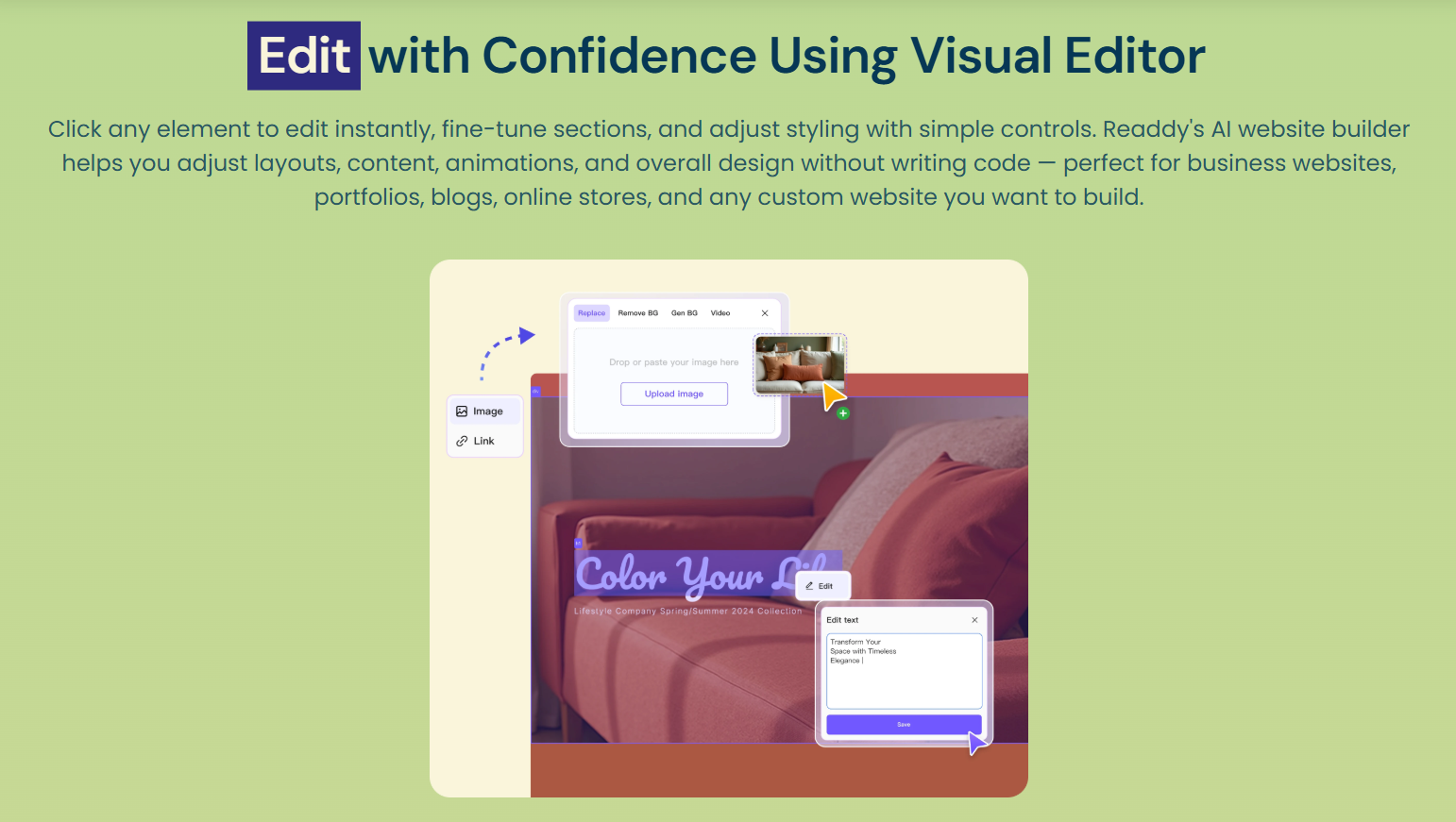
Selector-mode editing: beyond the standard drag-and-drop editor, you can click any element on the page and simply tell the AI what to change in natural language — a faster iteration loop than manually adjusting properties panel by panel.
Real integrations, not just templates: Readdy connects with Stripe, Shopify, Calendly, Mailchimp, Google Analytics, and Supabase, which means the sites it generates can plug into a working sales and marketing stack rather than existing as a static brochure page.
Key Features and Technology
Readdy’s feature set spans generation, editing, commerce, and post-launch tools. Here’s how the pieces break down.
AI Site Generation
Describe your business, goals, and target audience, and Readdy proposes a complete layout — sections, headers, imagery, and calls to action — matched to that brief. Independent testers have reported building a working multi-page prototype in as few as three prompts.
Visual Editor and Mobile Responsiveness
Every generated site is mobile-responsive by default, and the desktop and mobile views can be customized independently. The drag-and-drop editor handles text, images, layout, colors, and spacing without touching code.
E-commerce and Payments
For online stores, Readdy connects to Shopify for inventory and product listings and to Stripe for direct payments. It’s a solid fit for small catalogs and simple stores; large, complex inventories will still get more mileage out of a dedicated Shopify build.
SEO Tools
Readdy automatically sets title tags, meta descriptions, semantic HTML, and alt text, and it handles your sitemap.xml and robots.txt. You can also verify the site directly in Google Search Console, and newer plans add AI-driven SEO analysis and AEO/GEO (AI-search and generative-engine optimization) tools aimed at visibility in AI-powered search results.
Export and Developer Handoff
Higher-tier plans unlock code export (HTML/CSS, React, or Vue) and Figma export, plus GitHub integration on the agency tiers — letting developers take a Readdy-generated starting point and continue building in their own codebase.

Pricing, Plans, and Package Structure
Readdy uses a credit-based subscription model: every AI generation or edit consumes 25 credits, and plans differ mainly in how many credits, sites, and projects you get, plus which advanced features (backend, export, agency tools) are unlocked. Monthly billing is available, and annual plans (1, 2, or 3 years) apply a meaningful discount — up to 60% off the monthly rate on the longest term. Pricing below reflects Readdy’s published rates as of mid-2026; always confirm current pricing on Readdy’s site before subscribing, since SaaS pricing shifts often.
| Plan | Monthly Price | Annual Price (per mo) | Credits | Sites Included |
|---|---|---|---|---|
| Free | $0 | — | 250 / mo | 0 (no custom domain) |
| Starter | $25 | $15/mo | 30,000 / yr | 1 site |
| Pro | $40 | $24/mo | 72,000 / yr | 2 sites |
| Agency | $120 | $72/mo | 216,000 / yr | 6 sites |
| Agency Pro (White Label) | $199 | $119/mo | Unlimited | 10 sites |
How Readdy Compares to Alternatives
| Tool | Best For | Code/Design Export | Starting Price |
|---|---|---|---|
| Readdy | Fast prompt-to-site generation with an exit path | Yes — code and Figma | Free; $15/mo Starter (annual) |
| Wix (with AI/ADI) | Beginners wanting an all-in-one ecosystem | No | Free; ~$16/mo premium |
| Framer | Designer-grade marketing and landing pages | Limited | Free; paid tiers vary |
| WordPress (DIY/legacy) | Maximum long-term flexibility, at a time cost | N/A — fully owned code | Hosting + theme/plugin costs vary |
vs. Wix: Wix’s AI tools are more of an assisted setup wizard bolted onto a mature drag-and-drop platform, while Readdy is AI-first from the ground up — you can go from a blank prompt to a full site faster, though Wix’s app marketplace and ecosystem are more mature for businesses that need deep third-party integrations.
vs. Framer: Framer produces some of the most polished, designer-quality marketing pages available, but it leans more toward layout craftsmanship than full AI generation from a text brief — Readdy trades a bit of visual polish for genuinely faster, more automated site creation.
vs. WordPress (DIY): WordPress offers unmatched long-term flexibility through its plugin ecosystem, but that flexibility comes with real maintenance overhead — plugin conflicts, security updates, and a steeper learning curve. Readdy trades some of that depth for speed and near-zero maintenance, with code export as a bridge if you eventually outgrow it.
Pros and Cons
What Users Love
Genuinely fast generation: going from a text prompt to a usable, multi-page site takes minutes, not days — a real advantage for anyone racing to get a landing page or prototype live.
No lock-in via code export: the ability to export clean code or a Figma file means Readdy can serve as a rapid-prototyping step even if you plan to hand the project to a developer later.
Consistently clean design output: reviewers across independent sites note that generated layouts look modern and professional even across very different prompts, which matters for non-designers.
Everything-included hosting: hosting, SSL, and speed optimization ship by default, so there’s no separate hosting bill or setup step for most small sites.
Useful free tier for testing: the free plan’s 250 monthly credits are enough to genuinely try the AI generation and editing workflow before committing to a paid plan.
Limitations Worth Knowing
Credits disappear fast on iteration: at 25 credits per generation or edit, exploratory back-and-forth design tweaks can burn through a monthly allowance quickly, especially on the Free and Starter tiers.
Limited direct third-party integrations: beyond Shopify, Stripe, Calendly, Mailchimp, and a handful of others, Readdy doesn’t natively connect to as many services as established platforms like WordPress or Wix — you may need the code export route for anything more specialized.
AI doesn’t always nail intent on the first try: some users report that generated structure or copy occasionally drifts from what they actually asked for, requiring manual rework or a follow-up prompt.
Not built for complex web applications: Readdy Backend covers basic databases, forms, and functions, but it isn’t a substitute for custom development if your project needs deep, bespoke application logic.
Single-site limit on the Starter plan: at $15–25/mo you only get one included site — agencies or anyone managing multiple properties will need to move up to Pro or Agency, adding cost.
Who Should Use Readdy
Freelancers and solo founders who need a professional site fast without hiring a designer will get the most immediate value — the Free plan is enough to test the workflow, and Starter on annual billing covers a single production site affordably.
Small business owners launching a business, portfolio, restaurant, or services site will appreciate the all-included hosting, SEO basics, and built-in AI chatbot for lead capture — Starter or Pro, depending on whether you need more than one site.
Agencies and design consultancies managing multiple client sites should look at the Agency or Agency Pro (white-label) tiers, which add client management, outreach tooling, and — on Agency Pro — full white-labeling for reselling under the agency’s own brand.
Developers prototyping quickly can use Readdy purely as a rapid front-end generation tool, exporting the code once the structure is right and continuing development in their own stack — Pro tier unlocks this export.
Businesses needing deep custom applications — complex internal tools, heavy e-commerce catalogs, or bespoke integrations — are better served by a traditional developer build or a platform like Webflow with a development team behind it.
Getting Started: Step by Step
- Sign up for the Free plan at Readdy to explore the AI generation workflow before spending anything.
- Describe your project — enter a text prompt about your business, or upload a screenshot or reference URL if you want to recreate a specific look.
- Review and refine the generated site using the visual editor or Selector Mode, clicking any element and describing the change you want.
- Connect or purchase a domain — search and buy directly inside Readdy, or point an existing domain you already own.
- Set up SEO basics — edit meta titles, descriptions, and URLs using Readdy’s built-in SEO tools before publishing.
- Publish your site with one click — hosting, SSL, and speed optimization are handled automatically.
- Upgrade your plan once you know your credit usage pattern, choosing annual billing if you’ll keep the site running long-term.
Tips for Getting Maximum Value
Start on the Free plan and write one detailed, specific prompt rather than several vague ones — Readdy’s output quality improves noticeably when you front-load details about your business, audience, and desired tone, which also saves credits by reducing the number of regeneration cycles you need. If you know you’ll keep the site live for more than a few months, switch to annual billing immediately — the discount is substantial (up to 60% off at the higher tiers), and Starter’s annual rate makes a single production site very affordable. Before you commit to a paid tier, use the free 250 monthly credits to test how many generations a realistic editing session actually consumes, since the credit system is the single biggest variable in whether a plan feels generous or tight. Finally, if you’re a freelancer or agency building sites for clients, budget for the Pro or Agency tier from the start rather than the single-site Starter plan — multi-site management, higher form-submission limits, and the export options become worthwhile quickly once you’re managing more than one project.
Future Outlook and Final Assessment
AI website builders are one of the fastest-growing corners of the no-code market, and the broader wireless and AI-assisted design-tool space is projected to keep expanding well into the next decade as more small businesses skip traditional web design altogether. Readdy is well-positioned in that shift thanks to its code/Figma export — a feature that addresses the biggest long-standing objection to AI site builders (lock-in) — plus a genuinely fast generation engine and a growing set of agency-focused tools. The honest caveats remain real, though: the credit system rewards careful prompting over rapid trial-and-error, third-party integrations are still thinner than mature platforms like WordPress or Wix, and complex custom applications are outside its scope.
Conclusion
Readdy won’t replace a custom development team for complex applications, and its credit-based pricing means thoughtful prompting pays off more than trial-and-error clicking. But for freelancers, small business owners, and agencies who need a professional, mobile-ready website live in minutes — with a real exit path via code or Figma export if they ever outgrow the platform — it’s one of the most complete AI website builders available today. Start on the free plan, test how far 250 credits gets you, and scale up from there. That’s exactly the kind of tool AI Solutes exists to point you toward — because at the end of the day, we want to make everything easy.
Ready to build your website with AI in minutes?
Explore more honest reviews, tutorials and tool comparisons to find the right tech for the way you work and live — at AI Solutes, where we make everything easy.
👉 Open Free Account: https://ai-solutes.com/readdyai
👉 Our YouTube Channel: youtube.com/@ai-solutes
👉 Our Facebook Fanpage: Facebook
👉 Our X (Twitter): @AISolutes
- Master Weebly in 2026: Compare Features, Pricing, Pros and Cons, and SEO Strategies That Rank
- Unlock SEO Success with Spin Rewriter’s ENL Semantic Spinning Technology for Scalable Content Automation
- Unlock Next-Gen Music Creation with MixAudio AI: Ultimate Guide to AI Music Generation and Mixing in 2025
- AI AVATAR
- Scale and Digitize Your Photo Studio in 2025: Best Photo Studio Management Software, Workflow Checklist, and Proven Cost Cuts















