Every business owner, marketer and freelancer has a list of recurring tasks that eat the week: answering the same quote requests, pulling the same reports, checking inventory, drafting the same SEO briefs, generating the same daily ad variations. You know exactly how the work should be done, yet you still do it by hand, because wiring up traditional automation takes a technical afternoon and a stack of brittle triggers. That gap is the problem CREAO was built to close. CREAO is an AI agent platform where you simply describe a task in plain language, and it builds an agent that runs on a schedule inside the tools you already use, from Gmail and Slack to Shopify, Google Ads and Search Console. With a Free plan that costs $0 and needs no credit card, paid plans that start at about $20 per month, support for models from OpenAI, Anthropic, Google and others, and a pitch that reads “AI should be running your business by now,” CREAO is aiming squarely at people who want results from AI agents without becoming automation engineers.
For solo founders, small teams, ecommerce sellers, agencies and content creators, the promise is easy to grasp: stop doing the repeatable work yourself and let an agent do it while you focus on decisions. This 2026 review walks through what CREAO is, how its agents actually work, the connectors and models behind them, the full pricing ladder and its credit system, how it compares with Zapier Agents, Lindy and n8n, the honest limitations, and exactly who should (and shouldn’t) sign up.
CREAO Review 2026: The AI Agent Platform That Builds, Schedules and Runs Your Recurring Work for You
Overview and Background
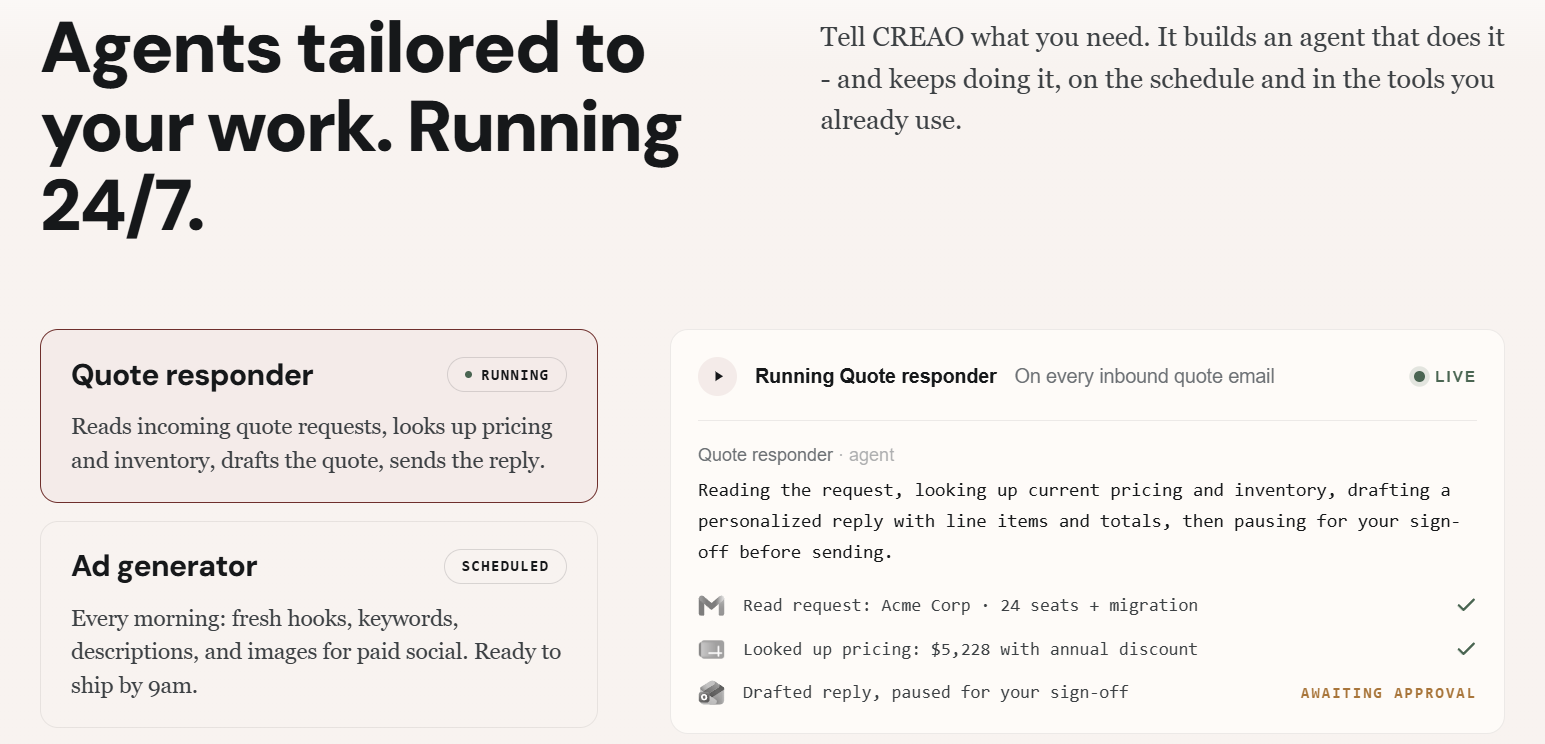
CREAO is an AI agent platform. The core idea is a short loop: you describe the work, CREAO builds an agent for it, the agent runs on your schedule inside your own tools, and approval gates apply wherever you want a human in the loop. Examples on the company’s own site include a quote responder, a daily ad generator, an inventory tracker and an SEO brief writer. Each one is a recurring job that most small businesses currently handle manually or with a patchwork of spreadsheets and notifications.
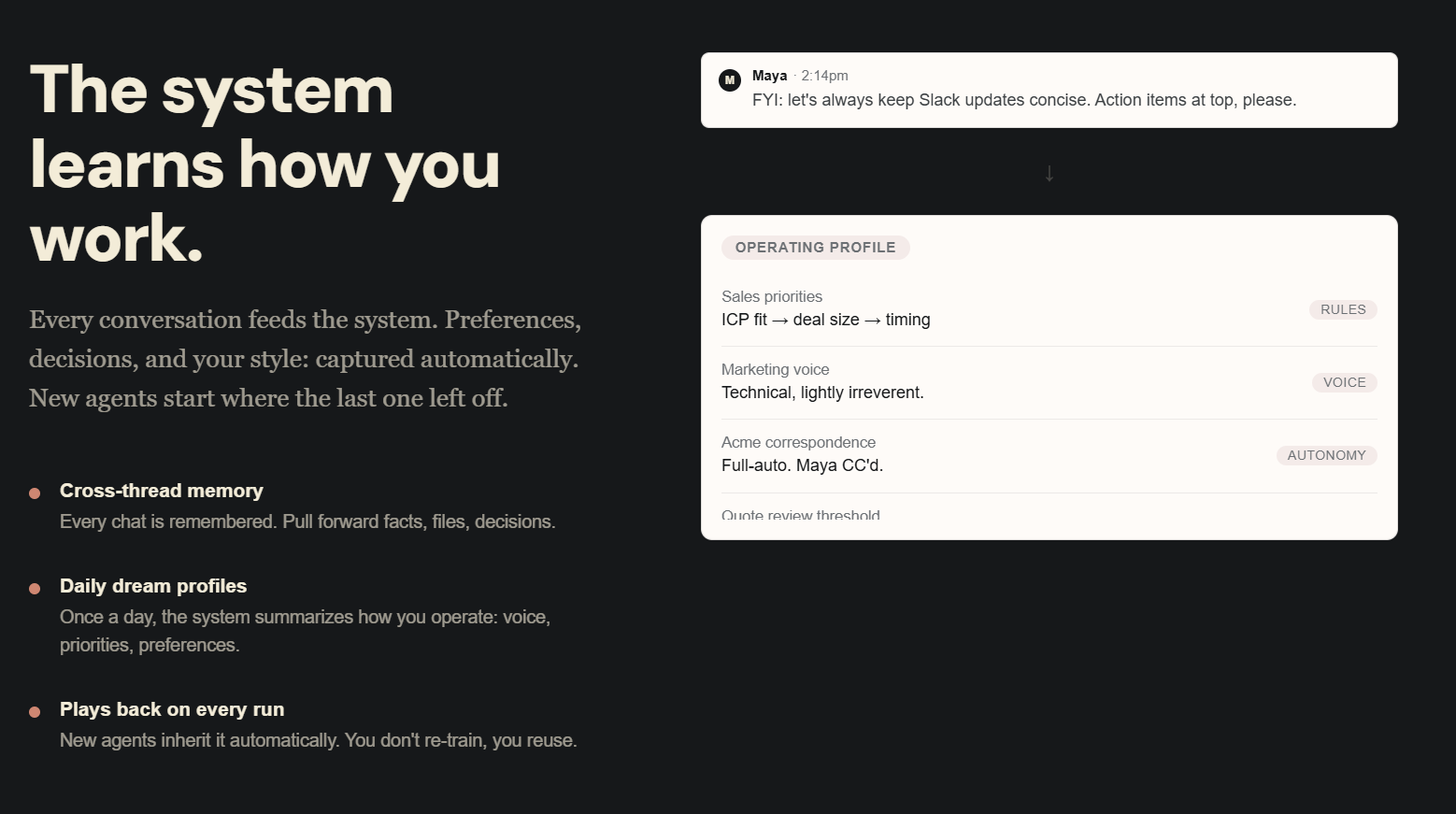
What makes the platform feel different from a chatbot is that the agent does not wait for you to open a window. Agents can run daily, weekly, on a webhook, or when a Slack message arrives, and they act through connectors to the apps where your work already lives. A second differentiator is memory: CREAO remembers your conversations across threads and maintains a daily profile summarizing your preferences and writing style, so a newly created agent starts with context instead of a blank slate.
CREAO has also evolved quickly. Earlier coverage described it mainly as an AI app builder that turned conversations into small applications, while the current product positions itself more broadly around autonomous agents that handle business operations. Independent write-ups report that the company was founded in late 2024, is staffed by people with backgrounds at Meta, Apple, LinkedIn and TikTok, and has raised roughly $10 million in early funding, though the company’s own pages do not name founders and attribute its blog to “the CREAO team.” Its homepage shows logos for Google, Amazon, TinyFish and Sakana AI under a “trusted by” banner, which signals credibility but is not the same as a published customer count.
Why CREAO Stands Out in 2026
Describe it, and the agent gets built: The headline feature is that you do not drag boxes onto a canvas or write trigger logic. You tell CREAO what recurring job you want done, and it assembles an agent to do it. For non-technical owners, that removes the biggest barrier that has kept automation platforms in the hands of operations specialists.
Real scheduling, not just chat: Agents are not one-off chat responses. They can run daily or weekly, fire on a webhook, or trigger when a Slack message arrives. That turns AI from a tool you use into a worker that shows up on time, which is the shift most small businesses actually need.
Autonomy controls you set yourself: You decide how much freedom each agent gets. You can require approval before any write or destructive action, such as sending an email or changing a spreadsheet, or let a trusted agent run fully automatically. Starting with approvals on and relaxing them as you gain confidence is a sensible, low-risk way to adopt agents.
A broad set of connectors: Connectors cover Gmail, Outlook, Slack, Microsoft Teams, Google Calendar, Notion, Asana, Google Sheets, Shopify, eBay, Google Ads, YouTube, Google Analytics, Search Console, Semrush, Firecrawl and X, with more on the way. You authorize each one once through OAuth or an API key, and every agent can then use it.
Memory that compounds: CREAO remembers across threads and keeps a daily profile of your preferences and style. New agents inherit that profile, so your tone in client emails or the way you like reports structured carries forward without being re-explained every time.
Model choice, including an in-house option: You are not locked into a single AI vendor. The platform offers models from OpenAI, Anthropic, Google, DeepSeek, Meta, Moonshot, Z.ai, MiniMax and Sakana AI, plus CREAO Lite, an in-house model built for cost-efficient agent work. Matching the model to the task is how you keep credit spend under control.
Media and browser tools in the same place: Agents are not limited to text. CREAO includes video generation (Veo and Seedance), image generation up to 4K, text-to-speech with more than 20 voices, and browser use with persistent logins and CAPTCHA solving. That makes it possible to automate creative production and web tasks that never had a clean API in the first place.
A low-risk way in: A $0 Free plan with no credit card required lets you validate the idea before spending anything, and the paid ladder scales smoothly from $20 to enterprise volumes. For a platform category that often hides pricing behind sales calls, that transparency is welcome.
Key Features and Technology
CREAO’s strength lies in how the agent loop, the connectors and the model layer fit together. Here is how the platform breaks down in practice.
The Agent Builder: Describe It, Then Let It Run
The builder starts with a plain-language description of the job. A user might write, in effect, “every morning, check my Shopify inventory, flag anything under ten units, and post a summary to Slack,” and CREAO turns that into a working agent with the right connectors attached. From there you choose the schedule (daily, weekly, webhook or Slack message) and the autonomy level. Because each run and conversation feeds the platform’s memory, agents are meant to improve in how well they match your preferences over time rather than staying frozen at their first version. The example agents CREAO highlights, a quote responder, a daily ad generator, an inventory tracker and an SEO brief writer, give a good sense of the sweet spot: repeatable, rules-plus-judgment work with a clear output.
Connectors and Memory: Your Tools, Your Style
The connector library is the practical heart of the product. Email (Gmail and Outlook), team chat (Slack and Teams), calendar, project tools (Notion and Asana), spreadsheets, ecommerce (Shopify and eBay), advertising and analytics (Google Ads, Google Analytics, Search Console, Semrush), content (YouTube and X) and web scraping through Firecrawl are all available. You connect an account once, and every agent can reach it. Paid plans are described as including all connectors, while the Free plan limits you to one personal connector per agent app. On the memory side, a daily profile summarizes your preferences and communication style, which is what lets an agent draft in your voice instead of a generic corporate tone.
Models and CREAO Lite: Balancing Cost and Quality
Model selection is a real lever on cost. Frontier models from OpenAI, Anthropic and Google handle complex reasoning, while CREAO Lite is positioned for the everyday bulk of agent work. The company claims CREAO Lite delivers about 95% of flagship-model quality at roughly 5% of the cost, citing blind-judged scores of 3.30 versus 3.46 out of 5 and a median session cost of about $0.037 versus $0.684. These are the vendor’s own figures from its aggregate scored runs, so read them as encouraging marketing evidence rather than an independent benchmark. Still, the direction is right: for scheduled, repetitive jobs, a cheaper capable model is usually the smart default, and you can reserve premium models for the steps that truly need them.
Media and Browser Tools: Beyond Text
CREAO’s agents can create as well as process. Video generation through Veo and Seedance, images up to 4K and text-to-speech across more than 20 voices make it possible to build, for example, a daily ad generator that produces creative assets without a designer in the loop. Browser use with persistent logins and CAPTCHA solving extends reach to sites that only exist as web interfaces. Higher tiers add durable long-running video and audio renders and larger uploads (up to 100 MB for images and PDFs, and 500 MB for videos), along with more storage.
Pricing, Plans, and Package Structure
CREAO charges a monthly subscription that includes a monthly pool of credits, and every plan adds a small daily bonus of about 5 credits. Annual billing is advertised with a 20% saving, although the pricing page does not list annual prices. Each paid tier includes everything from the tier below it, so moving up never removes a capability. The plans below reflect the official pricing page at the time of writing, and because credit allowances and promotions change often, treat every figure as approximate.
| Plan | Approx. Price | Credits and Key Features | Best For |
|---|---|---|---|
| Free | $0/mo | 30 one-time credits plus daily bonus; 1 video generation; PDFs up to 10 pages; 1 personal connector per agent app; community support; no credit card | Testing the platform on one or two real tasks |
| Pro | ~$20/mo | ~200 credits/month plus daily bonus; custom agents; all connectors; built-in, custom and open-source skills; custom model selection; PDFs over 10 pages | Solo founders and freelancers running a few agents |
| Pro Plus (Recommended) | ~$50/mo | ~600 credits/month plus daily bonus; scheduled runs; durable long-running video and audio renders; larger uploads; 5 GB storage; priority support | Small businesses depending on daily scheduled automation |
| Max | ~$150/mo | ~2,000 credits/month plus daily bonus; more simultaneous automations and renders; 25 GB storage; dedicated support | Agencies and heavy multi-agent users |
| Ultra | ~$1,000/mo | ~20,000 credits/month plus daily bonus; highest concurrency; 100 GB storage; dedicated support; founder office hours | High-volume teams and operators |
| Enterprise | Custom | Volume pricing, security controls, flexible credits, SSO; booked via a free AI discovery call | Larger organizations with compliance needs |
How CREAO Compares to Alternatives
| Factor | CREAO | Zapier Agents | Lindy | n8n |
|---|---|---|---|---|
| Core approach | Describe a task, get a scheduled agent | AI agents added to a huge app-automation platform | Agent-first, conversational setup | Open-source workflow builder with AI nodes |
| Approx. entry paid price | ~$20/mo (Pro) | ~$20/mo (Pro, ~750 tasks) | ~$49/mo (Starter) | ~$20/mo cloud; self-hosting free plus infrastructure |
| Free option | Yes, 30 one-time credits plus daily bonus | Check current plan | Check current plan | Self-hosted open source |
| Integrations | Gmail, Slack, Shopify, Google Ads and more; browser use | 7,000+ apps | ~80 deeply built integrations | Hundreds of nodes plus custom code |
| Technical skill needed | Low | Low to medium | Low | Medium to high |
| Model choice | OpenAI, Anthropic, Google, others plus CREAO Lite | Managed by Zapier | Managed by Lindy | Bring your own |
| Best for | Non-technical owners wanting recurring agents | Teams already invested in Zapier | Assistant-style workflows | Developers wanting control |
vs. Zapier Agents: Zapier’s advantage is sheer catalog size, with more than 7,000 apps, and a mature track record. Its AI agent features are generally described as shallower than agent-first rivals, because the platform grew up around trigger-and-action automations. CREAO is the more natural fit if you want to describe a judgment-heavy job in plain language and rely on memory and model choice; Zapier is the safer pick if the app you need to connect is obscure.
vs. Lindy: Lindy is a close philosophical cousin, with a conversational, agent-first setup and deeper builds on a smaller set of roughly 80 integrations. Its entry plan sits noticeably higher, at around $49 per month. CREAO’s $0 Free plan and $20 Pro tier make it the cheaper place to experiment, while Lindy may appeal to teams who prefer its assistant-style workflows.
vs. n8n: n8n is the choice for technical teams. It is open source, can be self-hosted for the cost of your own infrastructure, and offers deep control, but it expects you to design and maintain workflows yourself. CREAO trades that control for speed and simplicity: if you would rather describe the task than build the plumbing, CREAO removes a lot of work, though you give up the transparency and portability of open-source tooling.
Pros and Cons
What Business Owners Will Love
Plain-language agent building: You describe the job in plain language and get a working agent. There is no flowchart to design and no trigger logic to debug, which makes agents accessible to people who have never touched an automation tool.
Scheduled work inside your own tools: Agents run daily, weekly, on webhooks or on Slack messages, and they act inside Gmail, Slack, Shopify, Google Ads and other connected tools. The result is work that gets done while you are away from your desk.
Adjustable autonomy: Approval gates let you start cautiously and loosen control once an agent has earned your trust, which is exactly how most owners want to adopt autonomy.
Flexible model choice: Access to models from many providers plus the in-house CREAO Lite lets you tune cost against quality instead of paying flagship rates for routine jobs.
Memory and personalization: Persistent memory and a daily preference profile mean agents start with your voice and habits, which cuts the repetitive re-briefing that makes many AI tools tiring to use.
Low-risk entry: A $0 Free plan with no credit card and clear published tiers from $20 up make it simple to try before you commit.
Limitations Worth Knowing
Credits are the meter, and it is not fully transparent: The Free plan’s 30 credits are one-time, and the pricing page does not explain what a credit buys. That makes monthly cost hard to predict until you have measured your own workloads, so budget a testing period before relying on it.
It is an early-stage product: Agent platforms are a fast-moving category, and CREAO has changed its positioning more than once. One independent reviewer scored the product 7.1 out of 10 and described it as not yet ready for mission-critical work, citing early-stage issues reported by users such as errors and stuck loading screens.
Independent validation is thin: At the time of writing, G2 shows no user reviews for CREAO, and the company publishes no total user count. Most performance claims, including the CREAO Lite quality figures and the 95%+ high-quality response rate, come from the vendor itself.
Free and Pro have real limits: The Free plan limits you to one personal connector per agent app and does not clearly include scheduled runs. Scheduling is listed under Pro Plus, so the plan that delivers the headline experience is the $50 tier rather than the $20 one.
Autonomy needs supervision: An agent that can write to your email, store or ad account can also make mistakes at scale. Keep approvals on for customer-facing actions, and expect to review early outputs carefully.
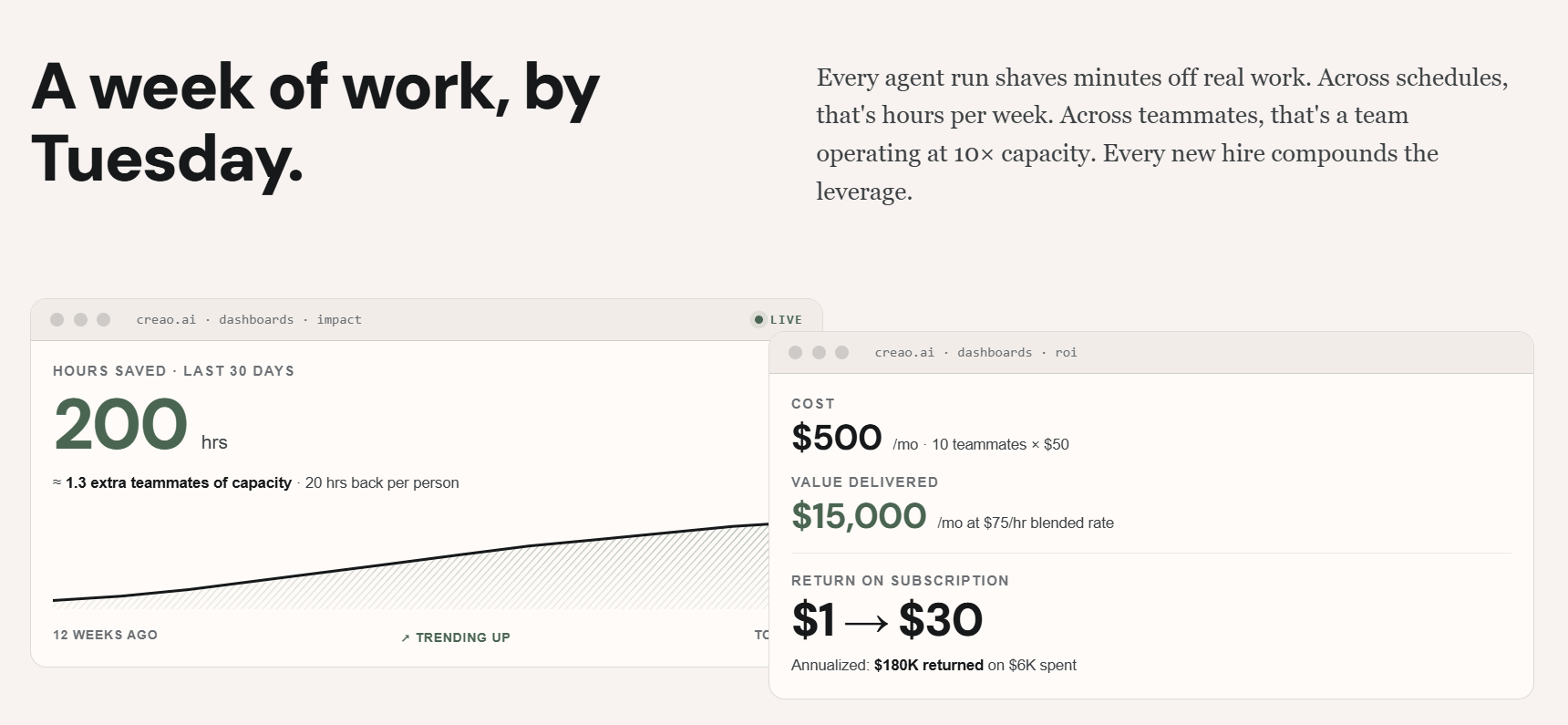
Marketing numbers are illustrative: The dashboard examples on CREAO’s site, such as 200 hours saved or $15,000 per month in value, are labeled as illustrative models. Your results will depend on the quality of your tasks and prompts.
Who Should Use CREAO
Solo founders and small business owners: If you handle the same quotes, follow-ups, reports and status checks every week, an agent that does them on a schedule is the clearest win. Start on the Free plan, then move to Pro or Pro Plus once you know what your workflows cost in credits.
Marketers and content creators: SEO briefs, daily ad creative, performance summaries from Google Analytics and Search Console, and social posting are natural fits, especially with the Semrush, Google Ads and YouTube connectors. Pro Plus is the sensible home for scheduled campaigns.
Ecommerce sellers: Inventory tracking, order monitoring and listing updates across Shopify and eBay are exactly the repetitive, rules-plus-judgment work agents handle well. Begin with approval gates on for anything that touches live listings.
Agencies and freelancers: Managing recurring reporting and content production across several clients is credit-hungry, so the Max tier’s extra concurrency and dedicated support are worth a look once you prove the workflow.
Operations and support teams: If your inbox, calendar and chat tools are where work piles up, agents that triage and summarize can give back hours a week. Pro is a reasonable starting point.
Who should wait: If you need guaranteed uptime, formal compliance sign-off or predictable per-run costs from day one, wait for the product to mature or talk to the Enterprise team about SSO and security controls before committing.
Getting Started: Step by Step
- Create a free account. Sign up on CREAO’s site. No credit card is required, and you receive the one-time credit allowance plus a small daily bonus.
- Pick one real recurring task. Choose something you do weekly, such as a daily summary, a quote reply or a keyword brief, so that you can judge the result against work you already know well.
- Connect only the tools you need. Authorize the relevant connectors (Gmail, Slack, Shopify, Google Sheets and so on) through OAuth or an API key. Remember that the Free plan allows one personal connector per agent app.
- Describe the task in plain language. Explain what the agent should do, what a good output looks like and when it should run. Be specific about tone, format and what counts as done.
- Turn approvals on and review early runs. Require approval before write or destructive actions, then read the first few outputs closely and refine your instructions.
- Watch the credit meter, then scale. Note how many credits each run uses, choose a cheaper model such as CREAO Lite for routine steps, and upgrade to Pro or Pro Plus only when the numbers justify it.
Tips for Getting Maximum Value
Begin with a single workflow and measure its credit cost before building ten agents, because predictable spending depends on knowing what one run consumes. Use a cheaper model, including CREAO Lite, for routine steps, and reserve premium models for the reasoning-heavy parts of a job. Keep approvals switched on for anything customer-facing until the agent’s output consistently matches yours, then relax them one agent at a time. Write instructions the way you would brief a new assistant, with examples of good output and clear boundaries, and let the memory profile do the rest as it learns your style. Check the official pricing page for current credit allowances and any promotions before upgrading, since both change often. And resist over-buying: most solo operators are well served by Pro or Pro Plus, while Max and Ultra only make sense when several agents run concurrently and heavily.
Future Outlook and Final Assessment
The tailwinds favor agent platforms. Businesses of every size are moving from asking AI questions to delegating recurring work to it, model costs keep falling, and connectors to everyday tools keep multiplying. CREAO’s bet on plain-language agent creation, persistent memory, multi-model choice and an in-house low-cost model positions it well for a future where small teams run operations that once required dedicated staff. If it keeps improving reliability and makes credit usage easier to forecast, it could become a default way for non-technical owners to put agents to work.
The honest caveats remain: the product is young, independent reviews are limited, credit consumption is not clearly documented, and the most useful features sit above the entry-level paid plan. Test on the Free plan, keep approvals on, and treat vendor performance claims as claims until you have verified them in your own work. Within those boundaries, CREAO offers one of the more approachable routes into autonomous AI agents available in 2026.
Conclusion
CREAO makes a simple promise and builds the product around it: describe the work, and an agent will do it, on schedule, inside the tools you already use. Its plain-language builder, adjustable approval gates, broad connectors, memory and wide choice of models make it one of the friendlier ways for non-technical owners to start delegating recurring tasks. It is still early, its credit system rewards careful testing, and the strongest claims deserve verification. If you are a founder, marketer, seller or freelancer who is tired of doing the same work by hand, start free, prove one workflow, and let CREAO help make everything easy, one scheduled task at a time.
Ready to put your first AI agent to work?
Explore more honest reviews, tutorials and tool comparisons to find the right tech for the way you work and live — at AI Solutes, where we make everything easy.
👉 Open Free Account: https://ai-solutes.com/creaoai
👉 Our YouTube Channel: youtube.com/@ai-solutes
👉 Our Facebook Fanpage: Facebook
👉 Our X (Twitter): @AISolutes
- Master Personal Loans in Vietnam 2025: Compare Rates, HELOC vs Unsecured, and Apply Fast with AI
- Explore Arteza Art Supplies Trends for 2026 and Master Creative Buying Decisions
- Say Goodbye to Manual Retopology: Streamlining 2D-to-3D Workflows Effortlessly with Tripo AI
- ServiceNow open sources Fast-LLM in a bid to help enterprises train AI models 20% quicker
- Does Bright Data Simplify Web Scraping? Reviewing the Bright Data Automated Data Extraction Technology