If you’re searching for the next evolution in digital productivity, you’re in the right place. In 2025, the integration of AI into office suites has become the catalyst for a revolution in the way we work, collaborate, and create. From seamless automation to powerful tools for writing, design, and presentations, the latest technology empowers individuals and teams to transcend old limitations—saving time, boosting quality, and opening up new levels of creativity. This article unveils the features, user stories, and industry insights behind WPS Office 2025, exploring why it’s not only keeping pace but setting an entirely new standard for the AI-powered workplace. Whether you’re a student, freelancer, entrepreneur, or part of a large team, discover how today’s tools are reshaping the future of productivity, making it smarter, more accessible, and more impactful than ever before.
WPS Office 2025 & The AI-Powered Office Suite Revolution
AI-Powered Office Suite Overview
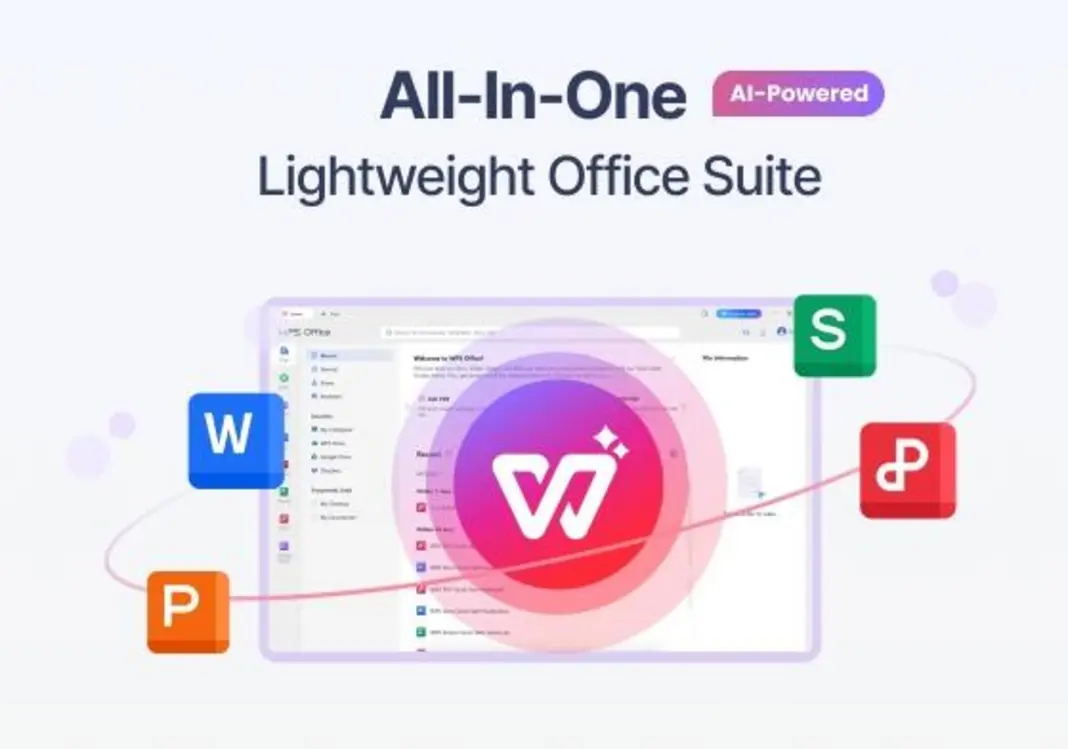
Step into any modern workspace in 2025—from high-rise headquarters to that indie coffee shop down the block—and you’ll see one big change: people are relying on AI-powered office suites like WPS Office 2025 to get real work done. It’s not just about faster spreadsheets or fancier templates. It’s about genuinely changing the game day by day.
Let’s pause for a sec: remember the old days when Microsoft Word, Excel, and PowerPoint all felt like separate universes? You’d email documents back and forth, fix typos manually, and lose track of the latest version. Now, the best office suites are integrated, collaborative, and super smart.
So, what really makes an AI-powered office suite stand out in today’s world?
- Seamless automation: Forget manual drudgery. Think about auto-generated reports, real-time context-aware spell checking, and one-click slide decks.
- Collaboration, redefined: You’re co-editing in real time, sharing comments, or assigning tasks—AI helps with version tracking and even automates feedback.
- Personalization: Adaptive menus, custom recommendations, even verbal commands—the suite learns how you work and tunes itself to fit.
- Accessibility: Everything lives in the cloud. Start a document on your laptop, tweak it from your phone in line at Starbucks, or present via your tablet, all for free.
That’s where WPS Office 2025 really shines. Whether you’re working in a Fortune 500 firm or freelancing across continents, it gives you the tools to work smarter instead of just harder.
WPS Office AI Key Features
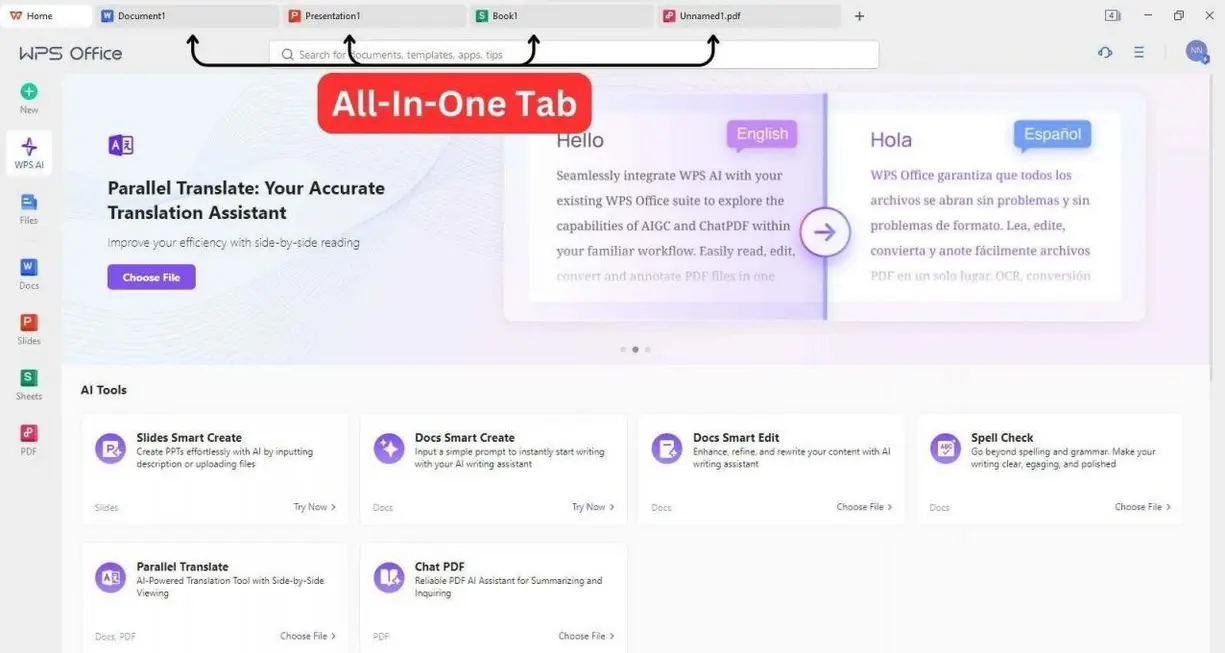
WPS Office 2025 isn’t just slapping “AI” on last decade’s tools. It’s reinventing how we interact with words, numbers, and presentations—no matter your industry or experience level.
Here’s an inside look:
- AI Writer
- Draft striking emails, reports, summaries—or heck, even your next viral LinkedIn post—in seconds thanks to built-in generative AI.
- Need to tweak the tone? Rewrite a draft? The AI adapts contextually, so your content always hits home.
- Whether you want professional, friendly, or fun—it tailors your voice for the audience.
- AI Presentation Builder
- Dread starting from scratch? Just jot your main ideas, and let the AI spin up a gorgeous, themed slide deck.
- It selects cool layouts, designs, graphics and ensures your message pops.
- AI Spell Checker & Grammar
- Sure, it catches your typos. But more: it fixes context issues, checks the emotional tone, and even catches industry lingo or regional dialects.
- This goes way beyond simple red squiggles—it’s like having your own team of editors.
- Smart Templates & Formatting
- With hundreds of AI-curated resume templates, business proposals, invoices, lesson plans, and more, every document not only looks stunning, it’s quick to create.
- Every template is smart, letting you swap out info and maintain pro-level design with ease.
- Voice & Image Recognition
- Input by speaking or snapping a photo—AI handles transcription, pulls out objects, and even inserts recognized content into documents.
- Imagine turning a whiteboard brainstorming session into a shareable report, all by snapping a photo with your phone.
Where WPS Office 2025 wins:
Unlike some office suites, where key functions are scattered across different apps, WPS Office brings everything together. You work in one integrated experience—AI tools are always a click (or voice command) away. Plus, it’s totally free for most core features.
“AI integration isn’t optional anymore—it determines which tools will shape the next decade of productivity.”
— Dr. Liyan Zhang, AI Productivity Analyst
Ever tried working with old-school tools after a taste of this? It’s like giving up Spotify for a CD player. Not happening.
AI Presentation Builder: Effortless Presentations
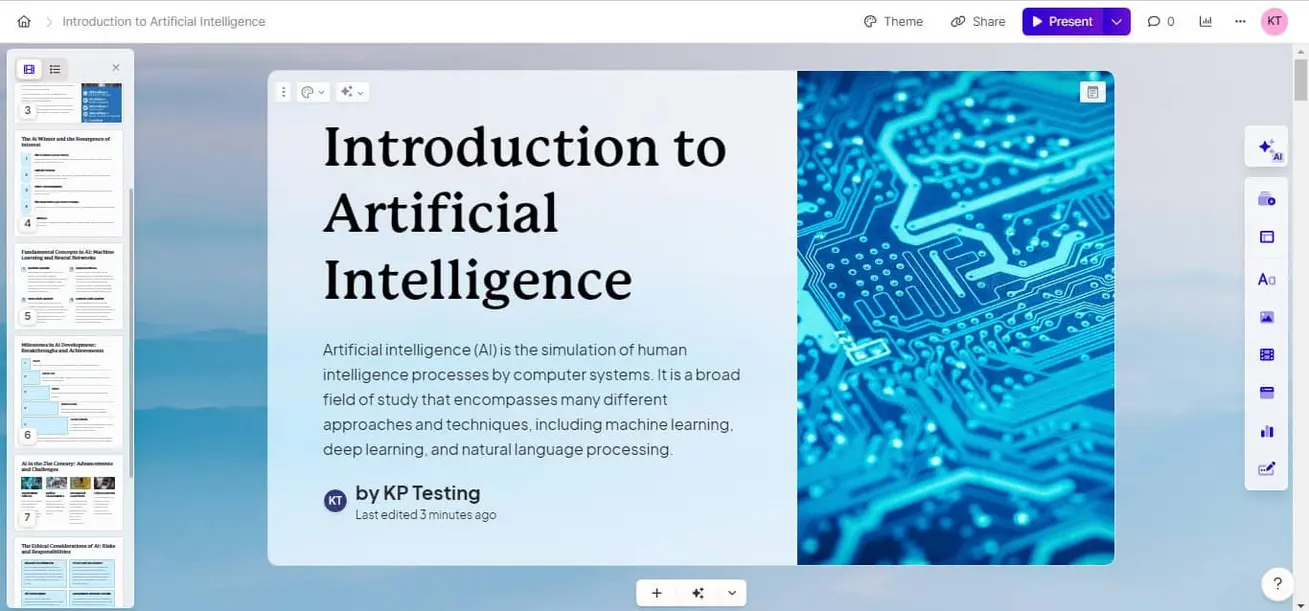
Presentations used to be everybody’s nightmare. Remember sweating over aligning images, fiddling with data charts, or spending hours finding that perfect color scheme? WPS Office 2025’s AI Presentation Builder is here to make that struggle, well, history.
The Old Grind: Traditional Presentation Pain Points
Everyone’s been there: staring at a blank slide, deadline looming, hoping for inspiration to strike. Instead, you slog through:
- Manually editing layouts
- Searching for icons and visuals
- Formatting charts and data
- Praying it looks “good enough” for the boss
Sound familiar? You’re not alone.
The AI Leap: Game-Changing Experience
- From Outline to Deck in Seconds: Paste a topic/points, and WPS Office’s AI turns it into a professional presentation—complete with visuals, transitions, and the right flow.
- Automated Visuals: AI scours your content for key points, then inserts just-right images, charts, and animations—no design skills required.
- Style Consistency: Everything from fonts to colors to iconography is harmonized thanks to machine learning trained on top-tier presentations.
- Easy Customization: Want to change a look? Just drag and drop, use voice commands, or let AI suggest alternatives. It’s like Canva but with your work’s specific context in mind.
Real-World Story: Beating the Deadline
Picture this: Taylor, a marketing manager, gets hit with an urgent product pitch request. The client wants slides in, oh, two hours. Taylor pastes her notes into WPS Office. AI gets to work—storyboards her argument, chooses relevant visuals, polishes the design. Taylor adds a couple custom touches. The result? A slick, persuasive deck—delivered early, with energy to spare.
The Stats Back it Up
A 2025 survey of 2,000 mid-sized businesses found that 67% said “presentation design bottlenecks” were a top productivity headache before switching to AI-powered solutions like WPS Office. That’s a lot of time (and coffee) saved!
AI Spell Checker in Action
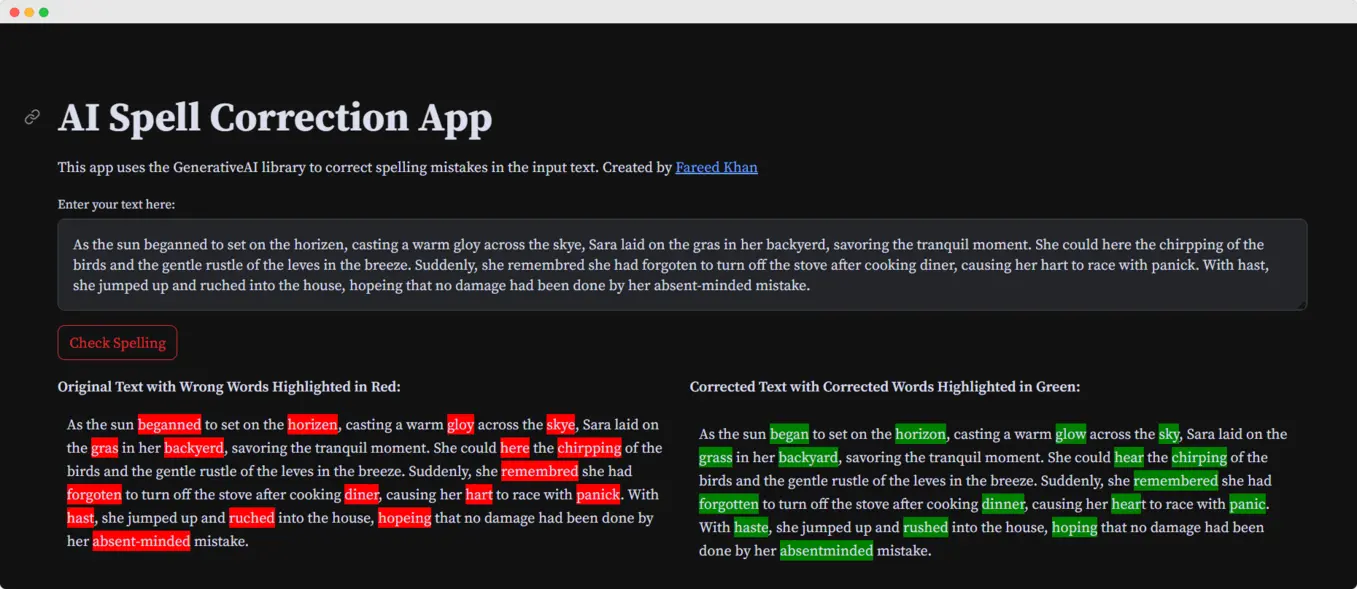
You know how a single typo can turn a client proposal from “polished” to “problematic”? (Don’t worry, we’ve all been there, like that one time you wrote “pubic relations” instead of “public relations”.) In business and academia, mistakes matter. That’s why WPS Office’s AI Spell Checker does much more than slap a red line under the wrong word.
How the AI Spell Checker Sets a New Bar
- Contextual Corrections:
The AI doesn’t just fix spelling; it knows when you’re using medical terms or legal lingo, senses your intended tone, and suggests improvements that fit the context. - Multilingual & Multicultural:
Instantly adapts to over 30 languages—helping international teams communicate smoothly and even paraphrasing for local nuance. - Industry-Smart:
Working on a research grant? Investor update? White paper? The AI recognizes specialized language so you always sound like you know your stuff. - Instant Feedback:
As you type, the AI learns from your writing habits, catching not just mistakes but offering proactive suggestions for clarity and conciseness.
Example: Investor Update, Upgraded
Imagine Jordan, a startup founder writing a make-or-break investor email. The WPS AI not only spots grammar issues, it also recommends swapping vague terms like “synergy” for punchier, specific language. The end result? A confident, clear, and compelling communication—one that stands out from the noise.
WPS Office’s focus on AI-driven editing truly helps deliver documents you can take real pride in, a crucial edge whether you’re closing deals, publishing research, or guiding your team.
Expert Tip:
For students and researchers, advanced AI proofreading is a total game-changer. Interested in how AI is rewriting the rules for academics?
Watch more about smart citation analysis to level up your research.
AI Writer Content Generation

Let’s get real: if “Content is king,” AI is now the power behind the throne. Whether you’re a small business owner, blogger, or nonprofit leader, coming up with great content (and getting it out fast) is business-critical in 2025. WPS Office’s AI Writer takes the heavy lifting out of writing so you can focus on the message, not the mechanics.
How the WPS AI Writer Elevates Content Creation
- Fast Drafts, Zero Stress: Start with a prompt, a few ideas, or a rough summary. The AI whips up a complete, structured article, report, or proposal in seconds.
- Built-in SEO: Need to boost your blog post? The AI checks keyword density and search intent, giving you a better shot at that coveted Google top spot.
- Customizable Voice: Instantly shift from professional to playful, persuasive to academic—whatever fits your audience.
- Smart Sourcing: Not just text, but suggested references and basic fact checks—so you’re not just fast, you’re accurate.
Expert Insight
Want to know the impact? Teams using AI writing tools like WPS Office report up to a 40% jump in content output and a 50% chop in editing time. Imagine having more hours in your day—for strategy, family, or just an extra episode of your favorite show.
Short Story: The Reluctant Blogger
Meet Sam, a nonprofit director with a mountain of passion for her cause and zero love for writing newsletters. With WPS Office AI Writer, she now types a few prompts about this month’s campaign, chooses a friendly voice, and gets a draft newsletter ready for her board—no more hours staring at a blank page.
The Competitive AI Office Suite Landscape
Ever wondered how WPS Office 2025 stacks up against other popular AI-powered office suites like Google Workspace, Microsoft 365, or LibreOffice? Let’s visualize the comparison:
| Feature | WPS Office 2025 | Google Workspace | Microsoft 365 | LibreOffice |
|---|---|---|---|---|
| AI Writing/Blog Tool | Yes | Limited | Yes | No |
| AI Presentation Builder | Yes (advanced) | Basic | Limited | No |
| AI Spell Checker/Grammar | Advanced | Yes | Yes | Basic |
| Integrated Free Version | Yes (robust) | Limited | Limited | Yes (No AI) |
| Multi-Device Support | Full | Full | Full | Partial |
| Cloud Sync & Collaboration | Yes | Yes | Yes | Limited |
| Smart Templates | Yes | Limited | Yes | Basic |
| Voice/Image Recognition | Yes | Partial | No | No |
| SEO Content Optimization | Yes | No | No | No |
Quick Takeaway
If you want top-shelf AI features without monthly fees, WPS Office stands out. It’s genuinely all-in-one—you don’t need a dozen logins, browser tabs, or separate subscriptions. Especially for freelancers, remote teams, and anyone watching budgets, WPS Office delivers the premium experience with a generous free tier.
Real-World Success Stories: WPS Office in Action
To see the impact of WPS Office 2025 in the wild, let’s peek into a few real-life scenarios:
1. Digital Marketing Firm: Creativity Unleashed
After switching to WPS Office, their output soared—35% more campaigns per quarter. The creative team spent 60% less time sweating over presentations, thanks to the AI Presentation Builder doing the heavy design lifting, and AI Writer knocking out first draft blog posts in mere minutes.
2. Startup Tech Founder: Investor Relations, Supercharged
Amira runs a lean startup. WPS AI Spell Checker became her not-so-secret weapon for investor reports. The result? Her emails and decks are consistently approved for clarity, and her time spent editing shrank to almost nothing—giving her precious hours back for product development.
3. Remote Education Platform: Language Barriers, Broken Down
Operating worldwide, this startup uses WPS’s multilingual AI tools to make course materials in several languages. AI-powered translation and spell checking helped them scale courses to new markets, sometimes spinning up converted content overnight.
For more about how unified dashboards and AI business tools boost productivity alongside WPS,
Watch more about the Multichat AI unified dashboard guide.
The Big Picture
From boardrooms in Berlin to classrooms in Kenya, WPS Office is helping teams do more, break language barriers, and turn ambitious ideas into finished projects, faster than ever.
The Future of Work: Why AI-Driven Office Suites Are Inevitable
Let’s get visionary for a second: The office of 2025—and honestly, every year after—is built on AI. It’s not an “extra” or a shiny toy, but the foundation of how work gets done everywhere.
Consider the bigger changes:
- Busywork is out: Tasks like proofreading, formatting, or first-draft writing are now handled by AI, so human minds spend more time on strategy, empathy, and innovation.
- Level playing field: A solo freelancer has access to tools just as powerful as major enterprise teams.
- High-quality design, for everyone: You no longer need a dedicated designer—AI ensures every proposal, pitch, and campaign packs a visual punch.
- Collaboration without borders: With cloud-based AI, global teams create, refine, and launch together—time zones and languages are no longer obstacles.
The Research Speaks
A recent McKinsey Global Institute report predicts that by 2027, over 80% of businesses worldwide will rely mostly on AI-powered office software for daily productivity. Not only will this save up to 30% of knowledge workers’ time, but it’ll also open new doors for creativity, flexibility, and scale.
Imagine Your Day, AI-Powered
Picture logging in at 8 am. Your AI highlights tasks, drafts key emails, checks yesterday’s reports, and suggests improvements while you focus on relationships and strategy. By afternoon, your team—spread across three continents—is editing the same doc live, brainstorming via voice notes. After lunch, you polish up an AI-built presentation for tomorrow’s client call. This isn’t “the future.” For WPS Office 2025 users, it’s right now.
Summary: Is WPS Office 2025 the Best Free AI Office Suite for You?
Let’s boil it down: in an era where automation, intelligence, and seamless teamwork are essential, WPS Office 2025 isn’t just keeping up—it’s setting the pace.
Here’s why it’s winning fans worldwide:
- Free (and robust!) for everyone
- Advanced AI for writing, design, formatting, spelling, and more
- Supports modern remote, hybrid, and global teams
- Loved by solopreneurs, startups, educators, and big business alike
Imagine how much more you could accomplish if busywork was history and creativity front and center. WPS Office is the toolkit for that world.
Want to supercharge beyond documents and presentations?
Watch more about effortless video creation with Veed IO AI, another leap in business automation.
Get Ahead of the Productivity Curve
If you’re ready to future-proof your workflow and stay ahead of the AI-powered productivity curve, there’s never been a better time to jump in.
Stay tuned for more expert tips, deep dives, and step-by-step tutorials right here:
👉 Open WPS Account : wpssoftwarepteltd.sjv.io/Vx09DM
👉 Our Website: https://ai-solutes.com/
👉 Our YouTube Channel: http://www.youtube.com/@ai-solutes
👉 Our Facebook Fanpage: https://www.facebook.com/profile.php?id=61576606911341
👉 Our X (Twitter): https://x.com/AISolutes
Have you tried WPS Office or another AI-powered suite recently? What’s changed in your workflow? Let us know—because the future of work is being written by users just like you.
- Accidentally Deleted a Precious Memory? How EaseUS Gently Brings Your Lost Files Back
- Master Colossyan AI Video Generator: Features, Pricing, and Pro Strategies to Scale Global Video
- Can We Turn Brain Chaos into Clear Strategies? Inside MindManager’s Visual Mapping Tools
- Unlock Powerful Workflows and Transform Your Productivity with ChatGPT 2025 and GPT-5
- Can AI Image Generation Feel Truly Effortless? Finding Your Creative Flow with RunDiffusion