In today’s rapidly evolving digital landscape, video content creation has transitioned from a technical challenge into a streamlined, creative process for all. This article offers an in-depth look at how VEED.io AI is revolutionizing the user experience, from its intuitive and accessible interface to its advanced AI-powered features. We’ll cover how VEED.io compares to traditional editors, guide you through getting started, and reveal the automation and collaboration tools that empower creators and teams. Whether you’re a business, creator, or educator, discover how next-generation video editing is now faster, smarter, and more inclusive than ever. Let’s explore the tools, processes, and innovations shaping the future of visual storytelling in 2025 and beyond.
In today’s world, video content is everywhere. Whether you’re scrolling through social media, sitting in a virtual classroom, launching a product, or crafting an explainer for your business, video connects people faster and better than ever before. But here’s the kicker—crafting great video once took hours of tedious editing, complicated software, and honestly, a bit of gray hair. Now? Thanks to the magic of AI, specifically VEED.io’s revolutionary platform, that old reality is about to feel as outdated as dial-up internet. If you’re a creative thinker, a digital entrepreneur, or someone obsessed with staying ahead of the curve, let’s go on a deep dive into how VEED.io AI is about to supercharge the way we tell stories on screen in 2025 and beyond. What does the future look like when intelligent video creation is not only possible—but effortless?
AI Veed User Interface Overview
The Dawn of Frictionless, Intelligent Video Editing
Okay, let’s set the scene. You’re about to launch a new marketing campaign, roll out a fresh module for your online course, or simply want to post a killer video update for your community. In 2025, you don’t worry about the tech. VEED.io AI has your back with an interface so smart and intuitive it feels like it’s reading your mind. Forget about those clunky, old-school editing suites stuffed with mysterious buttons and endless menus; VEED.io AI is all about getting you from idea to publish in less time than it takes to binge a YouTube short.
Whether you’re gunning to build the next viral trend, power up your brand’s video game, or simply create better TikToks, the AI Veed dashboard is made to help you move at lightning speed and have fun doing it. Let’s see what’s actually going on under the hood.
VEED.io AI Dashboard and Usability
At the very heart of it all is the VEED.io AI dashboard—think of it as the mission control for your entire video workflow. When you step into VEED.io, you’re greeted by a welcoming, zero-friction space where every must-have tool is… well, right there. No treasure hunts, no guesswork.
Some highlights waiting for you:
- AI-powered video creation wizard that lets you start with a script, a prompt, or just an upload (yes, really—no more blank-screen anxiety)
- One-click subtitle and translation tools, making your video global in seconds
- Real-time, multi-language transcription for those times you need video content to work everywhere
- Drag-and-drop media uploads plus AI-recommended templates based on your mood, goals, or even your brand colors
It’s big on focus, minimal on distractions—a place where content is the hero and software just melts into the background. Racing against a deadline? AI-powered search and context-aware tooltips serve up the next effect, transition, or template in literally a few seconds, almost like your own video-savvy assistant.
Accessibility Features Driving Universal Adoption
One of the coolest things? VEED.io AI isn’t just for video geeks or those who can tell a color grade from a color wheel. It’s designed for everyone. Accessibility sits at the platform’s core:
- Fully controllable via the keyboard for users with vision impairment
- Meets (and often exceeds) WCAG accessibility standards, with crisp, contrast-friendly design
- Enhanced with ARIA tooltips and voice instructions, so anyone can find their way around
Because honestly, genius tech is only genius if everyone can use it.
UI Walkthrough: Visual-First Onboarding in Minutes
We’ve all been there—signing in to “next-gen” software only to wander through endless pop-ups and tutorials. VEED.io ditches that energy drain. Instead, you get:
- Personalized, step-by-step walkthroughs that guide you right to what you want
- Visual context cues (think glowing buttons or quick “do this next” nudges)
- Crystal-clear menus and smart modals
The result? Even if you’ve never edited video before, plenty of users whip out ready-to-share uploads in under five minutes. That’s stunning, considering old-school programs could require hours just to figure out what button did what.
“The seamless UI experience of VEED.io AI cut our onboarding friction and learning curve by 75%. Our team’s productivity—and morale—skyrocketed overnight.”
– Senior Digital Producer, Global Agency (2025)
Real-World Impact
Imagine being a freelance creator who needs to impress a client in Japan and another in Brazil—VEED.io’s smart interface can auto-suggest transitions, auto-brand your project, and whip up perfect subtitles on the fly. Or, consider a corporate team: now, everyone can collaborate in the same workspace, sharing assets and edits in real time—no more messy email threads or anxiety about which version is the “real” one.
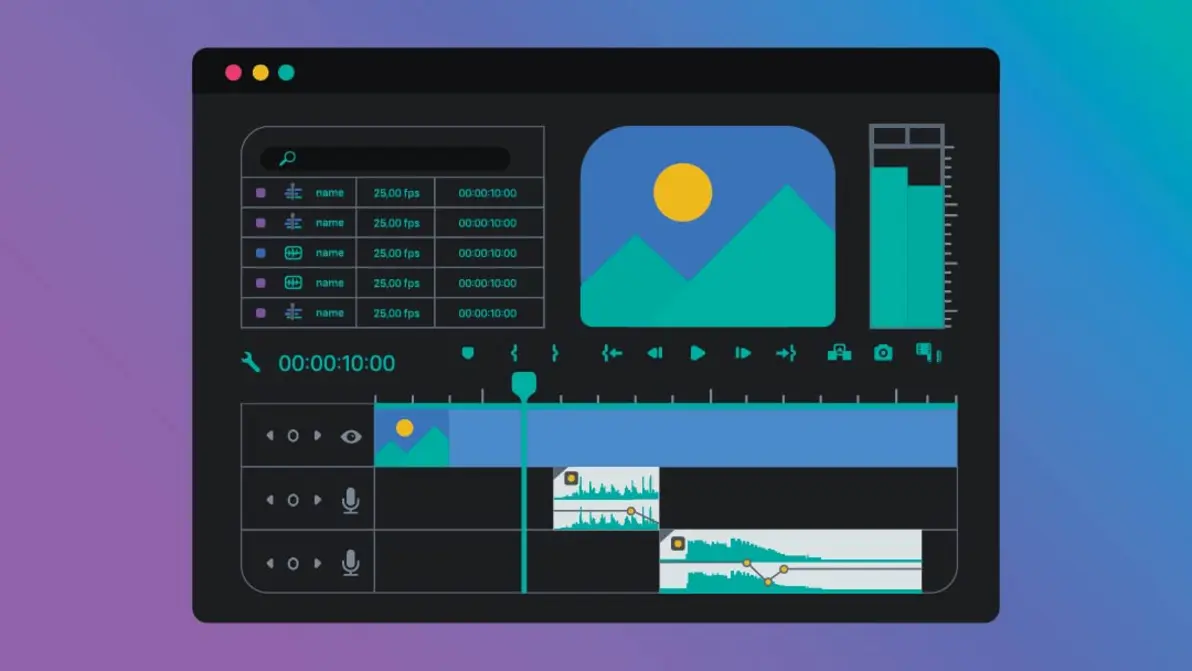
Explore the streamlined AI Veed dashboard—your launchpad for fast, smart video editing in 2025.
Key Takeaway:
The VEED.io AI interface for 2025 seamlessly fuses power, simplicity, and accessibility—making modern video editing both a breeze and a joy, not a chore.
Comparison of AI Veed and Traditional Editors
Quantifying the Leap: Speed, Intelligence, and Creative Freedom
What would your workflow look like if the editing busywork—manual chopping, endless timeline scrubbing, nitpicky tweaks—just vanished overnight? VEED.io AI offers a time travel moment: what took hours can now be achieved in minutes, with more polish and less brain drain than ever before.
Let’s put this new era head-to-head with classic, manual video editing tools—and see what really happens to speed, creativity, and your bottom line.
Feature Table: AI Veed vs Manual Editing
| Criteria | AI Veed (2025) | Traditional Editing |
|---|---|---|
| Speed (avg. 2-min video) | ~5 minutes (AI auto-trims, captions, effects) | 25-40 minutes (manual workflow) |
| Workflow Steps | Script/prompt → AI edit → Preview → Export | Import → Manual cut → Edit → Export |
| Learning Curve | Very low (interactive onboarding, AI help) | Moderate to steep |
| Automation | Captions, AI Scenes, B-roll, Smart Reformat | Manual everything |
| Collaboration | Real-time cloud teamwork | File-based, versioning hassle |
| ROI/project output | 4x-8x productivity boost, reduced per-video costs | Higher human effort/cost |
| Creative Assistance | Script, repurpose, image-to-video, prompts | 100% manual transformation |
| Output Quality | AI-optimized, consistent | Editor’s skill varies |
Source: VEED.io internal benchmarks, 2025
Editing Speed & ROI: The Numbers Don’t Lie
Across small agencies, content shops, and solo creators, VEED.io AI users are reporting up to an 80% reduction in production times. Sounds hypey? It’s not. Think about the practical difference: If your team produced 5 videos a week before, now you can realistically deliver 10, all without burning out!
And it doesn’t stop at speed:
- More time for strategy, less time spent futzing with audio levels and color correction
- A/B test multiple video versions in hours, not days
- Meet global deadlines without round-the-clock grind
Let’s face it—the brand or creator who gets their message out first, wins.
Automation: More than Just a Feature
VEED.io AI isn’t just fast. It’s smart:
- Instant captioning cracks open new language markets overnight
- Scene detection and B-roll suggestion mean you spend less time dragging files and more time telling real stories
- Repurposing tools turn webinar marathons into bite-sized, on-trend clips for Instagram Reels, TikTok, or LinkedIn posts
Key Insights:
Teams using VEED.io AI don’t just go faster—they unlock whole new possibilities for creativity, expand into fresh markets, and sidestep the workflow traffic jams that used to stop growth in its tracks.
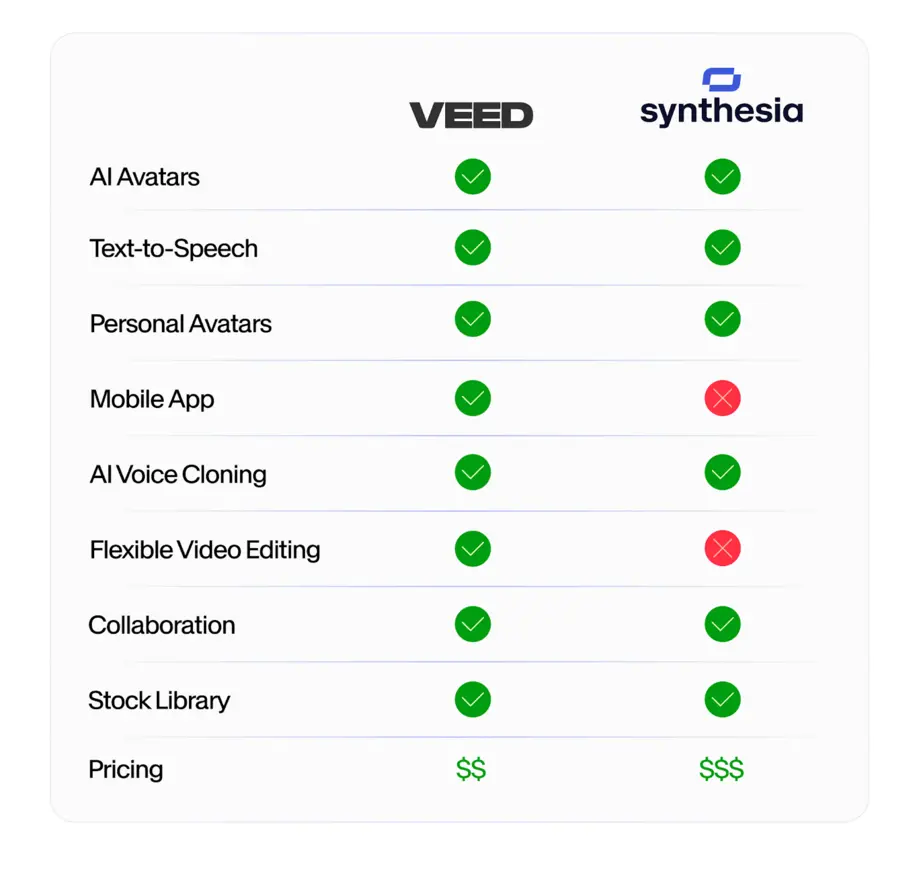
Directly compare how VEED.io’s AI features outperform legacy manual editing workflows—highlighting automation, speed, and creative capabilities.
Expert Take:
“Switching to AI editing platforms like VEED.io is like upgrading from a typewriter to a modern computer—you don’t just move faster, you work smarter and achieve things that were impossible before.”
– Tech Analyst, AI Video Trends 2025
Key Takeaway:
In every test—speed, creative potential, results per dollar—VEED.io AI leaves manual editors in the dust. Still editing by hand? The time to make the leap is right now.
Getting Started with VEED io AI Features
From Curiosity to Creation: Your Frictionless Onboarding Guide
Okay, maybe you’re thinking: “All this AI power sounds great, but can I use it without a Ph.D. in video production?” Absolutely. VEED.io’s brilliance is how it actually lowers the barrier—almost anyone who can send a text or upload to Instagram can get pro-level results in minutes. Let’s walk through how ridiculously easy it is to start.
Step-by-Step Setup and First Edit Checklist
1. Account Creation and Onboarding
- Jump onto VEED.io and sign up—it’s quick and free to start.
- Log into your dashboard, where all the magic lives.
2. Script/Prompt-Based Editing
- Hit “Create New Project.”
- Want to use your own clips? Upload them directly.
- Or, type a prompt or paste a script (“Make me a one-minute intro with fun music.”) VEED.io’s AI handles the heavy lifting, assembling your story with dynamic scenes, fitting music, cool transitions, and even snazzy captions right out of the gate.
- Tweak if you want: drag in extra video, trim clips, change the vibe, or shuffle text animations.
3. Your First Edit — Expert Checklist
- [ ] Made your account and logged in? ✔
- [ ] Started a new project (by prompt or upload)? ✔
- [ ] Entered a script or idea? ✔
- [ ] Previewed your AI-generated masterpiece? ✔
- [ ] Polished up subtitles, transitions, or effects? ✔
- [ ] Exported your video? ✔
- [ ] Turned on auto-captions or translations for even more reach? (Go global, baby!)
4. Troubleshooting Tips
- Remember, the cloud-based AI magic needs solid internet.
- Not loving your first draft? Refine your prompt, or test-drive one of the built-in templates.
- Use the live support chat—humans (not bots) are ready to coach you if you hit a wall.
A quick-start guide—see how easy it is to launch your first AI-driven video using VEED.io’s user-friendly workflow.
Key Takeaway:
Don’t let tech scare you. With VEED.io AI, the steepest part—getting started—is also the fastest. You’ll be uploading, editing, and publishing in less time than it takes to finish your coffee.
AI Video Generation Process
Inside the Engine: How VEED.io AI Turns Ideas into Viral Content
Now—the question everyone asks: How does VEED.io’s AI actually turn my raw thoughts, images, or script into a pro-level video? Time for a quick, jargon-free look under the hood.
Phase-by-Phase: Demystifying the AI Workflow
1. Input Stage
- Throw in your images, paste a script, or just describe what you want in plain English (“Show me a montage of city life with energetic music”).
- The AI reads your intent, extracts the main ideas, and gets a feel for what you want the final vibe to be.
2. AI Visualization & Smart Storyboarding
- The AI engine scours massive media libraries, pairing your assets or ideas to the right stock clips, animations, and music.
- If you upload images, advanced object recognition sorts everything, ensuring your video tells a cohesive visual story.
3. Preview, Tweak, Perfect
- Instantly see a preview—drag the timeline, pause to fine-tune a cut, or let the AI suggest better transitions and subtitles.
- You always stay in control, but the AI is constantly nudging you toward better, faster, more engaging results.
4. Export and Automation
- One click, and your video is resized for whatever platform you need—TikTok, YouTube, Instagram, Twitter/X, Facebook—you name it.
- Pros can still delve into manual tweaks, but honestly, most users are happy to ride the AI’s creative coattails.
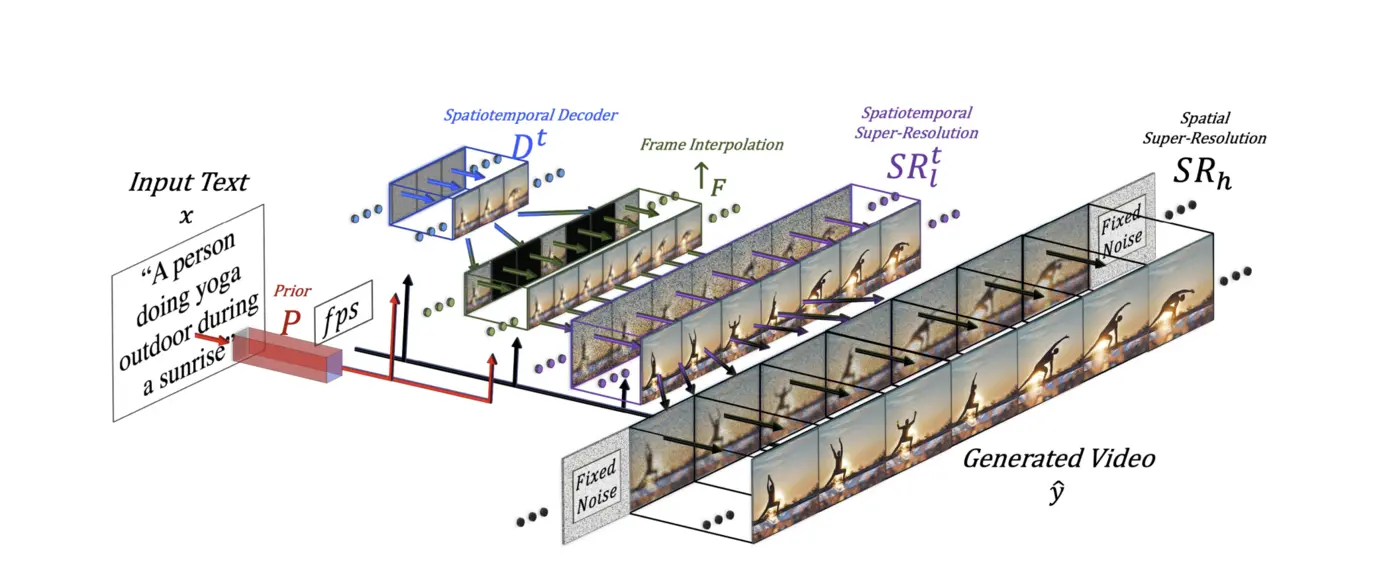
AI-powered video generation workflow in VEED.io: from text/image input, through visualization and real-time editing, to seamless export.
Why This Matters:
Clarity rocks. By making every step transparent, VEED.io AI boosts your confidence, helps you learn the ropes, and bridges the “tech gap” so more people can tell their story—whether they’re an influencer, a teacher, or a startup founder.
Practical Example:
Suppose you need a 30-second product sizzle for social. Upload your product shots, type in a catchy slogan, and VEED.io AI assembles the video—background music, captions, transitions, and calls-to-action ready to go.
Key Takeaway:
With VEED.io’s AI workflow, pro-quality, multi-format publishing is no longer reserved for tech wizards or big-budget agencies. The playing field just got a whole lot more level.
VEED io AI Powered Editing Tools
Power Features for the Next Generation: Automation, Virality, and Brand Control
So, what exactly turns VEED.io AI from just another editor into an all-in-one content machine? It’s not about having bells and whistles—it’s about features that save time, amplify your ideas, and help you reach more people, everywhere.
The Breakthrough Features Setting the Pace
- Automated Captions and Translation:
No more re-typing subtitles by hand. Instead, generate studio-perfect captions in 90+ languages in seconds. This not only makes your content global, but research shows subtitles boost watch times by up to 80%. For businesses, it’s also an instant SEO win—with captions increasing search discoverability by as much as 40%. - AI-Assisted Scriptwriting:
Stuck staring at a blank page? No worries. Pop in your topic, pick your audience, and select a vibe—VEED.io’s AI engine spins your ideas into full scripts. This can accelerate brainstorming for busy marketers, content teams, or solopreneurs. - AI Clips & Content Repurposing:
Let’s face it, not every audience watches hour-long binaries. AI Clips auto-detect the most shareable moments from your longform video, cutting them down to TikTok, Instagram Reel, YouTube Short, or Twitter-ready bites. Repurposing is no longer a chore—it’s automated virality. - Brand Consistency & Collaboration:
Centralized asset libraries let you drop in your logo, color palette, and intros so every video matches your brand’s vibe. Shared branded templates, watermarking, and robust commenting workflows keep entire teams in sync, even across time zones or departments.
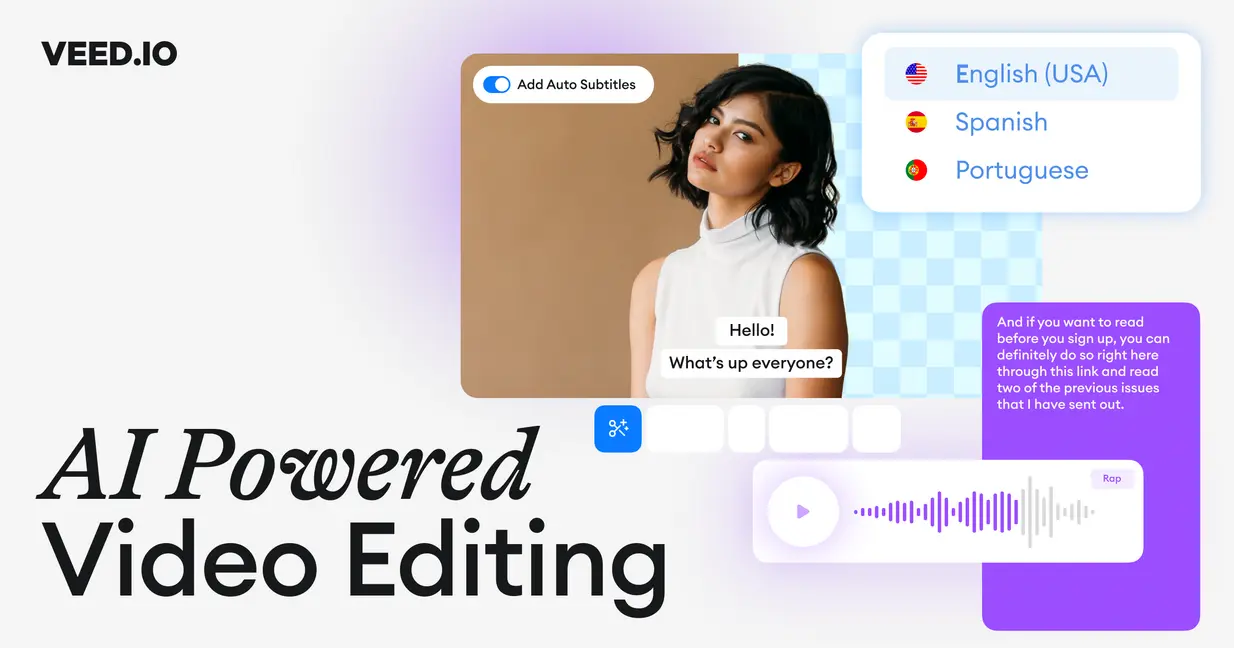
Discover VEED.io AI’s most advanced editing tools—auto-captions, instant AI scriptwriting, translation, and viral video repurposing—for 2025’s next-gen creators.
Case Study:
“The first time we used VEED.io’s automated caption and AI Clips features, post-production time fell 65% and social shares doubled.”
– Leading Content Creator, 2025
The Strategic Value for Creators and Teams
Let’s get real: Content is king, but distribution is how you win. VEED.io AI’s suite is built for the realities of 2025’s attention economy:
- Repurpose once, distribute everywhere—reach new audiences without burning out your team
- Real-time global collaboration: No more “version10final_final.docx” syndrome. Review, comment, and update in the cloud—together
- Raise engagement and accessibility with captions, translation, and HQ templates that help your message break through the noise
Key Takeaways:
- Turn on automated subtitles for more eyes (and ears!) on your videos
- Get more done with AI scriptwriting and fast repurposing—start scheduling, not scrambling
- Lock down your brand voice, no matter who’s making content
Broaden Your AI Video Horizons
The intelligent automations stirring beneath VEED.io AI’s surface offer a sneak peek at the future: creativity that’s turbocharged, collaborative, and adaptive to you—not the other way around. If you’re the kind of innovator, marketer, or creator who values your time (and your sanity), this is your chance to lead the pack.
Looking for even more cool tools changing the digital content game?
Xem thêm for a view on another next-level platform, especially if global communication and training videos are your jam.
Don’t Miss These New-Gen AI Tools
- Personal learning breakthrough! Try smarter AI tools with Xem thêm.
- Doing research? See how AI can level up your academic workflow at Xem thêm.
- Curious about the 3D revolution? Dive into creative new worlds with Xem thêm.
Conclusion: Next Steps to AI-Enhanced Creativity
Choosing VEED.io’s AI suite in 2025 isn’t about chasing a tech fad—it’s about future-proofing your workflows, reaching bigger audiences, and empowering creators at every skill level. Tools that were once locked away in expensive studios are now truly at your fingertips. From the easy onboarding and see-through AI workflows to smart features—like automated subtitles, script helpers, viral-ready Clips, and collaborative team management—VEED.io AI is a real-world game-changer.
Make your workflow as smart as your ambition:
- Jump in, use the step-by-step checklist above, and see how quickly you can create your first AI-assisted video
- Explore the entire video generation process—automation means you save time, every single project
- Use AI features to boost brand consistency, crank up productivity, and expand your creative reach
Hungry for more practical breakdowns and deep dives into AI’s impact on storytelling and creation?
Xem thêm.
Ready to join the revolution?
👉 Open VEED AI Account: https://veed.sjv.io/XYVy95
👉 Our Website: https://ai-solutes.com/
👉 Our YouTube Channel: http://www.youtube.com/@ai-solutes
👉 Our Facebook Fanpage : https://www.facebook.com/profile.php?id=61576606911341
👉 Our X ( Twitter ) : https://x.com/AISolutes
The future of video creation is smarter, faster, and more accessible. Will you lead, or follow?
- Best AI Chatbot Platforms in 2026: Why Chatbase Ranks #1 Against Manychat, Tidio, UChat, Botpress, Freshchat and Intercom
- Genspark Review 2026: The End of Search?
- Zeg AI
- Turbocharge AI Editorial Workflows for 2026 Global Events: Faster Submissions and Smarter Approvals
- Hume AI 2026 Guide: Build Empathic Voice Assistants with Emotion AI, EVI, and TADA TTS