

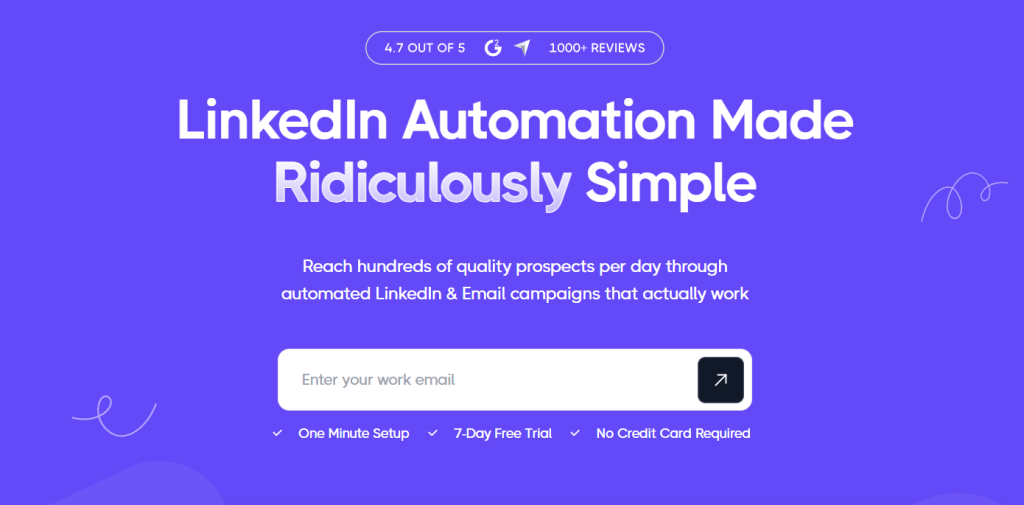
If you sell to other businesses, you already know that LinkedIn is where your buyers actually live, and you also know how painful it is to work it by hand. Searching for prospects, sending connection requests one at a time, writing follow-ups, remembering who replied and who went quiet, and then repeating the whole cycle tomorrow quickly eats the hours you should be spending on calls and closing. That daily grind is exactly the problem Dripify was built to remove. Dripify is a cloud-based LinkedIn automation platform that runs multi-step outreach sequences for you, from the first connection request to the last follow-up, and it keeps running even after you close your laptop. With a public entry price of roughly $39 to $59 per month, a 7-day free trial that does not ask for a credit card, a company-reported base of more than 40,000 businesses in 72+ countries, and an average user rating that sits around 4.5 out of 5 across G2, Capterra and Trustpilot, Dripify has become one of the most recognizable names in a very crowded category.
For founders, SDRs, recruiters, agency owners and solo consultants, the promise is simple: more conversations with the right people, with far less manual effort. This 2026 review walks through what Dripify actually does, how its plans really differ once you read the daily limits, what the personalization and analytics tools are like, how it compares with Expandi, Waalaxy and HeyReach, where the real risks and complaints sit, and exactly who should (and shouldn’t) sign up.
Dripify Review 2026: The Cloud LinkedIn Automation Platform That Turns Cold Outreach Into a Repeatable Pipeline
Overview and Background
Dripify is a sales automation tool focused on LinkedIn lead generation. Instead of asking you to install a browser extension and leave a tab open all day, it runs your campaigns from its own servers. You build a sequence, point it at a list of prospects, and the platform performs the actions on a schedule: viewing profiles, sending connection requests, delivering messages and follow-ups, and routing replies into a dedicated inbox. The brand positions itself around one idea, that LinkedIn outreach should be simple enough that a founder with no technical background can launch a working campaign in a few minutes, and its homepage promises a one-minute setup and first results within about 48 hours.
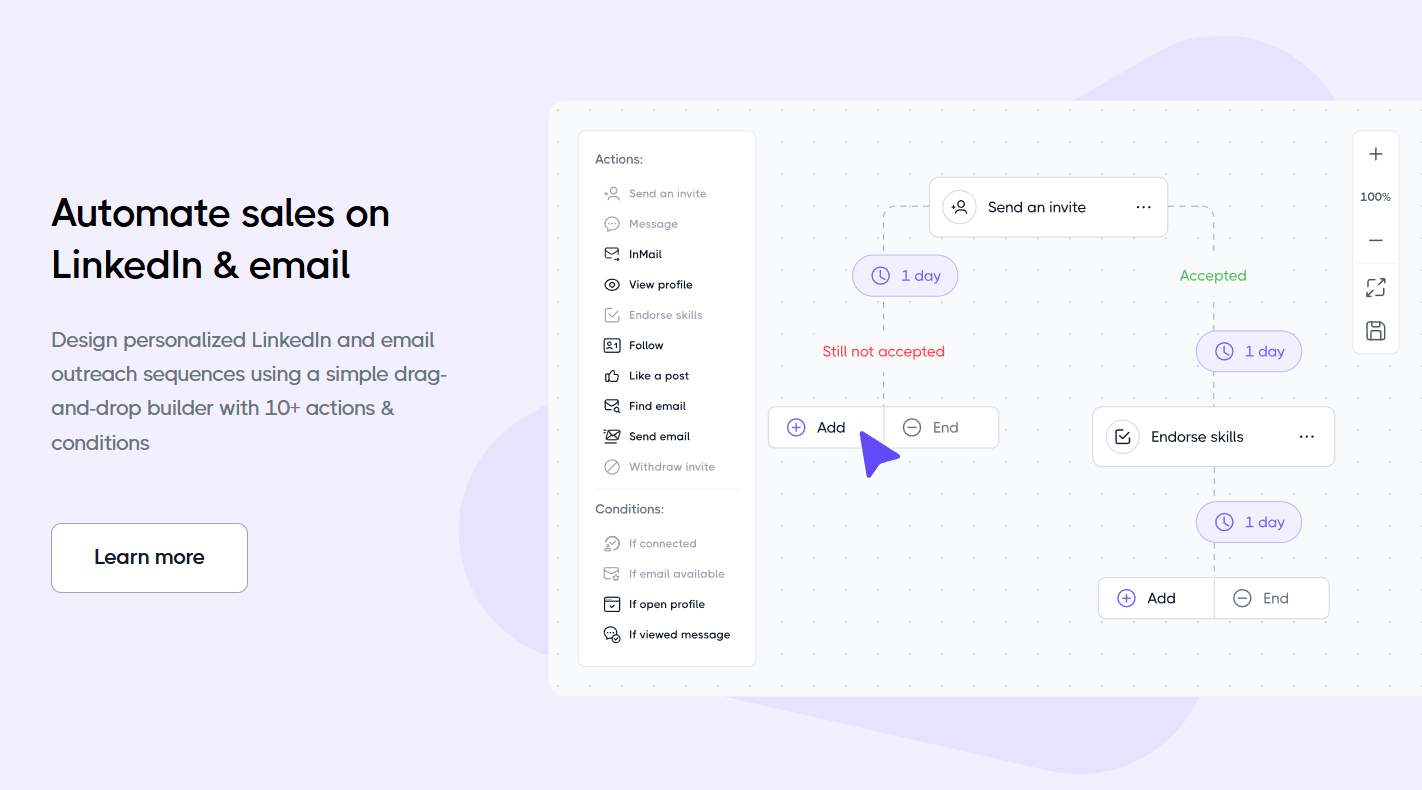
The product has grown well beyond its original connection-request-and-message core. Today it includes a drag-and-drop sequence builder with more than ten actions and conditions, a multichannel layer that mixes LinkedIn and email steps, an email finder and verifier, data enrichment, per-step analytics, a shared team workspace, and integrations that reach more than a thousand other tools through native connections, webhooks, Zapier and Make. The company also publishes customer stories and a trust center, and it runs an affiliate and an agency program, which tells you the business is built to serve both individual sellers and teams.
There is one crucial thing to understand before going further, and it is the single most important point in this whole review. LinkedIn’s own terms of service do not permit automated activity, and no automation vendor, Dripify included, can remove the risk that a LinkedIn account is limited or restricted. Dripify reduces that risk with cloud execution, pacing limits and randomized timing, and many users report running it for long periods without trouble. Others report restrictions, especially when they push daily limits hard. Treat the tool as a productivity multiplier that comes with a real, manageable risk, not as a guarantee.
Why Dripify Stands Out in 2026
Genuinely fast, no-install setup: Because Dripify lives in the cloud, there is nothing to download and no extension to maintain. You connect your LinkedIn account, choose a template or build a sequence, add leads, and launch. Reviewers on Trustpilot and G2 repeatedly describe getting a campaign running in a single sitting, and several mention that it worked as intended on the very first attempt. For anyone who has fought with fragile browser-based tools, that simplicity is the headline benefit.
Runs on autopilot: Campaigns continue while your computer is off. You can start a sequence on Monday morning and let it work through the week, which matters for people who do outreach alongside a full-time job or who work across time zones. It also means your results are not tied to how long your laptop stays awake.
A visual, easy-to-read sequence builder: Sequences are assembled as a flow of actions, delays and conditions. You can branch based on whether someone accepted your invitation, whether they replied, or whether they have a particular attribute. This is what separates a real drip campaign from a blast of identical messages, and the interface keeps the logic readable even for beginners.
Personalization that goes past the first name: Dripify offers more than twenty prebuilt variables, support for custom lead fields, fallback text when data is missing, and an AI-assisted icebreaker. The company claims that this kind of personalization can double response rates, a figure that depends heavily on your market and message, but the underlying point is sound: outreach that reads as researched outperforms outreach that reads as templated.
Step-level analytics: Many tools show you a campaign-wide reply rate and leave you guessing. Dripify breaks performance down by individual step, showing delivery, acceptance and reply rates for each action, with visual alerts when a step is dragging results down. Knowing that your second follow-up is the weak link, rather than the whole campaign, is the difference between guessing and improving.
One workspace for LinkedIn and email: You can add email steps to a sequence, find and verify business emails from LinkedIn profiles, and manage replies from a single inbox. This is not a full cold email platform, and we will be honest about that limit later, but for LinkedIn-first sellers who want an occasional email touch, it avoids juggling a second tool.
Team features and a wide integration layer: Managers can invite teammates, assign roles, share winning templates, and prevent two reps from contacting the same lead. Native integrations, webhooks, Zapier, Make, Google Sheets and HubSpot let you push replies and lead data into the systems you already use.
Strong public ratings: Across review sites, Dripify tends to land between about 4.5 and 4.7 out of 5, with roughly 270 to 350 reviews on G2, close to 480 on Capterra and several hundred on Trustpilot, depending on when you check. Users most often praise ease of use, time saved and responsive onboarding.
Key Features and Technology
Dripify’s feature set is organized around the sales workflow: find leads, enrich them, contact them, track results and close. Here is how the main pieces fit together.
LinkedIn Lead Generation and Sequences
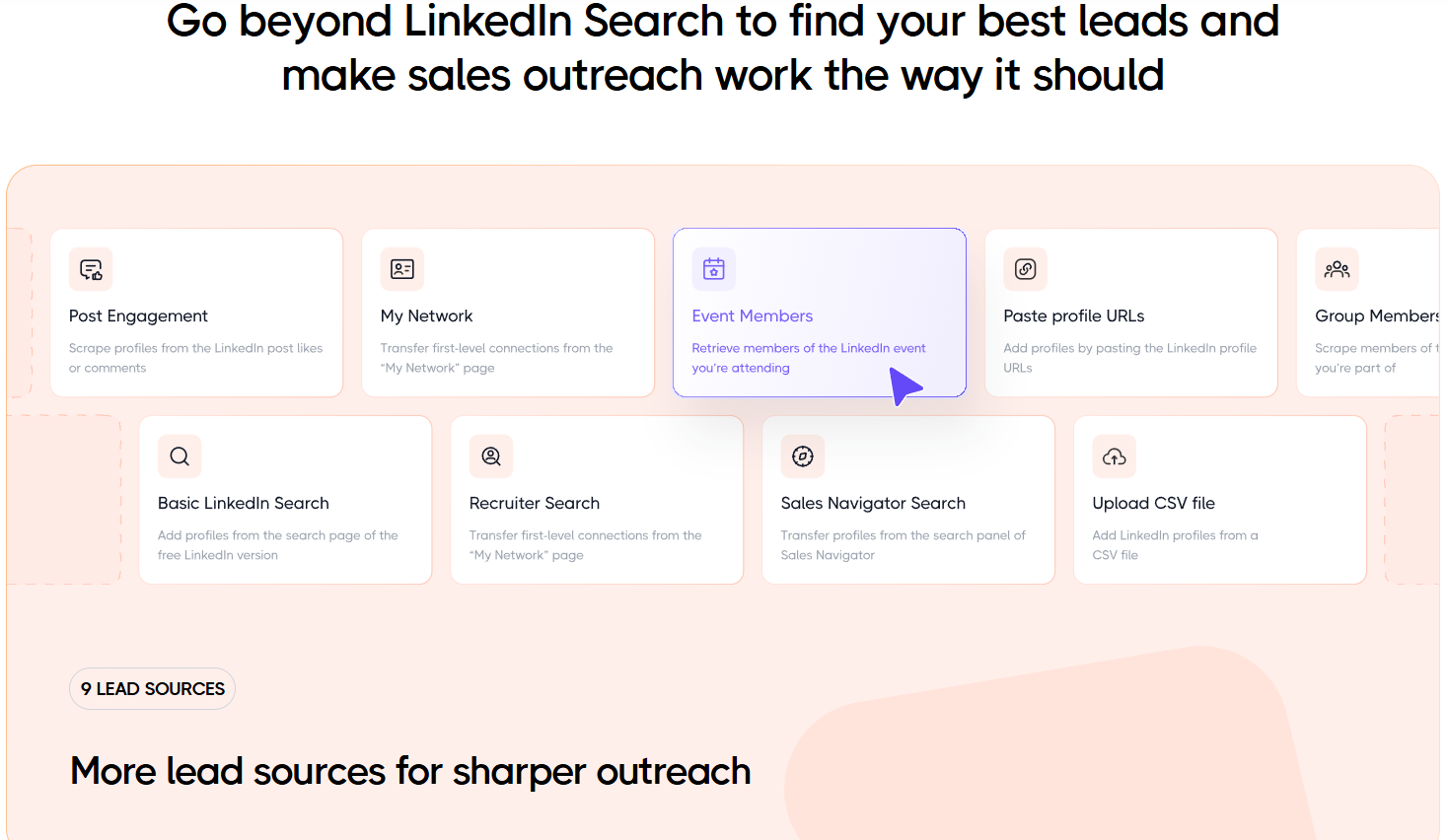
The core of the product is the automated LinkedIn sequence. A typical flow starts with a profile visit, follows with a personalized connection request, waits for acceptance, sends an opening message, and then delivers a series of follow-ups spaced by delays. You can add conditions so that anyone who replies is removed from the remaining steps, and you can use actions beyond messaging, such as post likes, follows and endorsements, to warm prospects up before you ask for anything. Dripify says it supports nine lead sources, including LinkedIn searches, Sales Navigator searches and LinkedIn posts, so you can turn the people engaging with a relevant post into a fresh daily list of prospects.
Multichannel Outreach, Email Finder and Enrichment
Beyond LinkedIn, Dripify lets you add email steps to the same sequence and includes an email finder, an email verifier and a data enrichment layer that the company says adds more than thirty attributes to each lead. Every plan includes a monthly allowance of about 100 email finder credits, which is enough to sample the feature but not to power heavy email outreach; larger packs are sold separately. Think of this as a convenient bridge from LinkedIn to the inbox, not a replacement for a dedicated cold email platform with mailbox warmup and deliverability tooling.
Inbox, Analytics and Split Testing
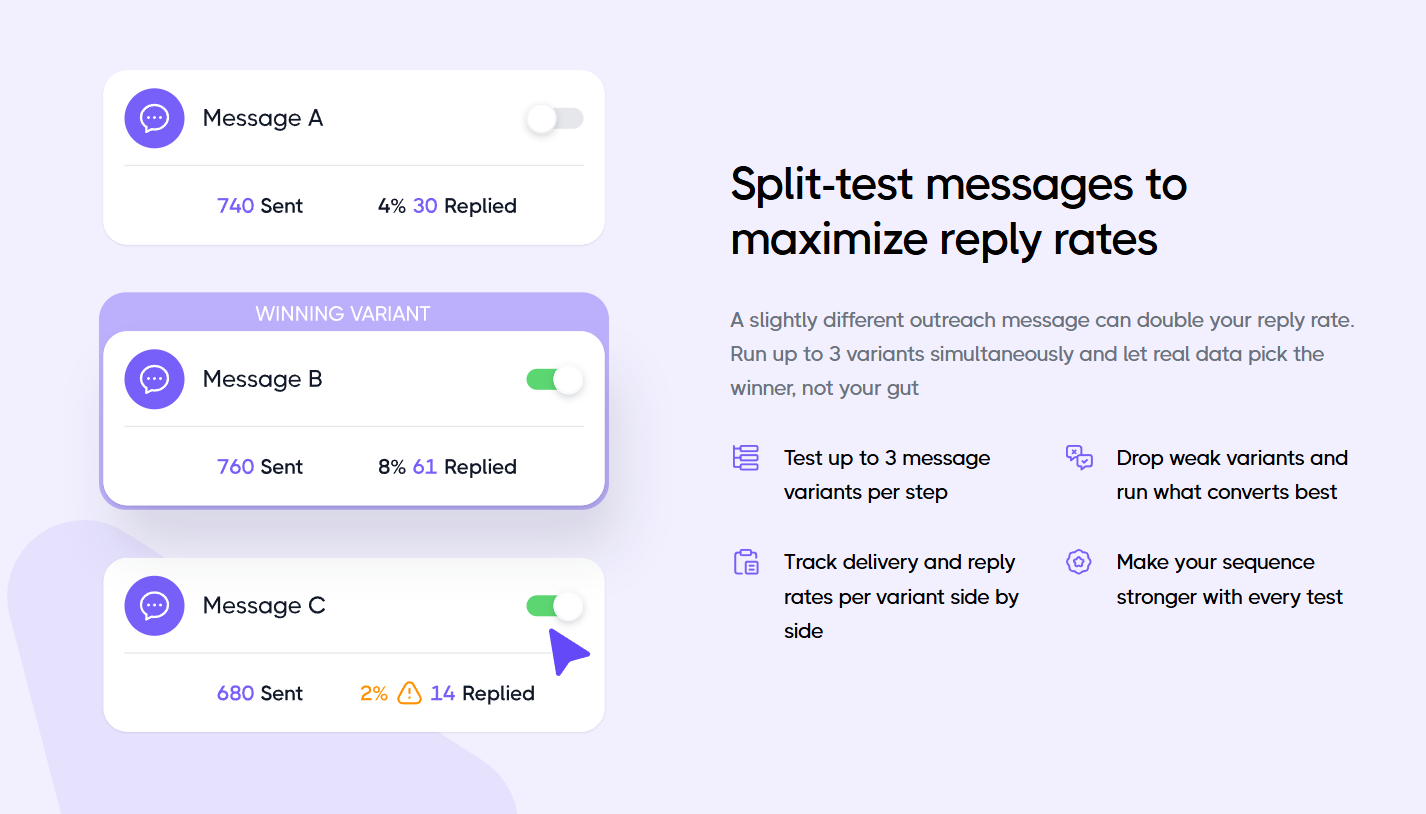
A dedicated inbox collects replies from all campaigns so you can respond quickly without hunting through LinkedIn’s own messaging screen. The analytics suite tracks campaign performance and conversion rates, and the step-by-step view highlights weak actions. Dripify also describes a split-testing feature that lets you run up to three message variants in a single step and compare delivery and reply rates side by side. The company’s site still invites visitors to join a waitlist for message A/B testing, while third-party reviews list A/B testing on the higher plans, so confirm exactly what is live on your plan before you rely on it.
Team Management and Integrations
For teams, Dripify provides role-based access, shared templates, combined reporting across accounts, and protection against overlapping outreach. Integrations cover popular CRMs and automation platforms, and an API is available for custom connections. Several of the more advanced team capabilities, including multi-team management, sit on the top plan, which is worth remembering when you budget.
Safety Architecture
Dripify states that it executes actions with safety ceilings tuned for each action type, human-like timing and location-matched IP addresses, and it offers pacing controls so you can keep volumes modest. An independent 2026 test cited by one competitor observed datacenter IP addresses and noted that users cannot bring their own proxy, which is a fair point to weigh if your LinkedIn profile is a critical business asset. As with every tool in this category, safer settings reduce risk without eliminating it.
Pricing, Plans, and Package Structure
Dripify is a subscription product billed per user, and that single fact shapes your real cost. The lowest numbers you see advertised are annual rates paid upfront, while month-to-month billing runs roughly $20 higher per tier. There is no permanent free plan, but a 7-day trial with no credit card gives you a full-featured look before you pay. A free LinkedIn account is enough to use the software, and the recurring extras to plan for are email finder top-ups and, optionally, Sales Navigator.
| Plan | Approx. Price (per user) | What You Get | Best For |
|---|---|---|---|
| Free Trial | $0 for 7 days, no credit card | Full-featured access to test sequences, analytics and the inbox | Anyone evaluating the tool |
| Basic | About $39/mo billed annually, or about $59/mo monthly | One active campaign, reduced daily limits (around 20 invites and 30 messages), no CRM links or export | Light testing, very small volumes |
| Pro | About $59/mo billed annually, or about $79/mo monthly | Unlimited campaigns, higher quotas (around 75 invites and 100+ messages), inbox, CSV export, webhooks and integrations | Solo sellers and small teams doing real outreach |
| Advanced | About $79/mo billed annually, or about $99/mo monthly | Everything in Pro plus multi-team management, step analytics, lead tagging and stronger LinkedIn protection | Agencies and sales teams |
| Enterprise | Custom quote | Tailored limits, onboarding and support for larger organizations | Large sales organizations |
How Dripify Compares to Alternatives
| Factor | Dripify | Expandi | Waalaxy | HeyReach |
|---|---|---|---|---|
| Approx. entry price | About $39 to $59/mo per user | About $79 to $99/mo per account | From about $19/mo per seat | About $63 to $79/mo per sender |
| Architecture | Cloud, no extension | Cloud, dedicated IP | Extension plus cloud features | Cloud, built for many senders |
| Free trial | 7 days, no card | 7 days | Free tier available | Trial available |
| Email in sequences | Basic email steps, finder credits | Limited | Higher tiers add cold email | LinkedIn focused |
| Team and agency use | Per-seat, team tools on Advanced | Agency plan from ten accounts | Per-seat tiers | Strongest for account fleets |
| Best for | Simple, reliable solo and small team outreach | Advanced conditional sequences | Budget buyers and beginners | Agencies running many senders |
Dripify vs. Expandi: Expandi is the closest rival in positioning, since it is also cloud based and built around conditional sequences. It costs more for a single account but bundles all features into one offer, whereas Dripify spreads capabilities across three tiers. If you want the lowest entry price and a gentler learning curve, Dripify is easier to start with. If you want everything unlocked from day one and do not mind paying more, Expandi is worth a trial.
Dripify vs. Waalaxy: Waalaxy is a lower-priced option with a monthly invite ceiling that rises by plan, which suits beginners with small lists. Dripify offers higher daily quotas on its paid tiers and a more polished sequence and analytics experience, so it tends to suit people who already know they will run LinkedIn outreach every week.
Dripify vs. HeyReach: HeyReach is aimed at agencies and teams that manage many LinkedIn senders at once and eventually moves to flat packages. For a single seller or a handful of reps, Dripify’s per-seat model is simpler. For an agency running dozens of accounts, HeyReach’s structure can work out cheaper and more flexible.
Dripify vs. doing it by hand: Manual outreach costs nothing in software but a great deal in time, and it rarely stays consistent. Dripify’s value is consistency: the same follow-up cadence, every day, across hundreds of prospects, with data on what works. Prices and plan details for competitors change often, so verify current figures on each vendor’s site before you decide.
Pros and Cons
What Users Love
Easy to learn and fast to launch: Ease of use is the most frequent compliment. Non-technical users report building a working sequence quickly, and the clear interface lowers the fear of getting started.
True cloud automation: Campaigns keep running without a browser tab or a powered-on computer, which frees up your day and keeps activity steady.
Useful analytics and personalization: Step-level reporting and a generous set of variables help you improve rather than guess, and the shared inbox keeps replies from slipping through.
Low-risk way to try it: A 7-day trial with no credit card lets you judge the product on your own audience before committing any money.
Strong overall ratings: Consistently high scores on G2, Capterra and Trustpilot, along with a long list of company-published customer stories, suggest the product delivers for a large share of its users.
Limitations Worth Knowing
LinkedIn account risk is real: Automation conflicts with LinkedIn’s rules, and some reviewers report temporary restrictions, particularly after pushing daily quotas. Safer settings help, but nothing removes the risk.
Billing and refund complaints: A recurring theme on G2 and Trustpilot is confusion around auto-renewal, cancellation timing and a strict refund policy. Read the terms carefully, especially before paying for a full year upfront.
The cheapest plan is very limited: Basic restricts you to one campaign and low daily volumes, so the advertised entry price rarely reflects what a serious user will pay.
Per-seat pricing adds up: There is no widely published volume discount, so teams and agencies pay full price for every LinkedIn account, and extras like Sales Navigator and email credits come on top.
Light on email and databases: Email sequences are basic, there is no mailbox warmup, and Dripify enriches leads you already found rather than offering a searchable contact database.
Mixed support experiences: Some users call support fast and friendly, while others describe slow responses, especially around billing disputes. Expect variable experiences.
Who Should Use Dripify
Founders and solo consultants: If you are the person doing your own selling and want a steady flow of conversations without a full-time SDR, the Pro plan on annual billing is the most sensible place to begin, after a free trial.
SDRs and small sales teams: Teams of one to three people who live on LinkedIn and want shared templates and simple reporting will get the most out of Pro, moving to Advanced only when multi-team management becomes necessary.
Recruiters and HR teams: Sourcing candidates is a natural fit for sequenced outreach, and Dripify works with Recruiter Lite accounts. Start with Pro and keep personalization high.
Marketers, freelancers and agencies with a few clients: If you generate leads or book meetings for clients, Dripify’s Advanced plan and agency program are worth a look, though very large agencies should compare per-sender alternatives.
Who should skip it: If your outreach is mostly email, if you cannot risk your LinkedIn profile, or if you need a large searchable lead database, a dedicated cold email platform or a data tool will serve you better.
Getting Started: Step by Step
- Define your target. Write down your ideal customer by job title, industry and company size before you touch the software. A clear audience matters more than any feature.
- Start the free trial. Sign up through the link below, create your account and connect your LinkedIn profile. No credit card is required for the 7-day trial.
- Build your lead list. Import a LinkedIn or Sales Navigator search, a LinkedIn post audience or a CSV, and review it so only relevant people go into the campaign.
- Create a sequence. Use a template or the drag-and-drop builder: a profile visit, a short personalized connection request, a first message after acceptance, and two or three spaced follow-ups.
- Personalize and set safe limits. Add variables and an icebreaker, set fallback text, and keep daily volumes conservative, especially in the first weeks.
- Launch and monitor. Start the campaign, then check step analytics and the inbox daily, answering replies quickly while interest is fresh.
- Refine and scale. Fix the weakest step, test message variants, and only upgrade your plan once the numbers show the campaign is working.
Tips for Getting Maximum Value
Use the full 7-day trial to test a real campaign on a real audience instead of clicking around the dashboard. Keep connection requests short and specific, since generic notes are the fastest way to a low acceptance rate and unwanted attention from LinkedIn. Ramp your daily activity up slowly rather than starting at maximum limits, and avoid running other automation tools on the same profile. Use your included email finder credits within the month because they do not roll over, and size any top-up to the list you actually plan to contact. Choose monthly billing for your first month or two if you are unsure, and only prepay for a year once you have proof that the sequence books meetings. Finally, remember that the message matters more than the machine: a relevant offer to a well-chosen audience will outperform any clever automation settings.
Future Outlook and Final Assessment
The outlook for LinkedIn outreach software is a mix of strong demand and tightening rules. Sales teams are under pressure to build pipeline with fewer people, and tools that save hours of repetitive work are easy to justify. Dripify is investing in the right direction, with AI-assisted personalization, richer analytics, multichannel steps, more lead sources and a roadmap that includes catching high-intent leads before they go cold. At the same time, LinkedIn continues to tighten enforcement against automation, and several 2026 reviews describe higher restriction rates across the whole category. Any serious user should plan for both realities.
The honest caveats remain: automation carries account risk, the advertised entry price is not the price most people pay, billing terms deserve a careful read, and email capabilities are basic. Within those boundaries, Dripify delivers one of the easiest, most approachable and best-reviewed ways to turn LinkedIn from a manual chore into a repeatable system, and its free trial lets you confirm that for yourself before spending anything.
Conclusion
Dripify has built something genuinely useful for anyone who sells on LinkedIn: a cloud platform that handles the repetitive parts of outreach, shows you which steps work, and keeps conversations organized in one place. It is simple to learn, fairly priced at its sensible tiers, and well rated by the people who use it. Know the limits before you commit: confirm the live price, read the billing terms, respect LinkedIn’s pacing, and choose the plan that matches how many conversations you truly want to run. Do that, and Dripify can turn scattered prospecting into a dependable pipeline habit, which is exactly the kind of simplicity we care about at AI Solutes, where we make everything easy for busy professionals.
Ready to put your LinkedIn outreach on autopilot?
Explore more honest reviews, tutorials and tool comparisons to find the right tech for the way you work and live, at AI Solutes, where we make everything easy.
👉 Start Your Free Trial: https://ai-solutes.com/dripify
👉 Our Website: https://ai-solutes.com/
👉 Our YouTube Channel: youtube.com/@ai-solutes
👉 Our Facebook Fanpage: Facebook
👉 Our X (Twitter): @AISolutes
- JumpSport Fitness Trampolines 2025 Buying Guide Protect Your Joints and Supercharge Low-Impact Cardio
- Writeless AI
- Can Nomad eSIM Empower Frequent Flyers? Assessing the Nomad Multi-Country Architecture
- Does Legal Templates Simplify Contract Creation? Evaluating the Legal Templates Document Automation Suite
- Does IObit Maximize PC Performance? Evaluating the IObit System Optimization Suite















