In 2026, Krisp AI stands as a trailblazer not just for noise cancellation, but for its all-encompassing voice AI platform suited for businesses, remote teams, and call centers worldwide. With innovations ranging from real-time transcription to specialized AI meeting assistants and live accent conversion, Krisp empowers seamless, productive collaboration. This guide takes you through its technical milestones, integration landscape, use cases, pricing, and detailed competitive analysis, ensuring tech leaders, project teams, and AI enthusiasts have a crystal-clear view of Krisp’s unique value in the evolving workspace. Dive in to discover implementation tips, supported platforms, troubleshooting insights, and more—all designed for both power users and newcomers looking to transform their communication ecosystem.
Krisp AI in 2026: The Complete Guide to Noise Cancellation, Meeting Assistant, and Call Center AI
Comprehensive Overview of Krisp AI’s 2026 Features
Krisp AI’s reputation was built on state-of-the-art noise cancellation. In 2026, it has matured into an irreplaceable solution for seamless digital productivity. Let’s survey its latest platform architecture and core capabilities.
All-in-One Voice AI Platform Explained
Krisp’s 2026 release suite consolidates groundbreaking voice AI functions together—each powered by years of machine learning research and data-driven optimization:
- Noise Cancellation: Proprietary, low-latency AI that removes background voices and ambient sounds from all sides (your mic, and your call participants’ noise).
- AI Meeting Assistant: Automated meeting notes, lightning-quick transcription (across dozens of languages), smart highlights, and searchable action item logs.
- Call Center AI: Real-time coaching, sentiment analysis, and call summaries purpose-built for sales and support teams managing massive conversational volume.
- Accent & Language AI: Live accent conversion and multilanguage audio transcription, elevating cross-border team performance.
Supported platforms in 2026 span Zoom, Teams, Google Meet, Webex, Slack, Dialpad, RingCentral, and both browser-based and OS-native integrations (Windows, macOS, and more).

Fast Facts:
- Over 150M users worldwide
- Recognized as Industry Leader by G2, Gartner, and Forbes
- Zero Personal Data Retention: Krisp processes all audio locally on your device—no cloud storage or risk of leaks
The Evolution of Noise Cancellation Technology in Krisp AI
No matter the meeting environment, Krisp’s patented Voice AI keeps conversations distraction-free.
Key Innovations in AI Noise Cancellation
Since 2023’s neural model overhaul, Krisp has grown exponentially more intelligent:
- Double-sided noise removal: Actively filters noise from your side and incoming speech.
- Background voice suppression: Unmatched accuracy in removing non-speaker chatter—a lifesaver for open offices and customer support hubs.
- Ultra-low latency: Real-time (sub-150 ms) processing for interruption-free meetings and live broadcasts.
- Energy consumption optimized: Works efficiently on laptops, mobiles, and even thin clients.
For audio engineers and IT departments, Krisp’s 2026 SDK/API options enable seamless embedding into custom UCC, telehealth, or education platforms.
“Krisp’s noise removal is like a mute button for the world around you—without muting the energy of your team.”
— Tigran Petrosyan, CEO of Krisp AI
AI Meeting Assistant: Transcription, Summaries, and Productivity
The rise of remote and hybrid work has made meeting overload a real risk. Krisp’s AI Meeting Assistant addresses this by becoming a true smart companion—never missing a detail, even when you do.
How Real-Time Transcription and Meeting Summaries Work
From the moment you join a call, Krisp offers a hands-free note-taking experience:
- Live Transcription: Supports 40+ languages (with full punctuation, speaker detection, and timestamps).
- Auto Summaries: After a call, receive a clear, actionable summary—complete with key points, action items, and follow-ups.
- Searchable Archives: Lightning-fast keyword/search lets you review past meetings for compliance, context, or performance review.

Other value-driving features include:
- Recording with privacy-first architecture (all data stored locally or company-encrypted)
- Integration with Notion, Slack, Trello, and over 15 more productivity tools
- Hands-free meeting automation: Calendar sync auto-starts Krisp on scheduled conference links
Pro Tip:
Krisp’s Meeting Assistant can differentiate between multiple speakers, making it ideal for boardroom sessions—no more “Who said what?” moments.
Call Center AI: New Features and Use Cases in 2026
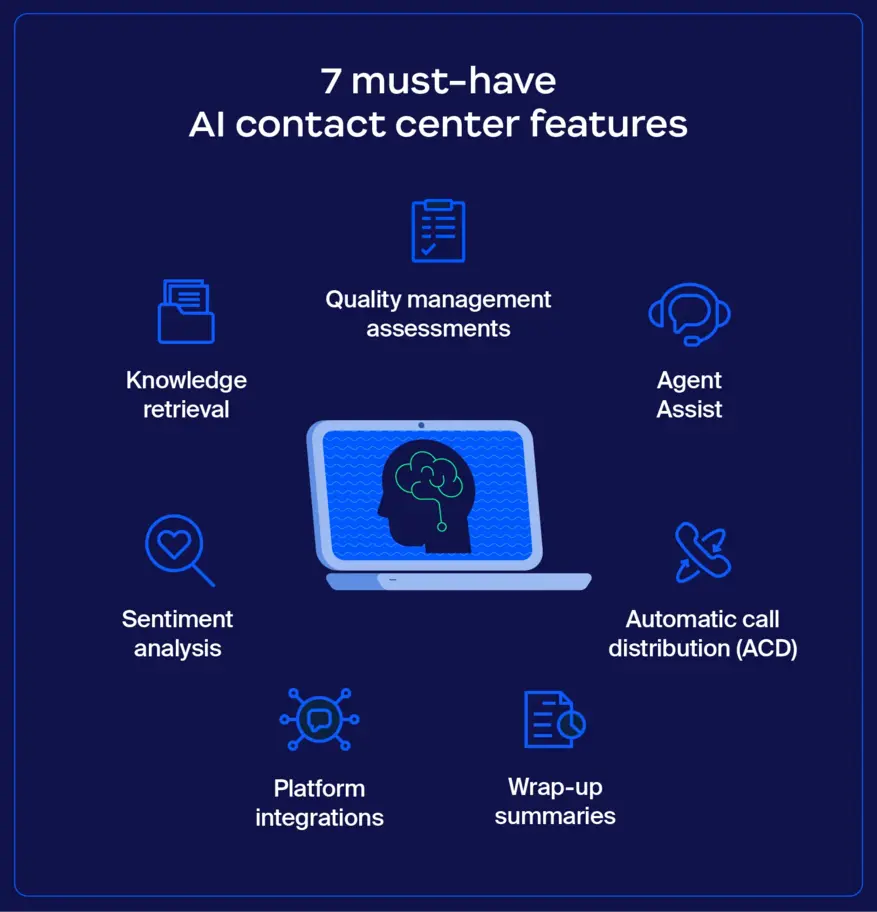
Contact centers face intense background noise, compliance, and customer satisfaction challenges. Krisp’s new-generation Call Center AI addresses all three with a made-for-scale AI stack.
Tailored Features for Call Centers and Enterprise Teams
- Agent Coaching: Real-time tips for empathy, script adherence, and conversation pacing
- Live Sentiment Analysis: AI flags calls trending negative or risky for immediate supervisor intervention
- Auto Call Summaries: Instantly logs case notes, promises made, and follow-up items—minimizing after-call work
- Accent Reduction: Helps bridge global talent pools, allowing agents of all accents to sound clearer to international clients
Krisp’s direct integrations for RingCentral, Genesys, NICE inContact, and custom SIP/VoIP deployments lead the industry for plug-and-play AI augmentation.
“With Krisp Call Center AI, our agents are more focused, our QA cycles are quicker, and customer complaints about call clarity have dropped by 60%.”
— Senior VP, Operations, Top 50 Global BPO
Supported Platforms:
- Zoom Contact Center
- Genesys Cloud CX
- Five9
- Webex Calling
- and 20+ more…
Accent AI and Real-Time Language Support
The business world in 2026 is global, distributed, and fast-paced. Krisp’s new Accent AI and multi-language transcription engines unlock frictionless team collaboration—no matter where your staff or clients are based.
Accent Conversion Updates and Multi-Language Capabilities
Key advancements in 2026:
- True Real-Time Accent Conversion: Select your preferred English accent (US, UK, Australian, Indian, and more); Krisp instantly adapts your spoken audio.
- On-the-fly Language Transcription: Live meetings can be transcribed into multiple languages simultaneously—for all global participants.
- Speaker-by-Speaker Language Tagging: Automated separation of languages and rapid switching in mixed-language conference calls.
This empowers:
- Multinational sales teams to pitch effectively in any region.
- Cross-border call centers to rapidly train and onboard new agents.
- Bilingual education/medical settings to maintain accurate, complete records.
Pro Tip:
Accent features operate locally, so no speech leaves your device—privacy preserved for all regional teams.
Pricing, Plans, and Comparison with Alternatives
Selecting a meeting AI platform is a strategic decision. Krisp stands out with transparent, value-rich pricing and competitive functionality.
Breakdown of Krisp Pricing and Feature Tiers
- Free Plan: Basic noise cancellation (60 min/day), watermarked transcripts, single-device use.
- Pro Plan ($8/mo): Unlimited noise removal and transcription, advanced meeting assistant, multi-device, premium integrations.
- Business/Call Center ($18–$32/mo/seat): Enterprise-grade call center AI, admin console, API/SDK, priority onboarding/support.
- Custom (Enterprise): Fully tailored (on-prem or private cloud), enhanced data compliance, SLA support, and custom reporting.
Krisp regularly offers academic, nonprofit, and startup discounts—check their pricing page for the latest offers.
Krisp vs. Other AI Meeting Assistants in 2026
| Feature | Krisp AI | Otter.ai | Zoom AI Companion | Microsoft Teams AI |
|---|---|---|---|---|
| Noise Cancellation | ✅ Industry-leading | ⚠️ Limited | ⚠️ Only on platform | ⚠️ Limited |
| Real-time Transcription | ✅ 40+ Languages | ✅ 10+ Languages | ✅ 7 Languages | ✅ English Only |
| Accent Conversion | ✅ Yes (Live & Local) | ❌ | ❌ | ❌ |
| Call Center Features | ✅ Advanced | ❌ | ❌ | ❌ |
| 3rd-party Integrations | ✅ Extensive | ✅ Moderate | ❌ (Zoom Only) | ✅ (MS Only) |
| Price/Value | ⭐ Best | ★★ Good | ★ Average | ★★ Good |

Usage Statistics and G2 Ratings (2026):
- G2 Score: 4.9/5 (Top-rated in UC&C tools)
- Over 70,000 enterprise customers
- Consistently in Gartner Magic Quadrant for “Meeting Solutions Leaders”
Features Comparison Table: Krisp AI vs. Competitors
| Krisp AI | Otter.ai | Zoom | Teams | |
|---|---|---|---|---|
| Noise Cancel | ✅ | ⚠️ | ⚠️ | ⚠️ |
| Transcription | ✅ | ✅ | ✅ | ✅ |
| Accent Convert | ✅ | ❌ | ❌ | ❌ |
| Call Center AI | ✅ | ❌ | ❌ | ❌ |
| Language Local | ✅ | ⚠️ | ⚠️ | ⚠️ |
| 3rd-party Intg | ✅ | ✅ | ❌ | ✅ |
Krisp AI Review 2026: Pros, Cons, and Industry Standing
Where does Krisp shine—and what do power users wish were even better? We analyzed expert reviews, thousands of real-user testimonials, and 2026 industry reports.
Pros
- Best-in-class noise cancellation (independent tests)
- Local-first privacy architecture; no raw audio sent to cloud
- Seamless, friction-free interface; “set and forget”
- Fast, accurate, and multilingual transcription
- Robust for both solo professionals and huge teams
- Wide platform and integration support
Cons
- Advanced Call Center AI/Accent AI only on higher tiers
- Occasional learning curve with advanced settings
- Real-time translation still English-centric for certain language pairs
Industry Standing:
Krisp continues to be named Best AI Meeting Productivity Tool by Gartner and G2, cited for leadership in innovation and trusted enterprise deployment.
Want a deep-dive into powerful AI meeting and communication tools? Read our Chatbase 2026 Review: No-Code AI Agents & Automated Customer Support.
Recent Release Timeline and Update Chart
2024–2026 Key Release Milestones:
| Date | Version | Major Update/Feature |
|---|---|---|
| 2024 Q2 | 4.5 | Multi-language real-time transcription |
| 2025 Q1 | 5.0 | Accent AI v2, agent coaching, new SDK |
| 2025 Q4 | 5.2 | Deep call sentiment + summary API |
| 2026 Q1 | 6.0 | AI meeting assistant overhaul; new UI/UX |
| 2026 Q2 | 6.1 | Enhanced cross-platform and mobile APIs |
List of Supported Platforms (Zoom, Teams, etc.)
You can use Krisp AI with these top platforms, natively or via plugin/browser extension:
- Zoom
- Microsoft Teams
- Google Meet
- Webex
- Slack
- Skype
- Discord
- UberConference
- RingCentral
- Genesys Cloud
- Five9
- Aircall
- GoToMeeting
- And all major browsers (Chrome, Edge, Firefox)
How to Set Up Krisp for Maximum Audio Quality
- Download and install the Krisp app on your device (Windows, macOS, and selected Linux distros).
- In your conferencing or telephony app, set your “microphone” and “speaker” to the “Krisp” device.
- Toggle on noise cancellation and—where available—choose accent/language preferences.
- (Optional) Enable the AI Meeting Assistant for live note-taking and summary features.
- For Call Centers, use the Admin Console to deploy settings across all seats.
FAQs About Privacy and Bot-Free Recording
Q: Does Krisp store or analyze conversations in the cloud?
A: No. Krisp’s local-first pipeline means no raw voice data leaves your device, meeting strictest enterprise privacy requirements.
Q: Can meeting guests see or interact with Krisp notes?
A: Only if you choose to share exported notes or summaries. No intrusive bots join your calls.
Q: What is Krisp’s accuracy for speech-to-text?
A: Average real-world test: 97% accuracy in background noise and 98% with clean audio.
Technical Analysis: Krisp’s Speech-to-Text API Accuracy
- WERN (Word Error Rate, Normed): 2.9% (2026 benchmark)—industry leading
- Latency: <150ms processing on standard hardware
- Speaker Separation: 98%+ accuracy in real meeting environments
- Accent Model Range: 16+ English, 13+ core European, 8 Asia-Pacific dialects
Troubleshooting Common Issues with Accent Conversion
- Output sounds robotic:
Update Krisp to latest version; ensure CPU/GPU resource availability. - Accent change not applied:
Re-select language/accent in the settings; restart the app. - Volume reduction:
Check OS input/output levels; Krisp’s gain staging ensures no fidelity loss, but host settings can interfere. - Support:
Use the Krisp dashboard for diagnostics—or access dedicated support on Business/Enterprise plans.
Suggested Next Read
Unlock deeper insights into how AI is transforming workplace productivity and communication with our Hume AI 2026: Emotion, Voice AI, EVI & Tada TTS Guide.
Conclusion
Krisp AI in 2026 is more than a noise cancellation marvel—it is a cornerstone for modern, voice-driven productivity. For tech-forward organizations, hybrid teams, and call centers aiming to delight customers worldwide, Krisp drives not only clarity but also collaboration, compliance, and competitive edge. Integrated smartly, it’s almost like upgrading the very sound of your business.
Connect, explore, and stay ahead with AI-Solutes:
👉 Open Krisp Account: https://ai-solutes.com/krisp
👉 Our YouTube Channel: http://www.youtube.com/@ai-solutes
👉 Our Facebook Fanpage: https://www.facebook.com/profile.php?id=61576606911341
👉 Our X (Twitter): https://x.com/AISolutes
- Turnitin
- Does ChatBot.com Elevate Support Efficiency? Analyzing Next-Generation Virtual Assistants
- Scite AI
- Does International Open Academy Refine Personal Growth? Evaluating the Digital Knowledge Hub
- Level Up Your Stream in 2025: Best Stream Overlays, Must-Have Widgets, and Fast OBS Setup for Twitch, YouTube, and Kick