Most professionals run their working lives through a handful of free or cheap services that quietly pay for themselves with data: an inbox that is scanned for ad signals, a cloud drive that can read every contract you upload, a browser full of saved passwords, and, increasingly, an AI chatbot that may learn from the client details you paste into it. For freelancers, consultants, small business owners and anyone handling sensitive information, that trade has started to feel expensive. Proton was built to offer a different deal. Born in 2014 out of a crowdfunding campaign led by scientists who met at CERN, the Geneva-based company now runs a full privacy-first ecosystem: Proton Mail, Calendar, Drive with Docs and Sheets, Pass, VPN, Wallet, Authenticator, the Meet video calling service and Lumo, its encrypted AI assistant. Proton passed 100 million accounts back in 2023, its VPN network spans more than 20,000 servers in 140+ countries, every core app has a genuinely free tier, and its all-in-one Proton Unlimited bundle starts at roughly $9.99 a month on an annual plan. Since 2024 the company has been controlled by the non-profit Proton Foundation, which is unusual in a market dominated by ad-funded giants.
The question for 2026 is no longer whether Proton is secure; its reputation there is well established. The question is whether it is complete enough to replace Google or Microsoft for daily work, and whether the bundle is worth paying for. This review walks through the whole Proton ecosystem, the new Proton Workspace business suite, Lumo 2.0, full pricing, head-to-head comparisons, honest limitations, and exactly who should (and should not) make the switch.
Proton Review 2026: The Encrypted Email, VPN, Cloud, Password and AI Ecosystem Built to Replace Big Tech Without Trading Away Your Privacy
Overview and Background
Proton AG was founded in May 2014 by Andy Yen, Jason Stockman and Wei Sun, and launched Proton Mail as one of the first mainstream end-to-end encrypted email services. Around 10,000 early backers funded the original campaign, and the product line has expanded steadily ever since: Proton VPN arrived in 2017, Proton Drive left beta in 2022, Proton Pass launched in 2023, Proton Docs followed in 2024, and Proton Sheets joined the suite in December 2025. Along the way Proton acquired SimpleLogin, the email alias service now woven into Mail and Pass, and Standard Notes, the encrypted notes app.
The core idea behind everything Proton builds is zero-access encryption. Your emails, files, calendar entries, passwords and saved AI conversations are encrypted on your device before they reach Proton’s servers, so the company holds data it cannot read. That design is backed by open-source apps that outside researchers can inspect, regular independent security audits, and a corporate structure that removes the advertising incentive entirely. In June 2024 Proton transitioned to the non-profit Proton Foundation as its controlling shareholder, with a board that has included web inventor Tim Berners-Lee.
The last eighteen months have been the most ambitious in the company’s history. Lumo, a privacy-first AI assistant, launched in July 2025, and Lumo 2.0 followed on June 30, 2026 with reasoning modes, project workspaces and image capabilities. Proton Meet, an end-to-end encrypted video calling service, opened to the public on March 31, 2026. And in spring 2026 Proton bundled the whole stack into Proton Workspace, a direct business alternative to Google Workspace and Microsoft 365. Proton has also been relocating parts of its infrastructure to Germany and Norway in response to a proposed Swiss surveillance law, with Lumo the first product hosted primarily outside Switzerland.
Why Proton Stands Out in 2026
A complete ecosystem under one login: Few privacy companies go beyond a single product. Proton covers email, calendar, cloud storage, documents, spreadsheets, passwords, two-factor codes, VPN, video meetings, a Bitcoin wallet and an AI assistant, all tied to one account and one encryption model. That means you can genuinely move your digital life off ad-funded platforms rather than stitching together five unrelated privacy tools.
Zero-access encryption by default: Encryption is not a setting you have to remember to enable. Files, mail, notes, passwords and saved Lumo chats are encrypted on your device, so Proton itself cannot scan them for advertising, hand readable copies to third parties, or use them to train AI models.
Free tiers that are actually usable: Proton Mail Free, Proton Drive Free, Proton Pass Free, Proton VPN Free and Lumo all work without a credit card. The free VPN has no data cap and no ads, and the free Pass plan includes unlimited logins on unlimited devices, which is more generous than several paid competitors.
Lumo, a private AI assistant: Lumo keeps no logs of your prompts, stores saved conversations with zero-access encryption, does not train on user data, and is open source. Lumo 2.0 adds Fast and Thinking modes, encrypted Projects for grouping chats and files, Custom Lumos tuned to tasks like writing or research, user-controlled memory and a doubled context window. For professionals who want AI help with confidential drafts, that combination is rare.
Hide-my-email aliases built in: Thanks to the SimpleLogin acquisition, Proton lets you generate a unique forwarding address for every newsletter, SaaS trial or online shop. If one leaks or starts spamming you, you switch it off without touching your real address. For marketers and content creators signing up for dozens of tools a month, this alone keeps an inbox sane.
A business suite that finally competes: Proton Workspace brings Mail, Calendar with booking pages, Drive, Docs, Sheets, Meet, VPN and Pass into one admin console, with Lumo included on the Premium tier. For small teams in regulated fields, it is now possible to run a company on end-to-end encrypted tools without giving up collaborative documents or video calls.
Independence and a European legal base: Proton is headquartered in Switzerland, operates data centers in Switzerland, Germany and Norway, is subject to GDPR-level protections, and is controlled by a non-profit foundation. For EU businesses looking for a “buy European” alternative to US cloud providers, that jurisdiction and ownership story is a genuine selling point.
Key Features and Technology
Proton is easiest to understand as a set of apps that share one account, one encryption model and one subscription. Here is how the ecosystem breaks down.
Proton Mail and Calendar: The Encrypted Core
Proton Mail is the flagship and still the reason most people join. Mail between Proton users is end-to-end encrypted automatically, and you can send password-protected, self-expiring messages to anyone on Gmail, Outlook or elsewhere. The free plan gives you one address, 1 GB of mail storage, up to 150 messages a day and a few folders and labels, while paid plans add multiple addresses, custom domains, catch-all routing, auto-forwarding, auto-reply, a short @pm.me address, a desktop app and IMAP/SMTP access through Proton Mail Bridge for clients like Outlook and Thunderbird. Easy Switch imports your mail, contacts and calendars from Google or Microsoft in a few clicks, and Proton Sentinel adds advanced account protection against takeover attempts. The 2026 roadmap brings automatic category sorting, full-content search on mobile and the ability to send and receive mail from other providers such as Gmail inside the Proton app. Proton Calendar is being rebuilt with offline mode and appointment booking pages, and Emergency Access lets a trusted contact reach your account if something happens to you.
Proton Drive, Docs and Sheets: Encrypted Cloud and Collaboration
Proton Drive is end-to-end encrypted cloud storage with desktop sync for Windows and macOS, mobile apps with photo backup, version history, and secure share links that can be password-protected and set to expire. Free users get up to 5 GB (new accounts start smaller and unlock the full amount by completing a few onboarding steps). Inside Drive sit Proton Docs, a collaborative word processor with real-time co-editing, comments and suggestions, and Proton Sheets, a spreadsheet editor added in late 2025. Neither yet matches the depth of Google Docs or Excel for heavy formula work or add-ons, but for proposals, client briefs, invoices and shared planning sheets they cover the everyday essentials while keeping the contents unreadable to the provider.
Proton Pass and Authenticator: Passwords, Passkeys and 2FA
Proton Pass is a full password manager with browser extensions, mobile and desktop apps, passkey support, secure notes, credit card storage and a password generator. Its signature feature is tight integration with hide-my-email aliases, so creating a new login can also create a new disposable address in one step. Pass Plus adds unlimited aliases, an integrated two-factor code generator, and dark web monitoring that warns you when your addresses show up in breaches, while Pass Family covers up to six people. The 2026 updates add folders, smarter autofill on embedded login forms and easier SSH key handling for developers. Proton also offers Proton Authenticator, a free, open-source two-factor app with encrypted backup and sync, as a private alternative to Google Authenticator.
Proton VPN: The Most Generous Free VPN, Plus a Serious Paid Tier
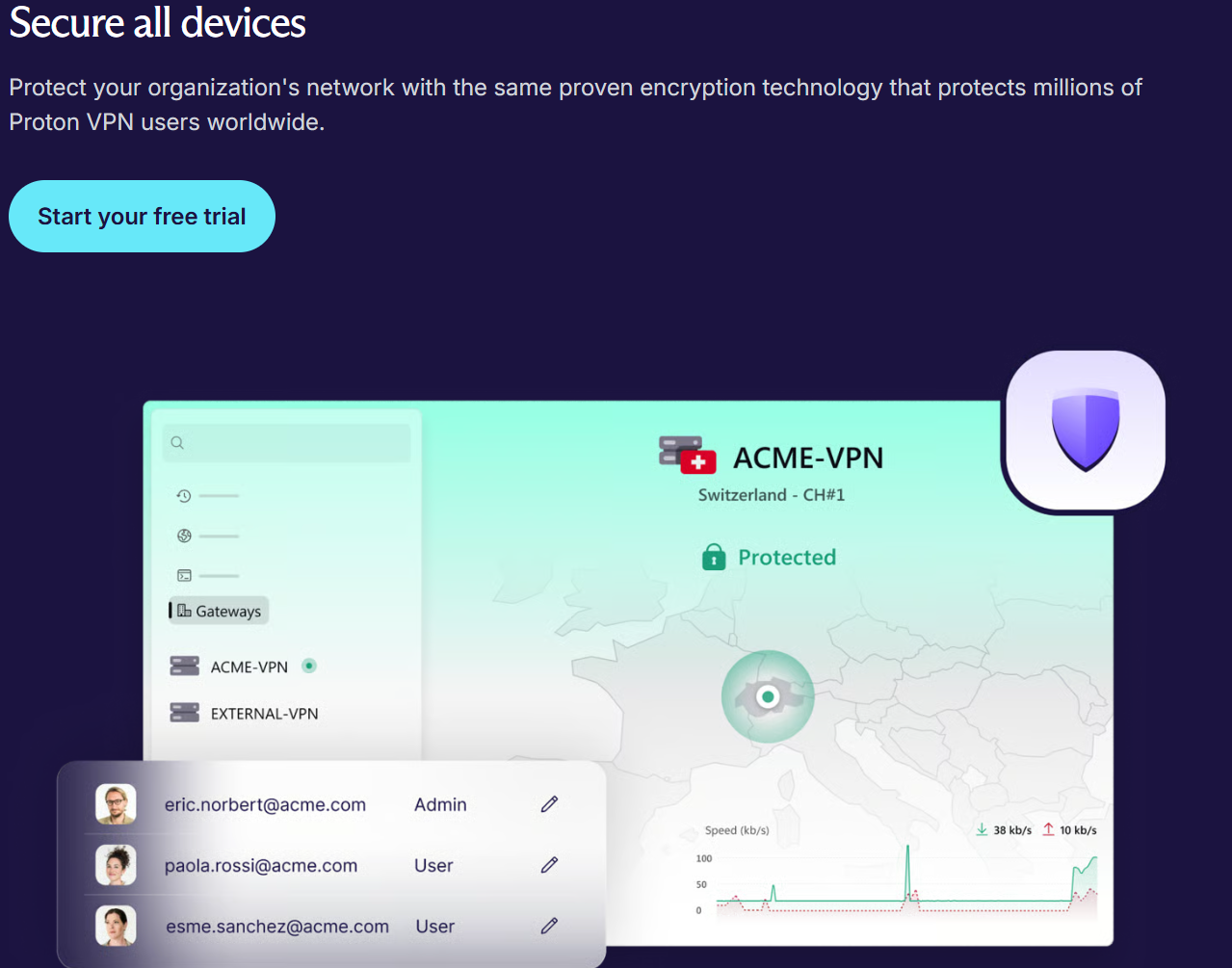
Proton VPN is widely regarded as one of the few free VPNs worth installing: no data cap, no ads, a strict no-logs policy and servers in roughly ten countries, though location is assigned automatically and you can protect one device at a time. VPN Plus unlocks more than 20,000 servers across 140+ countries, up to 10 simultaneous devices, streaming support, NetShield ad and malware blocking, split tunneling, and Secure Core, which routes traffic through hardened servers in privacy-friendly countries before it exits. The apps are open source and independently audited, and Proton is moving the VPN to a new WireGuard-based codebase in 2026 for faster, more reliable and more censorship-resistant connections, including the Stealth protocol on Linux. Remote workers on hotel and coworking Wi-Fi get immediate value here.
Lumo 2.0 and Proton Meet: Private AI and Encrypted Calls
Lumo is Proton’s answer to ChatGPT for people who cannot, or will not, paste sensitive material into a mainstream chatbot. You can use it as a guest without an account, sign in for encrypted chat history and higher limits, or upgrade to Lumo Plus for unlimited chats, document uploads, history search, priority responses and access to all available models. Ghost Mode lets you run sessions that disappear when you close them. Lumo 2.0 introduced Fast and Thinking reasoning modes, encrypted Projects, Custom Lumos, a larger context window, opt-in memory and image features, and Proton claims large benchmark gains over earlier versions. Independent reviewers still rate it below frontier assistants for raw capability, so think of it as the private option for confidential work rather than the most powerful AI on the market. Proton Meet, meanwhile, is an end-to-end encrypted video service built on the MLS protocol. Anyone can start an instant call with up to four people without an account, a free Proton account supports calls of up to 50 participants for up to an hour, and paid Workspace plans raise those limits and integrate scheduling with Proton Calendar, Google Calendar and Outlook.
Pricing, Plans, and Package Structure
Proton sells subscriptions, so this is a recurring cost rather than a one-time purchase. You can buy a single app’s Plus plan or bundle everything into Proton Unlimited, and families and businesses get their own tiers. Prices drop sharply on 12-month and 24-month terms, introductory discounts usually apply only to the first billing period, and Proton displays prices dynamically by region and currency, so treat the figures below as approximate ranges in USD.
| Plan | Approx. Price | What You Get | Best For |
|---|---|---|---|
| Proton Free | $0 | 1 address, 1 GB mail, up to 5 GB Drive, Pass Free, VPN Free, Lumo and Meet basics | Testing the ecosystem; light personal use |
| Mail Plus | ~$3.99 to $4.99/mo | 15 GB, 10 addresses, 1 custom domain, 10 aliases, desktop app, Bridge | Freelancers who only need private email |
| Pass Plus | ~$2.99 to $4.99/mo | Unlimited aliases, built-in 2FA codes, dark web monitoring | Password manager switchers |
| Drive Plus | ~$3.99 to $4.99/mo | 200 GB encrypted storage, Docs, Sheets, version history | Private file and photo backup |
| VPN Plus | ~$2.99 to $9.99/mo (term-dependent) | 20,000+ servers, 140+ countries, 10 devices, Secure Core, NetShield | Travelers, remote workers, streaming |
| Lumo Plus | ~$9.99 to $12.99/mo | Unlimited chats, uploads, history search, all models, priority speed | Professionals using AI on confidential work |
| Proton Unlimited | ~$7.99 to $12.99/mo | 500 GB, 15 addresses, 3 custom domains, Plus tiers of Mail, Calendar, Drive, Pass and VPN, Sentinel | Best overall value for individuals |
| Proton Duo | ~$14.99 to $19.99/mo | Unlimited for 2 people with a large shared storage pool | Couples and two-person businesses |
| Proton Family | ~$23.99 to $29.99/mo | Unlimited for up to 6 people, 3 TB shared | Households moving off Google together |
| Workspace Standard | ~$12.99 to $14.99/user/mo | Mail, Calendar, Drive, Docs, Sheets, Meet, VPN, Pass, about 1 TB per user | Small teams replacing Google or Microsoft |
| Workspace Premium | ~$19.99 to $24.99/user/mo | Everything in Standard plus about 3 TB per user, full Lumo, larger Meet calls, retention policies | Regulated teams that want private AI |
How Proton Compares to Alternatives
| Factor | Proton | Google Workspace | Microsoft 365 Business | Tuta |
|---|---|---|---|---|
| Encryption model | End-to-end and zero-access across apps | Encrypted, but provider holds the keys | Encrypted, but provider holds the keys | End-to-end, including subject lines |
| Core apps | Mail, Calendar, Drive, Docs, Sheets, Meet | Full office suite and Meet | Full Office suite and Teams | Mail, Calendar, Contacts |
| VPN and password manager | Both included in bundles | No VPN; basic password storage | No VPN; basic password storage | Neither |
| AI assistant | Lumo (private, no training on data) | Gemini (more powerful, bundled) | Copilot (more powerful, mostly add-on) | None |
| Entry paid price | ~$3.99/mo (Mail Plus); ~$12.99/user (Workspace) | ~$7 to $8.40/user (Business Starter) | ~$7/user (Business Basic) | ~$3/mo (personal) |
| Best for | Privacy-first individuals and teams wanting one ecosystem | Collaboration-heavy teams | Office and Excel-dependent businesses | Budget encrypted email only |
vs. Google Workspace: Google remains the benchmark for real-time collaboration, third-party integrations and AI power, and Business Starter is cheaper per seat than Proton Workspace Standard. The trade is structural: Google can technically access your data, and its business model depends on data at scale. Proton gives you less polish and fewer integrations in exchange for content Google could never read. If your team lives in shared spreadsheets with complex add-ons, Google still wins; if you handle client confidential files, legal drafts or health and finance data, Proton’s model is the stronger fit.
vs. Microsoft 365: Microsoft raised Business Basic and Business Standard prices in July 2026, narrowing the cost gap with Proton. Microsoft still owns desktop Office, Excel modeling and enterprise identity management, and for businesses whose clients send .xlsx and .docx files all day, that compatibility matters. Proton Workspace is the better choice for privacy-sensitive small teams who mostly need email, calendar, file sharing, light documents and secure calls, and who would otherwise pay separately for a VPN and password manager.
vs. Tuta: Tuta, based in Germany, is Proton’s closest rival on encrypted email and goes further in one respect by encrypting subject lines. It is also slightly cheaper at the entry level. But Tuta is essentially mail and calendar, without a mature cloud drive, password manager, VPN, AI assistant or video calling. If you only need private email on a tight budget, Tuta is worth a look; if you want to replace an entire Big Tech stack, Proton is in a different league.
Pros and Cons
What Users Love
Privacy that is built in, not bolted on: Users consistently praise the peace of mind of knowing that their mail, files and passwords are encrypted before they leave the device, with no ads, no scanning and no data sold to third parties, even on the free plan.
Outstanding bundle value: Proton Unlimited packs email, cloud storage, a password manager and a premium VPN into one subscription that costs less than buying comparable standalone tools from separate vendors.
Clean, modern apps: Reviewers describe the interfaces as simple and uncluttered, with fast sending and syncing, well-rated mobile apps, and an Easy Switch import tool that makes leaving Gmail far less painful than expected.
Free tiers that respect you: The free VPN with no data cap and the free Pass plan with unlimited logins are frequently cited as the best free offers in their categories.
Aliases that tame spam: Hide-my-email addresses are a favorite among marketers, creators and anyone who signs up for lots of tools, because a leaked alias can be switched off in seconds.
Limitations Worth Knowing
Encryption is strongest inside Proton: Emails to people on other providers are not end-to-end encrypted unless you use password-protected messages, subject lines are not end-to-end encrypted, and Proton must comply with valid Swiss legal orders. The protection is excellent for content, not total anonymity.
Tight free storage: 1 GB of mail storage fills quickly if you receive attachments, and the free plan limits you to one address and around 150 sent messages a day. Free is a trial ground, not a long-term home for a busy inbox.
Docs, Sheets and integrations trail Big Tech: Proton’s collaboration tools are still young, with fewer templates, formulas, add-ons and third-party integrations than Google or Microsoft. Desktop email clients need Proton Mail Bridge, which is a paid feature, and POP3 is not supported.
Lumo is private, not the smartest: Independent reviews rate Lumo behind frontier assistants for complex reasoning and breadth, and the free tier has tight usage limits. It earns its place on privacy, not raw power.
Support and billing friction: Support is ticket and email based with no phone callback, and user reviews on aggregator sites are polarized, with complaints about slow ticket responses and surprise renewal prices once introductory discounts expire.
Some regulatory uncertainty: Proton has openly opposed a proposed Swiss surveillance law and is shifting infrastructure to Germany and Norway. The company says it is not leaving Switzerland, but the long-term jurisdiction picture is still evolving and worth watching.
Who Should Use Proton
Freelancers and consultants handling client data: If you exchange contracts, financial records or confidential briefs, encrypted email and storage are a professional safeguard and a trust signal for clients. Proton Unlimited is the sweet spot, with three custom domains so you can run your business address on Proton.
Small businesses and regulated teams: Law firms, accountants, healthcare practices, agencies and startups that want to leave Google or Microsoft without losing shared documents and video calls should trial Proton Workspace Standard, and choose Premium if private AI through Lumo is part of the plan.
Marketers, creators and SaaS-heavy users: If you sign up for new tools every week, hide-my-email aliases and a solid password manager will clean up your inbox and reduce breach exposure. Start with Pass Free, then move to Pass Plus or Unlimited.
Remote workers and frequent travelers: Coworking spaces, airports and hotel Wi-Fi are exactly where a trustworthy VPN pays off. VPN Plus covers ten devices, and Unlimited adds the rest of the suite for a modest step up.
Families moving off ad-funded platforms: Proton Family gives up to six people their own private accounts with 3 TB of shared storage, which is a strong value compared with buying separate email, storage and VPN plans for everyone.
Who should think twice: Teams that depend on advanced Excel modeling, deep Google integrations or the most capable AI models will feel the gaps. They may be better served keeping their main suite and adding Proton Pass or Proton VPN on the side.
Getting Started: Step by Step
- Create a free Proton account. Sign up through the official site with just a username and password; no credit card is required, and one account unlocks Mail, Drive, Pass, VPN, Calendar and Lumo.
- Secure your account first. Turn on two-factor authentication, save your recovery phrase somewhere safe offline, and add a recovery method. Because data is encrypted with keys tied to your password, losing access without a recovery phrase can mean losing your data.
- Import your old data with Easy Switch. Connect your Gmail or Outlook account to bring over emails, contacts and calendars, then set up forwarding so nothing gets missed during the transition.
- Install the apps you will use daily. Add the Mail and Calendar mobile apps, the Proton Pass browser extension, Proton Drive desktop sync and the Proton VPN client, then import passwords from your current manager or browser into Pass.
- Start using aliases. Replace your real address with hide-my-email aliases for newsletters, SaaS trials and online shopping, so you can disable any alias that starts attracting spam.
- Upgrade only when you hit a limit. Once you run out of storage, need a custom domain or want the full VPN, compare a single Plus plan against Proton Unlimited and pick the longest term you are comfortable committing to.
- Bring your team or family in. If others will join, move to Duo, Family or Proton Workspace so storage is pooled and accounts are managed from one place.
Tips for Getting Maximum Value
Run on the free plan for a few weeks before paying, so you know which apps you actually use; many people discover they only need Pass and VPN, while others realize Unlimited is cheaper than the three subscriptions they were planning to buy. When you do upgrade, the annual and two-year terms deliver the biggest discounts, but put a reminder in your calendar a month before renewal so the standard rate never surprises you. Use a custom domain from day one if you run a business, because it makes future provider changes painless and looks more professional than a generic address. Lean on aliases for every new sign-up, keep Proton Sentinel and two-factor authentication enabled, and store your recovery phrase offline. For confidential AI tasks, draft and summarize in Lumo, and reserve mainstream chatbots for non-sensitive work where you need maximum capability. Finally, if you are a small team, compare Workspace Standard against Unlimited for each person: for two or three users who do not need admin controls, Duo or individual Unlimited plans can sometimes cost less.
Future Outlook and Final Assessment
The tailwinds are firmly in Proton’s favor. Businesses across Europe are actively looking for alternatives to US cloud providers, AI adoption has made people far more aware of how their data is used to train models, and Big Tech price increases are narrowing the cost gap that used to make privacy feel like a luxury. Proton has responded by turning a collection of apps into a credible workspace, shipping Docs, Sheets, Meet and Lumo 2.0 in quick succession, and committing to a 2026 roadmap focused on making those tools faster and more polished rather than simply adding more of them.
The honest caveats remain. Encryption is strongest when both sides use Proton, free storage is tight, the collaboration tools and Lumo still trail the biggest players in capability, support is ticket based, and the Swiss regulatory situation is not fully settled. Within those boundaries, though, Proton offers the most complete privacy-first alternative to Google and Microsoft available in 2026, backed by open-source code, independent audits and a non-profit owner whose incentives line up with its users.
Conclusion
Proton has grown from a single encrypted inbox into a full ecosystem that lets professionals, small businesses and families run their digital lives without handing their data to an advertising company. It is not perfect: collaboration tools are still maturing, Lumo prioritizes privacy over raw power, and you need to understand where encryption applies. But no other provider combines email, storage, documents, passwords, VPN, video calls and private AI under one account with this level of protection and transparency. Start with the free plan, move up to Unlimited or Workspace when the value is clear, and let Proton make everything easy when it comes to keeping your work and personal data private.
Ready to take back control of your inbox, files and AI chats?
Explore more honest reviews, tutorials and tool comparisons to find the right tech for the way you work and live — at AI Solutes, where we make everything easy.
👉 Open Free Account: https://ai-solutes.com/proton
👉 Our YouTube Channel: youtube.com/@ai-solutes
👉 Our Facebook Fanpage: Facebook
👉 Our X (Twitter): @AISolutes
- Master Unified Hosting in 2025: Choose the Best AI-Powered Platform for Domains and Security
- 2026 Geopolitics and AI: Build Resilient Supply Chains with Cleantech
- Discover How Grok AI Disrupts Real-Time Video Creation and Social Integration in 2025
- Boost Metabolic Flexibility in 2026 With the Lumen Metabolism Tracker for Faster Weight Loss
- Made a Video