

Staring at a blank page with a citation deadline looming is one of the most universal pains in academic life — and it’s exactly the problem Jenni AI was built to solve. Rather than acting as a general-purpose chatbot, Jenni is an AI writing assistant purpose-built for research papers, theses, and essays, combining an intelligent autocomplete engine, a citation manager with more than 10,000 citation styles, and a PDF-aware research workspace into a single editor. Since launching in 2018, Jenni has grown into one of the most recognizable names in academic AI writing, now used by more than 5 million academics worldwide across over 15 million papers written on the platform.
For students, graduate researchers, and academics who spend real time wrestling with citation formatting and literature-grounded drafting, that specialization is the whole appeal. This 2026 review walks through what Jenni AI actually does well, its current Free, Plus, and Pro pricing, how it stacks up against Paperpal and general tools like ChatGPT, and — just as importantly — the academic-integrity considerations every user needs to weigh before relying on it.
Jenni AI Review 2026: The AI Writing Assistant Built for Academic Research
Overview and Background
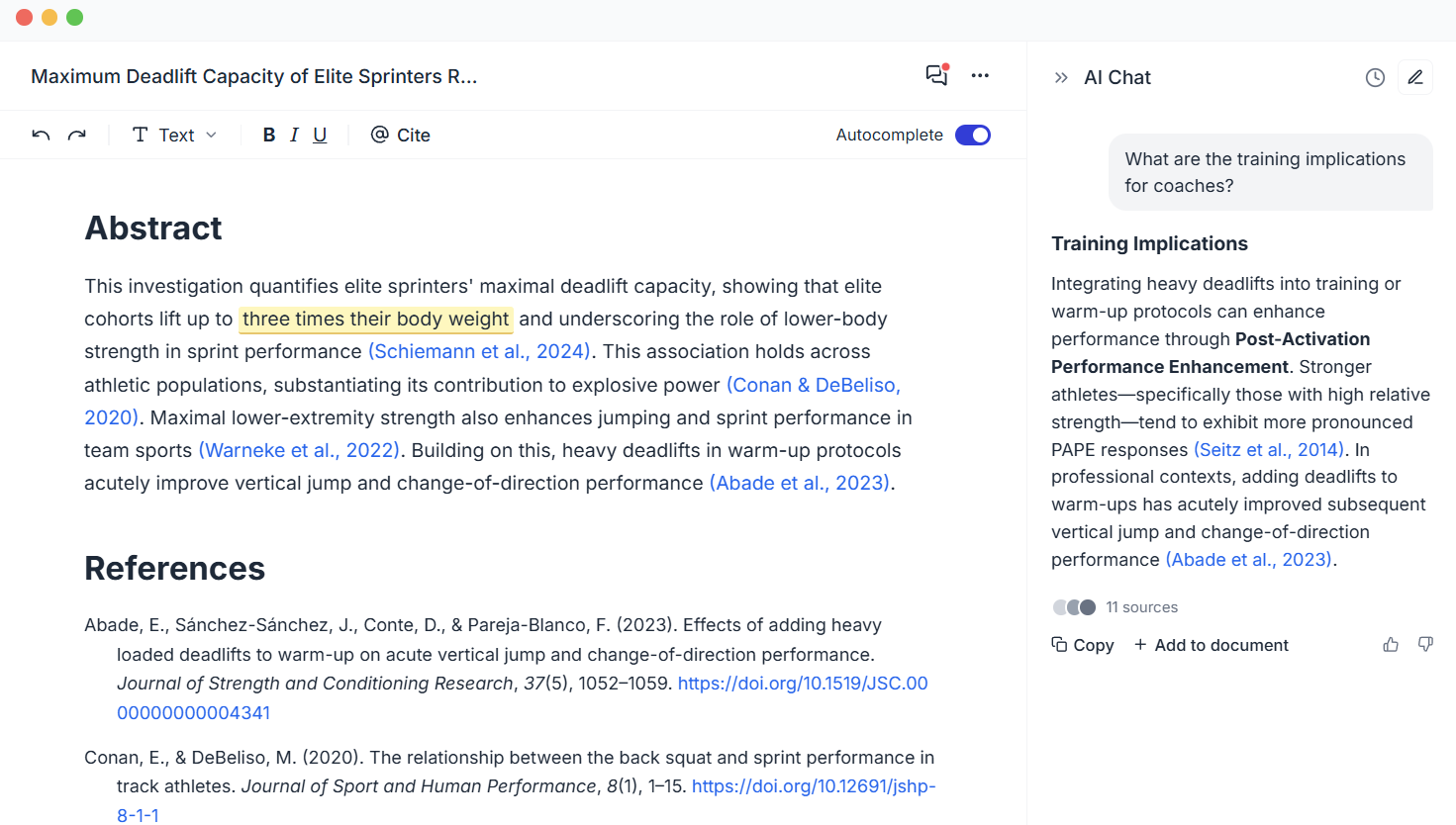
Jenni AI is an AI-powered writing and research workspace designed specifically for academic and scientific content — essays, research papers, theses, dissertations, and literature reviews. The core interaction model is deliberately incremental: rather than generating a full essay in one shot, Jenni suggests continuations sentence by sentence and paragraph by paragraph, and the writer accepts, edits, or ignores each suggestion. That keeps the author in control of the argument, which matters both for academic integrity and for producing work that actually reflects the writer’s thinking.
Where Jenni differentiates itself from general AI writing tools is its research-aware workflow: you can upload your own PDF sources, and Jenni drafts and cites directly from that material rather than inventing citations from nowhere. In-text citations are generated in more than 10,000 styles (APA, MLA, Chicago, Harvard, and thousands more), with references and bibliographies built automatically as you write.
Why Jenni AI Stands Out in 2026
Research-grounded drafting: Jenni can chat with and draft from your own uploaded PDF sources, keeping generated content anchored to literature you’ve actually chosen rather than producing generic, unsourced text.
Best-in-class citation coverage: with over 10,000 supported citation styles and automatic in-text citation generation, Jenni handles a genuine pain point that general AI tools ignore entirely.
Sentence-by-sentence control: the incremental autocomplete model keeps the writer actively steering the argument, rather than accepting a black-box essay — a meaningfully different (and more defensible) way to use AI for academic work.
Genuine longevity and scale: founded in 2018, Jenni has real staying power in a fast-churning AI tools market, with more than 5 million academics and 15 million papers written on the platform as of 2026.
Multilingual academic writing: Jenni supports writing in 30+ languages, which matters for international students producing institution-appropriate English work, or researchers writing in their native academic language.
Affordable relative to the category: at $12/month on annual billing, Jenni undercuts most dedicated academic writing tools while bundling citation management that would otherwise require a separate subscription.
Key Features and Technology
Jenni’s feature set centers on three pillars: drafting assistance, citation and reference management, and document workflow.
AI Autocomplete and AI Chat
The core writing experience offers in-context autocomplete suggestions as you type, plus a chat interface for asking questions, brainstorming structure, or requesting rewrites of specific passages. Both features scale by plan — from a modest daily allowance on Free to unlimited use on Pro.
Citation Engine and Library
Jenni generates in-text citations and full bibliographies across 10,000+ styles, and every plan supports unlimited citations. Your personal reference library can be exported in .ris, .bib, and .csv formats, making it compatible with tools like Zotero and Mendeley for researchers who want to maintain a citation library outside Jenni too.
PDF Upload and Research Integration
Free accounts can upload up to 10 PDFs (25MB, 150 pages max); Plus and Pro remove the upload count limit and raise size and page thresholds to 100MB and up to 1,000 pages on Pro — a meaningful difference for anyone working with long dissertations or dense technical papers.
AI Edits and Reviews
AI Edits let you rephrase, adjust tone, or restructure existing text, while Reviews scan a document for issues (structural, clarity, citation-related) and suggest fixes. Free gives you a handful of each per period; Plus adds 500 edits and 10 reviews monthly; Pro removes the caps entirely.
Export and Extensions
Free-tier exports are limited to body content only; Plus and Pro unlock full document export (including citations and formatting). A browser extension lets you use Jenni’s research and citation tools inside Google Docs and other web platforms without switching tabs.

Pricing, Plans, and Package Structure
Jenni AI offers a genuinely usable Free plan alongside two paid tiers, Plus and Pro, both billed monthly or annually — annual billing saves roughly 60% off the monthly rate. No credit card is required to start on Free, and cancellation is self-service at any time. Team and institutional plans are available with custom pricing for universities or research groups deploying Jenni across multiple users. Pricing below reflects Jenni’s published rates as of mid-2026 (shown at the annual-billing rate) — always confirm current numbers and monthly-vs-annual pricing on Jenni’s site, since SaaS pricing shifts often.
| Plan | Price (annual billing) | Autocompletes / Chat / Edits | PDF Uploads |
|---|---|---|---|
| Free | $0 | 10/day · 5 chat · 3 edits | 10 uploads, 25MB / 150 pages |
| Plus | $12/mo | 5,000/mo · 500 chat/mo · 500 edits/mo | Unlimited, 100MB / 500 pages |
| Pro | $29/mo | Unlimited | Unlimited, 100MB / 1,000 pages |
| Teams & Institutional | Custom | Unlimited | Unlimited, multi-seat |
How Jenni AI Compares to Alternatives
| Tool | Best For | Citation Support | Starting Price |
|---|---|---|---|
| Jenni AI | Full academic paper drafting with PDF-grounded research | 10,000+ styles, native | Free; $12/mo Plus (annual) |
| Paperpal | Academic-specific language and grammar polish | Style-focused, less citation depth | Free; ~$9.99/mo premium |
| Grammarly | General grammar, tone, and clarity editing | None (not citation-focused) | Free; ~$29.95/mo premium |
| ChatGPT / Claude | General-purpose writing, brainstorming, non-academic content | No native citation engine | Free tier; paid plans vary |
vs. Paperpal: Paperpal focuses more narrowly on academic language quality — grammar, tone, and journal-style polish — and is often preferred for final-draft language cleanup. Jenni’s strength is broader: research-grounded drafting from your own PDF sources plus deep citation management, making it more of a full writing workspace than a polish-stage tool.
vs. Grammarly: Grammarly is a general-purpose grammar and clarity editor with no academic citation features at all. The two tools are genuinely complementary rather than competitive — many students use Jenni for drafting and citations, then run the final text through Grammarly for a last polish pass.
vs. ChatGPT and Claude: General AI assistants produce strong writing quality for non-academic content and are more flexible across tasks, but they lack Jenni’s built-in citation engine, PDF-grounded research workflow, and academic-format templates. Many serious students end up paying for both — Jenni specifically for thesis and paper work, and a general assistant for everything else.
Pros and Cons
What Students and Researchers Love
Citation handling that actually saves hours: generating properly formatted in-text citations and bibliographies across 10,000+ styles is consistently the most-cited reason users stick with Jenni over general AI tools.
Real research-source grounding: the ability to upload and draft from your own PDF sources keeps generated content anchored to literature you’ve vetted, rather than producing plausible-sounding but unsourced claims.
Beats writer’s block without taking over: the sentence-by-sentence autocomplete model keeps momentum going while leaving the writer in control of the actual argument.
Affordable for the category: at $12/month annually, Jenni is meaningfully cheaper than most dedicated academic writing tools, while bundling citation management most competitors charge extra for.
Strong multilingual support: writing support across 30+ languages genuinely helps non-native English writers produce institution-appropriate academic work.
Limitations Worth Knowing
Citations still require manual verification: Jenni can suggest sources and generate citation formatting, but it cannot guarantee every suggested source actually exists or genuinely supports the claim — every reference needs to be independently checked before submission.
Can silently modify your text: multiple independent reviews report that AI edits and rewrites can alter wording or restructure paragraphs without always making the change obvious, which is a real concern for writers who want tight control over their original phrasing.
Output quality can feel generic: some users report that generated content leans vague or formulaic on complex or highly specific prompts, requiring meaningful editing before it reads as genuinely authoritative.
Academic integrity risk is real and institution-specific: the tool itself has no way of knowing your school’s or journal’s AI-assistance policy — using it irresponsibly is a genuine risk to a student’s academic standing, not just a quality concern.
Narrow use case outside academia: Jenni is built specifically for academic and research writing — for blog posts, marketing copy, or general business content, a general-purpose writing tool will serve better.
Who Should Use Jenni AI
Undergraduate and graduate students writing regular essays and research papers will get real value from Plus — the citation engine alone can save hours per paper across a semester.
PhD candidates and thesis writers managing long, multi-chapter documents with heavy source integration should consider Pro, where unlimited PDF uploads and higher page limits genuinely matter at dissertation scale.
International students writing in English can pair Jenni’s academic-tone support with a grammar tool like Grammarly for institution-appropriate polish on top of AI-assisted drafting.
Universities and research institutions deploying AI writing support across departments or graduate programs should engage the Teams & Institutional tier for centralized access and dedicated support.
Occasional writers who produce one paper a year, or anyone whose institution prohibits AI writing assistance outright, are better served by the Free plan for light editing help — or by skipping the tool entirely and relying on a citation manager alone.
Getting Started: Step by Step
- Sign up for the Free plan at Jenni AI — no credit card required to start.
- Upload your source PDFs for the paper you’re working on, so Jenni can draft and cite from material you’ve already chosen.
- Start a new document and use AI Autocomplete to move past writer’s block, accepting, editing, or rejecting each suggestion as you go.
- Generate in-text citations in your required style (APA, MLA, Chicago, or your institution’s format) as you reference each source.
- Run a Review scan before submission to catch structural or clarity issues, and manually verify every citation Jenni has suggested.
- Upgrade to Plus or Pro once you outgrow the Free plan’s daily limits, especially before a heavy writing period like finals or a thesis deadline.
Tips for Getting Maximum Value
Treat Jenni as a drafting and citation aid you actively direct, not a ghostwriter — the sentence-by-sentence model works best when you’re reviewing and steering each suggestion rather than accepting large blocks of generated text uncritically. Upload your source PDFs before you start drafting rather than after, since research-grounded suggestions are consistently more relevant and closer to the actual literature than generating first and citing later. Before submitting any paper, independently verify every citation Jenni has generated — check that the source exists and genuinely supports the claim it’s attached to, since AI-suggested references can occasionally be inaccurate or misattributed. If you’re a student on a tight budget, start on Free to test the citation and autocomplete workflow, then switch to Plus on annual billing only once you have a real paper due — the $12/month annual rate is far more defensible than paying monthly for a tool you might only need seasonally.
Future Outlook and Final Assessment
AI-assisted academic writing is one of the most contested corners of the education technology market, and Jenni’s longevity since 2018 — now serving over 5 million academics — suggests it has found a durable niche by staying narrowly focused on citation-heavy, research-grounded writing rather than chasing general-purpose chatbot features. That specialization is Jenni’s real competitive moat against ChatGPT and Claude, neither of which offers native citation management at anywhere near the same depth. The honest caveats remain real, though: academic integrity policy varies by institution and isn’t something the tool can navigate for you, citation accuracy still requires human verification, and output quality on complex or unusual prompts can feel generic without meaningful editing.
Conclusion
Jenni AI won’t be the right fit for general business, marketing, or creative writing, and it’s not a substitute for actually doing the reading and thinking your research requires. But for students, graduate researchers, and academics whose writing life centers on cited, source-grounded papers, its combination of research-aware drafting and deep citation support solves a genuine, expensive-in-time problem that general AI tools simply don’t address. Start on the free plan, upload your sources before you draft, verify every citation before you submit, and check your institution’s AI policy before you rely on it for graded work. That’s exactly the kind of careful, well-informed tool decision AI Solutes exists to help you make — because we want to make everything easy.
Ready to cut hours off your next research paper?
Explore more honest reviews, tutorials and tool comparisons to find the right tech for the way you work and live — at AI Solutes, where we make everything easy.
👉 Open Free Account: https://ai-solutes.com/jenni.ai
👉 Our YouTube Channel: youtube.com/@ai-solutes
👉 Our Facebook Fanpage: Facebook
👉 Our X (Twitter): @AISolutes
- Do Proxy-Cheap’s Budget-Friendly Subscriptions Truly Live Up to the Hype Regarding Total Online Anonymity?
- SME Insurance Vietnam 2025: Fast Enrollment and Digital Certificates
- SlidesGO
- Transform Your Cat’s Health with Two Crazy Cat Ladies: Nutrition, Natural Supplements, and National Cat Lady Day 2026
- Can Pipedrive Successfully Centralize Your Customer Communication Across Email, Web Forms, and Live Chat? Testing the CRM















