


Ask any working photographer where their time actually goes, and the answer is rarely “taking pictures.” It’s the hours afterward — culling hundreds of near-identical frames, smoothing skin without turning it plastic, whitening teeth, killing glasses glare, matching skin tones neck-to-face, and doing it all again for every image in the gallery. Evoto was built to hand those hours back. It’s an AI-powered photo editing and retouching suite that turns complex Photoshop tasks into single sliders and applies them across an entire batch, and in 2026 it has become one of the most talked-about tools in professional photography — used by over 1 million photographers across 200+ countries, with more than a billion images run through its engine and a spot in Capterra’s 2026 “Best Ease of Use” rankings for both AI and photo editing.
For portrait, wedding, headshot, event, real estate, and studio photographers — and for any content creator or small business that lives on polished images — the promise is simple: professional retouching in seconds, not hours, with the AI handling the pixels so you can focus on the shoot. This 2026 review walks through everything that matters — what Evoto actually does, its unusual credit-based pricing, how it stacks up against Imagen, Aftershoot, and Retouch4me, the honest limitations (including a trust episode worth knowing about), and exactly who should adopt it.
Evoto Review 2026: The AI Photo Editor That Turns Hours of Retouching Into Seconds
Overview and Background
Evoto is a standalone AI photo editing and retouching application developed by California-based Truesight Technology Inc. Rather than being a single-purpose gadget, it aims to cover the whole back end of a photographer’s workflow — tethered shooting, AI culling, RAW editing, color grading, portrait retouching, background work, and batch delivery — inside one interface. The core insight is elegant: many of the most tedious, time-devouring tasks in Photoshop (frequency-separation skin work, removing stray hairs, cleaning up backgrounds) follow predictable rules that AI can execute in one click, freeing the photographer to make creative decisions rather than pixel-level ones.
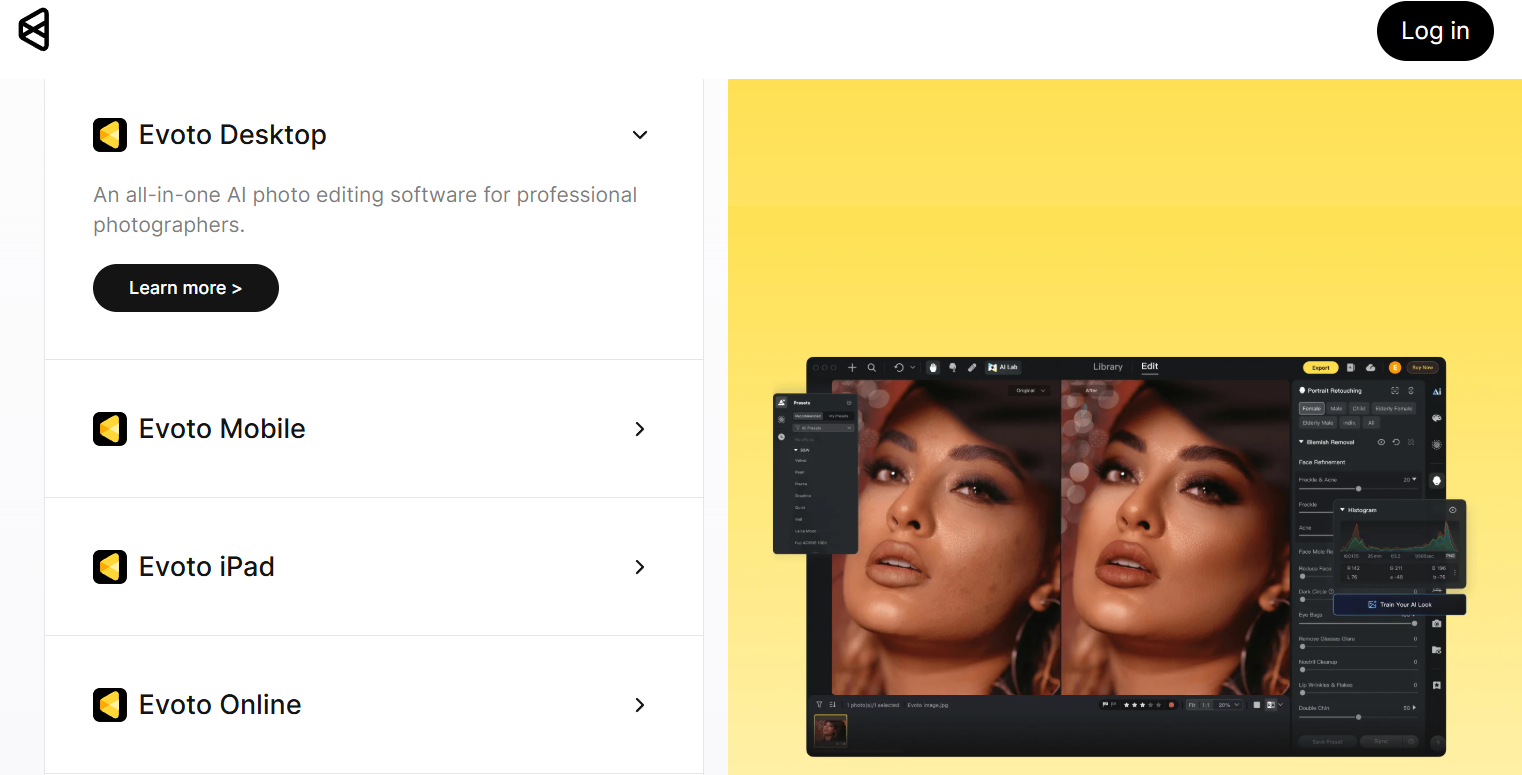
The traction is real. Evoto reports more than 1 million photographers across 200+ countries and over a billion images uploaded to the platform, and independent reviewers at outlets like Digital Camera World and Fstoppers have praised it as class-leading for AI retouching. It runs as a desktop app on macOS and Windows (one license activates two devices), with a companion iPad app, an online version, and a mobile workflow called Evoto Instant on iOS and Android. It even supports Vietnamese alongside English, German, French, Spanish, Japanese, Korean and more — a genuinely global tool.
Evoto splits into two main products. Evoto Photo Editor is the full-control application for photographers who want to retouch, color, and refine with precision. Evoto Instant is an automated tethered-to-delivery workflow for high-volume shooters — weddings, events, studios — who need edited images delivered on the spot with a consistent style.

Why Evoto Stands Out in 2026
Photoshop-grade retouching from a single slider: This is the headline. Techniques that used to demand real skill and time — frequency separation for flawless-but-natural skin, dodge and burn, sculpting a face — are reduced to intuitive sliders. Reviewers repeatedly call the frequency-separation slider a “game-changer,” and the results hold up: skin stays textured and real rather than airbrushed to plastic.
True batch power with per-subject intelligence: Build a detailed retouching profile on one image, then apply it to hundreds or thousands in a batch. Crucially, Evoto’s AI adapts the settings per subject — it won’t apply a child’s skin treatment to an elderly guest — so a whole event can be edited consistently without looking mass-produced.
One-click fixes for the tasks everyone dreads: Glasses glare, stray fly-away hairs, shiny foreheads, wrinkled clothing, lint, tattoos, dark circles, marionette lines, grey hairs — the exact annoyances that eat hours in manual editing are handled in a click or a slider. Photographers consistently cite these as the features that let them stop outsourcing retouching altogether.
A complete workflow, not just a retoucher: Evoto also culls (auto-flagging blinks, blur, and duplicates and surfacing the best frames), edits RAW, grades color, and can match a whole set to a reference image’s look. For many photographers it can genuinely replace Lightroom or Capture One for the bulk of a job.
A pay-only-for-what-you-export model: Because editing is free and you pay per exported image, there’s no wasted spend on culled frames or experiments. For photographers who retouch a curated selection rather than every shot, this is far more economical than a flat subscription.
Genuinely low learning curve: Its slider-and-preset interface is approachable enough that most photographers are productive within their first session — a stark contrast to the training a style-learning tool or Photoshop mastery demands. That ease is precisely why Capterra ranked it top for usability in 2026.
A privacy stance it puts in writing: Evoto states plainly that it does not use your images to train its AI models, complies with GDPR and CCPA, and deletes images from its servers immediately after processing (only storing them with your explicit consent). For professionals handling clients’ likenesses, that written commitment matters.
Key Features and Technology
Evoto’s toolkit is deep. Here’s how the most important capabilities break down.
AI Portrait Retouching
The core of the app. Evoto detects faces, skin, hair, and clothing, then offers slider-driven control over skin smoothing and blemish removal (with texture preserved), frequency separation, face sculpting, AI face slimming, body reshaping, and realistic digital makeup across all skin types. It even lets you subtly adjust expressions. This is the engine that turns hours of high-end beauty work into minutes.
One-Click Fixes: Glare, Hair, Teeth, and Eyes
A collection of targeted tools tackles the specific headaches of portraiture: Remove Glasses Glare, AI Stray Hairs Remover, AI Teeth Fixer and whitening, eye brightening and catchlight, hair color changer, and removal of dark circles, marionette lines, frown lines, and grey hairs. On the wardrobe side, AI removes clothing wrinkles and lint — a huge time-saver for fashion and formal shoots.
Backgrounds, Color Grading, and AI Color Matching
Beyond portraits, Evoto handles background removal and replacement, full color grading, and a standout AI Color Matching tool: upload a reference image and Evoto matches your set to its look. Combined with RAW support, it works as a color and tone engine for the whole shoot, not just the faces.
AI Culling and RAW Workflow
Before editing even begins, Evoto’s AI culling filters out closed eyes, blurry frames, and duplicates and highlights the strongest shots — letting you retouch only the keepers. It imports RAW or JPEG directly and preserves RAW quality on export, and integrates with Adobe Lightroom for photographers who want to keep part of their existing pipeline.
Batch Processing and 800+ Presets
Apply a complex edit once and roll it across an entire gallery, with the AI tailoring adjustments per subject. Evoto ships with 800+ built-in presets for weddings, e-commerce, and more, and lets you create, save, and import your own to keep a consistent signature look across every project.
Evoto Instant and Tethered Shooting
Tethered shooting (wired support for Canon, Nikon, Sony, Fujifilm, plus wireless on select models) is free to use, and Evoto Instant automates the path from a tethered capture to an edited, on-the-spot delivery with a customizable style — ideal for events, studios, and any shoot where clients want images in hand before they leave.
Cross-Platform and Ethical AI
Credits are shared across Desktop, iPad, and mobile, one license covers two devices, and subscriptions add cloud sync to resume editing anywhere. Exports support JPEG, PNG, and TIFF while preserving RAW quality. And as noted, Evoto commits in writing to never training its AI on your photos, with GDPR/CCPA compliance and immediate deletion after processing.
Pricing, Plans, and Package Structure
Evoto’s pricing is credit-based rather than a flat monthly fee, and every AI feature is available to everyone — you only pay to export. There are two routes: buy credits Pay-As-You-Go (valid two years), or take an Annual Subscription tier that refills credits yearly, offers a lower per-credit rate, and lets unused credits roll over (up to 5x your plan) as long as you stay subscribed. Approximate US figures are below; because Evoto adjusts pricing periodically and rates differ by region, treat these as a guide and confirm the live numbers before buying.
| Plan | Approx. Price (US) | Credits | Best For |
|---|---|---|---|
| Pay-As-You-Go | from ~$0.14 / credit | Buy as needed (2-yr expiry) | Occasional or seasonal editing |
| Starter (Annual) | ~$89 / year | 800 credits | Solo photographers, lighter volume |
| Basic (Annual) | ~$149 / year | 1,600 credits | Steady portrait/headshot work |
| Basic Plus (Annual) | ~$269 / year | 3,600 credits | Busy studios, wedding shooters |
| Standard (Annual) | ~$579 / year | 9,000 credits | High-volume teams |
| Enterprise | Custom quote | Volume-based | Large studios & organizations |
There are also Top-Up packs (cheaper than PAYG, tied to your subscription) and a separate mobile plan structure (roughly 60 credits monthly or 800 credits yearly). The essential mental model: 1 credit ≈ 1 finished image, editing is free, and the more you commit up front, the lower your effective cost per image.
How Evoto Compares to Alternatives
The AI photo workflow space has three other big names, each solving a slightly different problem: Imagen (learns your style), Aftershoot (offline culling + editing), and Retouch4me (Photoshop plugins). Here’s how they compare against Evoto and the manual Lightroom/Photoshop route.
| Factor | Evoto | Imagen AI | Aftershoot | Retouch4me |
|---|---|---|---|---|
| Core approach | Slider-based AI retouching + full workflow | Learns your Lightroom style | AI culling + style editing | Single-task Photoshop plugins |
| Pricing model | Credits (pay per export) | Per-image / subscription | Flat monthly (~$9.99–$19.99+) | Buy plugins outright |
| Best at | Detailed retouching & polish | Batch color/style consistency | Fast culling, offline editing | Bulk single-task retouching |
| Runs offline? | Cloud (needs internet) | Cloud processing | Yes (local) | Yes (in Photoshop) |
| Setup / learning | Minutes, no training data | Needs ~2,000 past edits | Learns from your edits | Per-plugin, in Photoshop |
vs. Imagen AI: The two aren’t really rivals so much as different jobs. Imagen clones your editing style from thousands of past Lightroom edits to color-grade whole galleries automatically — brilliant for batch consistency. Evoto is for surgical retouching: face sculpting, glare removal, background swaps. Many pros run both, Imagen for base edits and Evoto for the polish.
vs. Aftershoot: Aftershoot’s edge is fully offline processing and flat monthly pricing that’s predictable at high volume, with strong AI culling. Evoto counters with deeper, more granular retouching tools and a low-commitment credit model — better if quality of retouch matters more than editing without internet.
vs. Retouch4me & Photoshop: Retouch4me’s buy-once plugins can be more cost-effective for retouching massive volumes inside Photoshop, but the workflow is more manual. Evoto wins on all-in-one convenience, preview quality, and speed — though without layers, heavy compositing still belongs in Photoshop. (Competitor pricing and features change often; verify current details on each vendor’s site.)
Pros and Cons
What Photographers Love
Massive time savings: hours of manual retouching collapse into seconds, letting shooters take on more clients and stop outsourcing edits.
Natural, high-quality results: skin keeps its texture, and reviewers rate the retouching output at or above rival tools.
Effortless to learn: sliders and presets make it usable on day one, earning Capterra’s 2026 top ease-of-use ranking.
Fair, flexible pricing: free editing and pay-per-export mean you never spend on culled frames, and credits roll over on subscriptions.
Clear privacy commitment: no training on your photos, GDPR/CCPA compliance, and images deleted after processing.
Limitations Worth Knowing
Costs can climb at high volume: paying per exported image adds up fast if you deliver entire galleries — flat-rate tools may be cheaper past a certain scale.
No layers: for complex compositing you’ll likely still need Photoshop alongside Evoto.
Cloud dependency: most AI features require an internet connection, unlike fully offline alternatives.
A past trust episode: in early 2026 Evoto piloted an AI Headshot Generator that drew backlash; the company apologized, pulled the feature, and reaffirmed it does not train on user data. Worth knowing, even though it’s been addressed.
No public API: teams wanting deep custom integrations won’t find one, and some may want more advanced masking than the current toolset offers.
Who Should Use Evoto
Portrait, headshot, and boudoir photographers: if your bottleneck is skin, eyes, teeth, and blemishes, Evoto is arguably the best tool on the market for exactly that. Start on a Basic annual tier and let the retouching sliders replace hours of manual work.
Wedding, event, and studio shooters: batch processing plus Evoto Instant’s tethered-to-delivery flow make on-the-spot, consistent galleries realistic. A Basic Plus or Standard tier suits the volume; weigh credit use against flat-rate rivals if you export everything.
Real estate, product, and e-commerce creators: background cleanup, color matching, and batch consistency speed up listing and catalog work. Pay-As-You-Go is a low-risk way to start if your volume is seasonal.
Who should look elsewhere: if you need to auto-edit thousands of images in your own color style, Imagen fits better; if offline editing is non-negotiable, consider Aftershoot; and if you do heavy layered compositing, keep Photoshop as your primary tool.

Getting Started: Step by Step
- Download Evoto free for macOS, Windows, or iPad (or grab the mobile app), and complete your profile to unlock welcome credits.
- Import your RAW or JPEG files into a new project, or connect a camera for free tethered shooting.
- Run AI culling to flag blinks, blur, and duplicates so you only work on the strongest frames.
- Apply a preset or build your look using the retouching and color sliders on one representative image.
- Batch-apply across the gallery — Evoto adapts the edits per subject for a consistent but natural result.
- Fine-tune the keepers with targeted fixes (glare, stray hairs, teeth, background) as needed.
- Export your finished images — one credit per unique photo — and deliver, buying a subscription or top-up once you know your volume.
Tips for Getting Maximum Value
Squeeze the most out of Evoto by treating credits as precious: cull aggressively before you retouch so you only ever export images a client will actually receive, and remember that re-exporting the same image is free — so perfect an edit fully rather than exporting drafts. Build and save your own presets early to lock in a signature style and cut per-image time across every future shoot, and lean on batch processing for events instead of editing frame by frame. Choose your plan by realistic export volume rather than optimism — the annual tiers only beat Pay-As-You-Go if you’ll use or roll over the credits — and if you shoot huge weddings, run the math against a flat-rate competitor before committing. Finally, keep Evoto for the retouching it does best and pair it with Lightroom or Photoshop for anything layer-based, so each tool earns its place in your workflow.
Future Outlook and Final Assessment
Evoto is riding a powerful wave: AI is reshaping creative work, and photographers are among the biggest beneficiaries of automation that handles the tedious pixels while leaving the artistry to humans. With over a million users, frequent feature updates, and expansion across desktop, iPad, and mobile, the trajectory is strongly upward. The honest caveats remain — per-export costs at very high volume, the lack of layers, cloud dependency, and the reputational bruise from the early-2026 headshot pilot — but none undercut the core value, and the company’s firm no-training-on-your-data stance addresses the deepest concern head-on.
Conclusion
Evoto has earned its place as one of the standout AI tools in photography by solving a real, expensive problem: the hours lost to manual retouching. It won’t fully replace Photoshop for compositing, and its credit model rewards selective editing over exporting everything — but for portrait polish, batch consistency, and speed, it’s genuinely class-leading, and its written privacy commitments set a good example for AI tools handling personal images. For photographers, studios, and creative businesses who want professional results without the manual grind, Evoto is exactly the kind of tool that makes everything easy. Download it free, run a real shoot through it, and let the time you save make the decision for you.
Ready to Cut Your Editing Time From Hours to Seconds?
Explore more honest reviews, tutorials and tool comparisons to find the right tech for the way you work and live — at AI Solutes, where we make everything easy.
👉 Start for Evoto : Get Started with Evoto
👉 Our YouTube Channel: youtube.com/@ai-solutes
👉 Our Facebook Fanpage: Facebook
👉 Our X (Twitter): @AISolutes
- Sell The Trend Review 2025: Dominate AI Dropshipping with Nexus AI
- Unlock Seamless Collaboration with Notta AI: Advanced Transcription, Summaries, and Multilingual Support for Modern Teams
- Can AI Image Generation Feel Truly Effortless? Finding Your Creative Flow with RunDiffusion
- Does Pitch Revolutionize Presentation Design? Reviewing the Pitch Smart Slide Templates Technology
- Master Ulike IPL Hair Removal Devices for Pain-Free, Salon-Quality Results at Home in 2025















