GitMind has cemented its position in 2026 as one of the most accessible and genuinely AI-powered mind mapping platforms on the market, transforming the way students, educators, project managers, and creative professionals organize ideas — all from a browser, with no installation required. Before diving into the detailed feature breakdown and pricing analysis ahead, it’s worth highlighting what makes GitMind stand out in an increasingly crowded visual thinking space: AI-generated mind maps from text prompts, PDFs, YouTube videos, audio recordings, images, and URLs; a real-time collaboration whiteboard supporting up to 30 simultaneous users; an integrated AI chatbot (Copilot) for contextual brainstorming assistance; flowchart and UML diagram generation from technical documents; a YouTube video summarizer that converts lectures and tutorials into structured maps; AI image generation to enrich visual presentations; and a genuinely functional free tier with no credit card required. Whether you’re a student turning research papers into visual study guides, a project manager mapping complex workflows, a teacher building dynamic lesson plans, a content creator summarizing video research, or a business team collaborating on strategy in real time — this comprehensive 2026 review walks you through every major feature, plan, and real-world consideration of the GitMind platform.
GitMind Review 2026: The AI Mind Mapping Platform That Turns Any Content Into Visual Clarity
Overview and Background
GitMind is an AI-powered mind mapping, flowcharting, and collaborative whiteboard platform designed to help individuals and teams capture, organize, and communicate complex ideas visually — without design skills, technical background, or installed software. Running entirely in the browser and syncing across web, iOS, and Android, GitMind serves a wide audience: students building study guides, project managers mapping workflows, educators designing lesson plans, developers generating system diagrams, and business teams brainstorming strategy together in real time.
What separates GitMind from traditional mind mapping tools is its AI-first content ingestion layer: rather than building maps manually from scratch, users feed GitMind almost any type of content — a text prompt, a PDF, a YouTube video, an audio recording, a website URL, or an image — and the AI generates a structured, visual mind map automatically. The platform then functions as a collaborative workspace where that AI-generated structure can be refined, extended, and shared.
GitMind stores all content securely in the cloud, enabling cross-device access and real-time synchronization — so teams working across different locations see updates instantly, with no version conflicts or email attachment chains.
Why GitMind Stands Out in 2026
- Omni-Source AI Map Generation: GitMind can generate mind maps from text, PDFs, Word files, YouTube videos, audio recordings, images (via OCR), websites, and URLs — covering virtually every content format a researcher, student, or professional encounters daily.
- Real-Time Collaboration for Up to 30 Users: Team members can co-edit maps, flowcharts, and whiteboards simultaneously from any device — with changes syncing instantly and anonymous contribution options for open brainstorming sessions.
- YouTube Video Summarizer: One of GitMind’s most cited unique features — extract structured key points from any YouTube video and convert them into a navigable mind map, saving hours of note-taking during research or study.
- AI Chatbot (Copilot): An integrated AI assistant helps develop ideas, answer questions, and analyze content without leaving the workspace — functioning as a brainstorming partner that works alongside your map in real time.
- Presentation Mode: Transform any mind map directly into a slideshow presentation — useful for educators, consultants, and business professionals who regularly repurpose structured thinking into shareable formats.
- Student Discount Program: Students can access up to 50% off annual plans through Student Beans verification — making GitMind one of the most affordable premium mind mapping tools available for academic use.
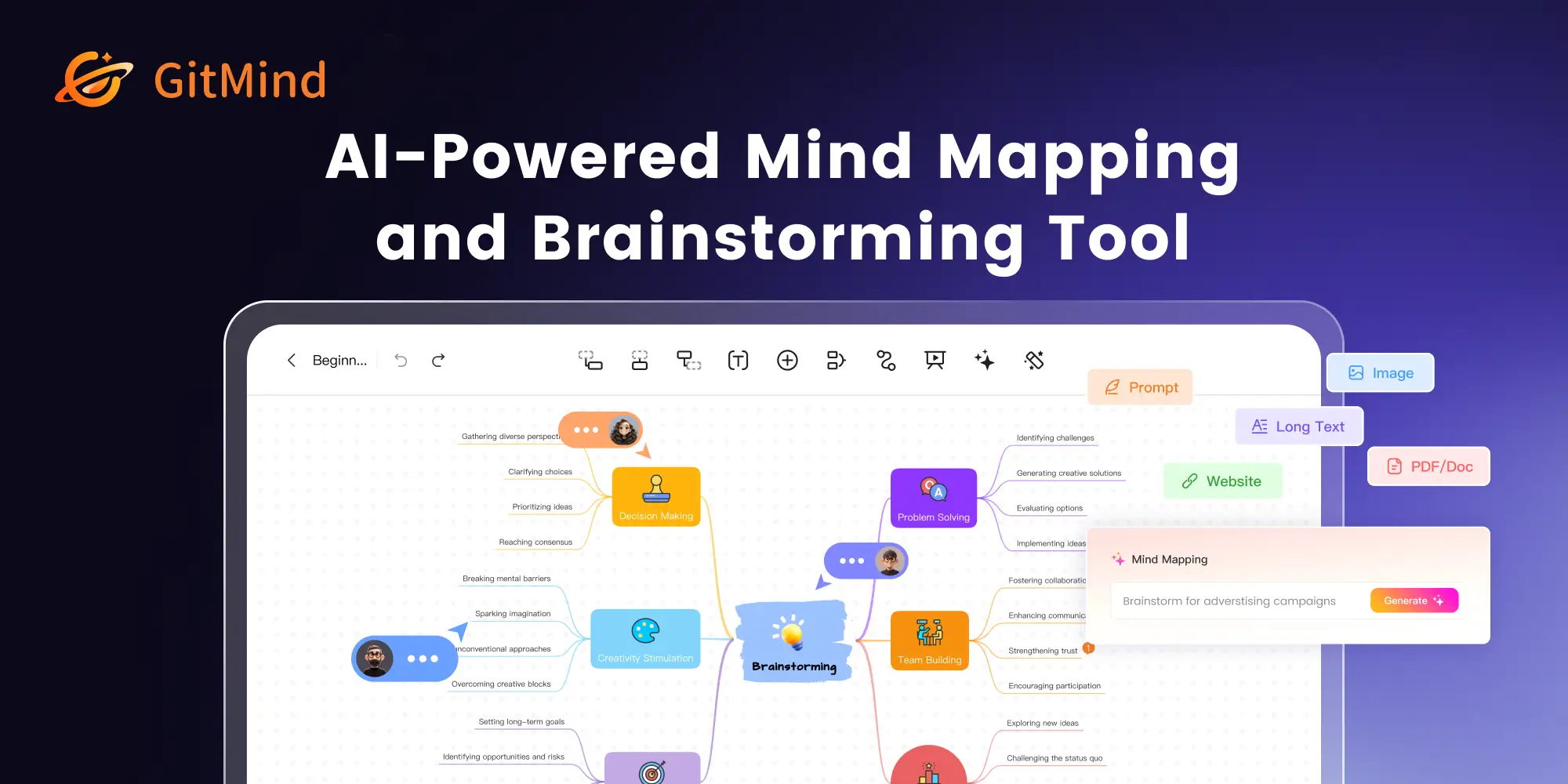
GitMind turns any content — text, PDFs, YouTube videos, audio, or URLs — into structured, collaborative visual mind maps in seconds, with AI assistance that works alongside your thinking rather than replacing it.
Key Features and AI Capabilities
GitMind’s competitive strength in 2026 is the combination of versatile AI input processing, broad diagram type support, and frictionless real-time collaboration — making it a complete visual thinking workspace rather than a single-purpose mind mapping tool.
AI Mind Map Generation from Any Source
The core capability that distinguishes GitMind from manual mind mapping tools is its ability to generate structured maps from virtually any content format:
- Text Prompt to Mind Map: Type a topic, concept, or outline — GitMind’s AI instantly generates a fully structured mind map with branches, sub-topics, and logical groupings. A prompt like “create a business plan for an e-commerce brand” produces a navigable map in seconds.
- PDF and Word File Summarization: Upload a document and GitMind extracts key themes, arguments, and structure into a visual map — compressing hours of reading into an immediately navigable overview.
- YouTube Video Summarizer: Paste a YouTube URL and GitMind generates a mind map of the video’s key points, complete with speaker identification and multi-language support — ideal for students summarizing lectures, researchers reviewing conference presentations, or content creators cataloging video research.
- Audio Recording to Map: Record a meeting, lecture, or brainstorming session — GitMind transcribes the audio and structures the content into a mind map automatically, with real-time transcription and speaker identification.
- Image OCR to Map: Upload a photo of a whiteboard, handwritten notes, or a printed document — GitMind’s OCR extracts the text and converts it into a structured digital map.
- Website and Article Summarizer: Paste any URL and GitMind summarizes the page content into a concise, visual mind map — useful for researchers tracking multiple sources or content teams auditing competitor content.
Diagram Types and Visual Formats
GitMind supports a broad range of visual thinking formats beyond standard mind maps:
- Mind Maps: Classic radial structures for brainstorming, concept mapping, and knowledge organization — with full customization of colors, shapes, branch styles, and themes.
- Flowcharts: AI-generated flowcharts from text descriptions or technical documents — with both “Text to Flowchart” and “Image to Flowchart” AI modes. Engineers and project managers cite this as a significant time-saver for process documentation.
- UML Diagrams: Generate UML class diagrams, sequence diagrams, and system architecture maps from natural language descriptions of technical processes — cited by developers as eliminating hours of manual diagram construction.
- Organizational Charts: Build team hierarchy and reporting structure diagrams automatically from input data — useful for HR teams, managers, and consultants documenting complex organizational structures.
- Swimlane Diagrams: Map cross-functional workflows showing responsibilities across teams — a standard requirement for process improvement and project handoff documentation.
- Whiteboards: Open-ended collaborative canvas for free-form brainstorming, sketching, and annotation — supporting up to 30 simultaneous users with anonymous contribution options for facilitating open ideation sessions.
AI Copilot (Integrated Chatbot)
GitMind’s integrated AI Copilot functions as a contextual brainstorming partner available in the sidebar of any active workspace:
- Idea Development: Ask the AI to expand a branch, suggest related concepts, or identify gaps in a map — without switching to a separate AI tool.
- Document Q&A: Upload a file and ask the Copilot specific questions about its content while simultaneously building a mind map — combining document analysis and visual organization in one workflow.
- Content Generation: Generate text for specific nodes, write summaries, or draft explanations for complex branches — useful for educators building comprehensive lesson materials or consultants preparing deliverable documentation.
- AI Search: The Copilot includes real-time web search capability, allowing users to retrieve current information and incorporate it directly into maps without leaving the platform.
Collaboration and Sharing
- Real-Time Co-Editing: Up to 30 users can edit maps simultaneously across web, iOS, and Android — with changes syncing instantly. Ideal for distributed teams, remote classrooms, and cross-functional planning sessions.
- Link Sharing (No Account Required): Share a view or edit link with anyone — collaborators can access and contribute without creating a GitMind account, removing onboarding friction for occasional participants.
- Anonymous Contribution Mode: Enable anonymous submissions in collaborative sessions — supporting open brainstorming where participants contribute ideas without social filtering.
- AI Planet (Community Knowledge Base): A shared community space where users can publish and browse mind maps created by the GitMind community — providing inspiration, reference templates, and collaborative learning opportunities.
- Presentation Mode: Convert any mind map into a navigable slideshow presentation with one click — useful for meetings, teaching, and client presentations without exporting to a separate tool.
Export Options and Customization
- Export Formats: Export mind maps as PNG, JPG, PDF, SVG, TXT, Markdown, Word, and Excel formats — covering both visual sharing and structured data extraction use cases.
- Template Library: Pre-designed templates for mind maps, flowcharts, project plans, SWOT analyses, meeting agendas, and more — usable as starting points to accelerate any workflow.
- AI Image Generation: Generate contextually relevant images to embed within mind maps and presentations — enriching visual communication without requiring design skills or external image sourcing.
- Customizable Themes: Apply color schemes, node shapes, branch styles, and layout configurations — keeping maps visually consistent with brand or personal preferences.
- Cross-Platform Sync: Cloud-based architecture ensures consistent map display and functionality across desktop and mobile interfaces — work started on a laptop continues seamlessly on a phone.
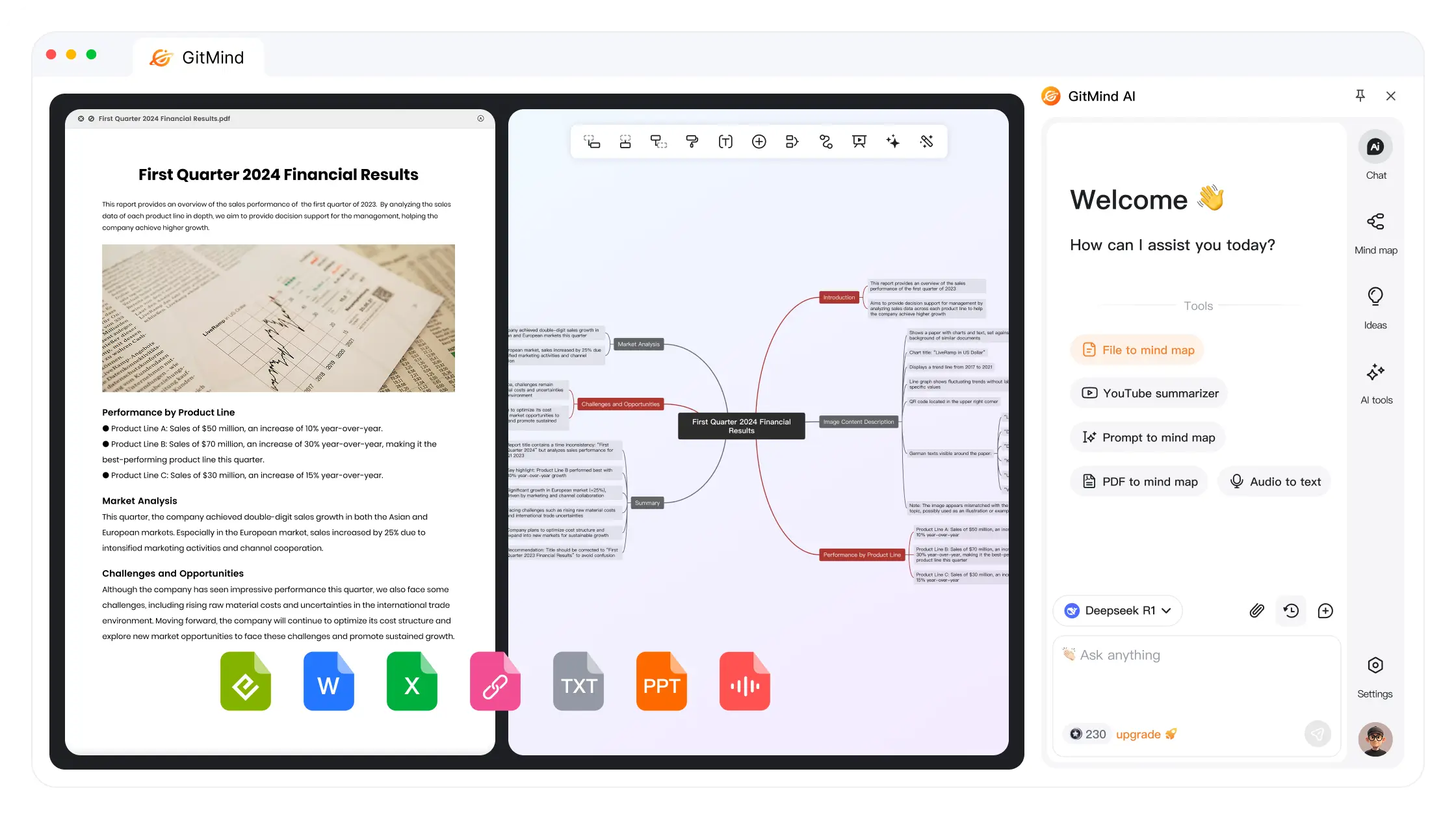
GitMind’s AI-powered diagram generation — from flowcharts to UML diagrams to organizational charts — saves engineers, project managers, and consultants hours of manual documentation work every week.
Pricing, Plans, and Accessibility
GitMind offers one of the most accessible pricing structures in the mind mapping category — with a genuinely functional free tier and paid plans starting at under $5/month on annual billing, making it a competitive option for students, individuals, and small teams with tight budgets.
GitMind Pricing Breakdown for 2026
| Plan | Price | Best For | Key Inclusions |
|---|---|---|---|
| Free | $0 | Casual users, students evaluating the platform | 10 mind map files, 30 images/map, 500MB cloud storage, standard export, basic collaboration, 10 AI chats |
| Basic (Annual) | $4.08/month (billed annually) | Regular individual users, students | Unlimited files, HD export, 500 images/map, 10GB cloud storage, full AI map generation from all source types |
| Pro (Monthly) | $9/month | Active professionals needing full AI features | Advanced AI features, unlimited mind maps, priority support, enhanced collaboration tools, higher AI credit limits |
| Pro (Annual) | ~$5.75/month (billed annually) | Year-round power users | All Pro features at reduced monthly rate; best value for daily users |
| Team Plan | $29/month per user | Organizations and agencies | Advanced permissions, admin controls, team management, priority support, enterprise collaboration features |
| Student Discount | Up to 50% off annual plans | Students (verified via Student Beans) | Same paid plan features at significantly reduced rate; verification required |
Free tier guidance: The free plan’s 10-file limit is the most significant constraint — casual users may not hit it, but anyone using GitMind as a regular workflow tool will exhaust it within weeks. The annual Basic plan at $4.08/month is the clearest upgrade path for individual users who need unlimited files without paying for the full Pro AI feature set.
Pro tip: Never pay monthly if you intend to use GitMind long-term — the annual Pro plan at ~$5.75/month versus $9/month monthly represents meaningful savings over a year. Students should always check the Student Beans discount page before purchasing any plan — up to 50% off on verified accounts is a significant benefit on an already-affordable platform.
Value vs. Alternatives
- vs. MindMeister: MindMeister offers stronger enterprise integration and polish, but its free tier is more restrictive (3 maps) and paid plans cost more. GitMind’s AI content ingestion is deeper — particularly the YouTube and audio-to-map capabilities that MindMeister lacks.
- vs. XMind: XMind delivers more sophisticated desktop-grade map styling and offline capability. GitMind wins on AI features and real-time collaboration accessibility — XMind’s collaboration tools require more setup and are less fluid for distributed teams.
- vs. Whimsical: Whimsical is considered stronger for professional team collaboration and UI/UX design workflows. GitMind is more accessible, more affordable, and more AI-capable for content-to-map conversion — but Whimsical has the edge on product design teams.
- vs. Miro: Miro is the enterprise whiteboard standard — with deeper integrations, better enterprise security, and broader template coverage. GitMind is a fraction of Miro’s cost and adds AI content generation capabilities Miro does not match. For non-enterprise teams, GitMind delivers 80% of the value at 20% of the cost.
Comparisons: GitMind vs. Competitors in 2026
| GitMind 2026 | MindMeister | XMind | Whimsical | Miro | |
|---|---|---|---|---|---|
| AI Map from PDF/Video/Audio | Yes (all formats) | No | Limited | No | No |
| YouTube Video Summarizer | Yes | No | No | No | No |
| AI Copilot / Chatbot | Yes (integrated) | Limited | No | No | Limited |
| Flowchart + UML Diagram AI | Yes | No | Yes (manual) | Yes | Yes (manual) |
| Real-Time Collaboration | Yes (up to 30 users) | Yes | Limited (desktop) | Yes | Yes (enterprise) |
| Presentation Mode | Yes (built-in) | Yes | Yes | No | Yes |
| Free Tier | Yes (10 files) | Yes (3 maps) | Yes (limited) | Yes (limited) | Yes (3 boards) |
| Student Discount | Yes (up to 50%) | No | Limited | No | No |
| Entry Annual Price | $4.08/month | ~$4.99/month | ~$4.99/month | ~$10/month | $8+/month |
| Best For | AI-first visual thinking, students, all-format content | Clean maps, basic teams | Desktop power users | Design and product teams | Enterprise whiteboard |
GitMind’s edge: No competitor at or below the $5/month price point matches GitMind’s combination of multi-source AI map generation (text, PDF, video, audio, image, URL), integrated AI Copilot, YouTube summarizer, UML diagram generation, and real-time collaboration for up to 30 users. MindMeister and XMind are credible alternatives but lack meaningful AI content ingestion. Whimsical and Miro lead on design team use cases and enterprise scale — but at significantly higher costs and without GitMind’s AI content transformation capabilities.
Pros and Cons: What Users Say
What Users Love Most About GitMind
- Zero-Friction Start: No installation, no account required for link-based sharing, and a genuinely functional free tier make GitMind one of the lowest-barrier entry points in the category. Multiple users report going from sign-up to a complete AI-generated mind map in under two minutes on their first session.
- YouTube Video Summarizer: Consistently cited as the feature that converts casual testers into committed users — the ability to paste a YouTube URL and receive a structured mind map of the video’s content is described as “genuinely magical” by students and researchers who consume large volumes of video content.
- AI Map Quality: Users praise the AI’s ability to generate logically structured, visually clean maps from complex input — with the consensus that AI suggestions provide a strong first draft that reduces blank-page paralysis, even if refinement is always needed.
- Collaboration Smoothness: Remote teams and classroom groups specifically highlight real-time collaboration as a strength — changes sync quickly, the up-to-30-user limit covers most team sizes, and the no-account-required link sharing removes onboarding friction for external stakeholders.
- Price-to-Value Ratio: At $4.08/month on the annual Basic plan and up to 50% off for students, GitMind is cited as delivering genuinely useful AI features at a price point accessible to users who cannot justify enterprise tool spend.
- Presentation Mode: Educators and consultants consistently cite the ability to convert a mind map into a slideshow in one click as a meaningful time-saver — eliminating the need to rebuild structured content in a separate presentation tool.
Limitations and Caveats Worth Knowing
- Free Tier File Cap: The 10-file limit on the free plan is the most frequently cited friction point — it is enough to evaluate the platform but too restrictive for regular use. Users who find GitMind valuable will need to upgrade within a few weeks of regular use.
- AI Suggestion Quality on Specialist Content: Independent reviewers note that AI-generated summaries can be generic or miss specialist context on highly technical, academic, or domain-specific content. The output is best treated as a first draft that requires user refinement rather than a finished deliverable.
- Sync Reliability: A minority of users report occasional bugs with saving or syncing across devices — particularly when working on large, complex maps with many nodes. For mission-critical documents, manual export as a backup is advisable.
- Limited Third-Party Integrations: GitMind’s integration ecosystem with external tools (project management platforms, CRMs, note-taking apps) is narrower than enterprise alternatives like Miro. Teams that need GitMind to connect deeply with existing toolchains may find the options restrictive.
- AI Credit Limits on Free Tier: The 10 AI chat credits on the free plan deplete quickly for users who rely on the Copilot feature — a meaningful limitation for students who are the platform’s most natural free-tier audience.
- Not the Leader on Raw Feature Depth: Industry roundups consistently rank GitMind sixth or below among all mind mapping tools for overall feature depth and collaboration sophistication. It earns its position through accessibility and AI content ingestion — not by out-featuring Whimsical or Miro on advanced workflow support.

From student study sessions to enterprise strategy workshops, GitMind’s real-time collaboration features support up to 30 simultaneous users — with anonymous contribution mode for open, uninhibited brainstorming.
Common Use Cases and Who Should Use GitMind
Best Use Cases by User Profile
- Students and Academic Researchers: Convert research papers, textbooks, and YouTube lectures into structured mind maps for revision, literature reviews, and exam preparation. The YouTube summarizer and audio transcription features are particularly transformative for students who consume large volumes of video and lecture content.
- Teachers and Educators: Design visual lesson plans, concept maps, and collaborative class activities using GitMind’s whiteboard and real-time collaboration features. The Presentation Mode turns lesson structures directly into classroom slides without extra formatting work.
- Project Managers: Map project scope, dependencies, timelines, and team responsibilities visually — using AI flowchart generation from project notes to accelerate documentation that used to require manual diagram construction.
- Software Developers and Engineers: Generate UML diagrams and system architecture maps from natural language descriptions of technical processes — cited consistently as eliminating hours of manual diagram work per project.
- Content Creators and Researchers: Use the website URL summarizer and YouTube video summarizer to build structured research maps from multiple sources rapidly — replacing fragmented browser tab research with organized, visual knowledge management.
- Business Teams and Consultants: Run collaborative strategy sessions, SWOT analyses, and stakeholder workshops using the whiteboard and anonymous contribution features — with structured outputs ready to export or present immediately after the session.
- Legal and Healthcare Professionals: Map case strategies, patient care pathways, and regulatory frameworks visually — using GitMind’s AI generation from uploaded documents to convert dense professional materials into navigable reference maps.
Step-by-Step: Getting Started with GitMind
- Access the Free Tier: Visit gitmind.com — no account required to view shared maps, and registration takes under a minute. The free account activates 10 file slots and 10 AI chat credits immediately.
- Create Your First AI Map: Click “New Map” and select the AI generation option. Type a topic or paste a text prompt — GitMind generates a fully structured map in seconds. Explore the branch editing and customization options to understand the workspace.
- Test the YouTube Summarizer: Paste a YouTube video URL into the AI input — this is the feature most likely to convert you from a casual tester to a regular user. Evaluate the map quality on a video in your own domain of work or study.
- Try PDF or Document Upload: Upload a PDF you work with regularly and let GitMind generate a mind map from it — comparing the AI’s structural interpretation against your own reading of the document is the best way to calibrate your expectations.
- Collaborate with a Team: Share a map via link with a colleague or classmate — test the real-time co-editing experience to evaluate collaboration quality before upgrading to a paid plan that increases file and storage limits.
- Choose Your Plan: If you hit the 10-file free limit and find consistent value, upgrade to the annual Basic plan at $4.08/month for unlimited files. Move to Pro only if you need advanced AI credit volumes or priority support. Students should claim the Student Beans discount before any purchase.
Tips for Getting Maximum Value
- Use the AI Summarizer on long documents to get the structural map first, then use the Copilot to drill deeper into specific sections — preserving AI chat credits for targeted inquiry rather than broad summarization.
- For team sessions, enable anonymous contribution mode during the initial brainstorming phase to encourage candid idea sharing — then switch to named editing for the refinement stage.
- When generating maps from YouTube videos, select videos with clear chapter markers or timestamps — GitMind’s summarizer produces more structured output when the source video has explicit organizational signals.
- Export completed maps as both PNG (for visual sharing) and Markdown (for text reuse) — capturing both the visual and structured text value of your work simultaneously.
- Use Presentation Mode for any meeting where you need to walk stakeholders through structured thinking — it eliminates the “build a deck from your notes” step entirely for most internal communication contexts.
Future Outlook and Final Assessment
GitMind’s trajectory in 2026 reflects the broader direction of AI productivity tools: moving from single-format input (text prompt) toward omni-source content processing that meets users wherever their information already lives. The platform’s ability to ingest text, PDFs, audio, video, images, and URLs into a unified visual workspace positions it well for a world where knowledge workers are drowning in content from multiple channels and desperately need tools that help them make sense of it faster.
The core competitive risk is that more established tools — Miro, Whimsical, Notion — are also adding AI capabilities rapidly, narrowing the differentiation gap. GitMind’s advantage lies in the depth and accessibility of its AI content transformation features at its current price point — particularly the YouTube summarizer and audio transcription capabilities that remain genuinely unique at the sub-$10/month tier.
For the platform’s primary audiences — students, educators, and lean project teams — GitMind’s price-to-AI-capability ratio is difficult to match anywhere in the current market.
Conclusion
GitMind delivers one of the most complete, AI-forward, and genuinely accessible visual thinking experiences available in 2026. With AI mind map generation from text, PDFs, YouTube videos, audio recordings, images, and URLs; a real-time collaboration whiteboard supporting up to 30 users; an integrated AI Copilot for contextual brainstorming; AI-powered flowchart and UML diagram generation; a built-in Presentation Mode; AI image generation; and plans starting at $4.08/month annually — with up to 50% off for verified students — GitMind has firmly established itself as the leading AI-first mind mapping platform for students, educators, content creators, and lean teams who need to turn complex information into visual clarity quickly and affordably. The free tier file cap, occasional sync reliability issues, and narrower third-party integration ecosystem are real considerations — but for the vast majority of visual thinkers and collaborative teams in 2026, GitMind belongs in your productivity stack.
Ready to turn any content — videos, documents, audio, or ideas — into structured visual mind maps in seconds?
👉 Open GitMind Account: https://ai-solutes.com/gitmindcom
👉 Our YouTube Channel: http://www.youtube.com/@ai-solutes
👉 Our Facebook Fanpage: https://www.facebook.com/profile.php?id=61576606911341
👉 Our X (Twitter): https://x.com/AISolutes
- ChatPDF
- Will Gorgias Transform Support Tickets into Revenue-Generating Opportunities? Evaluating the Up-Selling Features
- Dominate Local SEO in 2025 with Google Business Profile Rank Tracking and Geo-Grid Keyword Tracking
- Webcam Motion Capture
- Does iPostal1 Streamline Mail Management? Evaluating the iPostal1 Digital Mailbox Suite