Looking for the ideal PDF editor to streamline document workflows, enhance collaboration, and ensure compliance? You’re not alone—professionals, startups, and large enterprises alike are seeking solutions that save time, cut errors, and elevate productivity. This comprehensive guide will unveil how DocHub’s intuitive dashboard, robust annotation tools, smart templates, and secure digital signatures can optimize your document management—whether you’re managing remote teams, automating business processes, or future-proofing operations. Prepare to discover actionable insights, clear visuals, and practical examples to help you decide if DocHub is the transformative tool your workflow needs!
Finding the perfect PDF editor can truly change the game for businesses, freelancers, or really anyone who wrangles with documents every day. Maybe you’re tasked with gathering signatures from a team scattered across time zones, or you’re drowning in paperwork that needs reviewing, collating, and approving—preferably yesterday. Sound familiar? If so, you know efficient document management isn’t just a ‘nice-to-have’ anymore; it’s essential in today’s breakneck work environment. From handling forms smoothly to tracking edits and ensuring airtight digital signatures, the tools you choose can make or break your workflow.
Enter DocHub—a modern, user-focused PDF editor that’s taking document handling to the next level. This article is your in-depth walkthrough of DocHub: we’ll break down its smart dashboard, powerful annotation tools, advanced forms and templates, and ironclad digital signature workflows. You’ll see exactly how DocHub empowers teams big and small to work smarter, comply effortlessly, and bump up productivity. Whether you’re a digital veteran, a startup going paperless, or an enterprise looking to level up document automation, you’re in the right place. Get ready to see how DocHub can fit into your toolkit—and maybe even change how you think about document management forever.
DocHub PDF Editor: Complete Guide to Dashboard, Annotations, Form Templates, and Secure Digital Signatures
These days, managing documents isn’t just about making a few tweaks to a PDF and shooting off an email. It’s about running a whole system—where you can collaborate in real-time, automate form-filling, and keep everything secure and compliant. You don’t just want to edit a document; you want to streamline how your business handles paperwork from start to finish. That’s where DocHub shines.
Let’s dive deep. This guide will peel back the layers of DocHub—from its friendly dashboard to its robust annotation options, from form tools to bulletproof digital signatures—showing you how it gives professionals and teams the upper hand in document management.
Table of Contents
- DocHub PDF Editor Dashboard Screenshot
- DocHub PDF Annotation and Comment Tools
- Form Creation and Templates in DocHub
- Digital Signature Workflow in DocHub
- Comparative Insights: DocHub vs. Other Document Management Systems
- The Future of Document Management with DocHub
- Conclusion
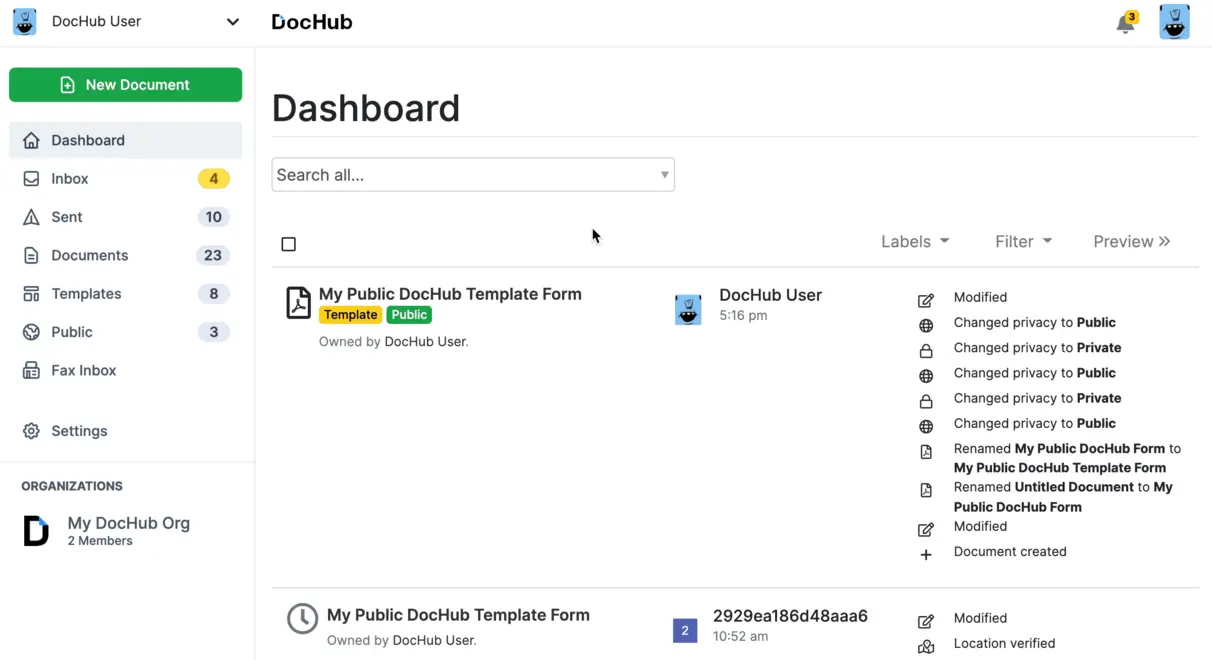
DocHub PDF Editor Dashboard Screenshot
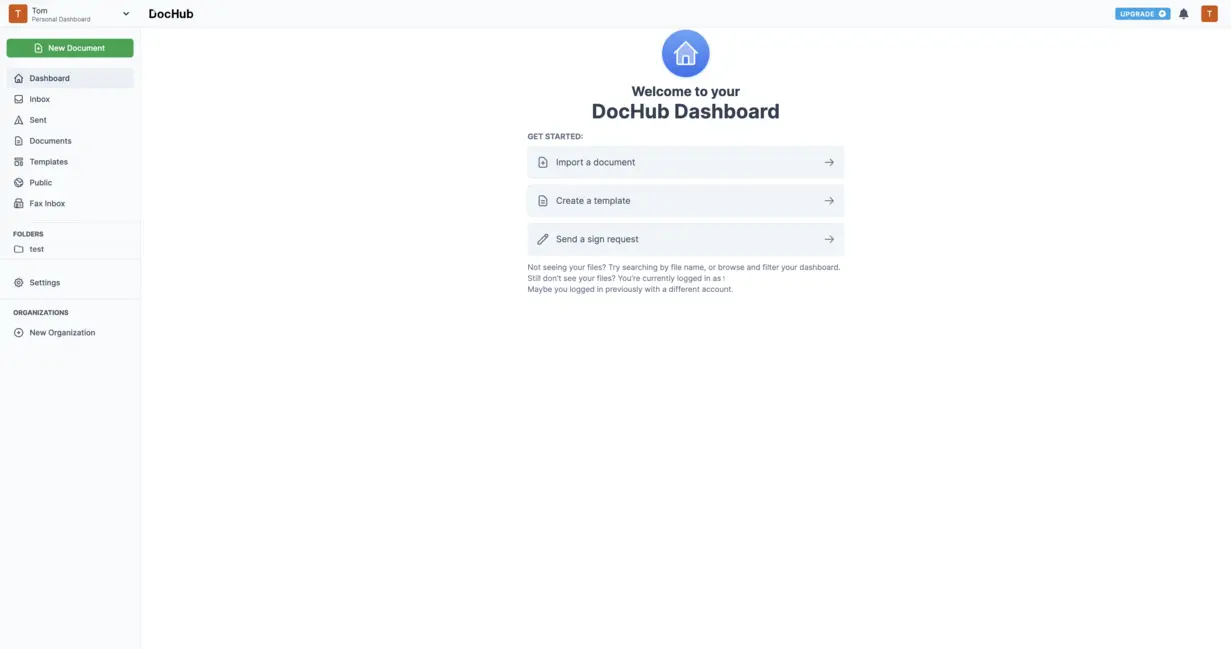
Let’s start at the heart of DocHub: the dashboard. If you’re picturing a cluttered screen with a hundred confusing menus, think again. DocHub’s dashboard is sleek, logical, and incredibly intuitive—even for first-timers. Seriously, you don’t need to be a tech wizard to find your way around.
When you first log in, you’re greeted with clearly labeled sections dedicated to uploading or creating new PDFs, organizing files into tidy folders, and instantly seeing which documents you’ve edited or shared recently. Need to find a signed agreement, a pending form, or a template you use every week? It’s all in one place.
But here’s why the dashboard really matters:
- You can upload, create, or organize PDFs in a snap—no digging through endless menus.
- Templates, completed forms, and signature requests are front and center for quick access.
- You can monitor activity logs and audit trails, which is huge for security and compliance, especially in regulated industries.
What’s the real impact? For solo professionals and busy teams alike, the dashboard erases the chaos of document overload. Think faster onboarding for new hires, way less frustration trying to chase down files, and—let’s be honest—more time sipping your coffee instead of fighting with your software.
Why the Dashboard Matters
Think about the last time you tried to find a document in a maze-like system (or, let’s be real, your desktop’s Downloads folder). It’s a productivity killer. With DocHub’s dashboard, users experience:
- Faster workflow adoption – Even across multiple departments, everyone gets it up and running quickly.
- Fewer mistakes – When tools are visible and processes are standardized, errors drop big time.
- A genuinely better user experience – And let’s face it, when tools are easy to use, people actually use them.
So, with a dashboard that feels more like a launchpad than a labyrinth, DocHub sets the stage for the smart, collaborative features that come next.
DocHub PDF Annotation and Comment Tools

Now for the fun part—annotations and comments. Ever emailed a PDF back and forth with feedback… only to lose track of what changed and when? We’ve all been there. DocHub solves that mess with tools built specifically for real-world collaboration.
Here’s what you get:
- Highlighting, underlining, and striking out text (perfect for contract reviews, editing drafts, or pointing out key points)
- Sticky notes and threaded comments, so team discussions stay with the document—not scattered across a dozen emails
- Freehand drawing for those visual thinkers who want to sketch circles, arrows, or even write a quick signature
- Text boxes and shapes, making it easy to add callouts or direct attention to important sections
- Live collaboration—multiple users can annotate or comment on the same PDF at the same time
Why does this matter? Because in a world of remote work, global teams, and constant deadlines, real-time annotation turns disjointed feedback loops into seamless conversations.
- Teams get instant context and actionable feedback—no waiting hours (or days) for email replies
- No more ‘version soup’– Because everyone can see updates and changes live, you avoid the never-ending cycle of attaching revised PDFs
- Clear visibility—You always know who did what and when
Studies show that collaborative document tools can increase productivity by up to 30%, especially in dispersed teams (McKinsey, 2023). When feedback is instant and transparent, work just… moves faster.
For IT leads and managers, transforming document review from a solo project to a team sport isn’t just “nice.” It’s the difference between hitting deadlines and constantly running behind.
“The best document workflows are those where stakeholders can engage, respond, and resolve in real-time—removing the friction of back-and-forth emails and slow approvals.”
—Industry Expert in Digital Collaboration Tools
Transitioning to Automated Workflows
Once your team gets hooked on instant feedback, it’s a natural leap to take things further—automating the repetitive stuff. That’s where DocHub’s form and template features come in.
Let’s talk scenarios. Imagine a legal team reviewing a client contract. Instead of bouncing documents around with vague notes, lawyers and paralegals jump into the same PDF, mark their sections, add comments in context, and resolve questions on the fly. The result? Legal reviews that take hours, not days.
Form Creation and Templates in DocHub
Here’s where DocHub becomes a workflow powerhouse. If you handle the same type of documents again and again—think HR onboarding, sales contracts, NDAs, or customer intake forms—you’re going to love this.
DocHub’s fillable form builder isn’t just a “nice extra.” It’s the foundation of scalable, mistake-proof document automation. Here’s what you get:
- Drag-and-drop fields for text, checkboxes, dropdowns, signatures, and dates—build a form in minutes, no coding required
- Reusable templates—create once, use forever (imagine sending polished, on-brand contracts every single time)
- Bulk send and collect—send that NDA to 100 clients at once, each with their own secure link
- Auto-calculation and validation—advanced forms can do math (like insurance premiums or expenses) and prevent errors (no more missing required fields!)
Key benefits:
- Speed & Scale – Deploy forms to dozens, hundreds, or thousands of users without breaking a sweat
- Consistency & Compliance – Every recipient gets the same structure, language, and look. No more “who changed the contract template?” worries
- Audit-Ready Data – All responses are centralized for easy export, analysis, and—if you’re in a regulated field—auditing
Workflow Example
Let’s say you’re HR at a company hiring remote workers. Before DocHub, onboarding meant creating custom packets, manually attaching contracts, and tracking who completed what. Now?
- Import your favorite offer letter as a template (or pick one DocHub provides)
- Drop in form fields for personal information, start date, and signature lines
- Bulk send it to all your new hires at once
- Login to your dashboard and watch completion rates in real time—no chasing, no confusion
Suddenly, your “mountain” of paperwork looks more like a speed bump.
This is where DocHub leaves basic PDF editors in the dust—by empowering users to do in minutes what used to take hours (or days, or a nervous breakdown).
If you’re curious how automated forms and real-time templates play out in high-stakes industries like retail, check out Watch more to see document automation in action.
Seamless Transition to Digital Signatures
Once your processes are humming along with templates and fillable forms, the last mile is getting airtight legal sign-off—without printing, scanning, or mailing anything. Say hello to electronic signatures.
Digital Signature Workflow in DocHub
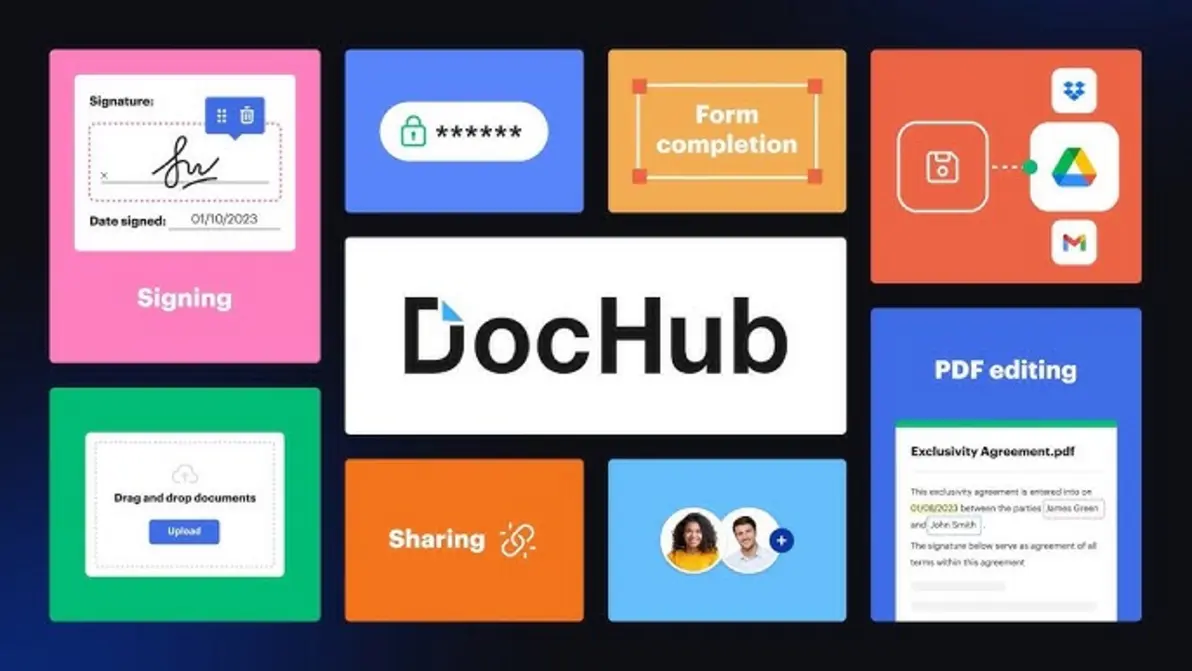
If you deal with contracts, agreements, or any approval process, you know: digital signatures are now a must. Not only for speed, but to actually comply with modern laws and keep your data safe. DocHub handles this elegantly:
- Encrypted, legally binding e-signatures that tick all the compliance boxes—ESIGN (USA), UETA, and eIDAS (EU)
- Multi-party signoff—line up two, five, or ten people to sign in whatever order you need
- Tamper-proof audit trails—track who signed, when, from what IP address
- Request signatures via email or by generating unique, secure links
Security Features You Can Trust:
- Everything’s encrypted, both in motion and at rest, so nothing leaks
- Extra verification—think PINs or authentication steps—to make sure the right person is signing
- Complete logs for audits or in case there’s ever a legal challenge
Businesses use DocHub’s signature tools to:
- Reduce risk: Every signature meets legal standards—no more lost contracts or disputes over “who signed what”
- Accelerate deals: Real story—one real estate team closed a high-stakes lease contract in under an hour by routing it through DocHub, rather than waiting days for pen-and-paper signoff
- Stay compliant: Finance, healthcare, and legal organizations can breathe easy with industry-standard data protection
A survey by Statista in 2022 found that 69% of businesses using digital signature platforms saw a turnaround increase of at least 25% in contract processing speed.
“A digital signature platform is no longer just a ‘nice to have’—it’s a business necessity for handling contracts, compliance, and auditability at scale.”
–Digital Transformation Consultant
A Day in the Life: Digital Signatures at Work
Imagine you’re in charge of vendor contracts for an events company. Instead of juggling hand-signed PDFs, scanning messes, and snail mail, you send a DocHub link to every vendor. Each contract is signed securely, and the moment each one comes in, you get notified—and your dashboard updates automatically. Simple, fast, and stress-free.
Comparative Insights: DocHub vs. Other Document Management Systems
When choosing tools, comparison is king. You might be eyeing heavyweights like Adobe Acrobat or old-school enterprise systems. Here’s where DocHub stands out from the crowd:
- No downloads, no pain – It runs in the cloud, right from your browser, so it’s Mac, PC, Chromebook, and even smartphone-friendly
- Lightning-fast sharing and collaboration – Guests, clients, or entire teams can edit and comment via unique links
- All-in-one automation – Templates, forms, e-signatures, audit trails—all under one roof, without a clunky stack of add-ons
- Mobile ready – Teams in the field (real estate agents, legal associates, finance consultants) can collaborate and sign on the go
In contrast, traditional alternatives (think Adobe, Nitro, or legacy Document Management Systems) may need big IT investments, are heavy on training, and often bolt on e-signatures or forms as expensive extras.
DocHub is tailor-made for:
- Startups and SMBs – Perfect for teams ready to go paperless fast without a huge budget
- Forward-thinking enterprises – Those wanting to augment or modernize legacy workflows
- Mobile, hybrid, and distributed teams – For professionals who need to handle documents anywhere, anytime
A 2023 G2 survey showed that businesses moving from legacy DMS to cloud-first platforms like DocHub saw a 45% reduction in document-handling bottlenecks.
If you want to deep-dive into how cloud-first workflow automation translates to real business growth, don’t miss Watch more.
Practical Example: A Day for a Distributed Team
Let’s put it all together. Imagine you run a global design agency with creatives in Paris, New York, and Seoul. With DocHub:
- Everyone reviews and comments on client proposals in real time, no matter the time zone
- Contracts get filled and signed digitally, no need for anyone to print, scan, or mail
- Final documents are archived automatically, with a searchable history in case of client disputes
Would your old workflow keep up?
The Future of Document Management with DocHub
So where is this all going? It’s clear: document management isn’t just about slapping together PDFs anymore. The demands are changing—fast.
Tomorrow’s best systems will feature:
- Automated compliance monitoring—catching issues before they become headaches
- AI-powered data extraction—turning scanned invoices and forms into searchable, actionable information, automatically
- Deep, no-fuss integrations—plugging DocHub directly into your CRM, billing system, or project management app
- Auto-routing and AI recommendations—suggesting next steps, reminders, or flagging missing signatures before you notice
DocHub is ahead of the curve, actively rolling out smart features inspired by these trends. That means a commitment to AI, improved UX, and even stronger analytics—helping teams anticipate bottlenecks and push efficiency even further.
Gartner predicts that by 2026, 90% of document workflows in businesses will be automated in some fashion, relying heavily on AI and smart integrations. Using DocHub is about futureproofing—not just patching over today’s paperwork headaches.
AI Example: What’s Coming Around the Corner?
Picture this: Soon, DocHub could automatically extract data from your scanned receipts and drop it right into your accounting software, saving your finance team hours every week. Or imagine an HR manager getting AI-driven reminders about incomplete onboarding forms—before the first day of work.
Conclusion
Let’s cut to the chase: DocHub isn’t just another PDF editor. It’s a fully integrated document workflow solution for teams who want to work faster, smarter, and with fewer errors. From its no-nonsense dashboard to its collaboration features, from bulk form handling to gold-standard digital signatures, DocHub stands out in a crowded field.
If your business is saying goodbye to paper and hello to futureproof productivity, DocHub delivers:
- A friendly, intuitive experience every user can master
- Collaboration tools that speed up feedback and decision-making
- Forms and templates that scale admin work without admin headaches
- Digital signatures that are secure, compliant, and legally tested
- Performance that grows with you—be it a nimble startup or an enterprise giant
So, are you ready to level up your document game? Whether streamlining processes, speeding up contracts, or empowering a remote-first workforce, DocHub is the missing piece your workflow has been waiting for.
For those looking to push even further—integrating deeper workflow automation or wanting to see real ROI stories—explore Watch more for advanced insights.
Ready to transform your document management? We’ve got your back with expert resources, hands-on demos, and up-to-the-minute updates. Want to keep the conversation going? Reach out, follow, or binge our latest how-to’s and case studies:
👉 Our Website: Watch more
👉 Our YouTube Channel: Watch more
👉 Our Facebook Fanpage: Watch more
👉 Our X (Twitter): Watch more
- Master Weebly in 2026: Explore Features, Pricing, Pros, Cons, and SEO Tips to Rank Faster
- Discover the Best Affordable Electric Bikes for Urban Commuters in 2026
- TutorOcean
- Does Medo AI Revolutionize Software Development? Evaluating the Medo AI Next-Gen Coding Framework
- Unlock Maximum Tax Savings for 2026: FreeTaxUSA Free Federal Filing Guide, OBBBA Deductions, and Crypto Import Tips