

If you run social media for a business, a personal brand, or a roster of clients, you already know the real problem isn’t ideas — it’s consistency. Showing up every day across Facebook, Instagram, LinkedIn, TikTok, X, and half a dozen other feeds turns into a full-time job of logging in, switching tabs, re-writing the same post five ways, and hoping you didn’t forget a channel. That endless, repetitive grind is exactly what SocialBee was built to erase. SocialBee is an AI-powered, all-in-one social media management platform that lets you create, schedule, publish, analyze, and reply to comments across ten major networks from a single dashboard — and its standout trick is turning your best content into an organized, self-recycling engine instead of a one-and-done post that vanishes down the feed. With paid plans starting around $29/month, a genuinely useful AI Copilot that can draft an entire content strategy from a short brand description, and a decade of pedigree behind it — founded in 2016 in Cluj-Napoca, Romania, and acquired by the WebPros software group (home of cPanel, Plesk, and WHMCS) in 2024 — SocialBee has positioned itself as one of the most complete answers to a question every marketer eventually asks: how do I stay consistent on social media without it eating my entire week?
For solopreneurs, small business owners, content creators, freelancers, and agencies juggling multiple brands, the value proposition is immediate: less tab-switching, fewer forgotten posts, and a smarter system that keeps your feeds active even on the weeks you’re too busy to touch them. This 2026 review walks through SocialBee’s entire platform — the AI Copilot and content tools, the category-and-evergreen scheduling model that defines it, engagement and analytics, full pricing across all six plans, honest head-to-head comparisons with Buffer, Hootsuite, and Later, the real limitations worth knowing, and exactly who should (and shouldn’t) sign up.
SocialBee Review 2026: The AI Copilot and Evergreen Engine That Keeps Your Social Content Consistent Without the Daily Grind
Overview and Background
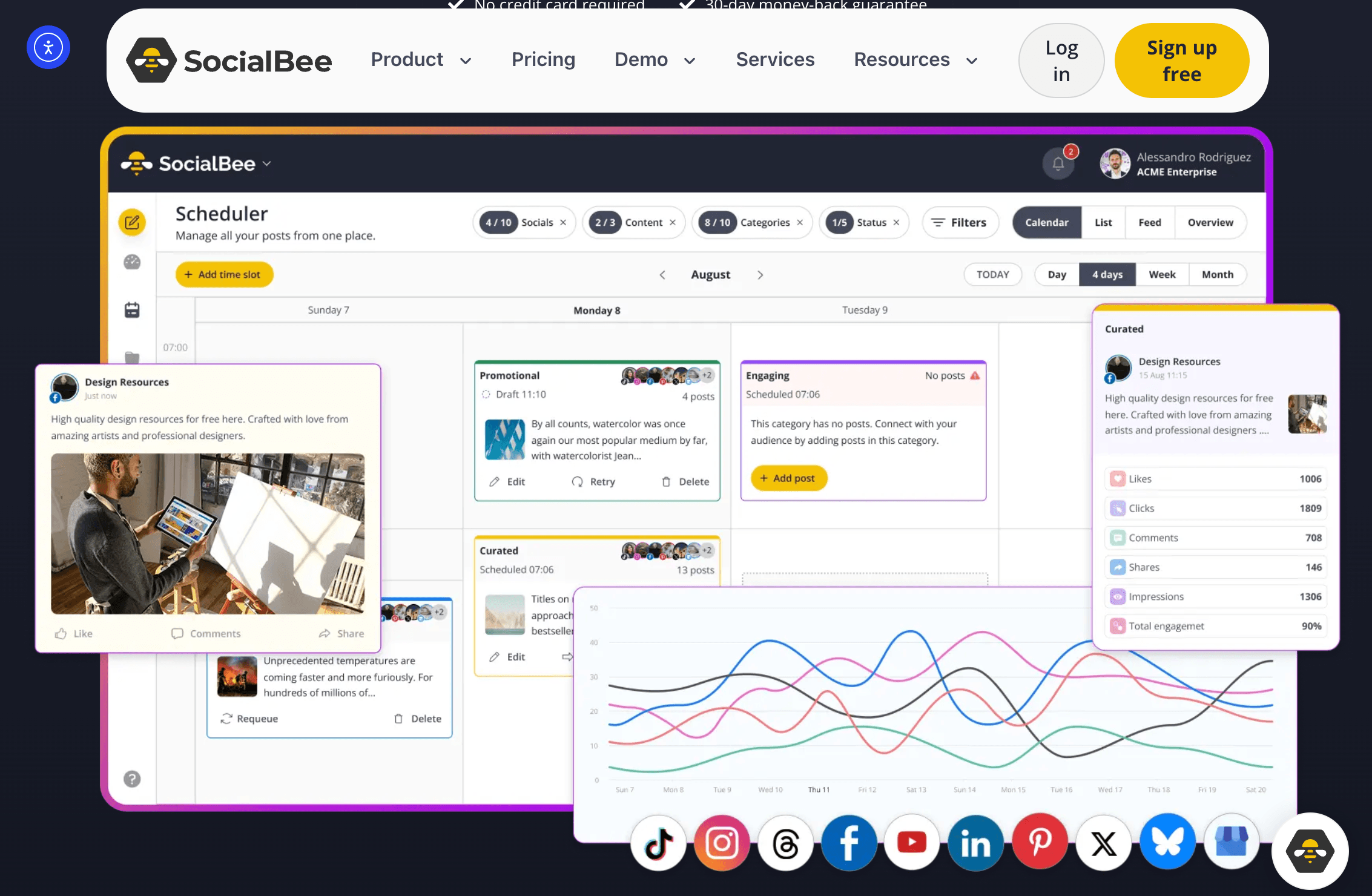
SocialBee is a cloud-based social media management tool that centralizes the whole publishing workflow — planning, content creation, scheduling, publishing, engagement, and analytics — into one interface. Rather than treating each post as a disposable event, SocialBee is built around the idea that your content is a reusable library: you sort posts into categories, set a recurring schedule for each category, and let evergreen material re-post automatically over time. It’s a philosophy that shaped the product from day one and still separates it from the pack.
The company was founded in 2016 in Cluj-Napoca, Romania, by Ovi Negrean and Vlad Hosu. The origin story is refreshingly practical: while running a previous startup, the founders grew frustrated that no existing tool let them batch-schedule posts and recycle the ones that performed well the way they wanted. They started with spreadsheets, Google Sheets, and Zapier, then built a dedicated platform around content organization and evergreen posting. SocialBee stayed bootstrapped for years while steadily growing its customer base, and in August 2024 it was acquired by WebPros — the Luxembourg-based software group behind industry staples like cPanel, Plesk, and WHMCS. The original founders continued to lead the team, and the product roadmap carried on without disruption, now with more resources to accelerate development.
Today SocialBee publishes to ten networks — Facebook, Instagram, X (Twitter), LinkedIn, Pinterest, TikTok, YouTube, Threads, Bluesky, and Google Business Profile — and layers a growing set of AI tools on top, including an AI Copilot that can generate an entire social strategy, per-platform caption writing, in-workflow image generation, and automatic hashtag suggestions. It serves a broad customer base, from solo creators and small businesses to marketing teams and agencies managing dozens of client accounts, and it’s used daily by thousands of marketers who value organized, consistent output over flashy dashboards.
Why SocialBee Stands Out in 2026
Category-based content organization: This is SocialBee’s signature feature and the reason many users never leave. Instead of dumping everything into one messy queue, you group posts into categories — say, “Blog Posts,” “Promotions,” “Quotes,” “Curated News,” and “Behind the Scenes.” You then set a posting schedule per category, so your feed automatically stays balanced and varied rather than accidentally firing off five promos in a row. It’s a genuinely smarter way to plan a content mix, and it’s the backbone everything else is built on.
Evergreen recycling that works while you sleep: Once a post is in a category, SocialBee can re-share it on a recurring basis, so your best evergreen content keeps circulating and driving reach without you lifting a finger. For time-sensitive posts, you can set an expiration date so they run once and retire cleanly. The practical payoff is huge: your channels never go silent during a busy week, and valuable posts get the repeated exposure that a single publish never delivers.
An AI Copilot that builds the whole strategy: This is where SocialBee intersects with the broader AI-tools landscape most directly. The Copilot can generate a complete social media strategy from a short description of your business — you tell it what you do, who your audience is, and the tone you want, and it returns suggested content categories, post ideas, and a recommended posting schedule. It’s not flawless, but as a starting framework that turns a blank page into a working plan in minutes, it’s a real accelerator for anyone who freezes at “what should I even post?”
AI captions plus in-workflow image generation: Beyond strategy, SocialBee’s AI writes captions tailored to each platform’s voice and character limit, generates images directly inside the post composer, and produces relevant hashtags from your caption or image. Baking image generation into the same workflow is something a number of competitors still don’t offer natively — it means you can go from idea to a finished, illustrated, platform-optimized post without leaving the tab or opening a separate design app.
Ten networks, including the newcomers: SocialBee supports the full modern lineup — Facebook, Instagram, X, LinkedIn, Pinterest, TikTok, YouTube, Google Business Profile, and crucially the newer Threads and Bluesky. Being able to schedule to emerging platforms from the same dashboard, and to customize each post individually per network, keeps you present where your audience is actually moving without adding another tool to your stack.
Agency-ready workspaces and collaboration: SocialBee lets you separate clients or brands into distinct workspaces, invite team members with defined roles, and keep each account’s content, schedule, and analytics cleanly isolated. Combined with internal notes, post approvals, and branded PDF report exports on the higher tiers, it’s a practical fit for freelancers and small-to-mid agencies who need structure without enterprise complexity.
Standout support and onboarding: One theme runs through nearly every user review — SocialBee’s support team is genuinely helpful, responsive, and invested in your success, often offering onboarding calls that shorten the learning curve. There’s also SocialBee University, a training course that’s included free with annual plans, plus regular webinars and a deep help center. For a category where you’re often left alone with a dashboard, that human backup is a real differentiator.
Key Features and Technology
SocialBee’s strength is how cleanly its toolset maps to a real content workflow — from the first idea all the way to measuring what worked. Here’s how the platform breaks down.
Content Creation and the AI Copilot
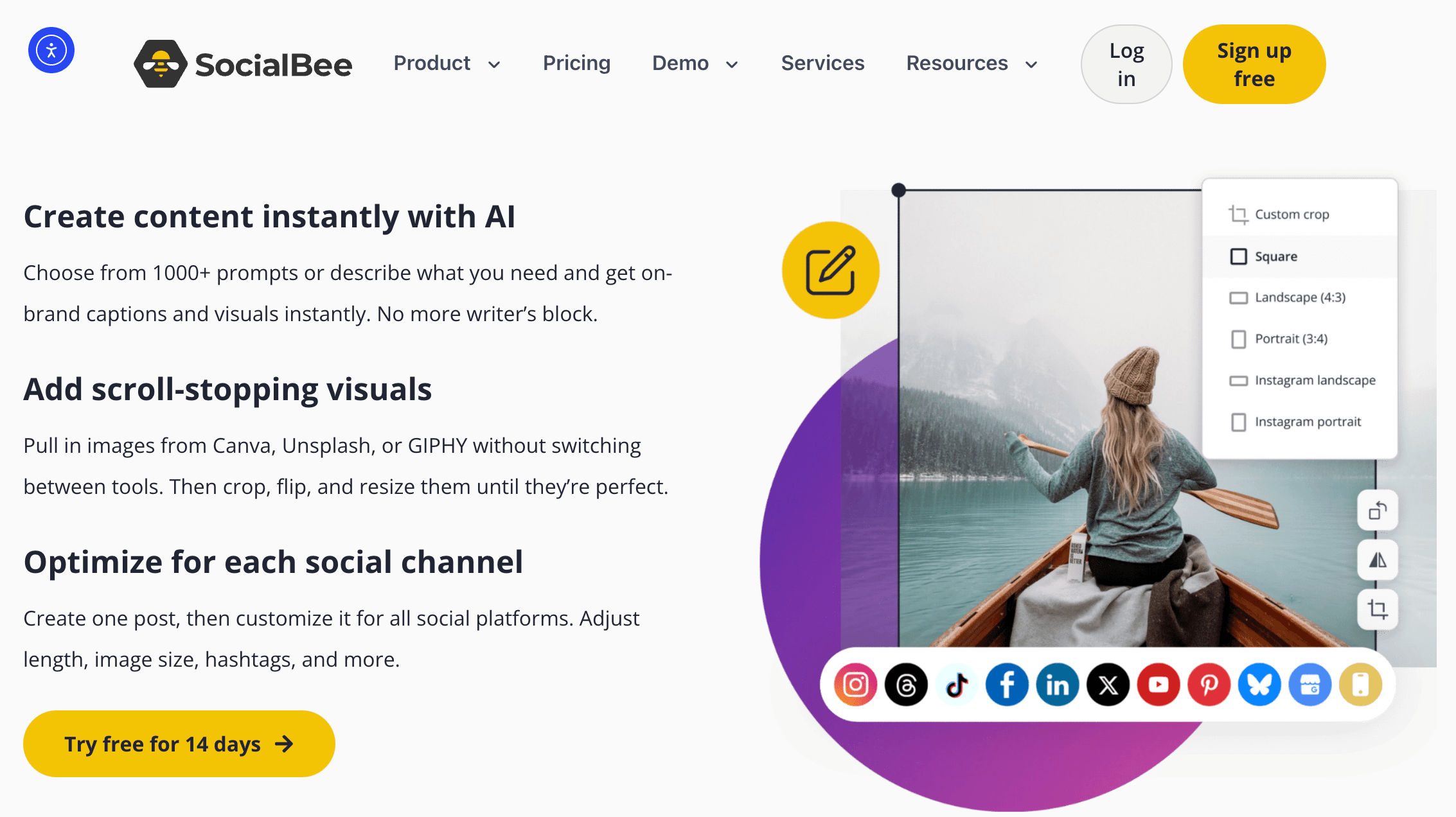
The post composer is split into an editor and a live preview, so you can see exactly how a post will look on each network before it goes out. You can write once and customize the copy, media, and formatting individually for every platform you’ve selected — a genuinely important detail, since a LinkedIn post and a TikTok caption should rarely be identical. The AI Copilot sits alongside all of this: it can draft a full strategy, generate captions adjusted to each platform’s tone and length, produce images inside the workflow, and suggest hashtags automatically. For visuals, SocialBee integrates with Canva, Unsplash, and GIPHY, so you can pull in designs, stock photography, and GIFs without leaving the composer. You can also pull content in from external sources — connect any blog’s RSS feed to import articles automatically, or use the Chrome and Firefox browser extension to save articles, posts, and videos straight into your queue.
Categories, Scheduling, and Evergreen Recycling
This is the heart of the platform. You organize posts into content categories, then build a calendar-style posting schedule for each one. From there you have three powerful levers: publish once, re-queue a post to recycle indefinitely, or set an expiration date so time-sensitive content automatically retires. The result is a feed that stays consistently active and well-balanced across content types, with far less day-to-day manual input than a plain scheduler. For teams importing large volumes of content, higher tiers add CSV bulk imports and bulk editing, so you can load and adjust dozens of posts at once rather than one by one.
Engagement, Analytics, and Reporting
SocialBee’s Engage module pulls comments, mentions, and messages into a unified social inbox, so you can respond to your audience from the same place you publish rather than hopping between native apps. On the measurement side, built-in analytics track engagement, follower growth, and reach across your connected accounts, and you can generate and download PDF reports — with branded exports available on the higher plans, which is handy for client-facing agencies. These insights are more than enough to monitor whether your strategy is working and to prove results to a client, even if they’re not as granular as a dedicated enterprise-analytics or social-listening platform.
Collaboration, Integrations, and Mobile
For teams, SocialBee offers separate workspaces per brand or client, team roles (manager, publisher, contributor), internal notes, and post approvals so work can be reviewed before it publishes. It connects to a wide set of tools — Canva, Unsplash, GIPHY, Zapier, and URL shorteners like Rebrandly and Bitly for link tracking — plus its own ConciergeBee service, a done-for-you agency that can manage your social accounts entirely if you’d rather outsource. Mobile apps for iOS and Android let you create posts, adjust your calendar, and reply to comments on the go.
Pricing, Plans, and Package Structure
SocialBee runs on a subscription model with six plans, so you can match the tier to the number of social profiles, brands, and team members you manage. Every plan — even the entry-level one — includes AI-powered content creation, the social inbox, analytics, content organization, and collaboration; the higher tiers simply raise the limits and unlock extras like branded report exports and internal notes. All plans come with a 14-day free trial that requires no credit card, and you can bill monthly or annually, with annual billing saving roughly 16%. SocialBee also runs periodic promotions and discount codes, so the live checkout price is sometimes lower than the list price below.
| Plan | Approx. Price (monthly) | What You Get | Best For |
|---|---|---|---|
| Bootstrap | ~$29 | 5 social profiles, all core planning/creating/publishing, ~3 months of analytics (no bulk edit, approvals, notes, or branded reports) | Solopreneurs and small businesses |
| Pro | ~$99 | 25 profiles, 5 workspaces, up to 3 users, every feature including branded reports and internal notes | Social media managers, small teams, agencies |
| Pro50 | ~$179 | All Pro features, plus up to 50 profiles, 10 workspaces, 5 users | Growing agencies managing more clients |
| Pro100 | ~$329 | All features, up to 100 profiles, 20 workspaces, 5 users | Larger teams handling multiple brands |
| Pro150 | ~$449 | All features, up to 150 profiles, 30 workspaces, 5 users | Large agencies and organizations at scale |
| Annual billing | ~16% off any plan | Same features, discounted; free SocialBee University access on request | Anyone committed for the year |
How SocialBee Compares to Alternatives
| Factor | SocialBee | Buffer | Hootsuite | Later |
|---|---|---|---|---|
| Entry price | ~$29/mo | Free plan; paid from ~$5/channel/mo | ~$99/mo per user (no free plan) | Free (1 profile); paid from ~$25/mo |
| Category + evergreen recycling | Yes (core strength) | Limited | Limited | No |
| AI content + image generation | Yes (Copilot, captions, images) | Text AI only | AI writer (usage limits) | AI captions |
| Networks supported | 10 (incl. Threads, Bluesky) | Broad, incl. niche networks | Broad | Visual-first focus |
| Best for | Organized, consistent content at fair value | Simple, low-cost per-channel scheduling | Enterprise teams, listening, governance | Instagram and visual-first brands |
vs. Buffer: Buffer is the budget-friendly baseline of the category, charging per channel (a free tier plus paid plans from around $5/channel/month) with a famously clean, minimal interface and an unlimited AI assistant on every plan. Where SocialBee pulls ahead is depth: Buffer’s AI is text-only and its scheduling is a straightforward queue, while SocialBee adds true category-based organization, evergreen recycling, in-workflow image generation, and richer collaboration. If you manage a handful of channels and just want the simplest possible scheduler, Buffer is hard to beat on price. If you want your content to run as an organized, self-recycling system, SocialBee is the more capable platform.
vs. Hootsuite: Hootsuite is the enterprise heavyweight, with deep social listening, competitor benchmarking, and governance features that SocialBee doesn’t try to match — but that power comes at a price, starting around $99/month per user with no free plan and per-seat pricing that climbs fast for teams. For large organizations that need advanced monitoring and reporting, Hootsuite earns its cost. For the vast majority of small businesses, creators, and lean agencies, SocialBee delivers the core publishing, engagement, and analytics they’ll actually use at a fraction of the spend.
vs. Later or posting manually: Later is excellent if your brand lives on visuals and Instagram, with a polished content calendar and media-first planning — but it lacks SocialBee’s category-and-evergreen model and broader content-recycling flexibility. And the true “legacy” alternative, posting manually across each native app, costs nothing but your time — which is exactly the point. Logging into ten platforms, re-writing each post, and remembering to stay consistent every single day is the friction SocialBee removes for a modest monthly fee. For anyone treating social media as a real growth channel rather than an afterthought, that trade is a clear win.
Pros and Cons
What Users Love
Organized, consistent content on autopilot: The category system and evergreen recycling are the features owners praise most. Once set up, your feeds stay active and balanced with minimal daily effort — the whole point, and something plain schedulers simply don’t do as elegantly.
A genuinely useful AI Copilot: Generating an entire content strategy, per-platform captions, images, and hashtags from a short brand description turns a blank page into a working plan fast. In-workflow image generation in particular is something several rivals still don’t offer.
Strong value for the feature set: Reviewers consistently note the pricing is fair and often lower than comparable tools with similar features — and the ability to manage everything from one dashboard saves hours every week.
Excellent, human support: Fast, helpful responses and onboarding calls come up again and again in user reviews, backed by SocialBee University (free on annual plans) and frequent webinars. That support meaningfully shortens the learning curve.
Ten networks and clean multi-client management: Support for Threads and Bluesky alongside the majors, plus separate workspaces per client, makes SocialBee a practical single tool for freelancers and small agencies covering a lot of ground.
Limitations Worth Knowing
A real learning curve: Because SocialBee is so feature-rich, the initial setup — categories, schedules, sources — can feel overwhelming, and some reviewers find the interface a little cluttered until they get familiar with it. Budget an afternoon (and lean on the onboarding call) to configure it properly.
Collaboration lags dedicated team tools: While SocialBee has workspaces, roles, notes, and approvals, some advanced teamwork features are limited — notes live in the Content section rather than the post composer and aren’t available in the Engage inbox yet, and larger agencies needing deep, polished white-label reporting sometimes prefer specialist alternatives.
The mobile app is a companion, not a replacement: You can create, schedule, edit the calendar, and reply on iOS and Android, but the app can’t do everything the desktop version can, and a few placements (like Facebook Groups or Reddit) rely on notification-assisted posting rather than fully automated publishing.
Analytics and integrations aren’t the deepest: The built-in analytics are solid for monitoring performance but not as granular as enterprise-listening platforms, and SocialBee offers fewer native third-party integrations than some competitors. There’s also no built-in link-in-bio feature.
Pricing and support hours to confirm: A few users have flagged inconsistency around promotional discounts at checkout and support availability during European daytime hours, and the interface and support are English-only. None of these are dealbreakers, but confirm the live price, any active discount code, and support coverage for your region before committing.

Who Should Use SocialBee
Solopreneurs and small business owners: If you’re a team of one wearing every hat, SocialBee’s category system and evergreen recycling keep your social presence alive without a daily time sink, and the AI Copilot handles the “what do I post?” problem. The ~$29 Bootstrap plan is the obvious starting point.
Content creators and personal brands: Creators who need to stay consistent across many platforms — and want AI to help draft captions and visuals in each platform’s voice — will get real leverage here. Start on Bootstrap and add profiles as your channels grow.
Freelancers and small-to-mid agencies: The separate workspaces, team roles, approvals, and branded reports make managing multiple clients clean and professional. The Pro plan (25 profiles, 5 workspaces) is the natural fit, stepping up to Pro50 or Pro100 as your client roster expands.
Marketers who value organization over enterprise depth: If your priority is a well-structured, consistent content operation rather than heavy social listening or granular competitor analytics, SocialBee hits the sweet spot. Pro gives you the full toolkit.
Who should look elsewhere: Large enterprises that need deep social listening, sentiment analysis, and governance may be better served by Hootsuite or Sprout Social; visual-first Instagram brands might prefer Later; and if you only manage one or two channels and want the cheapest possible scheduler, Buffer’s free or per-channel plans could be enough.
Getting Started: Step by Step
- Start the free trial. Sign up for the 14-day free trial — no credit card required — and pick the plan that matches how many profiles and team members you manage. You can upgrade, downgrade, or switch between monthly and annual billing later.
- Connect your social profiles. Link your accounts across Facebook, Instagram, X, LinkedIn, Pinterest, TikTok, YouTube, Threads, Bluesky, and Google Business Profile. Remember each connected account counts toward your plan’s profile limit.
- Let the AI Copilot draft your strategy. Describe your business, audience, and tone, and let the Copilot suggest content categories, post ideas, and a posting schedule as a starting framework — then refine it to fit your brand.
- Set up categories and schedules. Create content categories (for example, promotions, blog posts, tips, curated news), then build a recurring posting schedule for each so your feed stays balanced automatically.
- Fill your queue and turn on recycling. Add posts manually, import via RSS or CSV, or use the browser extension — customize each post per platform, then set evergreen posts to recycle and time-sensitive ones to expire.
- Engage and measure. Use the social inbox to reply to comments and messages, then check analytics and export reports to see what’s working and double down on it.
Tips for Getting Maximum Value
Run the full 14-day free trial before you pay, and use that window to actually build out your categories and schedules — SocialBee rewards the setup work, and the first afternoon is where the long-term time savings come from. Always check SocialBee’s official pricing page for an active discount code before checkout, since promotions run regularly and the list price is rarely the lowest available. Choose the right tier honestly: most solo creators and small businesses are well served by the ~$29 Bootstrap plan, and you should only jump to Pro when you genuinely need more than five profiles, multiple workspaces, extra users, approvals, or branded client reports. If you’re committing for the year, switch to annual billing for roughly 16% off and email the team afterward to claim your free SocialBee University access. Lean on the onboarding call to flatten the learning curve fast, book a demo webinar if you’re on the fence, and treat the mobile app as a companion — do the heavy configuration on desktop. Finally, put the AI Copilot to work as a first-draft engine rather than a finisher: let it generate the strategy and captions, then add your own voice so the output feels human, not generic.
Future Outlook and Final Assessment
The tailwinds favor SocialBee. Consistency and AI-assisted content have become the two biggest challenges — and biggest opportunities — in social media marketing, and SocialBee sits squarely at that intersection. Its bet on organized, category-driven, evergreen content plus a strategy-building AI Copilot matches exactly how creators and small businesses want to work in 2026: show up everywhere, consistently, without hiring a full team. Backing from the WebPros group gives it more resources and stability than most bootstrapped tools ever get, while the original founders continue to steer the roadmap — a rare combination of scale and continuity.
The honest caveats remain: expect a real setup learning curve, know that collaboration and analytics don’t go as deep as enterprise specialists, treat the mobile app as a companion, and confirm the live price and support coverage for your region before you commit. But within those boundaries, SocialBee delivers one of the most complete, well-organized, and genuinely useful social media management experiences available at its price — and it does so with a support team that actually shows up for you.
Conclusion
SocialBee has built something rare in a crowded category: a coherent, opinionated platform that treats your content as a reusable library instead of a disposable feed. It’s organized where it counts, forward-looking in its embrace of AI, fairly priced for what you get, and backed by support people who genuinely help. Confirm your plan matches how many profiles and team members you manage, invest the setup time up front, and SocialBee makes one of the most demanding parts of running a business or a brand feel calm and consistent — making everything easy, one scheduled post at a time.
Ready to put your social media on autopilot?
Explore more honest reviews, tutorials and tool comparisons to find the right tech for the way you work and live — at AI Solutes, where we make everything easy.
👉 Start Your Free Trial: https://socialbee.com/
👉 Our YouTube Channel: youtube.com/@ai-solutes
👉 Our Facebook Fanpage: Facebook
👉 Our X (Twitter): @AISolutes
- What If Large File Transfers Took Half the Time and Space? Inside WinZip’s Compression Engine
- How Can Apollo Accelerate Your Sales Pipeline? Inside the Smart Prospecting Tool
- Spokeo Free vs Premium 2025: Unlock the Best Plan for Deep Background Checks
- Maximize TopCashback Cashback Rewards in 2026: Earn More Money on Every Online Purchase
- RevZilla Dominates: Inside the Largest US Motorcycle Gear Store















