


If you’ve ever fought your CRM instead of using it — forcing a partnerships pipeline into a “Deals” object, or watching a rep spend an hour a day copy-pasting notes from calls into fields nobody trusts — Attio was built specifically to fix that. Attio is a London-founded, AI-native CRM that throws out the rigid “Contacts, Companies, Deals” template every legacy CRM assumes and replaces it with a fully customizable data model: you define your own objects, attributes, and relationships so the CRM mirrors how your business actually operates. Backed by more than $100 million from investors including Redpoint Ventures, Balderton Capital, Point Nine, and Google Ventures, and used by teams at OpenAI, Lovable, Granola, and Replicate, Attio has become one of the fastest-growing alternatives to Salesforce and HubSpot for startups and product-led growth companies — with a genuinely usable free tier and paid plans starting at roughly $29 per seat per month.
For founders, RevOps leads, and GTM teams who are tired of paying enterprise prices for software that still can’t model their business correctly, Attio is worth a serious look. This 2026 review walks through what Attio actually is, its full feature set and AI capabilities, real 2026 pricing, how it stacks up against HubSpot, Pipedrive, and Salesforce, the honest limitations G2 and Reddit reviewers keep flagging, and exactly who should (and shouldn’t) build their GTM stack on it.
Attio Review 2026: The AI-Native CRM Built on Custom Objects Instead of Rigid Pipelines
Overview and Background
Attio was founded in London in 2019 by CEO Nicolas Sharp and CTO Alexander Christie, who had run into the same problem repeatedly at earlier tech companies: traditional CRMs force every business into the same Contacts-belong-to-Accounts schema, no matter how differently a startup, an investment firm, or an agency actually tracks relationships. Attio’s answer is a relational, “objects and attributes” data model — every record type, from Companies and People to entirely custom objects like Investors, Partnerships, or Renewal Pipelines, can be linked to any other object through relationship attributes, and the same record can live inside multiple lists with list-specific data without ever distorting the master record.
The company has raised over $100 million to date across Seed, Series A, and two Series B rounds — most recently €44 million led by Google Ventures in 2025 — from investors including Redpoint Ventures, Balderton Capital, Point Nine, and 01 Advisors. That capital has gone almost entirely into building Attio’s AI layer: automatic relationship intelligence that populates the CRM from your team’s email and calendar the moment you connect them, AI-generated call summaries, a web-research agent that enriches records with public data, and an “Ask Attio” assistant that lets you query your entire CRM in plain language. Attio counts fast-growing AI-native companies like OpenAI, Lovable, Granola, Modal, and Replicate among its customers, and reports on G2 put it at roughly a 4.3–4.4 out of 5 rating across several hundred verified reviews.

Why Attio Stands Out in 2026
A data model that bends to your business, not the other way around: instead of Contacts and Deals as fixed objects, you can create any object your GTM motion needs — Investors, Vendors, Renewal Pipelines, Partnerships — and connect them with relationship attributes, so the CRM reflects how your team actually thinks about the business rather than forcing a workaround.
Automatic relationship intelligence from day one: the moment you connect a Google or Microsoft inbox and calendar, Attio auto-builds company and people records straight from your team’s communication history, so a new workspace already shows who knows who and every past conversation instead of starting from a blank CRM.
Genuine speed at scale: Attio’s underlying database is built to handle millions of records with sub-50-millisecond query latency, and founders regularly report going from signup to a working, populated CRM in under thirty minutes — a real contrast to legacy platforms that need weeks of implementation before anyone can use them.
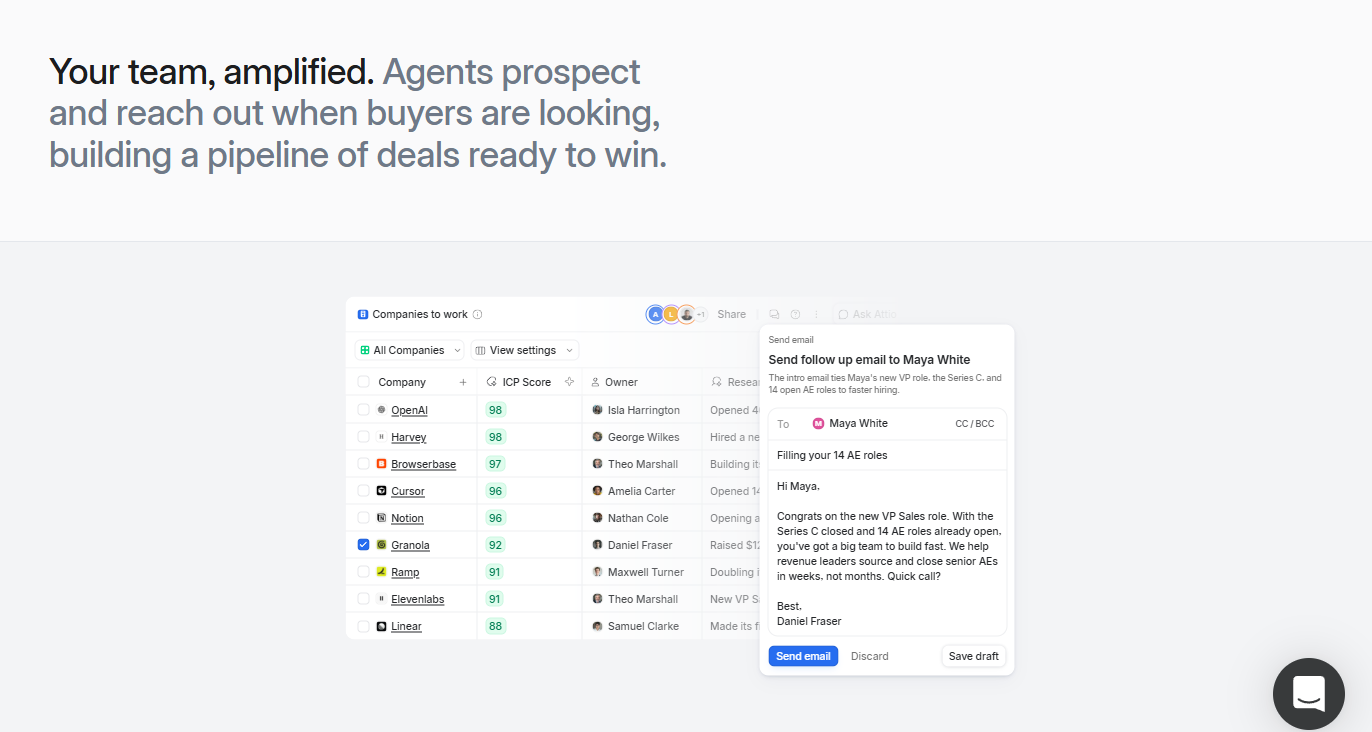
AI that’s built into the data layer, not bolted on: AI Attributes let you add fields to any object that auto-fill themselves — summarizing a record, scoring a contact against your ICP, or running a web-research agent to pull in funding stage or headcount — and AI Workflows can trigger multi-step automations from record events instead of rigid if-this-then-that logic trees.
Call intelligence that kills manual note-taking: on Pro and above, Attio automatically generates call summaries and extracts action items from recorded sales calls and writes them straight back into the relevant record, cutting into the 8–12 hours per rep per week that industry research pegs as typical CRM-maintenance overhead.
A genuinely usable free tier: unlike most modern CRMs that gate almost everything behind a paywall, Attio’s Free plan supports up to 3 seats, 50,000 records, real-time contact sync, and automatic enrichment with no time limit — a real way to evaluate the product before spending anything.
A Notion-like interface people actually enjoy: reviewers repeatedly describe the UI as intuitive, elegant, and modern, with real-time multiplayer collaboration — comments, mentions, and shared views — that makes Attio feel more like a live workspace than a form-heavy database.
Key Features and Technology
Attio’s feature set breaks down into a few core pillars: the data model itself, the AI layer built on top of it, and the collaboration and automation tools that tie a GTM team together.
Objects, Attributes, and Lists
Every record in Attio lives on a custom or standard object — People and Companies come built-in, but you can add as many additional objects as your plan allows. Attributes are the fields on those objects: text, number, currency, dropdown, date, and — crucially — relationship attributes that link one object to another, so a Deal can point to a Company, which points to multiple People, which point to an Investor object, all without duplicating data. Lists sit on top as flexible, filterable groupings — a pipeline view, a campaign cohort, an onboarding sequence — letting the same record carry different stage data in different lists without touching the master record. Pipelines are simply lists visualized as Kanban boards, so switching between a spreadsheet-style table and a drag-and-drop pipeline takes one click.
AI Attributes, Ask Attio, and the Research Agent
AI Attributes are custom fields that fill themselves in automatically — summarizing a record’s activity, classifying a contact into an ICP tier, or dispatching a web-research agent to pull in headcount, funding stage, or tech stack from public sources. “Ask Attio” is a natural-language assistant layered over your entire workspace, so instead of building a filtered view manually you can ask a question and get an answer pulled straight from your live data. Attio has publicly framed its long-term AI roadmap around inferring information — like deal value — directly from unstructured call and email data, aiming to remove manual data entry as a CRM bottleneck entirely.
Email, Calendar, and Call Intelligence
Connecting Gmail/Google Workspace or Outlook/Microsoft 365 triggers automatic contact and company creation from your communication history, plus a shared timeline showing every email, note, call, and task tied to a record in one collaborative view. On Pro and above, Call Intelligence records, transcribes, and summarizes sales calls and extracts action items automatically. Email sequences exist for outbound outreach, though several reviewers note they’re functional rather than sophisticated — there’s no AI personalization at scale and no built-in power dialer, so high-volume outbound teams often still pair Attio with a dedicated sales-engagement tool.
Workflows and API
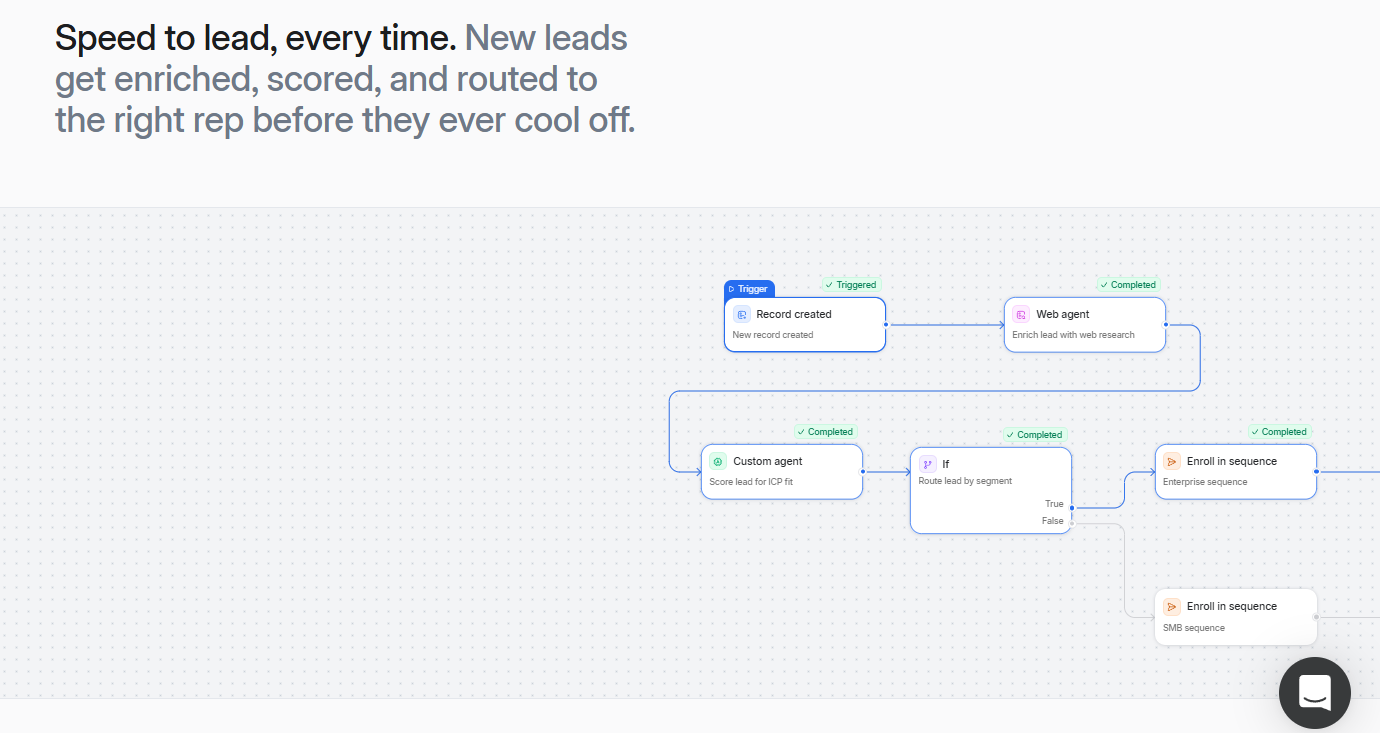
Attio’s Workflows engine triggers multi-step automations on record events — a field change, a new record, a stage transition — that can branch on conditions, call external APIs, and write data back into other systems, which is what lets RevOps teams build genuinely custom revenue processes rather than fighting a fixed automation menu. Attio also ships a modern, developer-friendly REST API, though full programmatic access on some workflows requires a higher-tier plan and separate approval, and native integrations beyond email/calendar are comparatively thin — Zapier or Make is frequently needed to connect tools that other CRMs support natively.
Pricing, Plans, and Package Structure
Attio runs a straightforward four-tier, per-seat subscription model, billed annually by default (monthly billing is available on Plus and Pro but adds roughly a 24% premium). As with any SaaS pricing page, treat the figures below as an approximate range at the time of writing and confirm the live numbers on attio.com/pricing before you buy, since credit allowances and add-on pricing shift more often than the headline seat price.
| Plan | Approx. Price | Seats / Records | Best For |
|---|---|---|---|
| Free | $0 | Up to 3 seats, 50,000 records, up to 3 objects | Solo founders, proof-of-concept, tiny teams testing the data model |
| Plus | ~$29/seat/mo (annual) or ~$36/seat/mo (monthly) | Unlimited records, custom objects, private lists | Single growing teams needing privacy controls and automation |
| Pro | ~$69/seat/mo (annual) or ~$86/seat/mo (monthly) | Adds AI workflows, call intelligence, sequences, advanced permissions | Multi-team, revenue-focused orgs that want native AI enrichment |
| Enterprise | Custom quote (often $100–150+/seat) | Custom limits, SSO, advanced security | Large companies needing compliance, governance, and dedicated support |
How Attio Compares to Alternatives
| Tool | Data Model | Starting Price | Best Fit |
|---|---|---|---|
| Attio | Fully custom objects & relationships | Free / ~$29 seat/mo | Startups & GTM teams with non-standard data |
| HubSpot | Fixed, opinionated schema | Free / paid tiers scale fast | Teams wanting an all-in-one marketing + sales suite |
| Pipedrive | Simple, pipeline-first | Budget-friendly, per-seat | SMB sales teams that want ease of use over customization |
| Salesforce | Highly configurable but complex | Premium, per-seat + admin overhead | Large enterprises with dedicated CRM admins |
| Spreadsheets / Airtable | Manual, DIY database | Free–low cost | Pre-CRM teams not ready to standardize a process |
vs. HubSpot: HubSpot bundles marketing, service, and sales into one opinionated platform, which is powerful if you want everything under one roof — but its Contacts-and-Deals schema is rigid, and costs climb quickly once you add marketing automation and multiple hubs. Attio is narrower in scope (it’s a CRM, not a full marketing suite) but far more adaptable to unusual data structures, and many teams specifically migrate from HubSpot to Attio when they’ve outgrown its fixed data model.
vs. Pipedrive: Pipedrive is a simple, pipeline-first CRM built for SMB sales reps who want to move deals through stages with minimal setup. It’s genuinely easier to onboard a rep onto in a day, but it trades away the customization and relationship modeling that make Attio useful for GTM teams with more complex org structures — investors, partners, multi-stakeholder deals — rather than a single linear sales pipeline.
vs. Salesforce: Salesforce can technically do almost anything Attio can, given enough configuration, custom code, and a dedicated admin — but that flexibility comes with months-long implementations and a cost structure that rarely makes sense below a few hundred employees. Attio delivers a comparable level of data-model flexibility with a setup time measured in minutes, not months, which is precisely why teams “migrating off rigid legacy CRMs” cite Attio as their landing spot.
Pros and Cons
What Users Love
Real customization without engineering help: reviewers repeatedly highlight how quickly they can create custom objects and attributes that mirror their exact business model, something that would take a Salesforce admin weeks to configure.
A UI people actually want to open: the Notion-like interface earns consistent praise for being intuitive and fast to navigate once you’re past the initial learning curve, in sharp contrast to how most CRM users describe their old tool.
AI that saves real admin time: fast call-summary generation and automatic enrichment are cited often as genuinely useful rather than gimmicky, cutting into the hours reps otherwise lose to manual data entry.
Strong price-to-flexibility ratio: at $29–$69 per seat, users consistently describe Attio as cost-effective relative to the customization and AI capability they’re getting, especially compared with Salesforce’s total cost of ownership.
Limitations Worth Knowing
Reporting runs shallow for analytics-heavy teams: multiple G2 reviewers specifically flag that per-rep reporting isn’t built in and requires workarounds, and built-in sales metrics for regular tracking are limited compared to dedicated reporting tools.
No SLA on lower tiers: at least one reviewer reported an outage that cost their team real leads with no contractual recourse — acceptable risk for an early-stage team, harder to justify once real revenue rides on the platform.
Thin native integrations and no mobile app: beyond email and calendar, connecting other tools frequently requires Zapier or Make rather than a native integration, and there’s currently no dedicated mobile app for reps who need CRM access on the go.
Outbound sales tooling is basic: sequences exist but lack AI personalization at scale, there’s no built-in power dialer, and coordinating email, phone, and LinkedIn touchpoints in one flow generally requires separate tools bolted on.
Setup takes real time investment: because there’s no fixed schema, teams have to deliberately design their objects and pipelines before the CRM pays off — onboarding support and training materials have historically been described as limited, which slows the first few weeks for teams new to the object-based model.
Who Should Use Attio
Early-stage founders and solo operators: the Free plan’s real-time sync and enrichment make it genuinely usable for evaluating a CRM before you have revenue to spend on one — start on Free and upgrade to Plus once you add a second or third teammate.
Startups and PLG teams with non-standard data: if your business genuinely doesn’t fit a Contacts-and-Deals mold — investors, partnerships, multi-sided marketplaces — Attio’s object model is the differentiator worth paying for; Plus is the right starting tier.
RevOps and GTM engineering teams: if you want to build custom, multi-step automated workflows tied to record events and call external APIs, Attio’s Workflows engine on Pro gives you room to build a genuinely bespoke revenue process without custom development.
Teams migrating off Salesforce or HubSpot: if your current CRM’s rigidity is the actual complaint — not its price — Attio on Pro delivers comparable configurability with a fraction of the implementation time and admin overhead.
Who should look elsewhere: high-volume outbound SDR teams that need a built-in power dialer and multi-channel sequencing, and large enterprises that require an ironclad SLA and a published SOC 2 Type II report out of the box, may be better served by a more execution-focused platform or Attio’s Enterprise tier after a direct conversation with sales.
Getting Started: Step by Step
- Create a free workspace at attio.com and choose whether you’re setting up for yourself or a small team of up to three.
- Connect your email and calendar (Google Workspace or Microsoft 365) first — this is what triggers Attio’s automatic relationship intelligence to populate your CRM from real communication history.
- Review the auto-created records for People and Companies, and clean up or merge any duplicates before building on top of them.
- Design your custom objects for anything that doesn’t fit the default schema — take the time here, since this decision shapes how usable the CRM feels for the next year.
- Build your first pipeline as a list and switch it to Kanban view to visualize deal stages without altering the underlying records.
- Turn on one or two AI Attributes — start with something simple like an ICP-tier classifier — before layering on more complex AI Workflows.
- Invite your team and set up shared views, then upgrade to Plus or Pro once you outgrow the Free plan’s three-seat, three-object limit.
Tips for Getting Maximum Value
Don’t skip the data-model design step to move faster — teams that jump straight into daily use without deliberately planning their objects and relationships end up rebuilding weeks later, which is the single most common regret in Attio reviews. Start on the Free plan even if you expect to pay eventually; it’s genuinely capable enough to validate whether the object-based model fits your business before you commit a card. If you’re evaluating Plus vs. Pro, count your team’s actual call volume first — Call Intelligence and AI Workflows are the main reasons to pay the Pro premium, and if your team isn’t running many recorded sales calls yet, Plus’s unlimited records and custom objects deliver most of the value at roughly half the per-seat cost. Watch your automation credit usage from month one rather than after you hit the ceiling, since scaling teams have been caught off guard mid-month by workflow-run limits on Plus. Finally, budget for Zapier or Make if your stack includes tools outside the core email/calendar/call ecosystem — native integrations are one of Attio’s thinner areas today, and that’s a real line item to plan for, not an afterthought.
Future Outlook and Final Assessment
Attio is riding a real tailwind: it’s positioned squarely at the intersection of two trends investors are betting big on — AI-native software built from the ground up rather than retrofitted, and a generation of startups that have outgrown legacy CRMs but aren’t ready for Salesforce-scale complexity. With over $100 million raised and a customer base skewing toward fast-growing AI companies, Attio has real momentum, and its public roadmap points toward deeper autonomous agents that reduce manual data entry even further. That said, the honest gaps are real too: reporting depth, native integrations, mobile access, and enterprise-grade compliance credentials (Attio currently holds ISO 27001 but no published SOC 2 Type II report) are all areas where more established players still have an edge, and no-SLA risk on lower tiers is a legitimate concern for any team with live revenue on the line.
Conclusion
Attio earns its reputation as one of the most genuinely flexible CRMs on the market in 2026 — a data model that adapts to your business, AI features built into the foundation rather than added as an afterthought, and a free tier generous enough to actually evaluate before you pay. It isn’t the right fit for high-volume outbound teams that need a built-in dialer, or for enterprises that need an SLA and full compliance paperwork out of the box — but for startups, PLG companies, and RevOps teams tired of forcing their business into someone else’s schema, Attio delivers real value at a fair price. Whichever tool you land on, the goal is the same one we chase with every review on this site: helping you make everything easy.
Ready to build a CRM that actually fits your business?
Explore more honest reviews, tutorials and tool comparisons to find the right tech for the way you work and live — at AI Solutes, where we make everything easy.
👉 Start Your Free Trial: https://ai-solutes.com/attio
👉 Our YouTube Channel: youtube.com/@ai-solutes
👉 Our Facebook Fanpage: Facebook
👉 Our X (Twitter): @AISolutes
- Master Vecteezy 2026: Find Royalty-Free Vectors, Logos, and Calendar Templates Fast
- Does Airwallex Simplify Cross-Border Payments? Reviewing the Airwallex Global Financial Technology
- Boost Local Ecommerce ROI with Pippit AI: Master Geotargeted SEO and Scalable Video Marketing for 2025
- Choose the Best Web Hosting Services 2025 to Boost Speed, Security, and Scalability
- Unlock Retail Transformation in 2025: How Increff SaaS Powers Inventory Optimization, Automation, and Omnichannel Success















