


You built the list. You wrote the campaign. You hit send — and a quarter of it never arrives. Worse, the bounces you just generated told Gmail and Outlook that you’re a careless sender, and now even your good contacts are landing in Promotions or Junk. Since Google, Yahoo and Microsoft turned their bulk sender guidelines into hard, enforced requirements — complaint rates under 0.3%, authenticated domains, one-click unsubscribe — list hygiene stopped being housekeeping and became infrastructure. ZeroBounce is the platform built for exactly that shift: an email verification and deliverability suite that has validated more than 60 billion addresses for over 600,000 customers across a decade in business, advertises 99.6% validation accuracy, and now wraps verification together with domain warmup, inbox placement testing, blacklist monitoring and DMARC reporting in a single account. It holds roughly 4.8 out of 5 across 4,000-plus reviews on Trustpilot, G2 and Capterra, and it starts at zero — 100 free validations every month, permanently.
For email marketers, B2B sales teams running cold outbound, agencies protecting client sender reputations, SaaS founders cleaning a CRM import, and developers wiring validation into a signup form, the question isn’t whether list hygiene matters in 2026 — it’s whether ZeroBounce is worth its premium over the cheaper verifiers now crowding the market. This review walks through the full platform, the real accuracy picture including where independent testing found genuine gaps, complete pricing with the credit maths, honest head-to-head comparisons, the limitations that show up repeatedly in user reviews, and exactly who should buy in — and who shouldn’t.
ZeroBounce Review 2026: The Email Verification and Deliverability Platform That Keeps Your Campaigns Out of the Spam Folder
Overview and Background
ZeroBounce is an email verification and deliverability platform. At its core it does one deceptively simple thing: you give it a list of email addresses, and it tells you which ones are real, which will bounce, which are traps that will damage your sender reputation, and which are too uncertain to risk. It checks syntax, resolves domain and MX records, performs an SMTP-level handshake with the receiving mail server, and cross-references its own accumulated data — then returns a verdict across 29 status and sub-status codes rather than a blunt valid/invalid flag.
The company has been at this for more than ten years, operates three proprietary data centers, and reports over 60 billion emails validated for a customer base north of 600,000. That longevity matters in a category where SMTP behaviour changes constantly and cheap verifiers frequently rely on stale cached data. It also carries the compliance stack that enterprise procurement teams ask for: SOC 2 Type II, ISO 27001, HIPAA, GDPR, CCPA and Data Privacy Framework, with uploaded files encrypted and purged after 30 days.
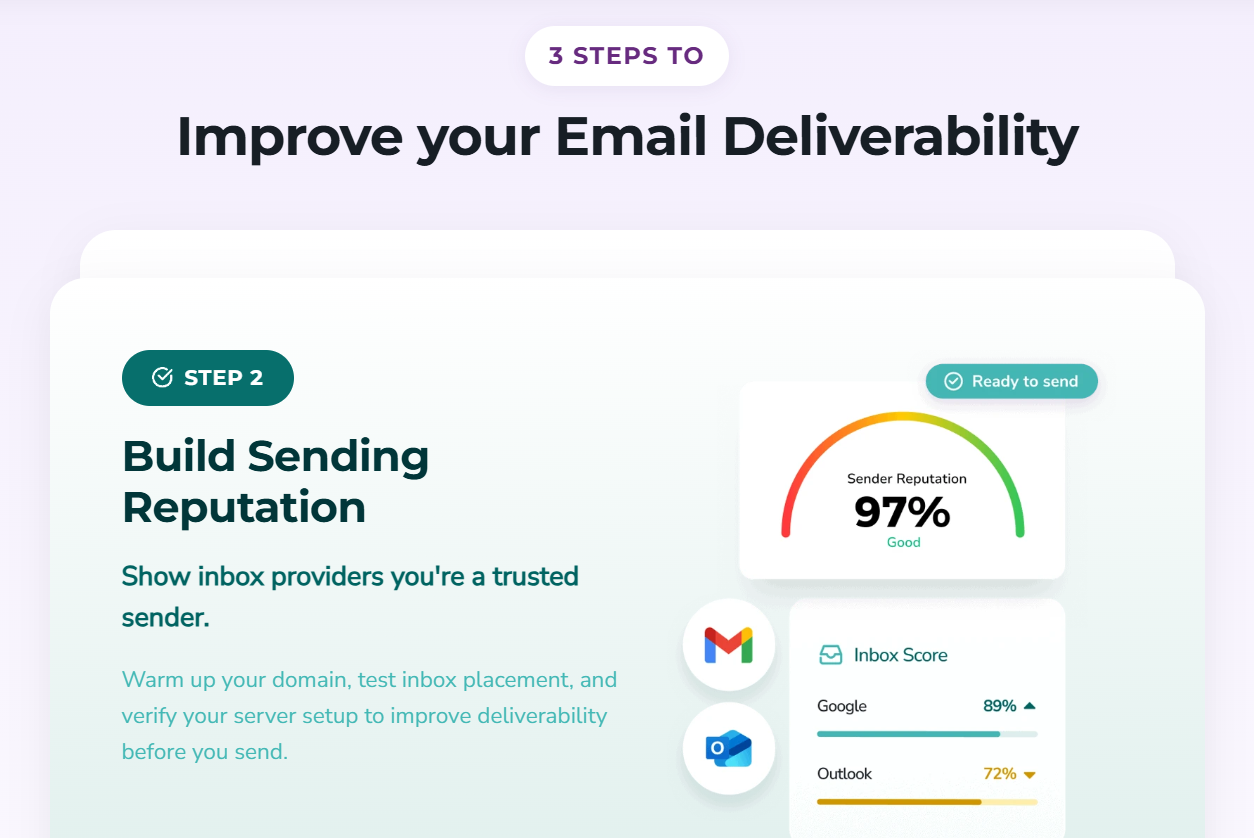
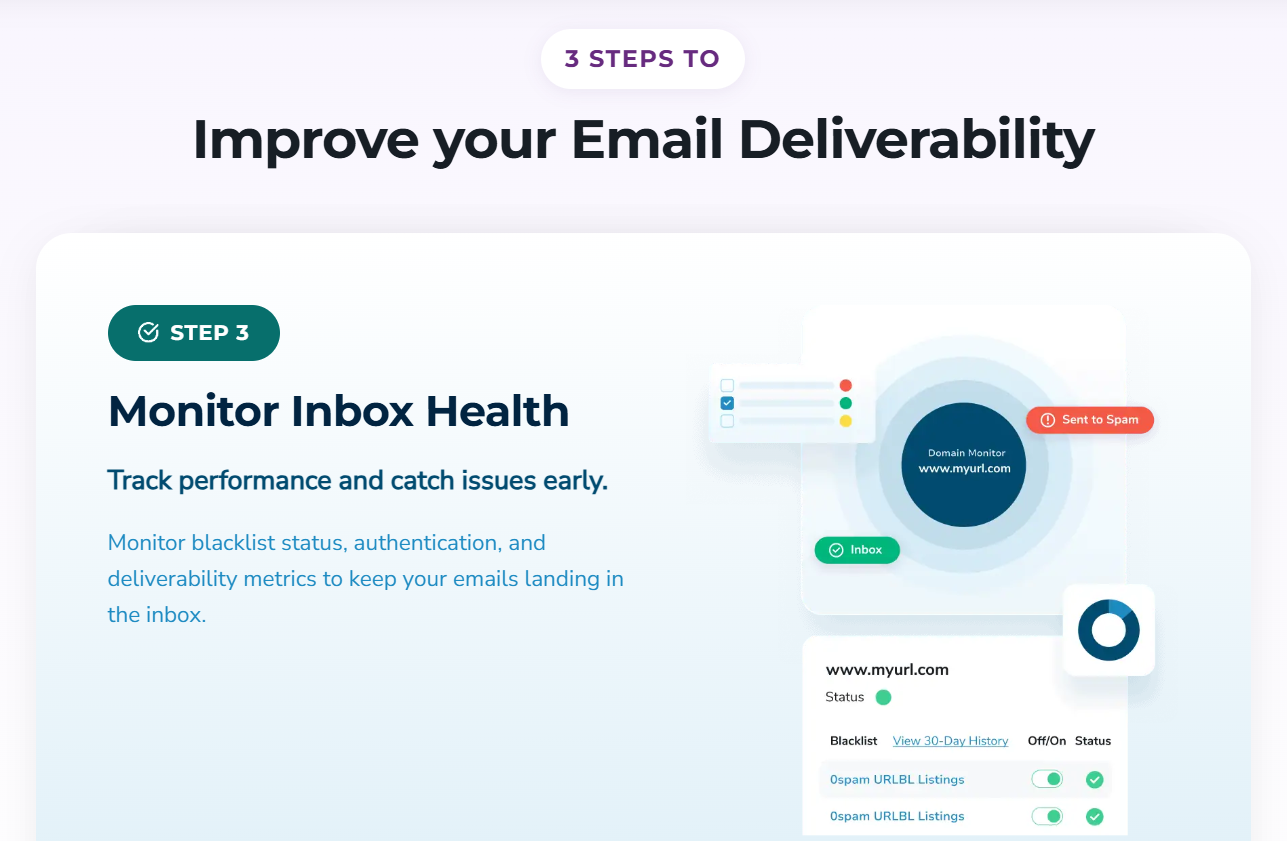
What has changed most in the last two years is scope. ZeroBounce was once a list-cleaning tool; it is now a full deliverability platform organised around three stages — clean your list, build your sending reputation, monitor your inbox health. Stage one covers verification, AI scoring, Email Finder and Activity Data. Stage two adds domain warmup, inbox placement testing and mail server configuration checks. Stage three adds blacklist monitoring across 200-plus databases, DMARC monitoring and a unified dashboard. The subscription bundling all of it is called ZeroBounce ONE™.
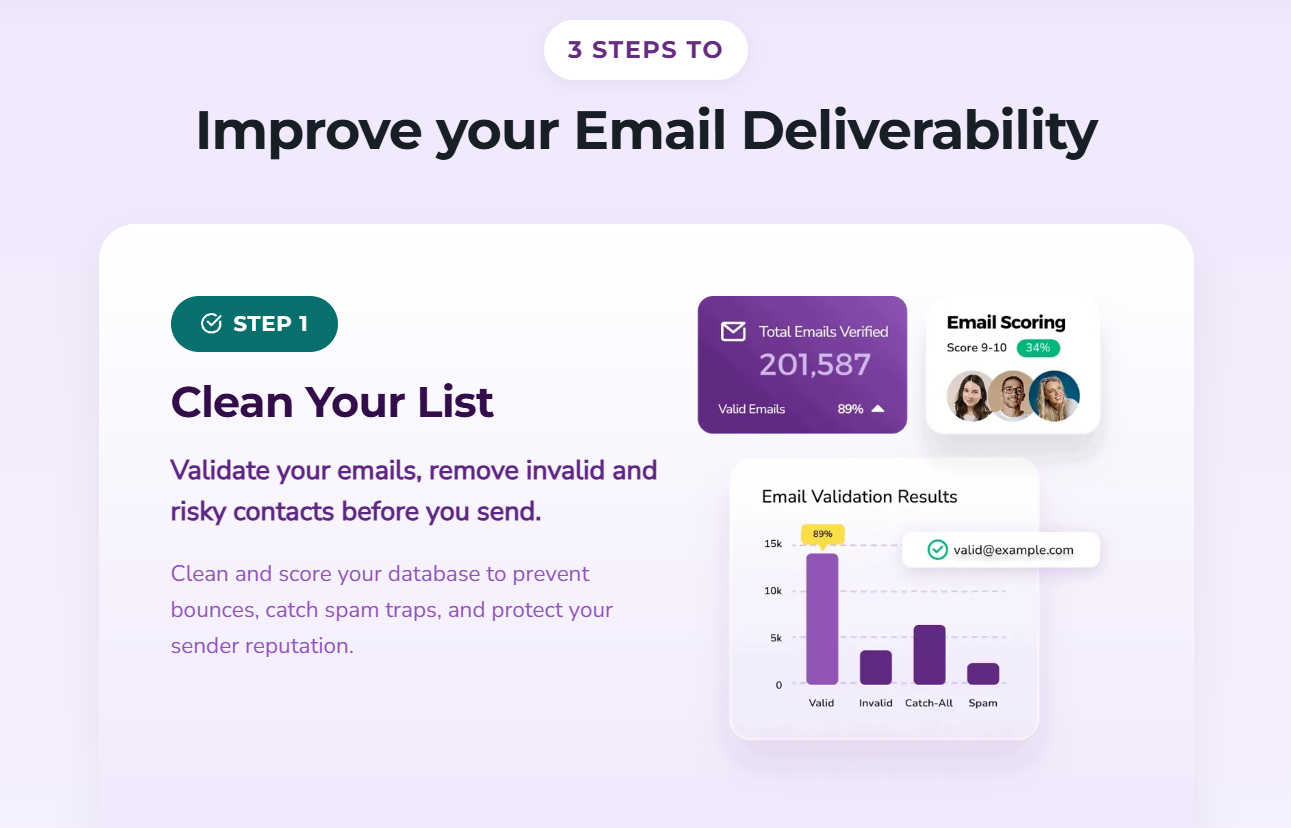
Why ZeroBounce Stands Out in 2026
One platform instead of four subscriptions: Most teams end up stitching together a verifier, a warmup tool, an inbox placement tester and a blacklist monitor from four different vendors. ZeroBounce consolidates all of it into one login with one credit pool. For a small marketing team, collapsing four tools into one is often worth more than a few dollars per thousand verifications.
You are never charged for “unknown” results: Every verifier occasionally hits a server that refuses to answer. Many competitors bill you for that non-answer. ZeroBounce doesn’t, and it reports an industry-low unknown rate of around 1.75% — meaning you get usable verdicts on more of your list and pay only for results you can act on.
Genuinely granular classification: A binary valid/invalid answer forces you to guess. ZeroBounce separates invalid addresses from spam traps, abuse complainers, disposable addresses, role accounts, toxic domains and catch-alls across 29 codes — so you can hard-delete one bucket, suppress another, and re-engage a third instead of nuking everything uncertain.
AI scoring that puts a number on the uncertainty: For catch-all and ambiguous addresses, the scoring engine rates each one from 1 to 10 on the likelihood of reaching a real person. It isn’t perfect — see the caveat above — but a graded confidence score lets you set your own risk threshold instead of discarding an entire segment, which is materially more useful than a shrug.
Speed that holds up on real list sizes: ZeroBounce publishes throughput figures rather than vague promises: roughly 250,000 addresses on popular domains in under ten minutes and a million in under 45, with mixed or obscure domain lists taking longer — around 2.3 hours for 250,000 and up to five hours for a million. Case studies back this up, including a 30,000-address list cleaned in about an hour.
An API developers actually praise: The validation API reports 99.99% reliability with a 1.09-second average response, wrappers for 16 programming languages, and 40-plus native integrations covering HubSpot, Salesforce, Klaviyo, Mailchimp, Zapier, WordPress, GoHighLevel and more. Reviewers on G2 repeatedly single out setup as easier than comparable tools.
Free extras that competitors charge for: Deduplication is included at no cost. So is list enhancement, which appends missing first name, last name, gender and location data where available — useful for segmentation you’d otherwise pay an enrichment vendor for.
Detection built for the 2026 inbox: The platform has begun flagging AI-managed mailboxes — addresses where an assistant, not a person, triages the mail. As AI inbox agents spread, knowing which of your contacts are filtered by software before a human ever sees them is a signal no legacy verifier was built to catch.
Key Features and Technology
The catalog is large enough to be confusing on first login. Here is how it actually breaks down by job.
Email Validation — the core engine
This is what you’re really buying. Upload a CSV or XLSX for bulk cleaning, paste a single address into the free verifier, or call the API in real time at the point of signup so bad data never enters your database at all. Each address comes back with a status, a sub-status and — where available — appended demographic data and IP geolocation. Real-time API validation on a form is arguably the highest-ROI way to use the product: it prevents the problem instead of cleaning up after it, and case studies show it stopping checkout-bot submissions that were driving bounce rates as high as 60%.
AI Scoring, Activity Data and Email Finder
Three tools that share the same credit pool as validation. AI Scoring grades valid and catch-all addresses 1–10 on likelihood of reaching a human. Activity Data tells you which contacts have actually opened or clicked anything in the last 30 to 180 days — the difference between a technically deliverable address and a live human being, and the fastest way to find the dead weight quietly dragging down your engagement metrics. Email Finder works the other direction, discovering B2B addresses from a name and company domain and validating them on the spot, with domain search for company-wide patterns.
Sender reputation: Warmup, Inbox Placement and Server Testing
Email Warmup automates positive interactions across a seed network to build trust for a new or dormant domain — essential before any cold outbound program, and the reason new domains get throttled when teams skip it. Inbox Placement Testing shows you where a specific email lands across major providers before you send it to the real list, so you can rewrite a subject line or strip a problem link while it still costs nothing. Email Server Testing audits SPF, DKIM, DMARC, DNS and server configuration — precisely the checklist Google, Yahoo and Microsoft now enforce for anyone sending 5,000 or more messages a day.
Inbox health: Blacklist Monitoring, DMARC Monitor and the Dashboard
Blacklist Monitoring scans your domain and IP against more than 200 global spam databases and alerts you on listing — with scans every eight hours on paid plans versus every 24 hours on free. DMARC Monitor surfaces who is authenticating mail as your domain and flags spoofing attempts, which matters both for security and for the DMARC record the major providers now expect. The Deliverability Dashboard pulls inbox placement, spam rates, authentication status and sending health into one view so problems surface before a campaign, not after.
Pricing, Plans, and Package Structure
ZeroBounce runs two models side by side. Pay-as-you-go credits carry no monthly commitment and never expire — buy a block, use it whenever. ZeroBounce ONE™ is a monthly subscription that bundles credits with the whole deliverability suite at a lower effective rate, with the trade-off that monthly credits don’t roll over. Annual billing cuts roughly 20% off the monthly rate, and subscribers get about 15% off any additional pay-as-you-go credits. Published figures vary between sources and by region, promo code and volume, so treat everything below as an approximate guide.
| Plan | Approx. Price | What You Get | Best For |
|---|---|---|---|
| Freemium | $0 / month | 100 validation credits monthly (refill each month, don’t expire), 1 inbox placement test, 1 email server test, 1 blacklist monitor, 10 Email Finder credits. No Activity Data, warmup or DMARC. | Testing real accuracy on a sample of your own list before spending anything |
| Pay-as-you-go (entry) | ~$0.008–0.01 per email, 2,000-credit minimum | One credit = one validation. Credits never expire. Unknown results free. Full API access included. | Quarterly cleans, one-off campaign prep, a single CRM import |
| Pay-as-you-go (volume) | ~$0.0035 per email at 100K; ~$0.00275 at 1M | Identical features at a steeply lower unit rate; extra ~15% off with autopay or an active subscription | Agencies, large database cleans, buying ahead of a launch |
| ZeroBounce ONE™ | From $99 / month | 10,000 validation/scoring credits, 250 warmup seeds daily, 100 inbox placement tests, 100 server tests, 10 blacklist monitors, 1 DMARC domain, 10,000 Email Finder searches, Activity Data, premium API limits, VIP 24/7 support | Teams sending consistently who want the full deliverability stack in one bill |
| Annual billing | ~20% below monthly | Same allowances, lower effective rate. Annual commitment is optional, not required. | Predictable, steady monthly volume you’ve already validated |
| Enterprise | Custom quote (above 1M credits) | Negotiated rates, sub-account management, advanced integrations, tailored onboarding, dedicated support | High-volume senders, ESPs, data providers, regulated industries |
How ZeroBounce Compares to Alternatives
| Factor | ZeroBounce | NeverBounce | Bouncer | MillionVerifier | No verification |
|---|---|---|---|---|---|
| Approx. cost per email | ~$0.008–0.01 entry, ~$0.0035 at 100K | ~$0.008 entry, ~$0.004 at 100K | ~$0.004–0.006 | Lowest in category, often a fraction of the above | $0 upfront, high cost in lost deliverability |
| Catch-all handling | AI score 1–10 (extra credits; imperfect) | Flagged, limited scoring | Confidence-scored | Basic bucket only | You find out by bouncing |
| Credit expiry | PAYG never expires; subscription resets monthly | Expiry window applies | Never expire | Never expire | N/A |
| Beyond validation | Warmup, placement tests, blacklist, DMARC, Activity Data, Email Finder | Mostly validation plus integrations | Deliverability kit sold separately | Validation and list cleaning only | Nothing |
| Compliance posture | SOC 2 II, ISO 27001, HIPAA, GDPR, CCPA | Standard enterprise compliance | EU-only data processing | Standard | Your risk entirely |
| Free tier | 100 credits every month, ongoing | One-time signup credits | Limited trial | Small trial allowance | N/A |
| Best for | Teams wanting accuracy plus a full deliverability stack | Deep ESP and CRM integration needs | EU data-residency requirements | Massive lists on the tightest budget | Nobody sending at volume in 2026 |
vs. NeverBounce: the closest like-for-like rival, with a similar entry price and a deep bench of native ESP and CRM integrations. The differences that decide it are credit expiry and scope: ZeroBounce’s pay-as-you-go credits never lapse, and it bundles warmup, placement testing and monitoring that NeverBounce leaves to other vendors. Multiple reviewers report switching specifically because NeverBounce returned too many “unknown” verdicts that later bounced. If you already live inside a NeverBounce-integrated stack and want validation only, it remains competitive.
vs. Bouncer: the strongest choice for European teams, because Bouncer processes all data inside the EU by default — which removes data residency from your legal review entirely. Its catch-all confidence scoring is genuinely good and its pricing sits below ZeroBounce. What you give up is breadth: Bouncer’s deliverability tooling is sold as separate add-ons rather than one bundled platform. If GDPR data residency is a hard requirement, weigh it seriously.
vs. MillionVerifier and the budget tier: the price gap is real and large — budget verifiers can run several times cheaper per address. The gap in independent accuracy testing is smaller than the price gap but not trivial, generally a couple of percentage points, and at scale a 2% accuracy difference is the distance between a safe bounce rate and one that trips a provider threshold. The honest framing: for low-stakes internal lists or a cheap second pass, budget tools are fine. For cold outbound to fresh prospects, or any list where burning a sending domain would genuinely hurt, the premium buys insurance, not just data.
Pros and Cons
What Users Love
Bounce rates drop, visibly and fast: this is the consistent theme across hundreds of reviews and the published case studies — one company went from a 19% bounce rate to 0.85%, another from 15% to about 1%, an agency from 16–20% down to 0.3–0.8% across every client account it manages. Whatever the accuracy debates, the core job gets done.
The API is the easy one: reviewers repeatedly describe setup as cleaner and faster than competing tools, with clear documentation, wrappers across 16 languages and a fast, stable response time. Developers rarely volunteer praise for a vendor API; here they do.
Support that actually answers: 24/7 coverage via chat, email and phone, with published averages of roughly 20 seconds to reach live chat and 17 minutes for a reply. In a category where support tickets often decide whether a campaign ships on time, that’s a real advantage.
Free credits that keep coming: 100 validations refill every month rather than expiring as a one-time trial. For a solo founder or a small blogger, that alone may cover the whole need — and for everyone else it’s a genuine way to test accuracy on your own data before paying.
No charge for non-answers, no charge for duplicates: unknown results are free, deduplication is free, and data enhancement is free. Small things that quietly reduce the real cost per usable record.
Compliance you can hand to legal: SOC 2 Type II, ISO 27001, HIPAA, GDPR, CCPA and DPF, with a 30-day data retention limit. For regulated industries and enterprise procurement, this shortens the review from weeks to a form.
Limitations Worth Knowing
Catch-all results still need your judgement: the most repeated criticism across G2, Capterra and independent testing. Valid business addresses on newer or catch-all domains get flagged as risky, and fictional addresses on accept-all domains get through as valid. AI scoring narrows the gap but doesn’t close it. Plan a manual review step for catch-all-heavy B2B segments.
The real accuracy is below the headline number: 99.6% is the marketing figure; independent tests generally land in the 96–98% band. That’s still strong, but you should budget for it rather than expecting a zero-bounce list.
Costs compound at scale: “reliable but not the best pricing” is close to consensus above roughly 20,000–50,000 addresses a month. Catch-all scoring charges again on top of validation — a frequent source of frustration in reviews — and Email Finder burns 20 credits per successful query. Multiple teams uploading lists without oversight will drain a balance quickly.
Subscription credits don’t roll over: if you buy 10,000 monthly and use 6,000, the remainder is gone. Only the pay-as-you-go credits are permanent. Choose the wrong model for your sending rhythm and you’ll pay for capacity you never touch — and some users reported their costs rising when they moved onto the bundled subscription.
The interface is dense: functional and well organised, but feature-heavy and visually behind newer competitors. More than one reviewer described it as overwhelming for less technical users. Expect a short learning curve before the dashboard makes sense.
Large mixed-domain lists take hours, not minutes: the sub-ten-minute figures apply to popular domains like Gmail. A million obscure or international domains can take around five hours. Fine if you plan ahead, awkward if you’re validating an hour before a send.
Isolated account-handling complaints: a small number of Trustpilot reviewers have reported accounts suspended with credits still on the balance. These are outliers against thousands of positive reviews, but if you’re buying a large credit block, it’s worth knowing the risk exists and keeping your purchase records.
Who Should Use ZeroBounce
Email marketers and ecommerce brands: if your revenue runs through Klaviyo, Mailchimp or HubSpot, a dirty list costs you twice — once in ESP fees for dead contacts, once in the deliverability damage that pushes your good emails to Promotions. Clean quarterly with pay-as-you-go credits, and wire the API into your signup forms so junk never enters.
B2B sales and cold outbound teams: your domains are the asset, and one bad campaign can burn one. Warmup plus verification plus inbox placement testing is the right combination here, which makes ZeroBounce ONE™ the sensible plan — with the caveat that catch-all-heavy prospect lists still need a human eye.
Agencies managing multiple client senders: team accounts with role permissions, blacklist monitoring across client domains, and volume credit rates make this a natural agency fit. Buy credits in bulk at the lower tier and allocate across accounts rather than subscribing per client.
Developers and SaaS teams: real-time API validation at signup is the highest-value implementation of this whole product. It blocks disposable addresses, typos and bot submissions before they reach your database. Start on the free tier to test, then move to pay-as-you-go as traffic grows.
Regulated industries and enterprise: healthcare, finance and legal teams that need HIPAA, SOC 2 Type II and ISO 27001 on the vendor questionnaire will find the compliance stack does most of the procurement work. Enterprise pricing with sub-accounts opens above a million credits.
Who should probably look elsewhere: if you’re cleaning enormous low-stakes internal lists purely on cost, a budget verifier will do the job for a fraction of the price. And if EU-only data processing is a legal requirement rather than a preference, an EU-resident competitor is the cleaner answer.
Getting Started: Step by Step
- Create the free account first. No card required, and you get 100 validation credits that refill monthly, plus one inbox placement test, one server test, one blacklist monitor and ten Email Finder credits. Sign up with a business domain to unlock the full free allowance.
- Test on a real sample, not a clean one. Pull 100 addresses from your messiest segment — old signups, an imported list, a catch-all-heavy B2B slice — and run them. Compare the verdicts against addresses you already know are good or dead. This tells you more about fit than any review.
- Run the free list evaluator on the whole database. Before spending credits, the evaluator gives you a rough picture of how bad the problem is, which tells you how many credits you actually need to buy.
- Choose your model deliberately. Occasional or unpredictable cleaning means pay-as-you-go, because those credits never expire. Consistent monthly volume plus real use of warmup and monitoring means ZeroBounce ONE™. Getting this wrong is the most common way people overpay.
- Clean in bulk, then act on the codes. Upload your CSV or XLSX and wait for processing. When results arrive, don’t just keep “valid” — hard-delete invalids and spam traps, suppress abuse and disposable addresses, and hold catch-alls in a separate segment for scoring or manual review.
- Connect the API or a native integration. Wire real-time validation into your signup and checkout forms, or connect the native integration for your ESP or CRM. This is what stops the list from re-degrading, and it’s where the tool pays for itself over time.
- Set up monitoring and re-clean on a schedule. Turn on blacklist monitoring and the server test to confirm SPF, DKIM and DMARC are correct, then re-verify before every major campaign. Email data decays at roughly 2–3% a month as people change jobs, so even a clean list goes stale within a quarter.
Tips for Getting Maximum Value
Buy credits in the largest block you’ll realistically use — since pay-as-you-go credits never expire and the unit rate falls steeply with volume, a single bulk purchase before a launch can halve your effective cost versus a dozen small top-ups, and the autopay discount stacks on top. Check for an active promo code before checkout; ZeroBounce runs them regularly and the listed rate is often not the lowest available. Don’t score every catch-all reflexively: scoring consumes extra credits, so reserve it for segments where the revenue justifies the spend and simply suppress the rest. Watch the Email Finder especially closely at 20 credits per successful query, and set expectations with anyone else on the account before they start prospecting. Use Activity Data to find contacts who are technically deliverable but haven’t opened anything in six months — removing them lifts engagement more than any subject line rewrite. And treat verification as recurring maintenance, not a one-time project: re-clean quarterly at minimum, and pair it with the real-time API so you’re maintaining a clean list instead of repeatedly rescuing a dirty one.
Future Outlook and Final Assessment
The tailwinds behind this category are structural rather than cyclical. The bulk email verification market is estimated at roughly $1.35–1.40 billion and growing at a healthy double-digit clip, driven directly by the enforcement regime that Google and Yahoo introduced and Microsoft joined: authenticated domains, one-click unsubscribe, and complaint rates that must stay below 0.3% with 0.1% as the recommended ceiling. Non-compliance no longer means a nudge toward the spam folder — it increasingly means permanent SMTP rejection, with compliant senders averaging far higher inbox placement than those who ignored the deadline. Every one of those requirements makes list hygiene mandatory rather than optional, and ZeroBounce’s decision to expand from verifier to full deliverability platform reads as the right bet on where the market is heading. Its early work on detecting AI-managed mailboxes suggests it’s also tracking the next shift, as inbox agents start filtering mail before humans ever see it.
The honest caveats stand. It is a premium-priced product in a market where budget alternatives are several times cheaper. Catch-all domains remain genuinely difficult, and independent testing puts real-world accuracy meaningfully below the advertised figure. Credit consumption across scoring and Email Finder can outpace expectations, and the subscription model punishes irregular senders. But within those boundaries, ZeroBounce is one of the most complete, best-supported and most thoroughly compliance-ready platforms in the category — and for anyone whose business depends on email actually arriving, the premium is small next to the cost of a burned sending domain.
Conclusion
Email is still the highest-ROI channel most businesses have, and in 2026 it’s also the most conditional — it only works if your messages arrive. ZeroBounce has spent a decade building the infrastructure that makes that happen, growing from a list cleaner into a platform that verifies, warms, tests and monitors across the whole sending lifecycle. It isn’t the cheapest option and it isn’t infallible on catch-all domains, and this review has been deliberate about saying so. But it’s accurate where it counts, well supported, seriously compliant, and confident enough to hand you 100 free validations every month to test the claims against your own list first. Good software should make everything easy, and for anyone whose business runs on the inbox, ZeroBounce comes genuinely close.
Ready to stop bouncing and start landing in the inbox?
Explore more honest reviews, tutorials and tool comparisons to find the right tech for the way you work and live — at AI Solutes, where we make everything easy.
👉 Open Free Account: https://ai-solutes.com/zerobounce
👉 Our Website: https://ai-solutes.com/
👉 Our YouTube Channel: youtube.com/@ai-solutes
👉 Our Facebook Fanpage: Facebook
👉 Our X (Twitter): @AISolutes
- Discover the Best Nina Shoes for Bridal Elegance: Ultimate Guide to 2026 Wedding, Dress, and Evening Footwear
- Ditch High Failure Rates and Elevate Data Extraction Accuracy with SOAX?
- Real-time Development Platform Unity: A Comprehensive Overview of Features, Capabilities, and Supporting Ecosystem
- Can Ollie Dog Food Thrive? Evaluating the Ollie Subscription Pet Diet
- Discover the Future of Smart Mirrors: AI-Powered Mirrors vs Traditional Smart Mirrors 2025 – Innovation, Health, and Privacy Insights















