

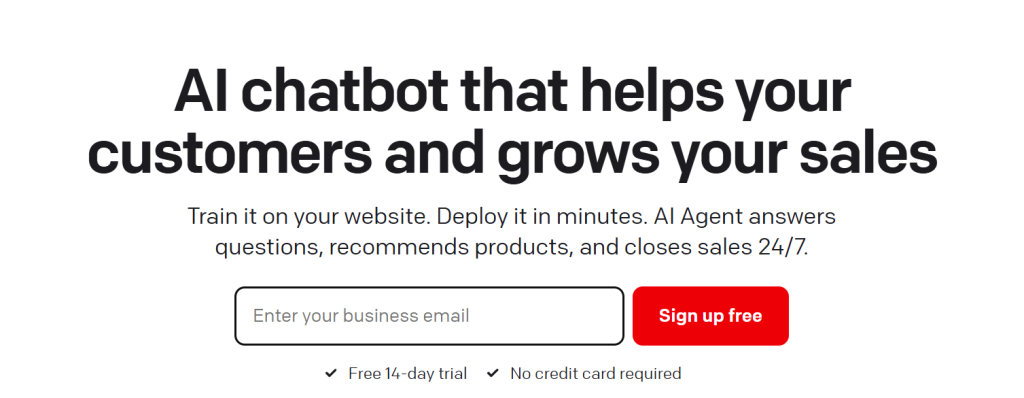
If your website’s live chat widget still routes every question to a human, you’re paying salary-level costs for work that a well-trained AI Agent can now handle around the clock. That’s the exact gap ChatBot.com was built to close. ChatBot.com is an AI Agent platform from Text (the company behind LiveChat) that trains itself on your website, help center, and product docs, then answers customer questions, recommends products, and closes sales without a developer ever touching code. With plans starting at $19 per user per month, a customer base of over 35,000 brands including Toyota, Adobe, and Mercedes-Benz, and case studies showing six-figure revenue lifts from AI-driven chat, ChatBot.com has become one of the most complete answers to a question every growing business eventually asks: why is our support team still typing the same answer for the hundredth time this month?
For e-commerce store owners, SaaS founders, marketing teams, and support leads who are tired of choosing between “hire more agents” and “let customers wait,” ChatBot.com offers a genuine middle path. This 2026 review walks through what ChatBot.com actually is, how its AI Agent and Copilot tools work, full current pricing, how it stacks up against Intercom, Tidio, and Chatbase, the honest limitations you should know before buying, and exactly who gets the most value from it.
ChatBot Review 2026: The AI Agent Platform That Turns Support Chat Into a Sales Channel
Overview and Background
ChatBot.com is a no-code AI chatbot platform built by Text, the parent company behind the well-known live chat tool LiveChat. Rather than a standalone rule-based bot, ChatBot.com is positioned as an “AI Agent”: a system you train on your own website, help center, and product documentation, which then holds natural-language conversations with visitors, answers support questions, and actively recommends products during the chat. The platform is now bundled inside the broader Text customer service growth suite, meaning a ChatBot.com subscription also includes a shared inbox, ticketing system, and workflow automation rather than just a chat widget.
The company’s traction is substantial: ChatBot.com is used by more than 35,000 brands, including household names like Toyota, Unilever, Adobe, PayPal, and Mercedes-Benz. Case studies are a genuine strength here rather than marketing filler — Wembley Stadium’s e-commerce team reported over $1.5 million in added revenue in eight months after implementing ChatBot.com, and hair-care brand Hairlust cut communication time by 20% across 13 country-specific storefronts using the same AI Agent.

Why ChatBot Stands Out in 2026
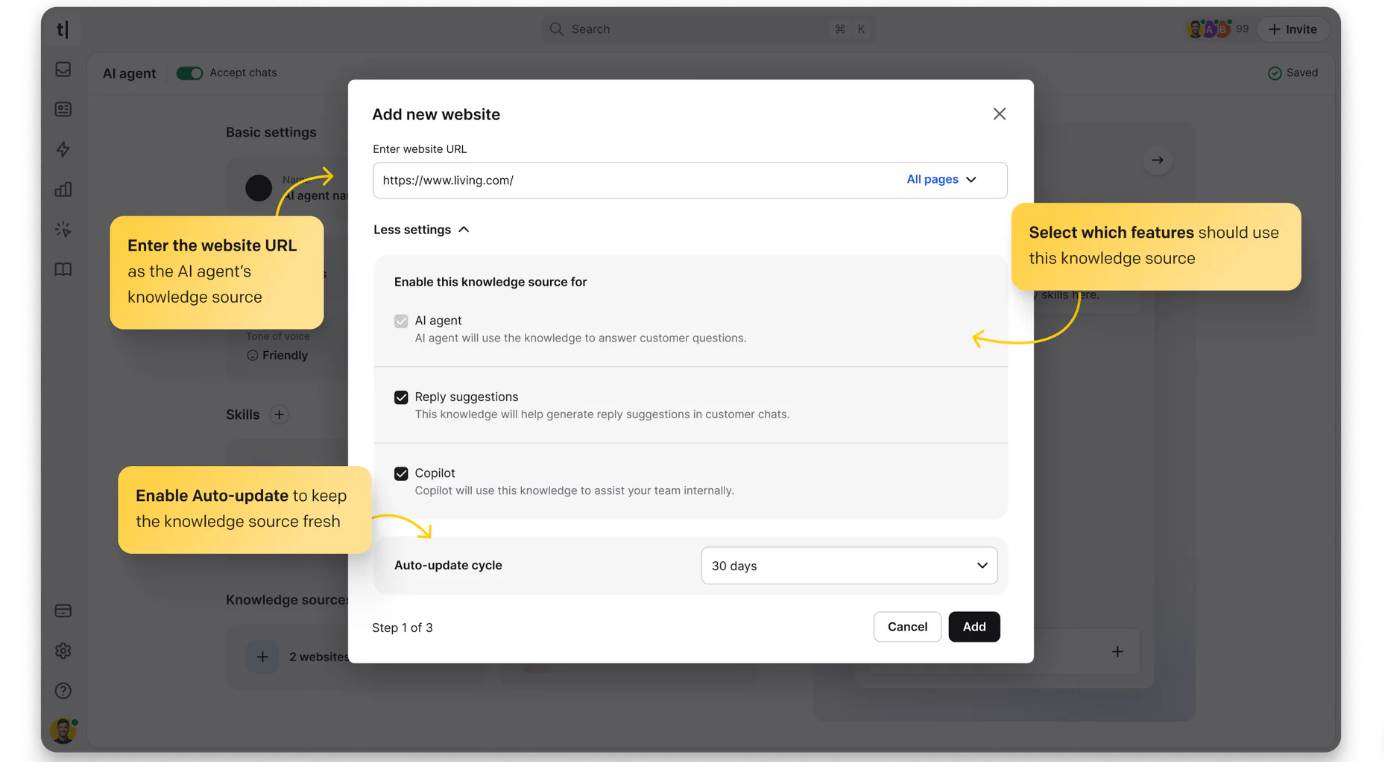
Genuinely no-code training: You don’t upload a spreadsheet of question-and-answer pairs. You paste your website URL, and ChatBot.com scans it, along with any help center articles or uploaded PDFs, to automatically build a working knowledge base within minutes. Most teams are live the same day they sign up.
The AI Agent is built to sell, not just answer: Where many chatbot tools stop at answering FAQs, ChatBot.com’s AI Agent actively spots buying signals mid-conversation — hesitation at checkout, bulk inquiries, product comparisons — and responds with product recommendations or discount codes. Text reports an average order value of $430 on AI-closed sales and roughly $11,000/month in extra revenue for active e-commerce users.
Real live Shopify catalog sync: For Shopify merchants, the AI Agent sees your actual product catalog, prices, variants, and stock levels in real time, so it never recommends something that’s sold out or mispriced. Combined with cart recovery campaigns and a checkout-page chat widget, this is a meaningfully deeper e-commerce integration than most competitors offer at this price point.
AI Copilot for your human agents: Every seat also gets an AI assistant that drafts replies, summarizes long chat threads, and suggests tags, so agents aren’t starting every ticket response from a blank box. This matters even on plans where the AI Agent itself has a low resolution cap.
Multilingual out of the box: The AI Agent detects a customer’s language automatically and replies in it, supporting 48 languages. For brands running multiple regional storefronts — like Hairlust’s 13 country domains — this removes a translation workflow that would otherwise require separate bots per market.
Predictable per-seat pricing with clear overage costs: Instead of the opaque per-conversation or per-message billing that many AI chatbot vendors use, ChatBot.com charges a flat rate per user seat, with a defined number of included AI resolutions and clearly priced top-up packs when you exceed them. You can budget around this even if it isn’t the cheapest model at scale.
MCP server for AI-to-AI connections: ChatBot.com now ships an MCP server on every plan, letting you connect external AI tools like Claude or ChatGPT directly to your ticket and chat history for custom automation. It’s a forward-looking feature most legacy help desk platforms haven’t shipped yet.
Key Features and Technology
ChatBot.com bundles four distinct product layers into one subscription: the AI Agent itself, a live chat and ticketing inbox, sales-focused e-commerce tools, and reporting. Here’s how each one works in practice.
AI Agent and Knowledge Base
The AI Agent pulls from a central knowledge base fed by your website, help articles, uploaded PDFs, and internal docs (up to 50 MB per file). It holds conversation history so it doesn’t ask a customer to repeat themselves mid-chat, adapts its tone of voice from professional to casual, and personalizes replies using account and purchase data. You can build up to 10 custom “skills” per agent, essentially if-this-then-that rules like “offer a 10% discount when a customer mentions a competitor.”
Inbox, Tickets, and Human Takeover
Every conversation — whether it starts on website chat, Messenger, or as an emailed ticket — lands in one shared inbox. Human agents can watch AI conversations live, whisper guidance, or take over instantly with chat supervision (Growth plan and above). Internal notes, canned responses, and automated ticket routing rules keep teams from duplicating work.
Selling Through Chat
This is where ChatBot.com differentiates itself from pure support bots. Live cart previews, buying-intent detection, proactive chat invitations, and a Shopify checkout widget are all built to convert a support conversation into a sale, with a dedicated sales report that ties revenue and average order value back to the specific chat that closed it.
Integrations and Channels
Native integrations cover Shopify, WordPress, Webflow, BigCommerce, Squarespace, Wix, Slack, Zapier, and Facebook Messenger, alongside SMS via Twilio. Every plan includes API access and the newer MCP server for connecting external AI models.

Pricing, Plans, and Package Structure
ChatBot.com uses per-seat pricing billed either monthly or yearly (yearly saves roughly 24%). There is no permanent free plan, only a 14-day free trial. The figures below are current as of mid-2026 — always confirm live pricing on the official site before purchasing, since SaaS pricing and included limits change often.
| Plan | Price (per user/mo) | AI Resolutions Included | Best For |
|---|---|---|---|
| Essential | ~$19 (yearly) / ~$25 (monthly) | 10/month | Solo founders and small teams testing AI chat for the first time |
| Growth | ~$79 (yearly) / ~$99 (monthly) | 200/month | Scaling support and e-commerce teams that want reporting, chat supervision, and unlimited chat history |
| Enterprise | Custom (contact sales) | 2,000+/month, custom | Larger organizations needing SSO, audit logs, SLAs, and white-label branding |
Beyond the seat price, two add-on costs matter: extra AI resolutions cost roughly $0.99 each, or about $49.50 for an auto-refilling 50-pack, and extra API calls run about $29.50 per 100,000. Neither is expensive in isolation, but a growing store that outpaces its Essential-plan resolution cap can see its bill climb quickly, which is exactly the “advertised vs. actual cost” gap independent pricing guides have flagged for this category.
How ChatBot Compares to Alternatives
| Platform | Starting Price | Pricing Model | Standout Strength |
|---|---|---|---|
| ChatBot.com | ~$19/user/mo | Per seat + AI resolutions | E-commerce sales features, live Shopify sync, no-code setup |
| Intercom (Fin AI Agent) | Custom, plus ~$0.99/resolution | Per-resolution AI + seat fees | Enterprise-grade resolution rates and mature help desk ecosystem |
| Tidio | Free plan; Lyro AI add-on ~$39/mo | Freemium + AI add-on | Lower entry cost for very small Shopify stores |
| DIY / manual live chat only | $0 tool cost + staff time | Hourly wages | No automation risk, but doesn’t scale past business hours |
vs. Intercom: Intercom’s Fin AI Agent is a strong choice for larger support organizations already inside Intercom’s ecosystem, but its per-resolution pricing on top of per-seat licensing tends to get expensive at volume. ChatBot.com’s flat per-seat model with bundled resolutions is generally easier for a small-to-mid-size team to forecast.
vs. Tidio: Tidio’s free tier and lower-cost Lyro AI add-on make it attractive for a solopreneur just starting out, but ChatBot.com’s deeper e-commerce sales tooling — live cart preview, checkout widget, sales attribution reports — is built for a team that already has real order volume to protect and grow.
vs. staying manual: A team relying only on human live chat has no AI resolution costs, but also no 24/7 coverage and no ability to recover an abandoned cart while everyone is asleep. For any business doing meaningful online sales volume, the ROI case for AI-assisted chat is usually straightforward within the first quarter.
Pros and Cons
What Teams Love
Fast, no-code setup: Reviewers consistently note that a working chatbot can be live the same day, without developer help, using nothing more than a website URL and a copy-pasted widget snippet.
Real revenue impact for e-commerce: The combination of live cart data, buying-intent detection, and sales attribution reporting gives store owners a rare, directly measurable ROI from a support tool.
Polished, modern interface: Independent reviewers on GetApp and Capterra frequently praise the clean interface and multi-channel setup — website, Messenger, Slack, and live chat handled from one inbox.
Reliable at scale: Long-time customers report years of stable use with minimal downtime issues, which matters for a tool sitting on the front line of customer experience.
Limitations Worth Knowing
No permanent free plan: Unlike some competitors, there is no free tier to fall back on after the 14-day trial ends — only a paid subscription starting around $19–25 per seat.
Per-seat costs multiply fast: Because pricing is per user, a support team of five or six agents on Growth can pass $400–500/month before any AI resolution overages are added.
Struggles with genuinely complex questions: Reviewers across multiple platforms note that while the AI handles routine, well-documented questions confidently, it can give generic or slightly off-target answers on nuanced, multi-step customer issues, and still needs a human safety net for those cases.
Overage packs add friction: Hitting your monthly AI resolution cap triggers an automatic $49.50 top-up rather than a hard stop, which is convenient for uptime but means an unexpectedly busy month can add a real line item to your bill without warning.
Who Should Use ChatBot
Shopify and e-commerce store owners get the clearest ROI here thanks to live catalog sync, cart recovery, and checkout-page chat — the Growth plan is the natural starting point once you’re past a handful of orders a day.
Small support teams drowning in repetitive tickets can use the Essential plan to test whether AI resolution genuinely cuts their ticket backlog before committing to a bigger seat count.
Marketing and lead-gen teams can lean on proactive chat invitations and campaign tools to qualify leads on landing pages without building a separate chatbot tool.
Multi-brand or multi-region businesses benefit from the 48-language support and multiple website widgets included from the Essential tier up, letting one account cover several storefronts.
Enterprises with compliance requirements should go straight to the Enterprise plan for SOC 2, GDPR, CCPA alignment, SSO, and audit logs rather than trying to make Growth work.
Getting Started: Step by Step
- Start your 14-day free trial on ChatBot.com — no credit card is required, and full AI Agent features are unlocked immediately.
- Paste your website URL so the platform can scan your pages, help center, and product docs to auto-build a knowledge base.
- Add the chat widget to your site with a single copy-pasted code snippet, or use the direct Shopify or WordPress integration.
- Customize your AI Agent’s tone and skills — pick a voice from professional to casual, and set up your first custom skills for discounts, escalations, or product recommendations.
- Connect additional channels like Messenger or SMS if you need to support customers beyond your website.
- Test the bot yourself using the built-in testing tools before publishing it live to real visitors.
- Review your AI resolution usage weekly during the trial so you pick the plan that actually matches your volume before the trial ends.
Tips for Getting Maximum Value
Pay yearly if you can commit — the roughly 24% discount on both Essential and Growth plans is one of the easiest savings available, and you can still cancel at renewal if it isn’t working out. Feed the AI Agent your most detailed help center content first, since resolution quality is directly tied to how complete your knowledge base is; a thin FAQ page produces vague answers no matter how good the underlying model is. Watch your AI resolution count closely in month one before deciding between Essential and Growth, since the jump from 10 to 200 monthly resolutions is the single biggest value difference between the two plans, not the extra reporting features. If you run Shopify, prioritize setting up the live catalog sync and cart recovery campaigns immediately rather than treating ChatBot.com as a pure support tool — that’s where the platform’s ROI case is strongest. Finally, don’t skip the human takeover setup: reviewers consistently flag that the AI struggles with complex, emotionally charged, or multi-step issues, so a clear escalation path protects your customer experience even as automation handles the routine volume.
Future Outlook and Final Assessment
AI-driven customer service is one of the fastest-growing categories in SaaS, and ChatBot.com’s parent company Text has clearly been iterating quickly — the addition of an MCP server, chat topic insights, and sales-attribution reporting all point to a platform investing in staying ahead of a crowded field of AI chatbot vendors. The honest caveats remain real, though: this is a per-seat, paid-only product with no permanent free plan, and the AI still needs a human safety net for anything outside routine, well-documented questions.
Conclusion
ChatBot.com earns its place among the leading AI chatbot platforms in 2026 by doing something a lot of competitors talk about but few execute well: turning routine support conversations into a measurable sales channel, without requiring a developer to set it up. It isn’t the cheapest option on the market, and the per-seat pricing means costs grow with your team, but for e-commerce brands and support teams that are ready to automate the repetitive 80% of their conversations, the platform delivers a genuinely strong return. Whichever tool you choose, the goal at AI Solutes is always the same — helping you find the right technology for how your business actually works, because we believe in making everything easy.
Ready to let AI handle your repetitive support chats and start closing more sales?
Explore more honest reviews, tutorials and tool comparisons to find the right tech for the way you work and live — at AI Solutes, where we make everything easy.
👉 Start Your Free Trial: https://ai-solutes.com/chatbot
👉 Our YouTube Channel: youtube.com/@ai-solutes
👉 Our Facebook Fanpage: Facebook
👉 Our X (Twitter): @AISolutes
- Supercharge Your Job Hunt with Jobscan AI – The Ultimate Resume Optimization Tool
- Dominate Local Ecommerce with Pippit AI: Regional SEO & Personalized Video Automation Strategies
- Master CapCut Trending Templates: Mobile vs Desktop Editing and AI Workflow Secrets for Viral Videos in 2025
- Unlock Creative Growth in 2025 with Vecteezy’s AI Editor, Asset Library, and Transparent Licensing
- Find the Best Cheap Proxies in 2026: Top Affordable Providers for SEO and Web Scraping















