In today's digital landscape, choosing the right AI video editing tool is essential for content creators, teams, brands, and agencies alike. With powerful automation, advanced subtitle capabilities, and scalable workflow options, editors like Veed.io and CapCut are competing head-to-head in 2025 for your attention and your creative output. This deep dive is designed to guide you through their features, strengths, and workflows in a visually enhanced format. Below you'll find tables, blockquotes, and resource links transformed for clarity and impact, ensuring your reading experience is both informative and visually engaging.
Veed.io vs CapCut 2025: The Ultimate Feature-by-Feature AI Video Editor Comparison
Veed.io vs CapCut Feature Comparison Table
Alright, let’s kick things off with a bird’s-eye view. Before we get lost in the nitty-gritty details, it just makes sense to see how these platforms line up. Here's a side-by-side table that quickly makes it clear where Veed.io and CapCut rule—and where they might leave you wanting more. This table isn’t just about features—it’s your shortcut to knowing which tool is the best fit for your workflow or business.
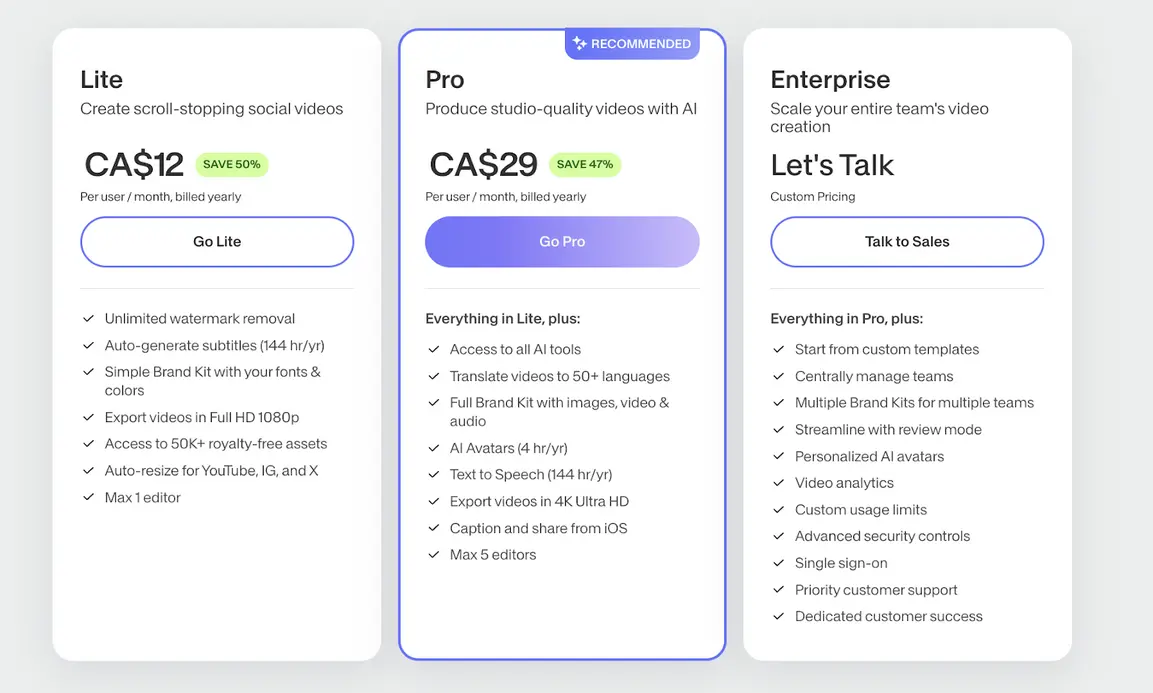
Key Takeaways from the Table:
- Core AI Automation: Both Veed.io and CapCut leverage AI to simplify editing tasks. But Veed.io really steps up the automation game, letting you breeze through editing bottlenecks—think batch resizing, lightning-fast color grading, and instantly-generated subtitles.
- Subtitle Capabilities: If subtitles are your jam (and honestly, they should be in 2025), Veed.io takes the crown. It nails automatic captioning, supports a stunning range of languages, and brings transcription accuracy even when voices are fast or accented.
- Teamwork & Workflow: Veed.io was clearly designed for groups—its detailed version histories and full-on brand kits make managing teams, agencies, or clients feel way less chaotic. CapCut, on the other hand, is all about solo creators who need speed, not committees.
- Interface: Veed.io’s dashboard is modern, clean, and super intuitive for beginners and pros alike. CapCut, meanwhile, is laser-focused on mobile-first, lightweight simplicity—the kind you can edit on while grabbing coffee or between Zoom calls.
Who Benefits Most?
- Teams, Agencies, and Brands: If you need everyone on the same page (and the same brand colors), Veed.io's collaborative experience is a lifesaver.
- Solo Creators and Mobile Marketers: CapCut shines when you’re editing on a phone, knocking out clips while you’re on the train or at a music festival.
- Creators Scaling Up with Automation: If you want to hand off as much grunt work to AI as possible, Veed.io’s workflow automation and smart subtitle tools give you serious leverage as you grow.
- Those Watching the Wallet: CapCut’s free version is undeniably attractive, but you sacrifice advanced team tools and automation you’ll find in Veed.io’s pro plans.
This top-level comparison is your go-to roadmap for choosing. But features don’t tell the whole story—let’s dive deeper into what really makes these platforms tick, starting with a look at their AI subtitle smarts and visual UX.
Visual Highlight: Automatic Subtitle Generation and AI Accessibility
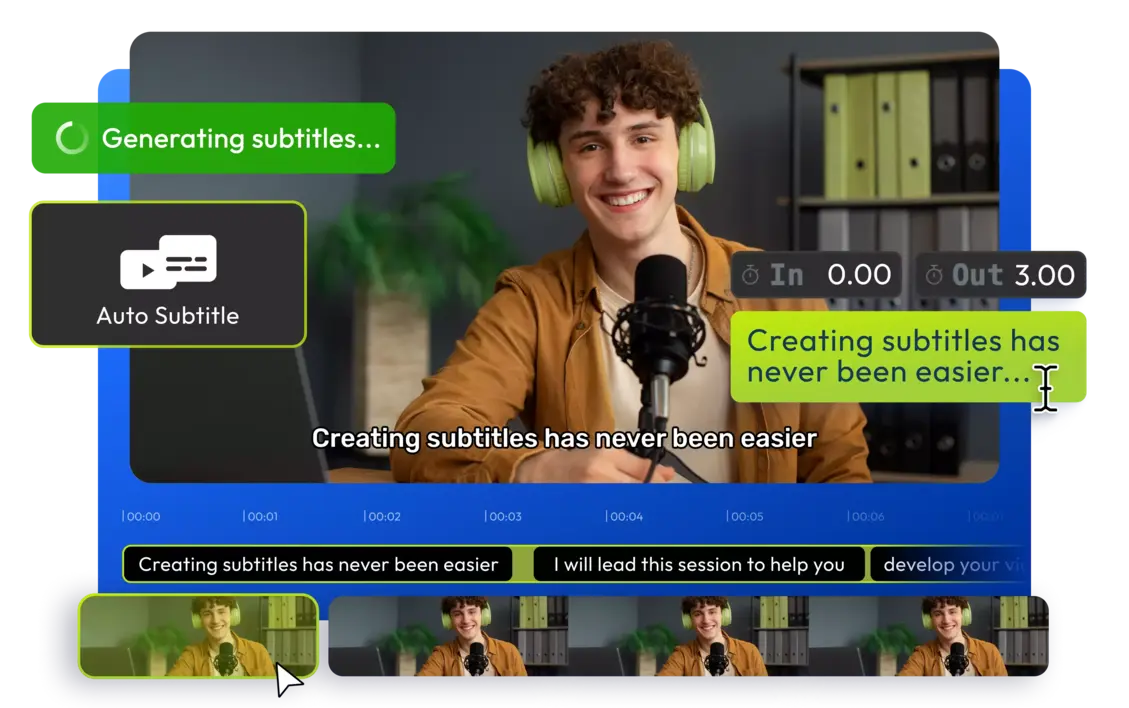
Let’s talk subtitles. Once an “extra” for accessibility, captions are now a must-have—whether your viewers are scrolling with the sound off or you want your content to reach audiences around the globe. Think about it: how many times have you watched a video in public without headphones, or scrolled through TikTok in bed with the audio off? Subtitles are now non-negotiable for reach and retention—and AI-powered creators know that time spent on manual transcription is time lost.
How Veed.io Leads with On-Demand AI Subtitles
1. Speed and Ease
- One-Click Subtitles: Upload your video, click a button, and boom—captions in over 100 languages. No more copy-pasting into third-party transcribers or wrestling with clunky subtitle files.
- Customization: Want a viral TikTok “bubble” subtitle, custom font, or brand color? Veed.io lets you tweak fonts, styles, and positions in an interface even beginners can navigate.
- Batch Processing: Need to subtitle a mountain of videos? Knock them all out in one go and get back to your actual creative work.
2. Accuracy & Language Support
- Advanced Speech Recognition: Veed.io’s AI understands a dizzying array of accents, dialects, and background noise, so you’re not endlessly fixing cringe-worthy captions.
- Translation & Transcription: Auto-translate captions into other languages, making your content instantly global—even if you barely remember high-school Spanish.
3. Social and Marketing ROI
- Boosts Engagement: Fun fact: according to research, videos with subtitles are watched 80% longer than those without. Why? Because captions help EVERYONE—those with hearing loss, scrollers in silent mode, and even non-native speakers.
- SEO Advantages: Search engines are learning to index subtitle text, giving your videos a bump in discoverability (yup, your captions can help you rank higher).
“Automated subtitles are redefining video accessibility, opening up content to a global, multi-lingual audience while saving creators hours per project.”
– AI Video Accessibility Advocate, 2025
Let’s be honest, CapCut’s subtitle feature is decent for quick clips, but if you’re publishing for a business or need flawless accuracy, you’ll find yourself spending extra time correcting errors—especially in longer or complex videos.
Automated subtitles aren’t just a convenience—they’re a content superpower. Next, let’s look at how Veed.io’s dashboard keeps teams (big and small) moving faster, with fewer headaches.
Unified Dashboard: Centralized AI Video Editing for Teams and Brands
Juggling a dozen browser tabs, endless “finalfinalv2.mp4” versions, and Slack messages from your team? You know that pain. That’s why a killer dashboard isn’t just nice—it’s mission-critical for modern content production. Veed.io’s centralized workspace is like a command center for modern video creators and agencies aiming for both speed and quality at scale.

Veed.io’s Dashboard: All-In-One Creative Command Center
Features:
- AI Workspace: Your hub for everything—editing timelines, dragging in subtitle recognizers, adding assets, and leaving feedback on the fly, all in one browser tab.
- Brand Kit Integration: Load your company’s fonts, colors, logos, and preferred styles, and lock them in so every exported video rocks the right look—no matter which team member edits it.
- Collaboration: Real-time editing with comment threads and full version control. Got a picky manager or a faraway client? Loop them in with shareable links and time-stamped feedback.
- Work-in-Progress Controls: Share view-only previews or keep content hidden until it’s fit for the world. You control who sees what—and when.
User Impact:
- Increased Output: No more hopping from app to app. You edit, subtitle, collaborate, and approve—all in one place, which means more content gets shipped, faster.
- Fewer Errors: Brand kit features help eliminate off-brand backgrounds or outdated intros. Consistency suddenly becomes automatic, not a teamwide struggle.
- Client Management: Ditch the endless email attachments. Manage approvals, feedback, and even revisions directly in the dashboard—saving everyone a ton of time.
Real talk: CapCut does all right for solo editing, but if you’re managing a multi-person workflow, you’ll feel the pinch. For agencies juggling clients or in-house marketing teams running big campaigns, the lack of true team features in CapCut is a dealbreaker.
The dashboard isn’t just a tool—it’s your creative headquarters. But the real magic happens when you use these tools to turn a single video into a multi-platform machine. Let’s see how video repurposing works with a little AI help.
Automated Social Video Repurposing: Scale Audience Reach with a Single Click
Picture this: You spend hours perfecting a YouTube tutorial, but now you need bite-sized snippets for TikTok, Instagram Reels, and even a teaser for LinkedIn. Historically, this means manually cropping, resizing, and subtitling for each platform. But in 2025, that should be ancient history—and Veed.io is making that vision real.

Highlights of Veed.io’s Repurposing Toolkit
AI-Powered One-Click Tools:
- Auto Crop & Resize: Just drag your video in, pick your destination (YouTube, TikTok, Insta), and let AI detect the main action. 16:9, 9:16, 1:1—you name it, it’s done automatically.
- Platform Templates: No more guessing the “perfect” dimensions. Just select the template for your target platform, and all formatting, branding, and aspect ratios are handled.
- Brand Consistency: Every repurposed video has your logo, colors, and any mandatory intros/outros front and center.
Workflow Savings for Creators & Marketers
- Batch Export: Push out a dozen versions of the same core video for every platform in minutes. Multiply your reach, not your workload.
- Auto Subtitles/Translations: Each output can have context-aware subtitles, including translations based on where (and whom) you’re posting to.
- Instant Preview: Avoid embarrassing cropping fails. Preview how your video will look on each social network before it goes live.
“Repurposing isn’t just a time-saver—it’s a multiplier for marketing impact. AI-driven tools ensure every video gets the biggest possible audience, wherever it appears.”
— Digital Video Strategist, 2025
Effortlessly repurpose and distribute videos at scale to maximize your marketing muscle. But how does Veed.io really stack up against CapCut and the rest of the AI editing world? Let’s wrap up with a visual, competitive summary.
By the way, if you want to see how a third option (Opus Clip) compares to both Veed.io and CapCut—especially for social video campaigns—Watch more
Visual Summary: Veed.io vs CapCut vs the Industry
Let’s face it—there’s a lot of hype out there. Sometimes, the only way to really “get” the differences is to see them laid out, side-by-side. Here’s a quick visual summary to keep your decision-making crystal clear (feel free to screenshot or share with your team!).
Competitive Benchmarking: How Veed.io Stacks Up
- Against CapCut: Veed.io leads in AI subtitle speed, cross-platform workflow, and pro-level team features—but you’ll pay more for those powers.
- Against Opus Clip: Veed.io is more powerful for teams and branding, while Opus Clip specializes in ultra-fast, single-purpose auto-clipping.
- Against Synthesia: Synthesia is the champion for AI avatar explainers, but lags behind Veed.io for advanced editing, format versatility, and true social repurposing.
- Market Context: With creators needing everything from video memes to long-form courses on a half-dozen platforms, Veed.io’s all-in-one AI package is becoming the go-to for agencies and ambitious brands.
Pricing, Features, and ROI: Which Platform Wins for 2025?
When it comes to investing time and money, you want numbers, not just adjectives. Here’s an at-a-glance breakdown of what you really get:
| Feature Area | Veed.io | CapCut |
|---|---|---|
| AI Subtitle Accuracy | Industry-leading, multilingual | Good; some manual edit |
| Team Collaboration | Extensive, w/ version control | Minimal |
| Automation Scope | End-to-end workflows | Basic, mobile-centric |
| Brand Kit Tools | Integrated | N/A |
| Repurposing Power | Templates + batch export | Manual resizing |
| Pricing | Tiered, business-friendly | Free/premium (limitations) |
| Long-term Fit | Enterprise, agency, pro creator | Solo creator, mobile-first |
Closing Arguments for Veed.io’s ROI
- Scalability: From five videos a week to a hundred a day, Veed.io scales—with built-in workflows for brands juggling multiple teams or client accounts.
- Efficiency: Imagine shaving literal hours off every project thanks to seamless AI automation and fewer “who uploaded the logo?” moments—yeah, that adds up.
- Accessibility: With subtitles in dozens of languages, you open your content to international audiences and ensure compliance with accessibility standards.
- Integration: All your edits, brand assets, comments, and media exports live in one digital dashboard. That’s not just tidy—it’s a game-changer for anyone handling more than a handful of videos per month.
FAQ: Veed.io vs CapCut (and Opus Clip) for AI Video Editing in 2025
Q: Is Veed.io worth the price premium over CapCut?
A: If you’re a team, an agency, or a pro who lives or dies by deadlines, absolutely. The end-to-end organization, powerful automation, and accessible subtitles mean less busywork and more growth. If you’re a solo TikTok creator, CapCut's freemium approach may be all you need to go viral.
Q: Which platform is fastest for repurposing videos across multiple networks?
A: Veed.io hands-down. Batch export, auto-resize, instant subtitle translation—it’s built for scale and speed. CapCut makes you do a lot of tasks one-by-one.
Q: Can I trust automated subtitles to be accurate for business content?
A: Veed.io’s subtitles are industry-leading. Whether you’re making legal content, webinars, or global launch videos, its accuracy and translation save hours of boring proofreading.
Q: Are there better alternatives for AI-powered clipping or avatar videos?
A: Opus Clip is awesome for auto-clipping highlights from long videos with minimal setup. Synthesia rules for avatar explainers. But for all-in-one brand consistency, repurposing, and team tools, Veed.io remains unbeaten.
Real-World Examples: How Creators Use Veed.io and CapCut in 2025
Let’s bring this battle to life with some storytelling…
Case 1: The Scrappy Indie Agency
Creative Collective, a 10-person marketing team, used to juggle five platforms, three designers, and mountains of back-and-forth edits. Switching to Veed.io’s dashboard meant every manager could instantly check a project’s status, leave feedback, approve timelines, and deploy to TikTok, LinkedIn, and YouTube in minutes. ROI? Video output doubled and client churn dropped by 25% as deadlines were always hit.
Case 2: The Solo TikTok Star
Jasmine, known for her dance trends and comic skits, runs everything from her phone. CapCut’s mobile-first design lets her shoot, cut, subtitle, and push to TikTok before her lunch break is over. She doesn’t need team collaboration—just viral-ready tools she can use with one thumb.
Case 3: The Online Educator
Dr. Minh teaches math in three languages. She started with CapCut but got frustrated correcting subtitles and managing versions. With Veed.io, she batch-exports full lessons for YouTube, bite-size teasers for Instagram, and keeps everything perfectly branded. Her reach expanded—now, students from 30+ countries tune in thanks to auto-translation in her videos.
The Evolving AI Video Market: 2025 Trends Worth Watching
It’s impossible to ignore how fast video tech changes. Did you know that, according to Statista, over 4.7 billion people now use social media—and over 95% of top-performing posts are video-based? Tools like Veed.io and CapCut are responding with smarter AI, faster rendering, and better global language support every month.
A recent survey from HubSpot shows that creators spend 30% less time per video project when using AI-powered repurposing or subtitle tools. Imagine what you can do with that extra time: launch more campaigns, boost YouTube SEO, or just leave the office before sunset for once!
What’s next for the space? Expect AI editors to:
- Offer deeper analytics (think: “Which subtitle format boosts your TikTok watch time?”)
- Integrate with livestream tools so you can edit and push video in real-time
- Automate content strategy (“Repurpose your latest YouTube for Instagram, LinkedIn, and X—auto-scheduled for every timezone”)
- Augment storytelling with smart overlays, meme detection, and more.
Conclusions: Choosing the Right AI Video Editor for Your Workflow
We’ve covered workflows, UI design, AI magic, team tools, and social strategy—but what’s the bottom line? If your content strategy involves brand growth, team efficiency, or targeting a global audience, Veed.io offers a future-proof platform with automation and scale that free apps simply can’t match. If you're shipping daily TikToks or want fast clips without a steep learning curve—and keeping budgets tight matters more—CapCut is a reliable, fun companion.
Want to go even deeper into AI-powered video marketing? Watch more
Further Resources & Next Steps
- 👉 Open Veed AI Account: https://ai-solutes.com/veed
- 👉 Our YouTube Channel: http://www.youtube.com/@ai-solutes
- 👉 Our Facebook Fanpage: https://www.facebook.com/profile.php?id=61576606911341
- 👉 Our X (Twitter): https://x.com/AISolutes
Want to Join the Conversation?
Which side are you on? Are you team Veed.io, or is CapCut your secret weapon for going viral with zero fuss? Have you tried mixing and matching these tools for the perfect workflow? Drop your best AI video hack, nightmare, or success story below—or tag us on X for a chance to be featured in a future deep dive!
Ready to step up your video editing game? Whether you crave AI-powered automation or love the freedom of mobile edits, you’re now equipped to make the smartest bet for your content and your career in 2025. Happy creating!
- Master Weebly in 2026: Explore Features, Pricing, Pros, Cons, and SEO Tips to Rank Faster
- MagicSlides
- Scale and Digitize Your Photo Studio in 2025: Best Photo Studio Management Software, Workflow Checklist, and Proven Cost Cuts
- What If You Could Design Your Own AI Companion from Scratch? Exploring CrushOn AI’s Persona Builder
- Maximize Rakuten Rewards in 2026: Earn More Cash Back and Stack Amex MR + Bilt Points