
Plesk 2026 elevates web hosting management to a new level by integrating advanced AI-powered workflows, security protocols, and a streamlined user experience. This in-depth guide equips readers — whether agencies, developers, or enthusiasts — with all essential knowledge to leverage Plesk 2026 for website administration, migration, optimization, and scalability. From UI comparisons and smart WordPress tools to licensing, pricing, and seamless transition tutorials, this review visually organizes every detail for easy navigation, plus side-by-side tables and user testimonials. Read on to unlock the full capabilities and best-practices to maximize your web infrastructure for the future.
Plesk 2026: The Ultimate Guide to Features, Pricing, and SEO Optimization
What is Plesk 2026? An Overview of the Platform
Plesk has become a cornerstone for web hosting management, trusted by agencies, enterprises, and freelance developers alike. As we enter 2026, Plesk Obsidian continues to evolve, providing a unified interface for managing websites, domains, email, and cloud infrastructure. The platform seamlessly supports both Linux and Windows environments, catering to a broad spectrum of hosting needs.
Key Advantages of Plesk 2026 for Agencies and Developers
- Centralized Management: Handle multiple sites and clients from a single dashboard.
- Automatic Updates & AI Optimization: Smarter update routines reduce downtime.
- Flexible Licensing: Web Admin, Web Pro, and Web Host editions scale with your business.
- Advanced Security: Integrated firewalls, SSL management, and malware scanning.
- Best-in-Class WordPress Toolkit: Automates updates, staging, and management.
- Extensive Integration: Connect to cloud providers, Git, Docker, and hundreds of extensions.
Real-world Example:
“Our development agency switched to Plesk for its WordPress Toolkit and seamless Docker integration. Time savings on updates and client onboarding jumped 40% vs. our old cPanel setup.” – [Tech Agency Review, 2026]
Core Features and Capabilities of Plesk 2026
Plesk’s feature set is designed for both ease-of-use and technical depth. Below, we break down the core modules and the tools that separate Plesk from legacy control panels.
Overview of the Unified Plesk Dashboard
The dashboard brings server stats, domains, and app management under one roof, with customizable widgets for monitoring, backup, and workflow automation.
Highlights:
- Single sign-on across all modules
- Real-time server health monitoring and analytics
- Drag-and-drop UI for site setup
- Integrated extension marketplace (over 150 tools)
- Role-based access for teams and clients
Powerful WordPress Management Capabilities

The WordPress Toolkit is a game-changer. Agencies can stage, clone, secure, and update hundreds of WordPress sites in batches—ideal for rapid dev and zero-downtime deployments.
Capabilities:
- 1-click staging, backup, restore
- Mass plugin/theme updates
- Site cloning for rapid scaling
- Security scanning and hardening
- Smart Updates (AI-powered)
Summary Table: WordPress Toolkit Features
| Feature | Description | Automation Level |
|---|---|---|
| Staging Sites | Clone production to dev | Full |
| Auto Updates | Plugins/Themes/Core | Smart/Batch |
| Security Check | Vulnerability scan | Manual/Automated |
| Site Clone | Duplicate entire site | 1-click |
Up-to-date Security Tools and Protocols
- Let’s Encrypt SSL automation
- Advanced web firewall and intrusion detection
- Malware and spam prevention (Kaspersky, Imunify360 plug-ins)
- Secure file management, backups, and disaster recovery
- Built-in email anti-spam and DDoS mitigation
VPS and Cloud Hosting Management with Plesk
Plesk supports Oracle, AWS, Google Cloud, and Azure out of the box, with flexible tools for provisioning, scaling, and monitoring. The control panel integrates with Docker for container orchestration and Nginx for high-performance web delivery.
Editions, Licensing, and Plesk Pricing 2026
Understanding Plesk’s editions and pricing structure helps agencies and businesses forecast hosting ROI and scalability.
Breakdown of the Plesk Obsidian Editions
Plesk Obsidian offers three main editions:
- Web Admin: For managing a handful of sites (typically freelancers).
- Web Pro: Ideal for agencies needing client management and development tools.
- Web Host: Full-featured, designed for hosting providers and resellers.
Plesk Pricing Tiers Table (2026)

| Edition | Sites Supported | Key Features | Monthly Price (2026) |
|---|---|---|---|
| Web Admin | Up to 10 | Basic management, SSL, email | $9.99 |
| Web Pro | Up to 30 | WordPress Toolkit, dev tools | $18.99 |
| Web Host | Unlimited | Reseller, advanced security | $34.99 |
Add-ons:
- WordPress Toolkit Deluxe: +$5/month
- Security extensions: $2-$10/month
- Backup and cloud plugins: $3-$7/month
Note: Special pricing for cloud deployments and enterprise license.
New Updates and Trends in Plesk Obsidian (2026)
Plesk’s development team is rolling out major changes in 2026, focusing on smart automation and tighter security.
Exploring Plesk’s AI-Powered Features and Smart Updates
- Smart Updates: AI tests site compatibility before applying patches.
- Automated backups triggered after key changes
- Predictive monitoring: Server health alerts generated by AI
- Simplified staging and rollback workflows
Recent Changes: AWStats Deprecation and GoAccess Integration
- AWStats deprecated in favor of GoAccess for real-time analytics.
- Enhanced logs, faster reports, GDPR-compliant privacy tools.
- Improved database management for high-traffic hosting.
For more on hosting trends and proxy management, see Watch more Master Bright Data 2026: Web Scraping, Proxies, SERP APIs & AI.
Plesk vs cPanel and Other Alternatives: Competitive Analysis
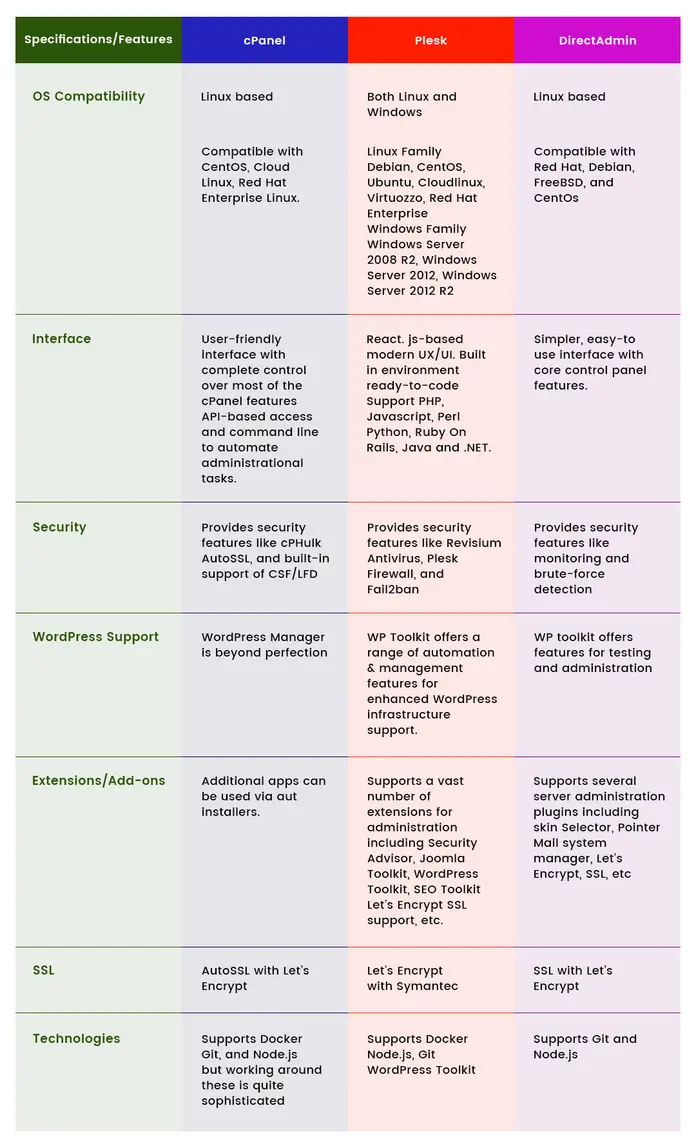
Plesk’s rise in popularity stems from its usability, feature depth, and automation. Let’s see how it stacks up against cPanel and other control panels like DirectAdmin.
Comparing Plesk and cPanel: Which is Better for 2026?
| Criteria | Plesk 2026 | cPanel 2026 | DirectAdmin |
|---|---|---|---|
| OS Support | Linux, Windows, Cloud | Linux only | Linux |
| WordPress Toolkit | Advanced, batch ops | Basic, manual | Basic |
| Security | AI, layered, plugins | Manual updates | Third-party |
| Dashboard UI | Modern, modular | Classic, dated | Minimal |
| Extensions | 150+ marketplace | 60+ | 30+ |
| Pricing (avg) | Lower at enterprise | High per user | Budget |
Feature Comparison Table
| Feature | Plesk | cPanel |
|---|---|---|
| Smart Updates | Yes (AI) | No |
| Site Cloning | Yes (1-click) | Manual |
| Security Layers | Multiple, advanced | Fewer, basic |
| Staging | Yes | Manual |
| Docker Support | Yes | Limited |
Expert Insight:
“For agencies managing hundreds of WordPress sites, Plesk is a clear winner. Smart Updates and batch operations aren’t matched by cPanel in 2026.” – Hosting Technology Analyst
How to Use Plesk: Tutorials and Best Practices
Even complex infrastructure is simplified with Plesk’s guided workflows and visual management.
Step-by-Step: Getting Started with Plesk
Bullet-list Tutorial
- Provision Plesk: Choose your edition, spin up on local or cloud server.
- Connect Domains: Add root and subdomains via dashboard.
- Setup Email & SSL: Autofill options for SSL, configure mailboxes.
- Install WordPress: Use Toolkit for automated deployment.
- Configure Backups: Set scheduled and event-triggered backups.
- Enable Extensions: Browse Marketplace for dev, SEO, security add-ons.
- Monitor Stats: Activate real-time analytics and alerts.
Plesk Migration Guide for Seamless Transitions

Migration is designed to be frictionless.
Visual Guide: Plesk Migration Workflow
Steps:
- Prepare old environment and backup all data
- Use the Migration Wizard in Plesk dashboard
- Select data to transfer (sites, emails, databases)
- Review compatibility and resolve warnings
- Run migration and monitor status
- Validate migrated content and DNS
- Finalize with Smart Updates
Technical Tip:
For large migrations, segment by site size or traffic for smoother transitions. Schedule downtime for legacy environments only.
Hands-on with Key Features: Real-Life Usage Examples
- Deploy Dockerized WordPress: One-click integration for dev/test staging.
- Automate batch plugin updates: Schedule or trigger via Toolkit.
- Monitor site health: AI-generated alerts reduce manual checks.
How to Interpret Plesk Monitoring Metrics:
- CPU, RAM, bandwidth spikes highlighted for action
- Security warnings and backup success/fail rates tracked
- Extension-specific log integration for advanced analytics
Is Plesk 2026 Right for You? Pros, Cons, and User Ratings
Thinking about switching or upgrading? Here’s what the 2026 hosting landscape says.
User Review Statistics: Hosting, Monitoring, and Storage Ratings
“Plesk’s monitoring prevented a major outage in our e-learning platform, and downtime dropped 35% after migration.” – EduTech Hosting User
Ratings (2026, from Hosting Marketplace Survey):
- Usability: 4.9/5
- Security: 4.8/5
- Extension Ecosystem: 4.7/5
- WordPress Management: 5/5
- VPS/Cloud Integration: 4.6/5
- Pricing Flexibility: 4.4/5
Pros and Cons
Pros
- Automated management and updates
- Flexible for developers, agencies, enterprises
- High security with advanced protocols
- Best WordPress Toolkit in market
- Smooth migration and cloud scaling
Cons
- More advanced features may have a learning curve for beginners
- Linux-only alternatives like cPanel still popular in legacy hosting
- Some extensions require premium subscriptions
Feature Comparison Tables (Plesk vs cPanel/DirectAdmin)
Quick Reference
| Feature | Plesk 2026 | cPanel 2026 | DirectAdmin |
|---|---|---|---|
| OS Support | Linux/Windows | Linux | Linux |
| WordPress Toolkit | Yes (Advanced) | Limited | Basic |
| Docker/Nginx | Yes | Limited | No |
| Extension Market | 150+ | 60+ | 30+ |
| Automated Updates | Smart (AI) | Manual | Manual |
| Pricing Tiers | Flexible | Static | Budget |
| Security | Multi-layered | Basic | Add-on |
List of Top Extensions and Integrations for Plesk
- Kaspersky Security Extension
- Imunify360 Malware Scanner
- Let’s Encrypt SSL
- Fail2Ban Firewall
- Google Cloud Backup
- Docker Integration
- Git Manager
- SEO Toolkit
- Plesk WordPress Toolkit Deluxe
Stepwise Bullet-List Tutorial for New Users
- Choose Plesk edition (Web Admin, Pro, Host)
- Provision server (local/cloud)
- Configure domain(s) and email
- Install SSL and security extensions
- Deploy WordPress and optimize
- Set up scheduled backups and monitoring
- Enable advanced extensions (Git, Docker, SEO)
Optimization Strategies for WordPress in Plesk
- Use Smart Updates to minimize downtime
- Batch update plugins/themes across all sites
- Schedule backups before major changes
- Clone sites for dev/testing, not direct edits
- Harden security with AI-based scans
- Monitor performance using integrated analytics
Frequently Asked Questions (FAQs) about Plesk 2026
- Can I migrate from cPanel to Plesk easily?
– Yes, Plesk offers a migration wizard for seamless transfer. - Is Plesk suitable for Windows hosting?
– Absolutely. Plesk supports both Linux and Windows. - Does Plesk charge extra for WordPress tools?
– Basic tools included; the Deluxe toolkit is a paid add-on. - How do updates impact site uptime?
– Smart Updates test compatibility first, minimizing risk. - Can I run Docker containers in my Plesk setup?
– Yes, Docker integration is native in most editions.
Technical Troubleshooting for Plesk Updates, Migrations, and Security
- Monitor logs for migration errors
- Use rollback options after failed updates
- Regularly scan for malware and vulnerabilities
- Segment traffic during major upgrades
- Consult Plesk forums or support for extension issues
Tips for Maximizing Performance with Docker and Nginx
- Offload static workloads to Nginx for faster delivery
- Use Docker containers for scalable dev/test environments
- Monitor resource usage via Plesk dashboard for optimal allocation
- Schedule downtime during major container upgrades
How to Interpret Plesk Monitoring Metrics
- CPU/Memory usage: Check for spikes—optimize or upgrade
- Bandwidth: Identify abnormal traffic to prevent outages
- Security warnings: Investigate immediately, enable auto-scan
Suggested Next Read
For a deep-dive on web hosting solutions powered by AI and automation, Watch more Hostinger 2026 Review: AI Website Builder, LiteSpeed, Pricing, hPanel
Conclusion: Is Plesk 2026 the Right Choice for Agencies, Developers, and Businesses?
Plesk 2026 stands out as a powerful, flexible platform for web hosting management in the age of AI and automation. With its WordPress Toolkit, smart updates, migration workflows, and advanced security, it’s a strong contender for agencies, enterprises, and anyone needing scalable infrastructure. Whether you’re migrating from cPanel, expanding your hosting portfolio, or simply seeking to optimize web operations, Plesk’s 2026 feature set offers industry-leading solutions.
Connect & Learn More
👉 Open Plesk Account: https://ai-solutes.com/plesk
👉 Our YouTube Channel: http://www.youtube.com/@ai-solutes
👉 Our Facebook Fanpage: https://www.facebook.com/profile.php?id=61576606911341
👉 Our X (Twitter): https://x.com/AISolutes