


Somewhere in your organization right now, a virtual machine is about to crash, a ransomware payload is quietly encrypting files, or an admin is about to fat-finger a delete on a production database — and the only thing standing between that moment and a very bad week is whether your backups actually work. Veeam has built its entire business around that single, high-stakes question. What started as a niche VMware backup tool in 2006 has grown into one of the most widely deployed data protection platforms on the planet, protecting workloads for 82% of the Fortune 500 and holding the #1 spot in global market share for data protection, according to IDC. With a free Community Edition that backs up to 10 workloads at zero cost, paid tiers that scale from a few hundred dollars a year to enterprise-wide deployments spanning thousands of virtual machines, and a seventh consecutive year as a Leader in the Gartner Magic Quadrant for Data Protection, Veeam has become the default answer to “how do I make sure I can actually recover?”
For IT administrators, MSPs, and business owners who can’t afford downtime — and in 2026, that’s essentially everyone — Veeam offers a rare combination: genuine hardware and hypervisor independence, immutable ransomware-resistant backups, and licensing flexible enough to fit a five-person shop or a five-thousand-VM enterprise. This review walks through Veeam’s full product lineup, how its licensing and pricing actually work, what real users love and complain about, how it stacks up against Rubrik and Commvault, and exactly who should (and shouldn’t) build their disaster recovery strategy around it.
Veeam Review 2026: The Data Resilience Platform Built to Guarantee Your Recovery, Not Just Your Backup
Overview and Background
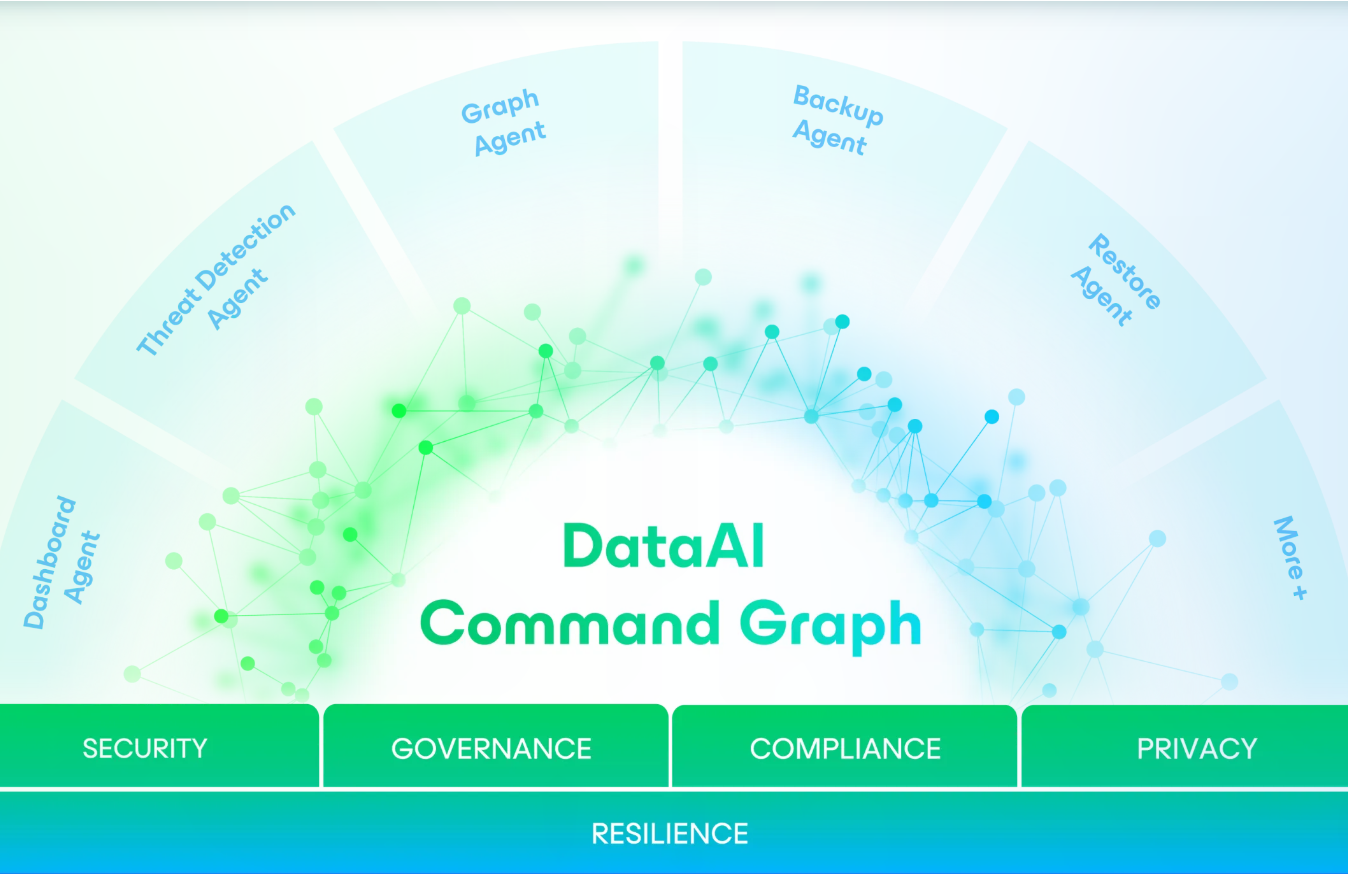
Veeam Software is a data protection and cyber-resilience company founded in 2006, originally built to solve VMware backup — a category that barely existed at the time. Nearly two decades later, the company has expanded far beyond its virtualization roots into a full “DataAI Command Platform” spanning on-premises backup, cloud-native SaaS backup, Kubernetes protection, and AI-driven data security. Its flagship product, Veeam Data Platform (built around the long-running Veeam Backup & Replication engine), now protects virtual machines, physical servers, Microsoft 365 and Entra ID, Salesforce, AWS, Azure, Google Cloud, and Kubernetes clusters from a single console.
The core insight behind Veeam’s design is simple but important: a backup you can’t restore from is worthless. So rather than treating backup as a checkbox exercise, Veeam built its platform around provable recovery — instant VM recovery, automated malware scanning of backup files, immutable storage that ransomware can’t touch, and “clean room” recovery environments that let you validate a restore is safe before you bring it back into production. That focus has made Veeam the go-to name that IT teams reach for after a ransomware incident, not just before one.
Why Veeam Stands Out in 2026
Hardware and hypervisor independence: Unlike backup appliances that lock you into specific storage hardware, Veeam runs as a software layer across VMware, Hyper-V, Nutanix, Proxmox, and bare-metal environments, and its backups are portable, self-describing files you can restore anywhere — a genuine hedge against vendor lock-in, which matters enormously to organizations mid-migration away from VMware.
A free tier that actually protects production data: Veeam Community Edition backs up to 10 workloads — VMs, physical servers, or cloud instances — completely free, with instant recovery and file-level restore included. It’s one of the few “free” tiers in enterprise software that small businesses can genuinely run their entire backup strategy on.
AI-driven threat detection built into the backup path: Every backup run can be scanned inline for malware, anomalous file changes, and YARA-rule indicators of compromise, so you find out a workload is infected before you restore it back into production — not after.
Immutability by design: Backups can be written to storage that literally cannot be altered or deleted for a set retention window, even by an administrator with full credentials — a critical defense against the growing trend of ransomware groups specifically targeting backup repositories before detonating their payload.
Analyst-validated leadership: Veeam has been named a Leader in the Gartner Magic Quadrant for Data Protection for seven consecutive years and holds the #1 spot in global market share for data protection and data privacy compliance, according to IDC — a track record most competitors can’t match.
Coverage that goes well past virtual machines: The same platform natively protects Microsoft 365, Entra ID, Salesforce, Kubernetes, and the major public clouds, so mid-sized IT teams can consolidate several point tools into one vendor relationship instead of stitching together separate SaaS backup subscriptions.
Fast, granular recovery: Instant VM Recovery and Continuous Data Protection let teams restore a workload in seconds rather than hours, which is often the difference between a minor incident report and a business-halting outage.
Key Features and Technology
Veeam’s product line has grown well beyond a single backup tool. Here’s how the pieces fit together.
Veeam Data Platform (On-Premises & Hybrid)
The core product, built around the Veeam Backup & Replication engine, runs as a hardened software appliance that deploys quickly and patches itself automatically. It covers VMware, Hyper-V, physical servers, NAS, and enterprise applications like SQL Server, Oracle, and SAP HANA, with a single unified web UI, role-based access control, and single sign-on.
Cyber Security and Threat Detection
Inline malware scanning runs during the backup process itself, flagging suspicious file changes and known indicators of compromise via YARA rules. Combined with immutable backups and a “clean room” recovery environment for validating restores before they touch production, this is the layer that turns Veeam from a passive backup tool into an active part of an organization’s ransomware response plan.
AI-Driven Insights (Veeam Intelligence)
Veeam Intelligence uses generative AI to translate raw backup telemetry into plain-language recommendations — surfacing risky configurations, suggesting the cleanest recovery point after an incident, and reducing the amount of manual log-digging admins have to do during a stressful outage.
SaaS and Cloud Workload Backup
Separate but integrated modules cover Microsoft 365 and Entra ID, Salesforce, AWS, Azure, Google Cloud, and Kubernetes (via Veeam Kasten) — closing the common gap where organizations assume their SaaS vendor is responsible for backup when, in most cases, it isn’t.
Veeam Data Cloud and Vault
For teams that want backup infrastructure without managing storage themselves, Veeam Data Cloud offers fully managed, air-gapped, immutable cloud storage — useful as an offsite copy for the classic 3-2-1 backup rule, or as a full SaaS-delivered backup service.
Pricing, Plans, and Package Structure
Veeam’s pricing is notoriously not a single number — it depends on your licensing model, edition, and workload count, and most quotes come through a reseller rather than a public checkout page. That said, based on current market data, here’s how the main options break down. All figures below are approximate and should be confirmed with a live quote before you budget against them.
| Tier / Model | Approx. Price | Best For |
|---|---|---|
| Community Edition | Free (up to 10 workloads) | Homelabs, very small businesses, testing before committing |
| VUL — Standard Edition | ~$250 / workload / year | SMBs needing core backup and recovery without frills |
| VUL — Advanced Edition | ~$350 / workload / year | Mid-market teams wanting Continuous Data Protection and advanced monitoring |
| VUL — Premium (Enterprise) Edition | ~$450 / workload / year | Enterprises needing full storage integration, orchestration, and compliance reporting |
| Legacy Socket Licensing (Enterprise Plus) | ~$1,200–$1,800 / socket / year + ~22% annual maintenance | Existing customers renewing older per-socket contracts |
How Veeam Compares to Alternatives
| Platform | Strength | Trade-off |
|---|---|---|
| Veeam | Broadest workload coverage, hardware independence, strong free tier | Licensing model can get complex at large scale |
| Rubrik | Security-first architecture, very simple management UI | Premium pricing, less deployment flexibility |
| Commvault | Widest estate coverage, strong for large heterogeneous environments | Steeper deployment complexity |
| Manual / legacy tape backup | Lowest ongoing subscription cost | No AI threat detection, no instant recovery, no immutability guarantees |
vs. Rubrik: Rubrik is frequently praised for a cleaner, more opinionated interface and a security-first design philosophy, but that simplicity comes at a real cost premium and generally less deployment flexibility than Veeam offers across mixed hypervisor and hardware environments.
vs. Commvault: Commvault leans into breadth — protecting the widest range of estates including mainframe and legacy systems — which suits very large, heterogeneous enterprises, but that breadth typically translates into a steeper learning curve and longer deployment cycles than Veeam’s more streamlined approach.
vs. staying on legacy tape or manual backup: Older backup approaches can look cheaper on paper, but they lack the ransomware-specific defenses — immutability, inline malware scanning, clean-room validation — that have become non-negotiable as attackers increasingly target backup infrastructure directly before detonating an attack.
Pros and Cons
What IT Teams Love
Genuine reliability at scale: Across G2 and Capterra reviews, the single most consistent theme is that backups simply run and restores simply work, even in complex hybrid environments.
Fast, confident recovery: Users repeatedly cite quick setup and fast, intuitive restores as a reason they sleep better at night — a meaningful thing for an IT admin to say about backup software.
Strong free and low-cost entry points: Reviewers specifically call out the free Community Edition and comparatively affordable small-business licensing as standout value versus enterprise-only competitors.
Responsive vendor support: Onboarding and support quality are frequently singled out as accessible and helpful, even for smaller accounts.
Limitations Worth Knowing
Licensing can get genuinely confusing: Multiple concurrent models (VUL, per-socket, per-instance) plus edition tiers make it easy to over- or under-provision without expert guidance — one of the most repeated complaints in third-party reviews.
Cost climbs quickly at enterprise scale: Small and mid-size businesses can hit real cost barriers once workload counts and storage requirements grow, especially before volume discounts and negotiated rates kick in.
Extending beyond core backup adds complexity: Reviewers note that stretching Veeam into broader BCDR or security-adjacent use cases sometimes requires extra tools and integrations, adding cost and administrative overhead compared to more unified competitors.
Resource requirements at scale: Large deployments need meaningful compute and storage resources, and some reviewers note the platform benefits from dedicated administration time to run smoothly.
Who Should Use Veeam
Small businesses and IT solo-admins: If you’re running under 10 workloads, the free Community Edition genuinely covers a real backup strategy — start there before paying for anything.
Mid-market IT teams: Organizations with a mixed VMware/Hyper-V/physical environment and growing compliance needs will get the most value from the VUL Standard or Advanced editions.
Enterprises and regulated industries: Companies needing audit-ready compliance documentation, orchestrated disaster recovery, and full cyber-resilience features should look at the Premium edition, ideally negotiated through a Veeam partner for volume pricing.
MSPs and service providers: Veeam Cloud Connect and its service-provider licensing let managed service providers resell backup-as-a-service to clients without building storage infrastructure from scratch.
Anyone rethinking disaster recovery after an incident: If you’ve experienced ransomware or a close call, the combination of immutability, inline threat scanning, and clean-room validation makes Veeam a natural rebuild point — pair the Advanced or Premium edition with Veeam Vault for an offsite immutable copy.
Getting Started: Step by Step
- Download the free Community Edition from Veeam’s site and install it on a Windows or Linux host to test against up to 10 real workloads before spending anything.
- Map your workload count and environment — count VMs, physical servers, and cloud instances so you can size licensing correctly and avoid over- or under-buying.
- Choose your licensing model — for most new deployments, VUL (Universal License) is simpler and more portable than legacy per-socket licensing.
- Pick an edition based on your actual needs — Standard for core backup, Advanced for CDP and monitoring, Premium for full orchestration and compliance reporting.
- Set up your first backup jobs and repository, following the 3-2-1 rule: three copies of your data, on two different media types, with one copy offsite (Veeam Vault is a natural fit here).
- Enable immutability and malware scanning on your backup repository so ransomware can’t touch — or hide inside — your recovery points.
- Test a real restore, not just a backup job — schedule regular recovery drills so you know your RTO and RPO numbers hold up under real conditions, not just in theory.
Tips for Getting Maximum Value
Before committing to a paid tier, run the free Community Edition against your smallest, least critical environment for a few weeks to get a real feel for the interface and restore speed. When you do move to a paid license, request quotes for both VUL and legacy socket models even if you assume you know which one applies — many organizations default to whatever their reseller quotes first and overpay as a result. If you’re negotiating an enterprise deal, ask specifically about multi-year discounts and volume tiers at 50, 100, and 500+ workloads, since these can meaningfully lower your effective per-workload cost. And don’t treat storage as an afterthought: for most organizations, long-term backup storage costs end up rivaling or exceeding the license cost itself, so pushing older backups to object storage tiers and enabling deduplication and compression from day one will save far more than haggling over the license price alone.
Future Outlook and Final Assessment
Backup is no longer a background IT function — it’s a front-line defense against ransomware, and the market is moving fast in that direction. Veeam’s own research found that 89% of organizations had their backup repositories specifically targeted by attackers, which is exactly why the company has poured investment into AI-driven threat detection, immutability, and clean-room recovery rather than resting on its long-standing reputation as “the VMware backup company.” That said, the honest caveats remain: licensing can be genuinely confusing without expert help, costs scale up meaningfully at enterprise size, and competitors like Rubrik offer a simpler (if pricier) experience for teams that value pure ease-of-use over flexibility.
Conclusion
Veeam has earned its reputation the hard way — not through marketing, but through nearly two decades of being the tool IT teams reach for when everything else has already gone wrong. Its combination of hardware independence, genuine free-tier value, AI-powered ransomware defense, and analyst-backed market leadership makes it one of the safest bets in enterprise data protection today, whether you’re a solo admin protecting a handful of VMs or a Fortune 500 IT department managing thousands of workloads across hybrid cloud. The licensing takes a little homework to get right, and costs do add up at scale — but for an organization’s most important insurance policy, that’s a reasonable trade. Whatever tool you ultimately choose for your infrastructure, the goal at AI Solutes is always the same: to make everything easy, starting with cutting through the noise around picking the right one.
Ready to Protect Your Data with Confidence?
Explore more honest reviews, tutorials and tool comparisons to find the right tech for the way you work and live — at AI Solutes, where we make everything easy.
👉 Open Free Account: https://ai-solutes.com/veeam
👉 Our YouTube Channel: youtube.com/@ai-solutes
👉 Our Facebook Fanpage: Facebook
👉 Our X (Twitter): @AISolutes
- Choose the Best Web Hosting Services 2025 to Boost Speed, Security, and Scalability
- OpalAi
- What If You Could Delegate Daily Tasks to a Dedicated AI Team? Inside Sintra AI’s Automation Suite
- Upgrade Your Browser Now to Secure Online Shopping: 2025 Chrome, Edge, Firefox, Safari Comparison and Pro Tips
- Does Rawpixel Revolutionize Access to Public Domain Art? A Closer Look at Rawpixel’s Vintage Curation Framework















