

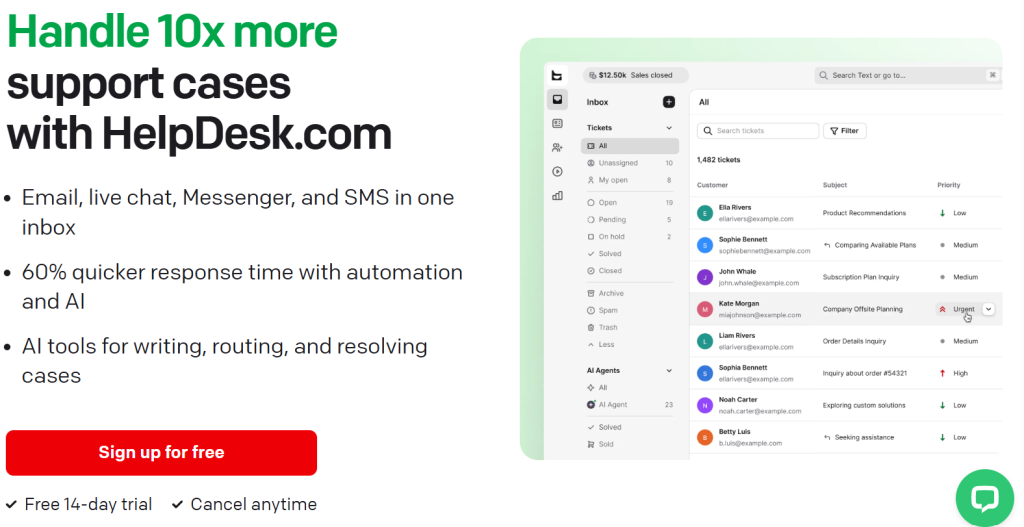
If your team is still juggling a shared Gmail inbox, a separate live chat widget, and a spreadsheet to track who answered what, you already know the real cost of scattered support: slow replies, duplicated work, and customers who repeat themselves on every channel. HelpDesk.com was built to collapse all of that into a single, AI-assisted inbox. It’s the ticketing system behind Text (formerly LiveChat’s helpdesk product), now used by 100,000+ support professionals and trusted by 35,000+ brands including Toyota, PayPal, Adobe, and Mercedes-Benz. With plans starting at roughly $19 per agent per month, a 14-day free trial that needs no credit card, and an AI Agent that the company says resolves up to 73% of routine questions before a human ever sees them, HelpDesk.com has positioned itself as one of the more approachable entry points into modern, AI-powered customer service.
For small business owners, SaaS support leads, e-commerce teams, and IT help desks who need every channel in one place without a six-figure enterprise contract, this is exactly the kind of tool worth a close look. This 2026 review walks through what HelpDesk.com actually does, its AI features, full current pricing, how it stacks up against Zendesk, Freshdesk, and Help Scout, the honest limitations, and who should (and shouldn’t) sign up.
HelpDesk.com Review 2026: The AI-Powered Ticketing System That Turns Support Into a Revenue Channel
Overview and Background
HelpDesk.com is a ticketing and multichannel support platform built by the company behind LiveChat, now operating under the unified brand Text — described as an AI customer service platform. Rather than being a standalone email ticketing tool, HelpDesk.com is one piece of that broader ecosystem: it brings email, website chat, Facebook Messenger, and SMS (via Twilio) into a single AI-assisted inbox, then layers automation, workflows, and reporting on top so a conversation that starts on one channel can be resolved without losing context.
The core idea is straightforward: every incoming message, regardless of channel, becomes a ticket. Agents work those tickets from one queue, with private notes, tags, statuses, and collision detection to prevent two people replying to the same customer. On top of that foundation, HelpDesk.com has steadily added AI capabilities — an AI Agent that can independently resolve routine questions, an AI Copilot that drafts and polishes replies, automatic ticket summaries, tag suggestions, and language detection.
Why HelpDesk.com Stands Out in 2026
Genuinely usable AI, not a marketing checkbox: The AI Agent isn’t a chatbot bolted onto a ticket form — it’s trained on your own knowledge base and product docs, can be given a specific tone of voice, and hands off to a human agent with full conversation context when it can’t resolve something. That handoff quality is often where competing AI features fall short.
Support that can double as a sales channel: Through the Shopify integration, HelpDesk.com surfaces live cart data inside a conversation, lets the AI Agent run a full sales motion (spot buying intent, recommend products, close the sale), and reports revenue back to a chat-level sales dashboard. Few help desks in this price range connect support conversations to actual order data this directly.
Multichannel from day one, not as an upsell: Email, website chat, Messenger, and SMS are included even on the entry-level Essential plan. Many competitors gate live chat or SMS behind a higher tier.
Fast, low-friction setup: HelpDesk.com is fully browser-based, with desktop apps for Mac and Windows, and the company’s own positioning — “live in minutes, not weeks” — matches the general experience: connecting email and chat channels and going live the same day is realistic for a small team.
Security that scales with the plan: Every tier gets SOC 2, GDPR, and PCI DSS (SAQ A) compliance, encryption, role-based access, and anti-spam protection. Enterprise steps that up further with SOC 2 Type 2, HIPAA-track compliance, SSO, and audit logs — a meaningful jump for regulated industries.
Free, hands-on migration: Moving historical tickets, workflows, and data from another help desk is handled by HelpDesk.com’s own team, with costs covered where possible — removing one of the biggest reasons teams stay stuck on a tool they’ve outgrown.
Built-in Model Context Protocol (MCP) server: A newer, notably forward-looking feature — HelpDesk.com can connect directly to external AI models like Claude or ChatGPT through a secure API layer, letting teams build custom automations on top of their own ticket and chat data without middleware.
Key Features and Technology
HelpDesk.com organizes its capabilities around five stages of the support lifecycle: Capture, Solve, Route, Automate, and Measure. Here’s what sits inside each.
Unified Inbox and Ticketing
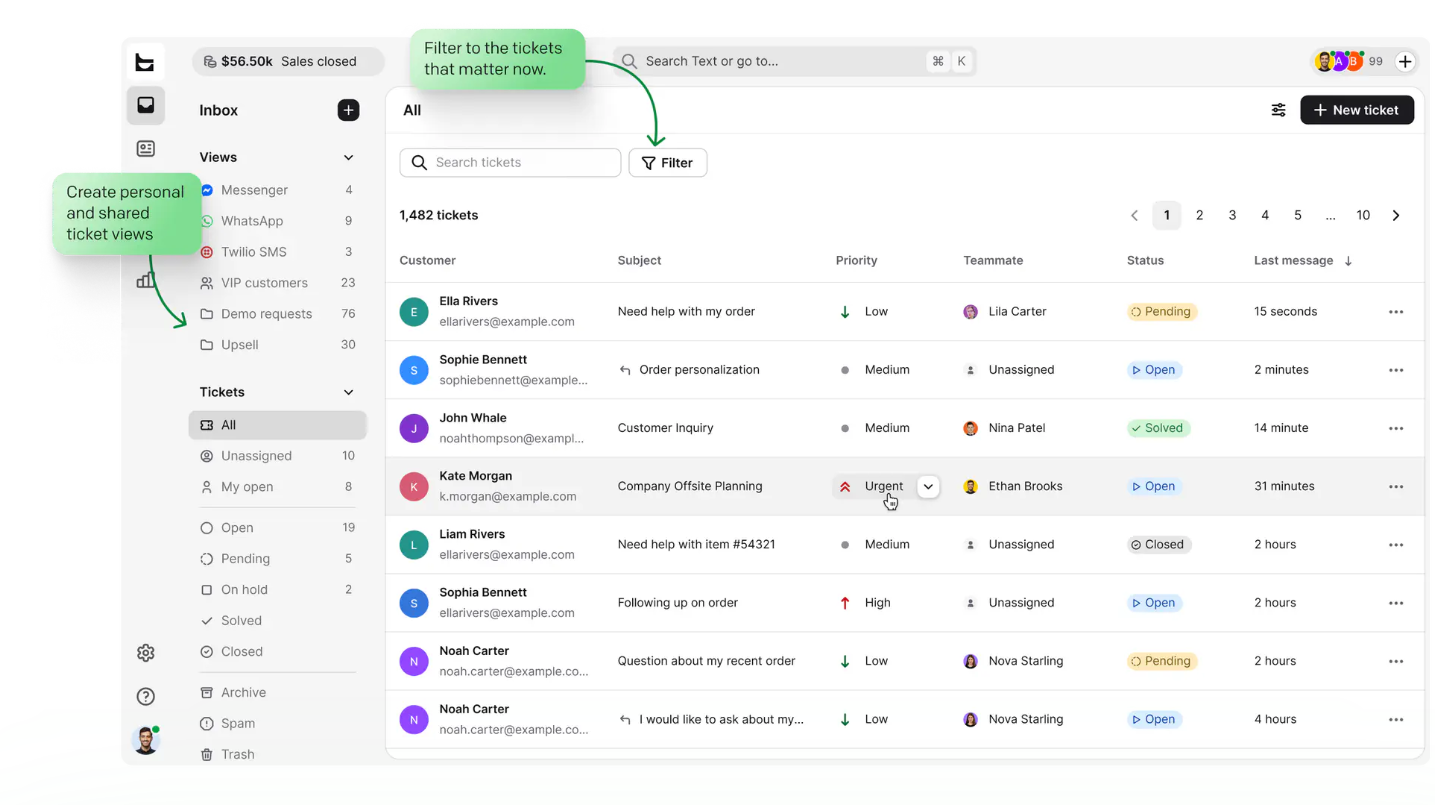
Every email, chat, Messenger, and SMS message lands as a ticket in one queue. Agents get statuses, priorities, custom fields, canned responses, ticket tags, and a built-in contact form that publishes to your website and feeds tickets straight into the inbox. Ticket volume itself is unlimited on every plan — the metered limits sit on AI resolutions and workflow executions, not on how many tickets you can handle.
AI Agent and AI Copilot
The AI Agent runs conversations independently using the knowledge, tone, and skill rules you configure — it can detect language across 48 supported languages, remember prior conversation history for context, and hand off to a human at any point. The AI Copilot, available to every agent, drafts reply suggestions from your help center and product docs, summarizes long chats and tickets, suggests tags, and can rewrite any draft in a different tone (formal, casual, more concise).
Automation and Workflows
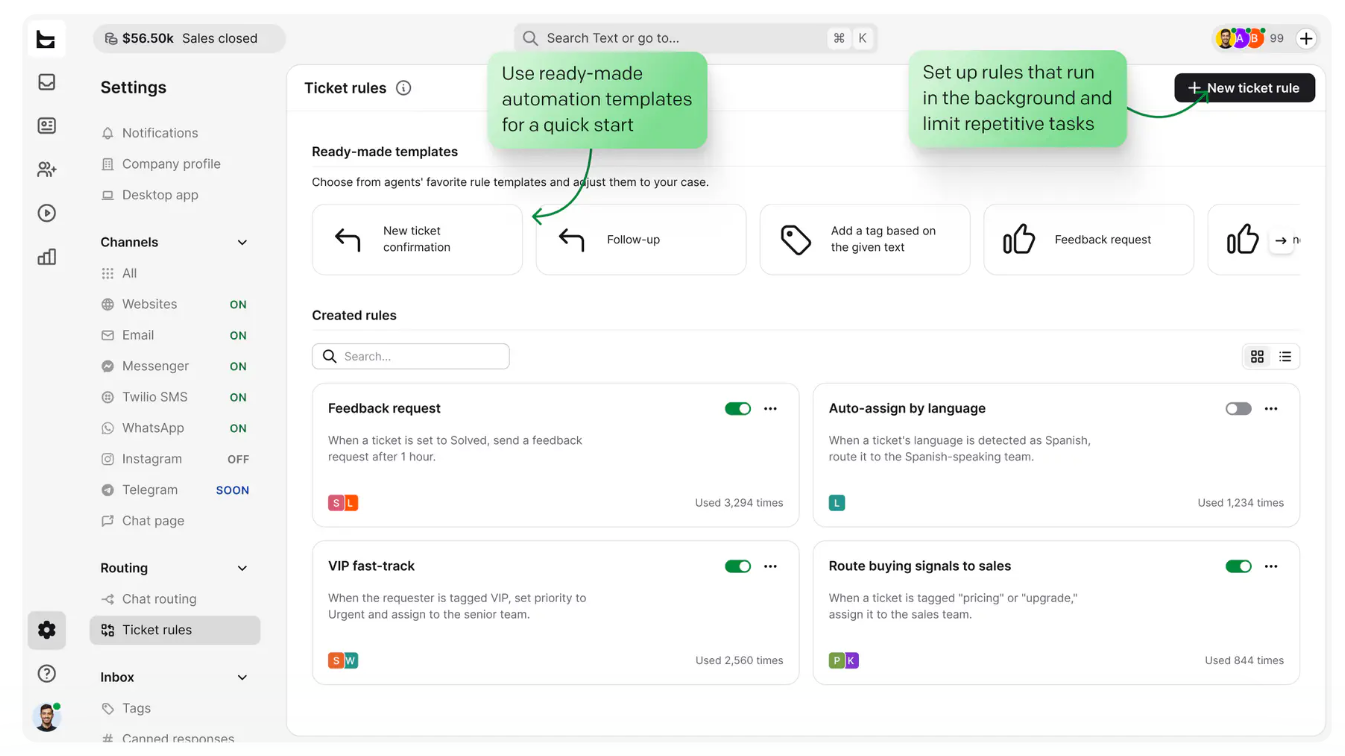
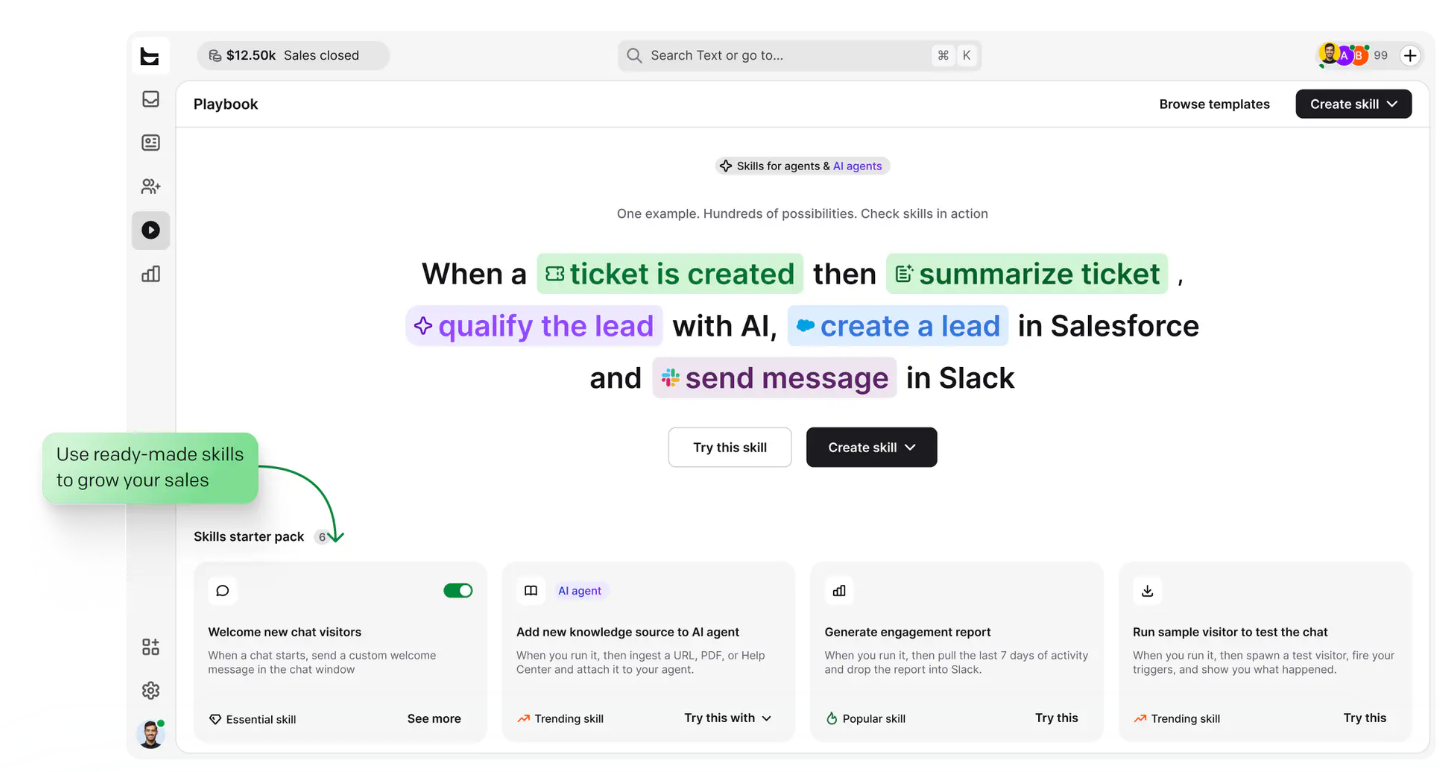
The Playbook lets you build no-code workflows that connect HelpDesk.com to tools like Shopify, Salesforce, HubSpot, WordPress, Webflow, Slack, WhatsApp, and Mailchimp, plus custom webhooks and the API for anything else. Ticketing rules handle routing, assignment, tagging, and auto-replies without agent involvement — one case study reports 7,000 automated actions performed instead of by agents.
Collaboration and Team Management
Teams can be split by language, region, or product line. Internal notes, chat transfer, collision detection, and (on Growth and Enterprise) chat supervision and team-member takeover let managers step into a conversation without disrupting the customer’s experience.
Reporting and Analytics
Chat and ticket metrics cover response time, resolution rate, and satisfaction on every plan. Growth and Enterprise add agent performance and activity dashboards, plus an AI Agent sales report that ties revenue, orders, and average order value directly back to the chats that generated them.
Pricing, Plans, and Package Structure
HelpDesk.com uses per-user (per-seat) pricing with a set number of included AI resolutions on each tier. Annual billing saves up to 24% compared with paying monthly. There is no per-ticket charge and no limit on ticket volume — the only usage-based costs are extra AI resolutions and extra API calls. Every plan includes a 14-day free trial with no credit card required. Prices below are current as of publication and are subject to change — always confirm live pricing before purchasing.
| Plan | Price (annual / monthly billing) | Best for | Key inclusions |
|---|---|---|---|
| Essential | ~$19/user/mo (annual) or ~$25/user/mo (monthly) | Small teams starting out | 1 AI Agent, 10 AI resolutions/mo, email + chat + Messenger + SMS, 3 ticketing rules, 5 custom fields, 60-day history |
| Growth (Most Popular) | ~$79/user/mo (annual) or ~$99/user/mo (monthly) | Scaling teams that want tickets to drive revenue | 10 AI Agents, 200 AI resolutions/mo, ticket & chat summaries, tag suggestions, up to 10 teams, unlimited history, agent performance reports |
| Enterprise | Custom — contact sales | Large or regulated organizations | Custom AI Agents, dedicated Account Manager, SOC 2 Type 2, HIPAA track, SSO, audit logs, SLAs, multiple brands |
How HelpDesk.com Compares to Alternatives
| Tool | Entry price (approx.) | Strength | Trade-off |
|---|---|---|---|
| HelpDesk.com | ~$19–25/agent/mo | Multichannel + AI Agent + Shopify sales tools bundled from tier one | AI resolutions are metered even on paid plans |
| Zendesk | ~$19–55+/agent/mo | Deep enterprise feature set, huge marketplace | Real-world cost frequently climbs well past the sticker price once AI Copilot and add-ons are included |
| Freshdesk | Free (1–2 agents) to ~$19–89/agent/mo | Generous free tier for tiny teams; strong ticketing core | Freddy AI Copilot and AI Agent sessions are separate paid add-ons on top of the plan price |
| Help Scout | ~$20–65/user/mo | Clean, email-first UX; simple for small support teams | Weaker native live chat and SMS; AI is billed per resolution as an add-on |
| Shared inbox / spreadsheet (DIY) | $0 (hidden labor cost) | No new tool to learn, no monthly bill | No automation, no AI, no reporting, no shared history — doesn’t scale past a couple of agents |
vs. Zendesk: Zendesk offers more enterprise depth and a larger app marketplace, but real-world buyer data shows most mid-market teams end up paying far more than the advertised entry price once AI features and add-ons are included. HelpDesk.com’s AI Agent is bundled into the base plan rather than sold as a separate module.
vs. Freshdesk: Freshdesk’s free tier is attractive for a one- or two-person team, but its useful AI tools (Freddy Copilot, AI Agent sessions) are priced separately from the core plan. HelpDesk.com folds AI resolutions into every paid tier’s price, which is simpler to budget even if the free entry point isn’t as generous.
vs. Help Scout: Help Scout is a strong, simple option if your support is almost entirely email-based. HelpDesk.com pulls ahead for teams that also need live chat, Messenger, and SMS handled natively, plus e-commerce-specific tools like live Shopify catalog sync and cart recovery.
Pros and Cons
What Support Teams Love
Fast time-to-value: Teams can connect their channels and be handling real tickets the same day, without a lengthy implementation project.
AI that’s actually usable out of the box: The AI Agent, Copilot, ticket summaries, and tag suggestions work together rather than feeling like bolted-on features.
Unlimited tickets on every plan: No per-ticket fee and no arbitrary ticket cap, which removes a common source of surprise invoices.
Strong security baseline: SOC 2, GDPR, and PCI DSS compliance are standard from the entry tier, not reserved for Enterprise.
Free, supported migration: Switching from another help desk doesn’t mean losing ticket history or starting workflows from scratch.
Limitations Worth Knowing
AI resolutions are tightly metered on Essential: Ten resolutions per month is a very small allowance if you’re hoping AI will meaningfully offload your queue right away; budget for the $49.50 top-up packs or plan to move to Growth sooner than expected.
Limited ticket filtering options: User reviews on Capterra and GetApp note it isn’t always possible to sort or filter tickets by every identifier a team might want (for example, custom form-submission types), which can slow down triage in high-volume queues.
Big jump from Essential to Growth: The step from roughly $19 to roughly $79 per user is a substantial price increase, and several of the more advanced collaboration and reporting features only appear at that higher tier.
Refunds are case-by-case: There’s no published blanket refund policy — requests are reviewed individually by support, which offers less certainty than a stated money-back guarantee.
Some features are still “coming soon”: A handful of listed capabilities (multiple brands, custom roles, HIPAA compliance, AI canned reply suggestions on Essential) are marked as in progress rather than fully live, so confirm current availability before relying on them.
Who Should Use HelpDesk.com
Small businesses and startups handling support across email and chat for the first time will find the Essential plan gives everything needed to look professional and organized from day one, without an enterprise-level commitment.
E-commerce brands, especially on Shopify, get real added value from the live cart preview, buying-intent detection, and sales attribution reporting — features that turn support conversations into a measurable revenue channel, best accessed on the Growth plan.
SaaS support and IT help desk teams that need multichannel coverage, automation, and clear ticket metrics will find the core ticketing and workflow tools solid at either tier, with Growth recommended once the team passes roughly five to ten agents.
Regulated or large enterprises that need HIPAA-track compliance, SSO, audit logging, and a dedicated account manager should go straight to Enterprise and negotiate pricing directly with the sales team.
Teams that rarely get support requests or run support entirely through informal channels (a personal inbox, a single WhatsApp number) may not yet need a dedicated ticketing system at all — the value shows up once volume and team size grow past what one person can track manually.
Getting Started: Step by Step
- Sign up for the free 14-day trial on helpdesk.com — no credit card required, and you can add as many agents as you want to test with your real team.
- Connect your first channel. Start with email (forwarding address) and the website chat widget, since these cover the majority of incoming volume for most teams.
- Import or migrate existing tickets if you’re switching from another help desk — reach out to HelpDesk.com’s migration team so history and workflows carry over.
- Set up your AI Agent’s knowledge base by feeding it help articles, product docs, and PDFs so its replies and resolutions are accurate from day one.
- Build your first automation rules in the Playbook — start simple, like auto-tagging by keyword or auto-assigning by channel, before layering in more complex workflows.
- Invite your team and assign roles, grouping agents into teams by language, product, or region if your support load justifies it.
- Review your metrics weekly during the trial — response time, resolution rate, and AI resolution count will tell you quickly whether Essential or Growth fits your actual volume.
Tips for Getting Maximum Value
Start on annual billing once you’re past the trial and confident in the tool, since it saves up to 24% per seat compared with month-to-month pricing — a meaningful difference once you have more than a couple of agents. Feed the AI Agent’s knowledge base thoroughly before going live rather than letting it learn on the fly, since accuracy from day one builds trust with both customers and your own team faster than course-correcting mistakes later. If you’re an e-commerce team, connect Shopify early even if you don’t need the sales features immediately, since the live catalog sync takes time to fully populate. Watch your AI resolution count closely in the first month on Essential — ten resolutions disappears fast, and it’s cheaper to plan an upgrade to Growth in advance than to repeatedly buy $49.50 top-up packs. Finally, take HelpDesk.com up on its free migration offer if you’re switching tools; doing it yourself risks losing ticket history that customers may reference months later.
Future Outlook and Final Assessment
Customer service software is moving fast toward AI-first resolution, and HelpDesk.com’s parent platform, Text, is clearly betting on that shift — the built-in MCP server for connecting external AI models, the sales-attribution reporting tied to chats, and the steady rollout of new AI features (chat topics, canned reply suggestions, custom customer segments) all point to a company actively building out its AI roadmap rather than treating it as a one-time feature launch. The honest caveats are real, though: AI resolutions are metered even on paid tiers, some newer features are still labeled “coming soon,” and the jump from Essential to Growth pricing is steep enough that fast-growing teams should plan for it early.
Conclusion
HelpDesk.com earns its place among the better-value help desk options in 2026 by bundling multichannel support, working AI, and unlimited ticketing into an entry plan that most small teams can afford without a procurement process. It isn’t the deepest enterprise platform on the market, and the metered AI resolutions mean you’ll want to watch your usage closely, but for a business that wants email, chat, Messenger, and SMS handled in one place — with AI actually pulling its weight rather than just being a feature on a slide deck — it’s a genuinely solid choice. Whether you’re comparing tools for AI Solutes readers building out a support desk or a broader tech stack, HelpDesk.com is a good example of a category leader that’s still trying to make everything easy for the team using it.
Ready to bring every support channel into one AI-powered inbox?
Explore more honest reviews, tutorials and tool comparisons to find the right tech for the way you work and live — at AI Solutes, where we make everything easy.
👉 Start Your Free Trial: https://ai-solutes.com/helpdesk
👉 Our YouTube Channel: youtube.com/@ai-solutes
👉 Our Facebook Fanpage: Facebook
- Choose the Best AI Video Editor for 2025: Veed.io vs CapCut Feature Showdown and Workflow Secrets
- AI Valentine by Movio
- What If End-to-End Privacy Was Built Into Proton’s Security Engine?
- Discover Oakstone Publishing CME in 2026: Practical Reviews, Board Prep, and Modern Online Learning
- Does Hargreaves Lansdown Simplify Stock Trading? A Closer Look at Hargreaves Lansdown’s Market Architecture















