


If your last ten presentations all looked the same — a title slide, six bullet-point slides, a thank-you slide — there’s a real chance your audience checked out before slide four. That’s the exact problem Prezi was built to solve back in 2009, and in 2026 it has grown into a full AI-powered platform that replaces the linear slide deck with a zooming, non-linear canvas. With a free tier to start, paid plans that generally run from roughly $7 to $29 per user per month, a claimed base of 160 million-plus users worldwide, and enterprise customers like Cisco, Salesforce, Autodesk, BMW, and Sony, Prezi has stayed relevant for well over a decade in a space that now includes fast-moving AI newcomers.
For marketers, trainers, educators, sales teams, and consultants who present live rather than just email a deck around, that combination of AI speed and cinematic delivery is worth a close look. This 2026 review walks through what Prezi actually is, how Prezi AI’s newest features work, the full pricing picture, how it stacks up against Gamma, Canva, and traditional slide tools, the honest limitations reviewers keep flagging, and exactly who should (and shouldn’t) make the switch.
Prezi Review 2026: The AI-Powered Zooming Canvas That Makes Presentations Feel Like a Story, Not a Slideshow
Overview and Background
Prezi is a cloud-based presentation platform founded in Budapest in 2009 around one core insight: real explanations aren’t linear. People understand ideas by zooming from the big picture into detail and back out again, not by clicking through a rigid sequence of boxes. That insight became the Zooming User Interface (ZUI) — an open, map-like canvas where your entire presentation lives spatially, and you navigate by zooming and panning between topics instead of advancing slide by slide.
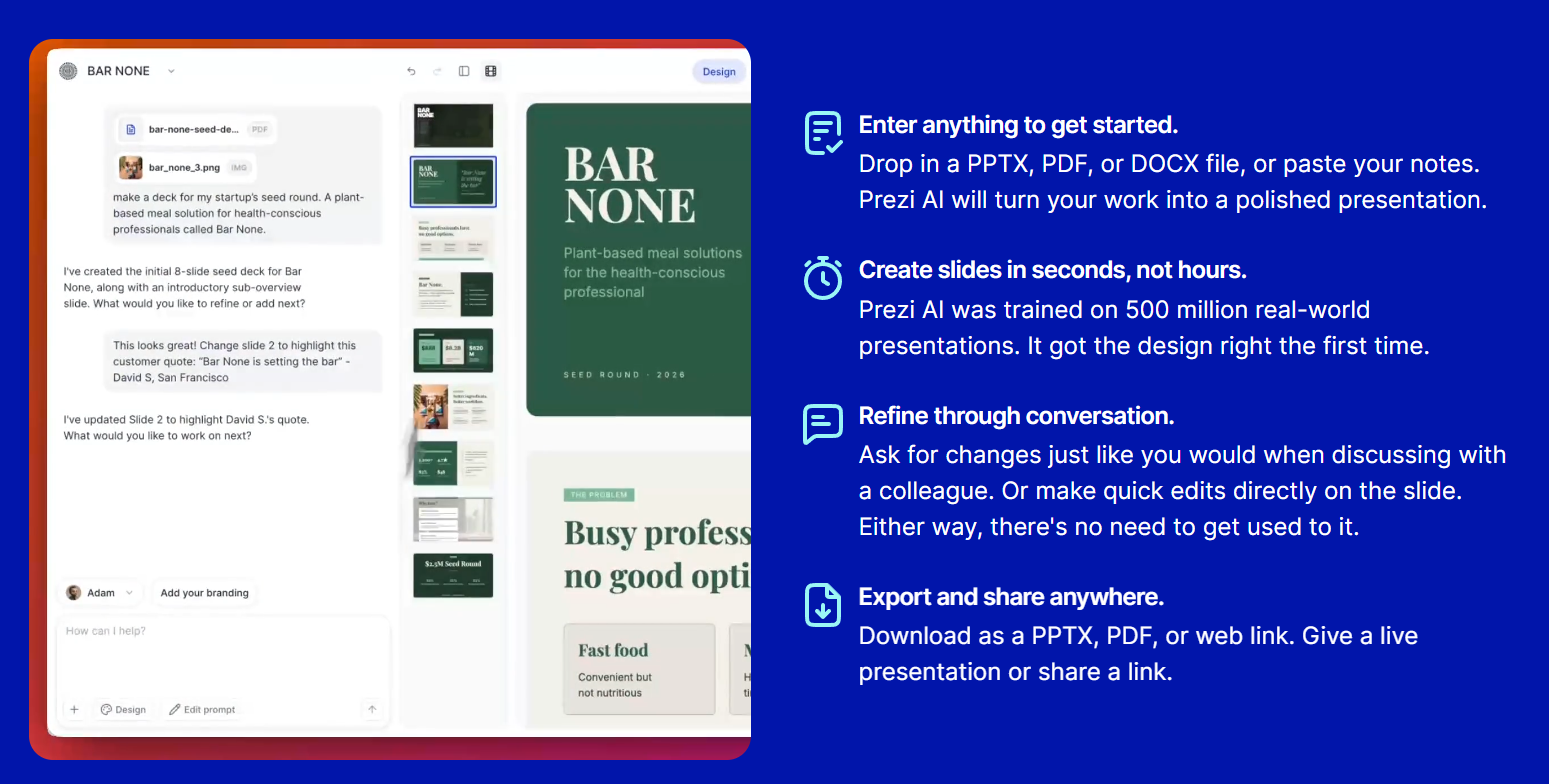
Over fifteen-plus years, Prezi has grown from a single zooming-canvas app into a three-product suite. Prezi Present is the flagship tool for building zoomable, non-linear presentations. Prezi Video overlays your slides beside your live camera feed inside Zoom, Microsoft Teams, Google Meet, and Webex, so you’re visible next to your content instead of vanishing behind a shared screen. Prezi Design extends the same spatial canvas to interactive infographics and reports. Since 2025–2026, all three are powered by Prezi AI, which generates a complete first draft from a text prompt or an uploaded PowerPoint, Word, or PDF file in under a minute.
Why Prezi Stands Out in 2026
A genuinely different presentation experience: Instead of a straight line of slides, your content lives on an open canvas you can zoom into for detail and pull back from for context. That non-linear structure creates visible spatial relationships between ideas — timelines, hierarchies, cause-and-effect chains — that a flat slide deck simply can’t show as clearly.
Prezi AI generates a full deck, not just an outline: Type a prompt or upload an existing document, and Prezi AI produces a complete, structured presentation — including custom AI-generated imagery for each slide, so you’re not stuck hunting for stock photos that half-match your topic.
Chat-based, context-aware editing: Once your deck exists, you keep refining it through natural-language chat — asking for content changes, a full retheme, or new slides — and the AI understands which slide or overview you’re currently looking at, so edits land where you mean them to.
Prezi Video removes the “screen-share and disappear” problem: For anyone doing sales calls, webinars, or virtual training, having your face visible next to your content inside Zoom or Teams — instead of a flat shared screen — is a meaningful engagement upgrade that most competitors don’t offer natively.
Narrated video export: Prezi AI can turn any deck into a cinematically animated, voiced-over video — complete with overview reveals and zoom transitions — which is useful for async training material, course content, or a leave-behind after a live pitch.
Built for mobile creation, not just mobile viewing: Prezi’s 2026 updates let you build a full presentation end-to-end on your phone from a prompt, with improved gesture controls for pinch-zoom, pan, and swipe — genuinely useful for anyone drafting ideas between meetings.
Fifteen-plus years of scale behind it: With a claimed 160 million-plus users and enterprise clients spanning Cisco to BMW, Prezi is a mature, well-resourced platform rather than an unproven newcomer — which matters if you’re presenting for a company that cares about vendor stability.
Key Features and Technology
Prezi’s feature set spans three connected products, each aimed at a different moment in how you communicate.
Prezi Present — The Zoomable Canvas
This is the original, signature product: an infinite canvas where content exists spatially instead of in a fixed slide order. You (or the AI) place topics, subtopics, images, and data on the canvas, then design a path that zooms into detail and pans across related sections, creating a cinematic, storytelling feel that’s hard to replicate with a traditional slide-by-slide tool. Hundreds of professionally designed templates across industries give you a starting structure rather than a blank canvas.
Prezi AI — Generation, Editing, and Media
Prezi AI generates a complete deck from a prompt or an uploaded PDF, PowerPoint, or Word document, complete with an editable outline stage before final generation. Its AI text tools can shorten, expand, simplify, or convert paragraphs into visual elements, and it selects and generates custom imagery slide-by-slide based on what each slide is actually communicating — rather than dropping in generic stock photos. Newer additions include in-slide polls for live audience response and QR codes for easy sharing during a presentation.
Prezi Video — Present on Camera, Not Behind a Shared Screen
Prezi Video puts your presentation content on screen beside your live webcam feed, compatible with Zoom, Teams, Google Meet, and Webex. For sales calls, webinars, and remote training, this keeps you visibly present and reading the room instead of disappearing behind a static shared screen — something reviewers consistently call out as one of Prezi’s most genuinely useful features in 2026.
Prezi Design — Infographics and Interactive Reports
Prezi Design applies the same spatial, zoomable canvas to infographics, one-pagers, and interactive reports — useful for marketing teams and consultants who need visual assets beyond a standard slide deck, though its AI capabilities here are less developed than in the core presentation generator.
Pricing, Plans, and Package Structure
Prezi runs on a recurring subscription model with a genuinely usable free tier and several paid steps above it. Independent pricing trackers show some variation between sources and over recent months — a sign that Prezi runs regular promotions and periodically adjusts tier pricing — so treat the figures below as an approximate, well-sourced range rather than a locked-in quote, and always confirm the live price at checkout.
| Plan | Approx. Price | What You Get | Best For |
|---|---|---|---|
| Basic | Free | Core zooming canvas and AI generation with a limited credit allowance; presentations are public and carry Prezi branding | Testing the format risk-free before you commit |
| Standard | ~$7/user/month | Privacy controls, basic AI generation, presentations no longer forced public | Occasional presenters who need private decks |
| Plus | ~$15–19/user/month | Unlimited AI generation, offline access, PowerPoint import | Regular presenters who need real day-to-day flexibility |
| Premium | ~$25–29/user/month | Presentation analytics, advanced AI tools, priority support | Professionals who present often and want engagement data |
| Teams | ~$39/user/month | Brand kit (colors, fonts, logo), collaboration tools, SSO | Organizations standardizing brand presentations across a team |
How Prezi Compares to Alternatives
| Factor | Prezi | Gamma | Canva | PowerPoint / Google Slides |
|---|---|---|---|---|
| Format | Non-linear zooming canvas | Linear, card-based slides | Linear, design-first slides | Traditional linear slides |
| AI generation speed | Fast, prompt or document to full deck | Fastest raw generation in the category | Good, less AI-first than Gamma | Minimal native AI (Copilot/Gemini add-ons vary) |
| On-camera video overlay | Yes — Prezi Video, built in | No | No | No native equivalent |
| PowerPoint file portability | Weak — zoom effects break on export | Good | Good | Native |
| Entry price | Free; paid from ~$7/mo | Free; paid plans available | Free; Pro ~$12.99/mo | Free (Slides) or Microsoft 365 bundle |
| Best for | Live, memorable delivery | Fast decks shared as a web link | Design-heavy, multi-format brand content | Standard business documents, universal compatibility |
vs. Gamma: Gamma is the faster pick when you need a polished deck in minutes and plan to share it mainly as a web link rather than present it live. Prezi’s advantage shows up specifically in live delivery — the zooming canvas and Prezi Video overlay create an audience-engagement experience Gamma’s linear cards simply weren’t built for.
vs. Canva: Canva wins on raw design breadth — a massive asset library, a proper brand-kit manager, and usefulness well beyond presentations. Prezi wins when the presentation itself needs to be cinematic and non-linear; if you’re presenting live and want the audience to remember the experience, not just read through slides, Prezi is the more purpose-built tool.
vs. PowerPoint / Google Slides: The legacy tools remain unmatched for universal compatibility, offline editing without restriction, and organizations standardized on Microsoft 365 or Google Workspace. Prezi trades some of that universality for a format that, used well, is measurably more engaging in a live room — a trade worth making for public speakers, trainers, and salespeople, less so for teams that mainly circulate static reports.
Pros and Cons
What Users Love
A format that actually holds a room’s attention: Reviewers across education, sales, and training consistently cite the non-linear zoom as measurably more engaging than slide-by-slide delivery, especially in high-stakes live settings.
Prezi Video is a real screen-share alternative: Being visible next to your content on camera, rather than behind a flat shared screen, is a feature users repeatedly single out as unique in the category.
Fast AI generation from a prompt or existing document: Turning a rough outline or an old PowerPoint into a full, structured Prezi deck in under a minute meaningfully cuts prep time.
Strong template library and design quality: Users regularly praise the slide design and template variety, which helps non-designers produce a polished result without much manual effort.
A free tier that’s genuinely usable for testing: Unlike some competitors that gate AI generation entirely behind a paywall, Prezi’s Basic plan lets you build and try the actual zooming experience before you pay anything.
Limitations Worth Knowing
PowerPoint exports are unreliable: Because .pptx files can’t represent zoom and pan, exporting a Prezi deck to PowerPoint routinely flattens or breaks the layout — a real problem if you ever need to hand a file to someone using a different tool.
Core features are locked behind higher tiers: Offline access, PDF export, and privacy controls — features many buyers assume come standard — require at least the Plus plan, and brand kits require Teams.
Annual billing on paid tiers: Multiple paid plans require a yearly commitment with the full amount charged upfront, which is less flexible than the monthly billing many competitors offer.
Motion can be a genuine problem for some viewers: Heavy zooming and panning, especially if overused, can cause motion discomfort for sensitive audience members — a real accessibility consideration, not just a stylistic complaint.
Support and AI scope are limited compared to newer rivals: Some reviewers note customer support leans heavily on self-service knowledge-base articles, and that Prezi AI’s generation capability is currently concentrated in the presentation builder rather than across every product in the suite.
Who Should Use Prezi
Public speakers, trainers, and educators who present live and want the audience to remember the experience, not just retain information, get the most out of Prezi’s core zooming format — the Plus plan is the practical starting point once you outgrow the free tier’s public-only limitation.
Sales teams doing remote demos and pitches benefit specifically from Prezi Video’s on-camera overlay, which keeps prospects looking at a face instead of a static shared screen through the entire call.
Marketers and content creators who want to repurpose a written brief or PDF into a fast, visually distinctive presentation will get real value from Prezi AI’s document-to-deck generation, ideally on the Plus or Premium tier for the extra AI headroom and analytics.
Freelancers and consultants pitching clients async can lean on the narrated-video export feature to send a polished, voiced-over walkthrough instead of a static attachment.
Teams standardized on strict PowerPoint workflows or Microsoft 365 compliance are the clearest case where Prezi is the wrong fit — the export limitations and non-linear format work against a document-first culture, and a traditional slide tool will serve better.

Getting Started: Step by Step
- Create a free Prezi account using your email or an existing Google account — no card required for the Basic tier.
- Choose your starting point: a blank canvas, a template from the library, or Prezi AI’s prompt-based generator.
- Generate or upload content: type a prompt describing your topic and audience, or upload an existing PDF, Word doc, or PowerPoint to convert.
- Review the AI-built outline before final generation, and adjust the structure if any section needs reordering.
- Refine through chat: ask the AI to shorten sections, retheme the design, or add slides, and manually fine-tune the zoom path between topics.
- Set up Prezi Video if you’ll be presenting on a call, and do a short test run in Zoom or Teams before the real session.
- Present live or export a narrated video for async sharing, keeping in mind the PowerPoint export limitations noted above.
Tips for Getting Maximum Value
Getting real value out of Prezi mostly comes down to matching the tier to how often you actually present: casual, occasional use is genuinely well served by the Basic or Standard plan, while anyone presenting weekly should budget for Plus so offline access and PowerPoint import aren’t a recurring friction point. Resist the urge to over-zoom — the biggest complaint from live audiences isn’t that the format is boring, it’s that too much motion in one deck becomes disorienting, so use dramatic zoom-outs sparingly and reserve them for genuine “big reveal” moments. If you’re testing Prezi against a specific competitor before committing budget, build the same short deck in both tools first; the differences in editing speed and export behavior show up fast. And because pricing and billing terms shift with promotions, always check the live checkout page rather than budgeting off an old screenshot or a third-party pricing roundup, including this one.
Future Outlook and Final Assessment
The presentation software category is being reshaped fast by AI-first entrants like Gamma, and Prezi’s 2025–2026 push to layer AI generation, chat-based editing, and narrated video across its existing zooming canvas is a credible response — it keeps the platform’s genuine differentiator (the non-linear format) while closing the speed gap that used to favor newer tools. The honest caveats remain real, though: export portability is still weak, several useful features sit behind higher-priced tiers, and annual billing reduces flexibility for anyone who isn’t sure yet whether the format fits their workflow.
Conclusion
Prezi isn’t the right tool for every presentation, and it isn’t trying to be. It’s built for the moments when you’re standing in front of a room, on a sales call, or teaching a class and you need your audience to actually remember what you said — and for that specific job, the combination of a mature zooming canvas, real AI generation, and the on-camera Prezi Video overlay is hard to match. Professionals researching presentation tools for live delivery, not just static documents, should put it on the shortlist alongside Gamma and Canva and test the free tier directly against their own content. At AI Solutes, we make everything easy — and that starts with pointing you to the tool that actually fits how you present, not just what’s trending.
Ready to turn your next presentation into something your audience actually remembers?
Explore more honest reviews, tutorials and tool comparisons to find the right tech for the way you work and live — at AI Solutes, where we make everything easy.
👉 Open Free Account: https://ai-solutes.com/prezi
👉 Our YouTube Channel: youtube.com/@ai-solutes
👉 Our Facebook Fanpage: Facebook
👉 Our X (Twitter): @AISolutes
- What Dynamic Design Templates and Illustrations Give Vecteezy an Edge Over Competitors for Modern UI/UX Projects?
- Discover Notta – Your Ultimate AI-Powered Transcription Assistant
- Aithor
- Master Weebly in 2026: Features, Pricing, Pros, Cons, and SEO Strategies
- Is LightPDF Efficient Today? Reviewing the LightPDF Document Management Suite















