

If you run paid social ads for a living, you already know the quiet panic of a Monday morning: dozens of creatives live across Meta, TikTok, YouTube and LinkedIn, a spend number that keeps climbing, and one impossible question staring back at you from a spreadsheet — which of these ads is actually working, and what should we make next? Pulling that answer together by hand can swallow an entire day, and even then it’s mostly guesswork. That is precisely the problem Motion (motionapp.com) was built to solve. Motion is an AI-powered creative analytics platform that connects your ad creative — hooks, formats, messaging angles, the talent on screen — to the performance data behind it, so you can see what’s driving results and brief your next winner with confidence instead of luck. Trusted by more than 2,100 performance-marketing teams whose accounts analyze over $14 billion in ad spend every year, and backed by brands like HexClad, Jones Road Beauty, Ridge and Vuori, Motion has become one of the most established names in the creative analytics category — and it starts with a free trial that needs no credit card.
For growth marketers, creative strategists, media buyers, agencies and DTC founders who live and die by ROAS, the pitch is immediate: stop drowning in tabs and start seeing your creative like your ad platform does. This 2026 review walks through Motion’s entire platform — its visual reporting engine, AI auto-tagging, the new AI agents, competitor research, full pricing, honest limitations, head-to-head comparisons with the main alternatives, and exactly who should (and shouldn’t) sign up.
Motion Review 2026: The AI Creative Analytics Platform That Tells You Which Ads to Make Next
Overview and Background
Motion is a creative analytics platform built by Motion Creative Cloud Inc. for performance-marketing and creative teams running paid social at scale. Rather than replacing your ad platforms, it sits between them and your creative team: it pulls performance data from your connected ad accounts, maps every metric back to the actual creative asset that produced it, and surfaces the patterns you’d otherwise never spot buried in a reporting dashboard. The company describes itself as the command center for creative and performance teams — a single place to see what’s working, understand why, and decide what to make next.
The core insight behind Motion is that growth teams and creative teams almost never look at the same picture. Media buyers see numbers; creatives see the ads. Motion’s answer is a visual-first report that shows the creative asset itself with performance data overlaid on top, so both sides of the house finally speak the same language. That “unite growth and creative” positioning is the thread running through the entire product, and it’s the reason the tool has spread so quickly through the DTC and agency world.
Motion has iterated fast. What began as a visual reporting tool has grown into an AI-driven platform with auto-tagging, frame-by-frame video analysis, competitor tracking, and a suite of AI agents that can analyze an entire ad account and tell you what to test next. In 2026 the company introduced Runneth by Motion, pitched as an “AI brain for marketing,” signaling a clear push deeper into AI-assisted creative strategy. Its customers analyze more than $14 billion in media spend annually, and the platform integrates with Meta (Facebook and Instagram), TikTok, YouTube and LinkedIn, with attribution data flowing in from Northbeam and Google Analytics 4.
Why Motion Stands Out in 2026
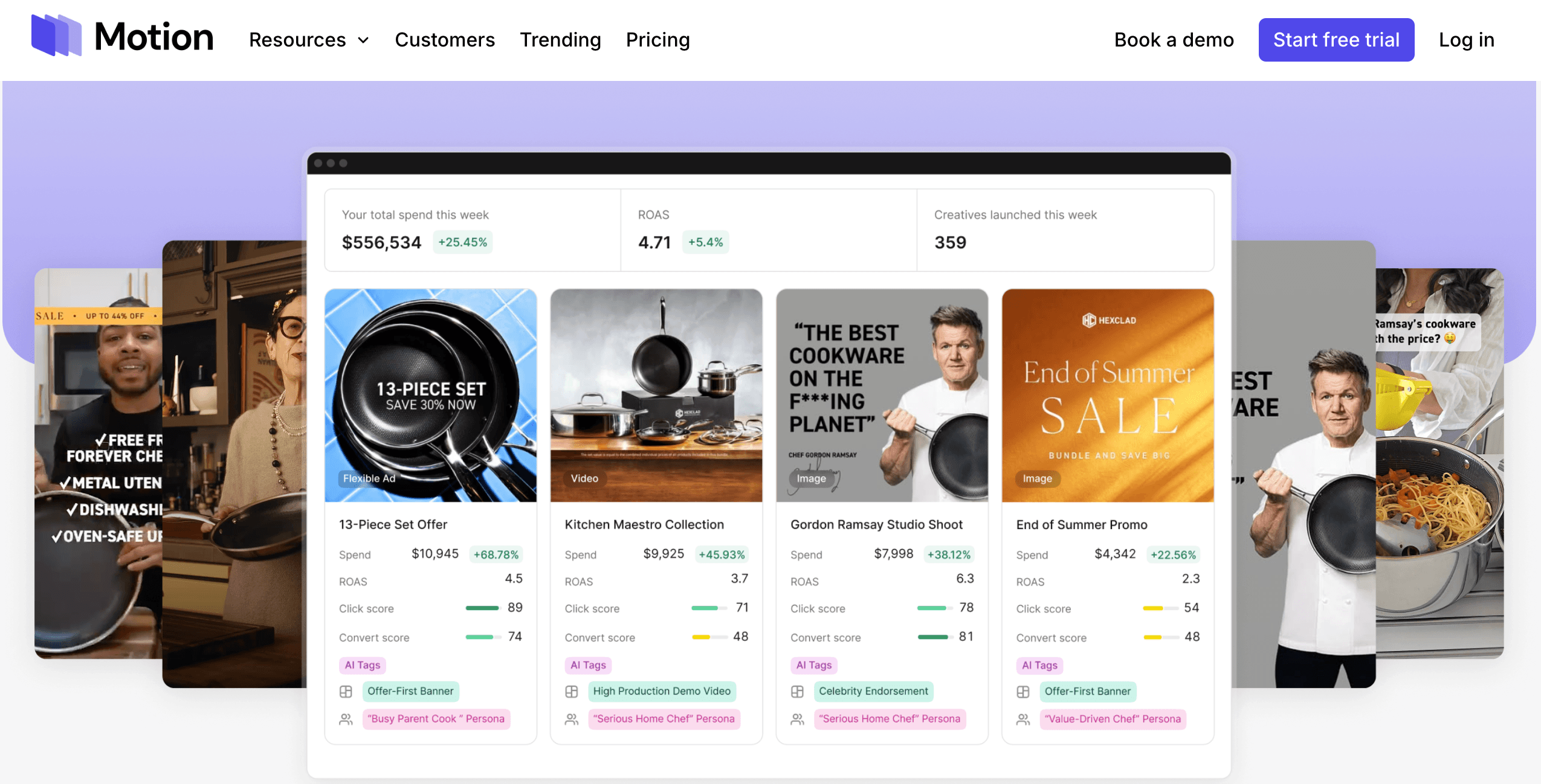
Visual-first reporting that finally unites two teams: Motion’s defining feature is that its reports show the creative alongside the numbers. Where most analytics tools hand you rows and charts, Motion displays the ad itself with performance data attached — so a media buyer and a creative strategist can look at one screen and instantly agree on what’s winning. It automatically groups related creatives together, revealing patterns at the concept level rather than making you compare individual ads one by one.
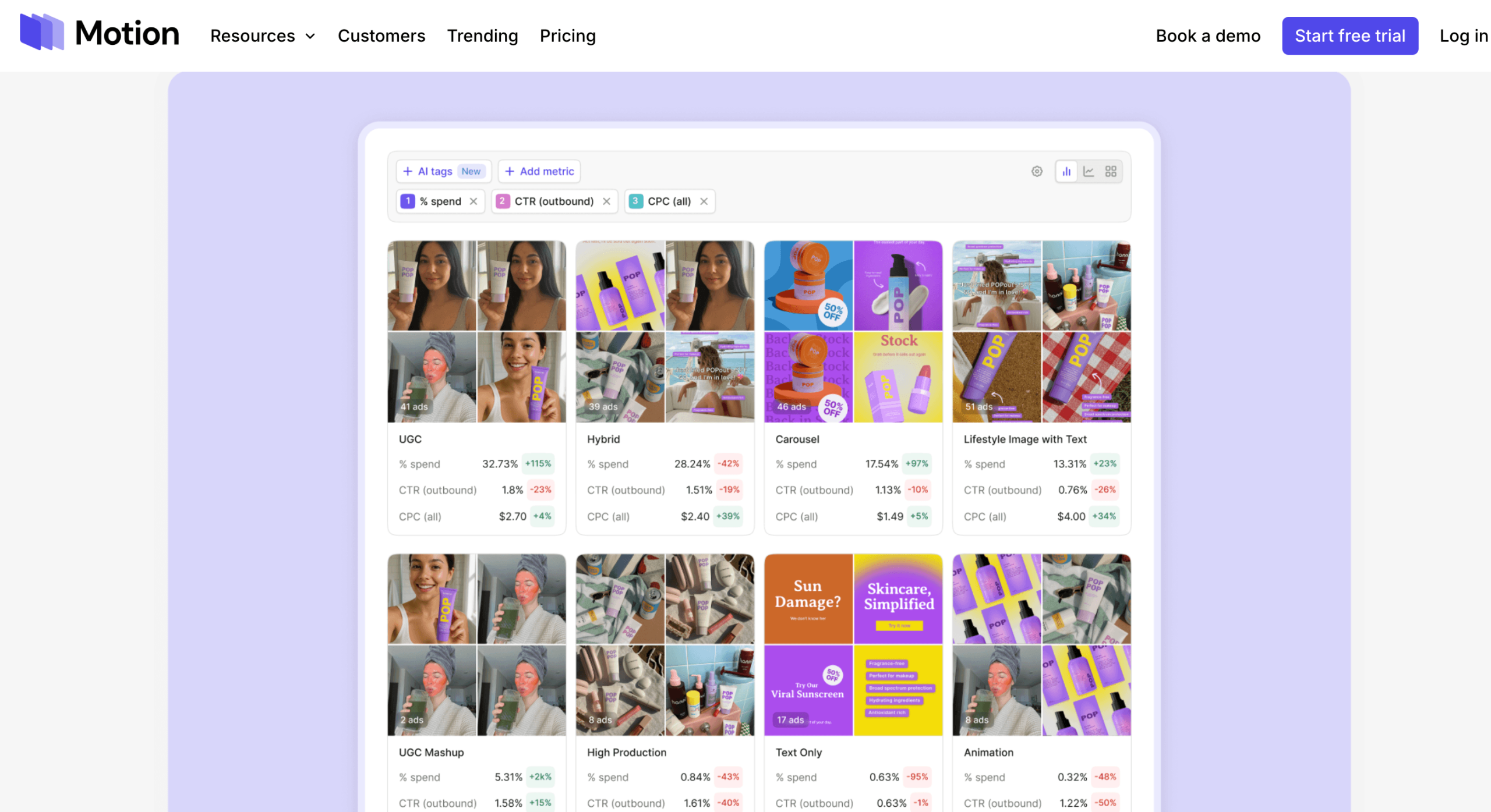
AI auto-tagging that reads your creative like the platform does: Motion’s AI automatically tags every creative asset across categories like hook type, visual format, messaging angle and talent. That means you can slice performance by “which hooks work,” “which formats convert,” or “which creators drive sales” without labeling a single ad by hand. The tags appear directly inside reports and dashboards, helping teams achieve the kind of creative diversification Meta’s Andromeda system rewards.
Context-aware AI, not generic ChatGPT answers: Motion’s AI is trained on performance-creative frameworks and, crucially, on your account. It can analyze thousands of ads in your data and give recommendations grounded in your brand’s recent wins and historical learnings — timely insights like “here’s what happened with the ads you shipped last week” rather than the generic advice a standalone chatbot would produce. The company notes its AI is shaped by the elite DTC advertisers analyzing $14B+ in spend through the platform.
Frame-by-frame video analysis: For video-heavy accounts, Motion can break a creative down frame by frame to pinpoint exactly where viewers drop off, then cross-reference placements and demographic data to explain why an ad works or stalls. That level of granularity turns a vague “this video underperformed” into a specific, briefable fix.
Built-in competitor research: Motion’s Inspo feature and AI competitor agent hunt down your rivals’ latest ads through public ad libraries and summarize their testing strategies, hook ideas and positioning gaps — then help you build a plan to beat them. It’s creative intelligence delivered without you manually scrubbing through ad libraries yourself.
AI agents that do the weekly grind for you: Motion has leaned hard into agentic workflows. One agent runs your entire weekly ad retro in a single click, producing a summary of what’s working and what to cut. Another — built with DTC figure Jess Bachman — analyzes creative before it goes live so you catch a flop before it costs ad spend. It’s like having a creative strategy assistant working day and night.
Unlimited seats and ad accounts: Unlike many SaaS tools that meter every login, Motion’s paid plans include unlimited seats and unlimited ad-account connections. For agencies and growing teams that would otherwise pay per user, that pricing model is a genuine and often underrated differentiator.
Key Features and Technology
Motion’s value comes from how cleanly its capabilities map to the real workflow of a performance-creative team — from raw data ingestion all the way to briefing the next batch of ads. Here’s how the platform breaks down.
Creative Reporting & Dashboards
This is Motion’s foundation. The platform automatically pulls your creative assets and metrics from Meta, TikTok, YouTube and LinkedIn into visual reports that update on their own and, as Motion puts it, never break. You can build reports that group creatives by any variable — format, creator, product, messaging angle, hook type — and compare performance across those groups. An ad leaderboard ranks your creatives by the metrics that matter, and reports can be shared with live data or as static snapshots that require no login, with the option to hide sensitive numbers when sharing with freelancers or agencies.
AI Tagging & Deep Creative Analysis
Motion’s AI reviews your ad account, auto-detects brand-relevant creative categories, and tags every asset so patterns surface without manual work. From there you can zoom all the way in — hunting down top creative by naming convention, sorting by AI tags such as asset type, visual format, hook or creative angle, and layering in custom conversions, product categories and third-party attribution. The platform supports over 200 metrics, giving analytically minded teams room to dig as deep as they want.
AI Agents & Creative Strategy Assistant
This is where Motion has moved fastest. You can talk to your ad data the way you’d talk to ChatGPT and get an expert, brand-aware perspective on what’s good, what to fix, and the exact steps to lift ROAS and lower CPAs. Dedicated agents handle competitor tracking, pre-publish creative analysis, one-click weekly retros, and full-account pattern reports that surface the formats and trends generating the most revenue. The 2026 Runneth by Motion layer pushes this “AI brain for marketing” vision even further.
Integrations & Attribution
Motion connects to Meta (Facebook and Instagram), TikTok, YouTube and LinkedIn through secure OAuth connectors, so it never stores your ad-platform credentials. For teams that need attribution beyond native platform data, Motion integrates with Northbeam and Google Analytics 4 to enhance reports with third-party attribution and custom conversions — sales calls booked, offline purchases and more. It supports video, static image, dynamic creative and carousel formats.
Pricing, Plans, and Package Structure
Motion is a subscription tool, and it sits at the premium end of the creative analytics market. There’s a free trial (14 days, no credit card) so you can connect an ad account and see your own data before committing. After that, only the entry Starter tier has a published price — roughly $250/month for brands spending up to about $50,000/month on ads — while the higher tiers require a sales conversation. Every paid plan notably includes unlimited seats and unlimited ad accounts. Because pricing can change and promotions come and go, treat the figures below as guidance and confirm the live numbers on Motion’s pricing page before you buy.
| Plan | Approx. Price | What You Get | Best For |
|---|---|---|---|
| Free Trial / Free | $0 (no card) | Connect one ad account, explore analytics, AI features and dashboards (limited data window) | Solo buyers or freelancers evaluating the platform |
| Starter | ~$250/mo | AI tags & tasks, ad leaderboard, creative analytics, competitor research, unlimited seats & ad accounts, chat support | Smaller brands spending up to ~$50k/month on ads |
| Pro | Custom (contact sales) | Everything in Starter, plus personalized onboarding, AI workflows, and Northbeam + GA4 attribution | Growing teams spending ~$50k–$250k/month |
| Growth | Custom (contact sales) | Everything in Pro, plus a dedicated Customer Success Manager and private Slack support | High-growth brands spending $250k+/month |
| Agency | Custom (contact sales) | Cross-account reporting, client sharing, and creative insights across multiple brands | Agencies managing ads for many clients |
How Motion Compares to Alternatives
| Factor | Motion | Rule1 | Foreplay / MagicBrief | DIY (Spreadsheets) |
|---|---|---|---|---|
| Primary job | Visual creative analytics + AI strategy | Creative analytics + ROAS benchmarking | Swipe files + creative briefing | Manual data pulls |
| AI auto-tagging | Yes (~8 categories) | Yes (20+ dimensions) | Limited | No |
| Competitor research | Yes (Inspo + AI agent) | Limited | Yes (core strength) | Manual |
| Entry price | ~$250/mo | ~$49/mo | ~$49–$249/mo | “Free” (your time) |
| Seat pricing | Unlimited seats + accounts | Tiered | Tiered | N/A |
| Best for | Mid-to-large DTC teams & agencies | Early-stage, budget-conscious teams | Briefing-first creative shops | Tiny accounts with time to spare |
vs. Rule1: Rule1 is Motion’s most direct value-focused rival, starting around $49/month against Motion’s ~$250/month, and it tags across more creative dimensions (20+ vs. Motion’s roughly eight) plus offers an MCP server for piping data into AI agent workflows. If you’re early in your growth curve or spending under ~$25k/month on ads, that price gap is material. Motion’s edge is its polished visual reporting, its established competitor-research suite, and the depth of an AI trained on billions in real DTC spend. For a refined, team-uniting ecosystem, Motion pulls ahead; for lean budgets, Rule1 deserves a serious look.
vs. Foreplay / MagicBrief: These tools are excellent at swipe files and creative briefing — building a library of inspiration and structured creative direction — but they solve a different job than Motion. Foreplay and MagicBrief help you decide what to make based on “what’s working in the market”; Motion tells you what to make based on “what’s working in your account.” Many strong teams actually run a briefing tool and an analytics tool side by side. If your biggest gap is analytics and reporting depth, Motion wins; if it’s briefing workflow, look their way.
vs. the DIY spreadsheet approach: Plenty of teams still export ad data by hand and stitch it into spreadsheets. It’s “free,” but the true cost is hours of weekly manual work, reports that break the moment a naming convention slips, and a creative-to-performance link that’s fragile at best. Motion automates that entire pipeline — auto-syncing assets and metrics into reports that update themselves — and users routinely report saving ten or more hours a week on creative reporting. For any team spending real money on ads, that trade is an easy win.
Pros and Cons
What Marketers Love
Reporting that used to take a day now takes a click: The most consistent praise is time saved. Motion auto-syncs creative and metrics into visual reports that update on their own, and teams routinely report reclaiming 10+ hours a week they used to lose to manual reporting. The one-click weekly retro is a favorite.
Growth and creative finally aligned: Because reports show the actual creative next to the data, media buyers and creatives stop arguing past each other. Users describe it as the “missing link” that gets both teams seeing eye-to-eye on performance — a cultural win as much as a technical one.
AI that knows your brand, not just the internet: Motion’s context-aware AI analyzes your own ads and history to recommend what to test next, which is far more useful than the generic output of a standalone chatbot. It’s trained on performance-creative frameworks and billions in real ad spend.
Genuinely useful competitor intel: The Inspo feature and competitor AI agent are frequently cited differentiators — automated summaries of rivals’ testing strategies and hooks that would otherwise take hours of manual ad-library digging.
Unlimited-seat pricing scales with teams, not against them: Including unlimited seats and ad accounts on paid plans is a real advantage for agencies and larger teams, who avoid the per-seat creep that inflates the bill on many competing tools.
Limitations Worth Knowing
The entry price is premium: At roughly $250/month, Motion’s Starter tier is one of the pricier entry points in creative analytics. That’s a small fraction of budget for a brand spending $50k/month on ads, but it prices out smaller teams and early-stage brands who want analytics without committing a quarter-grand a month before proving value internally.
Attribution integrations aren’t on Starter: Northbeam and GA4 — the attribution most serious performance teams need — live on Pro and above. If that’s central to your workflow, the entry plan won’t cut it, and you’ll need to budget for a higher (custom-priced) tier.
Meta-first, with narrower coverage elsewhere: Meta gets the deepest integration and fullest AI-tagging support. TikTok, YouTube and LinkedIn are supported but more limited, and Motion doesn’t cover Google Search, Display or programmatic channels at all. If Meta isn’t your main channel, verify the feature depth before you buy.
It rewards setup, not plug-and-play: Teams that invest in clean naming conventions and organized accounts get strong value; those expecting instant magic can find the initial configuration effort higher than anticipated. The tool amplifies good data hygiene — it doesn’t replace it.
Higher-tier pricing isn’t transparent: Only Starter has a public price; Pro, Growth and Agency all require a sales conversation. That’s common for B2B SaaS, but it makes upfront budgeting harder and means you can’t fully self-serve into the plan you may actually need.
The free plan is for evaluation, not real work: The no-card free access is great for kicking the tires, but its single ad account and short data window make it impractical for spotting fatigue or seasonal trends, which need weeks or months of history. You’ll outgrow it quickly if you’re serious.
Who Should Use Motion
DTC brands scaling paid social: If you’re spending five or six figures a month on Meta and other channels and creative is your main growth lever, Motion is squarely built for you. Start on Starter if you’re near the $50k/month mark, and move to Pro when you need Northbeam or GA4 attribution.
Creative strategists and media buyers: Anyone whose day is spent deciding what to test next will get the most from Motion’s AI tagging, frame-by-frame analysis and ad leaderboard. It turns “I think this worked” into evidence you can brief an editor with. The Starter or Pro plan fits most.
Performance agencies managing many clients: The Agency plan’s cross-account reporting, client sharing and unlimited seats are tailor-made for shops running ads across multiple brands who need polished, shareable performance reports without per-seat costs ballooning.
Growth leads who need to unite two teams: If your creative and media-buying sides don’t share a source of truth, Motion’s visual-first reports are worth it for the alignment alone. Any paid tier delivers the shared picture; pick the one matching your spend level.
Who should skip it (for now): Solo marketers, organic-only strategies, and early brands spending only a few thousand a month will likely find the price hard to justify — a cheaper tool like Rule1, or a free tier from Superads or Uplifted, is the smarter starting point until your spend grows into Motion’s value.
Getting Started: Step by Step
- Start the free trial. Head to motionapp.com and begin the trial — no credit card required. You’ll be able to connect an ad account and see your own data before spending anything.
- Connect an ad account. Link at least one of Meta, TikTok, YouTube or LinkedIn through Motion’s secure OAuth connector. Motion never stores your platform credentials, and it will begin syncing your creative and metrics automatically.
- Let the AI tag your creative. Give Motion a little time to auto-sync assets, apply AI tags, and build your first reports. The categories it detects adapt to your account, so the more history it sees, the sharper the patterns.
- Tidy your naming conventions. This is the single biggest lever on value. Clean, consistent naming lets you slice performance by format, creator, angle and hook — so invest a little time here early to unlock deeper reporting later.
- Build your first report and leaderboard. Group creatives by the variable you care about most, rank them on the ad leaderboard, and share the report with your team using live data (or a hidden-metric snapshot for external partners).
- Put the AI agents to work. Run a one-click weekly retro, ask the AI what to test next, and try the competitor and pre-publish agents to catch flops before they cost you spend.
- Pick the right plan. Match your tier to your ad spend and integration needs — remember Northbeam and GA4 attribution start on Pro — and confirm the live price before you commit.
Tips for Getting Maximum Value
Use the free trial with your real ad account, not sample data — Motion’s value only becomes obvious when it’s analyzing your actual creative, so connect a live account and give it enough history to surface genuine patterns. Invest early in clean, consistent naming conventions; teams that do this get dramatically deeper reporting, while teams that skip it hit a ceiling fast. Match your plan to your integration needs from the start rather than signing up on Starter and discovering you need Pro-tier Northbeam or GA4 attribution a month in. If Meta is your primary channel you’ll extract the most value, so double-check feature depth before leaning on Motion for TikTok, YouTube or LinkedIn. And don’t over-buy: if you’re spending only a few thousand a month, prove the workflow on a cheaper tool first and graduate to Motion once your ad budget makes the subscription a rounding error — because at real spend levels, Motion typically pays for itself in the hours it saves and the flops it prevents.
Future Outlook and Final Assessment
The tailwinds favor Motion. Creative is now the biggest lever in paid social, AI is reshaping how strategists work, and Motion has bet hard on the intersection of the two — auto-tagging, context-aware AI, competitor agents and the new Runneth “AI brain for marketing” all point to a platform racing to become the intelligence layer for performance creative. With 2,100+ teams and $14B+ in analyzed spend already, its data advantage compounds: the more elite advertisers it serves, the smarter its recommendations become. For teams that live in paid social, that’s a genuinely defensible position.
The honest caveats remain: the ~$250/month entry price prices out smaller teams, attribution integrations sit behind Pro, coverage is Meta-first, and you’ll get out what you put into your account hygiene. But within those boundaries, Motion delivers one of the most polished, genuinely useful creative analytics experiences available in 2026 — and for teams with real ad spend, it removes so much manual grind that the subscription quickly becomes an easy yes.
Bottom line: For most performance-marketing teams evaluating creative analytics, the smart move is to start free — connect a live ad account and let Motion analyze your own data before paying a cent. If it earns its place, the Starter plan (~$250/month) is the value pick for brands spending up to ~$50k/month, while teams that need Northbeam/GA4 attribution and AI workflows should step up to Pro. Either way, Motion turns a spreadsheet full of guesswork into a clear, visual answer to the only question that matters: what should we make next?
Conclusion
Motion has built something rare in the marketing stack: a single platform that meets performance teams exactly where the pain is — pulling scattered ad data into visual reports, tagging every creative with AI, surfacing the patterns behind your wins, and telling you what to make next with evidence instead of hunches. It’s fast where it counts, deep where it matters, and forward-looking in its embrace of AI agents. It isn’t cheap, and it’s built for teams already spending real money on ads — so confirm your channels and budget fit, invest a little in clean setup, and Motion transforms the messiest part of paid social into something clear and confident. For growth and creative teams tired of guessing, that’s exactly what it’s here to do: make everything easy, one winning ad at a time.
Ready to stop guessing and start shipping winning ads?
Explore more honest reviews, tutorials and tool comparisons to find the right tech for the way you work and live — at AI Solutes, where we make everything easy.
👉 Open Free Account: https://motionapp.com/
👉 Our YouTube Channel: youtube.com/@ai-solutes
👉 Our Facebook Fanpage: Facebook
👉 Our X (Twitter): @AISolutes
- Unlock Explosive Fiverr Growth in 2025: Dominating the AI Freelance Boom
- Unlock the Power of ElevenLabs AI Voice Generator: Usability, Growth, and Ethical Innovation 2025
- VEED.io Review 2026: The Browser-Based AI Video Studio That Turns Almost Anyone Into a Video Creator
- Unlock Viral Video Success in 2025 with CapCut’s AI Filters and Export Hacks
- Dominate Local Ecommerce with Pippit AI: Regional SEO & Personalized Video Automation Strategies















