

A visitor lands on your website with a question — about pricing, a product, a shipping date — and there’s no one to answer. Within seconds, many of them leave, and that’s a sale or a lead gone. It’s a costly gap: surveys consistently show that around 79% of consumers prefer live chat over any other support channel, precisely because it’s instant. LiveChat exists to close that gap. It puts a fast, polished chat widget on your site so your team — assisted by AI — can talk to visitors in real time, answer questions, recover abandoned carts, qualify leads, and support customers across channels, all from one clean dashboard. Built by Text, Inc. (a company publicly traded on the Warsaw Stock Exchange) and refined since 2002, it’s one of the longest-running dedicated live chat platforms in the world, trusted by more than 37,000 companies across 150 countries, with 200-plus integrations, pricing from around $20 per agent per month, and a 14-day free trial that doesn’t even require a credit card.
For e-commerce stores, SaaS and online service businesses, agencies, freelancers, and small business owners who sell or support online, fast and reliable chat can directly lift conversions and customer satisfaction. This 2026 review walks through everything that matters: what LiveChat actually is, its standout features, its built-in AI tools, the full plan-by-plan pricing breakdown, how it compares to Tidio, Intercom, and free tools, the honest limitations worth knowing — including how per-agent pricing scales and what’s sold separately — and exactly who should, and shouldn’t, use it.
LiveChat Review 2026: The Polished, Reliable Live Chat Platform for Online Businesses
Overview and Background
LiveChat is customer-service software that lets businesses talk to their customers directly on their websites, in mobile apps, or across messaging platforms, in real time, with the help of human agents. At its core it’s a chat widget plus a powerful agent dashboard: visitors start a conversation on your site, and your team handles those chats from one fast, organized interface — with AI assistance, canned responses, routing, and analytics built in to keep things efficient.
The platform is built by Text, Inc. (formerly LiveChat Software), a Polish company publicly traded on the Warsaw Stock Exchange. Founded in 2002, LiveChat has spent over two decades focused on doing one thing well — making real-time customer conversations work — which is part of why it powers support for more than 37,000 companies in 150 countries. It’s available as web, desktop, and mobile apps, so agents can handle chats from anywhere.
One thing to understand up front is LiveChat’s modular philosophy. Rather than trying to be an all-in-one platform, it stays focused on the chat experience and relies on sibling products in the Text ecosystem for adjacent needs: ChatBot for autonomous AI automation, HelpDesk for ticketing, and KnowledgeBase for self-service help centers. This keeps LiveChat itself clean and focused, but it means the full support stack can involve more than one subscription.

Why LiveChat Stands Out in 2026
Dead-simple setup and a fast widget: You can install the widget and start chatting within about 15 minutes, with no technical skills required. The widget itself renders in under two seconds — which matters more than people think, since slow widgets increase bounce — and supports rich messaging with cards, carousels, buttons, and quick replies. It’s the kind of frictionless start that gets a small business live the same afternoon.
Two decades of reliability and focus: LiveChat has been around since 2002 — older than most of its competitors — and the company quietly built one of the most dependable chat platforms on the market while flashier rivals chased the “everything platform” dream. Reliable uptime and a fast, stable interface are exactly what you want from the tool your customer conversations run through. Sometimes focused and boring is precisely right.
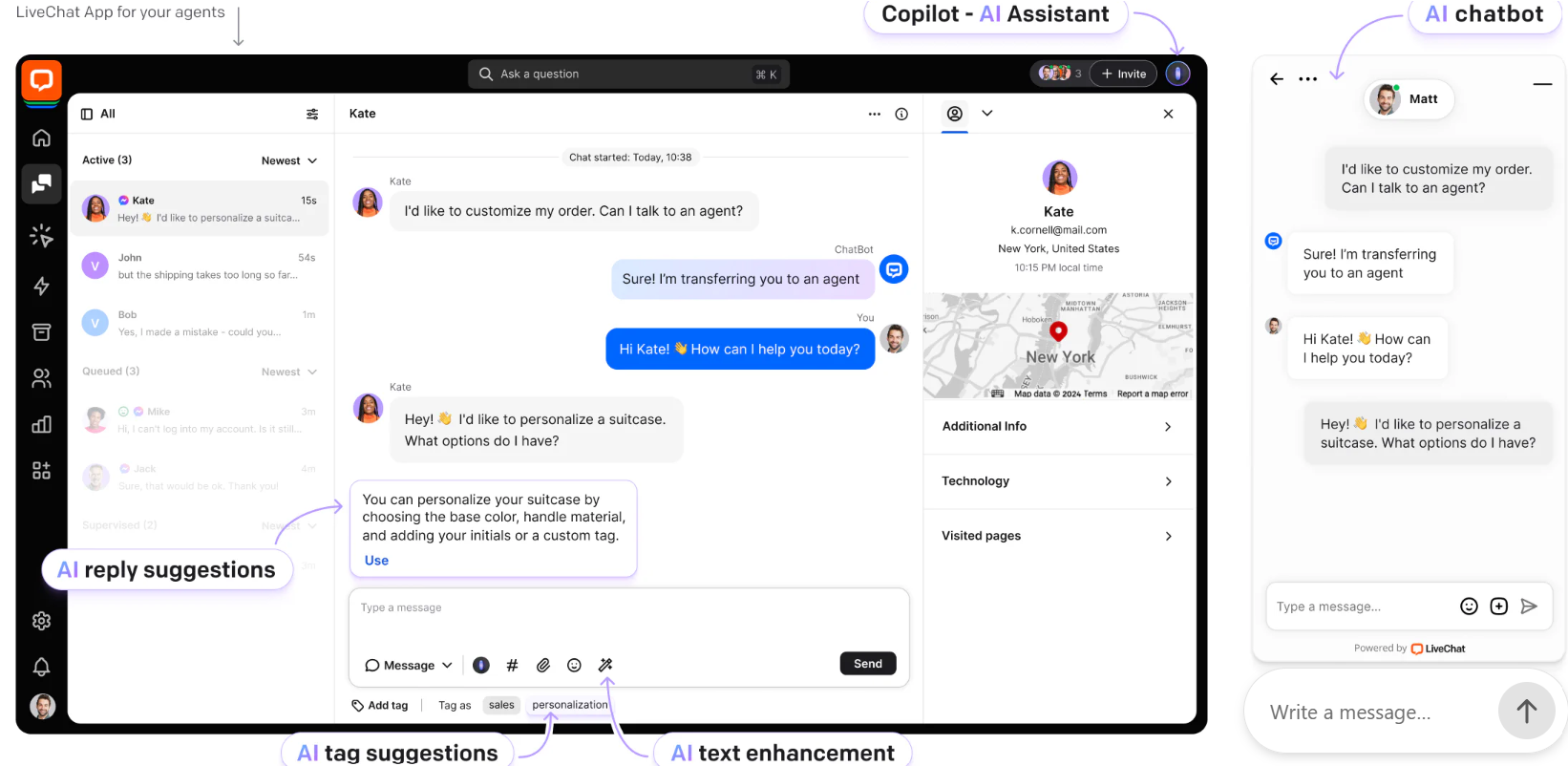
AI that assists your agents — on every plan: LiveChat’s built-in intelligence is included across all four pricing tiers. The Copilot acts as an AI sidekick during chats, offering real-time assistance and smart actions; reply suggestions generate instant, context-aware responses drawn from your knowledge sources; chat summaries condense long conversations automatically; and tag suggestions and AI insights help you categorize and learn from your conversations. It’s practical AI that makes human agents faster and more consistent.
Genuinely useful reporting and staffing prediction: Chat reports cover response times, satisfaction scores, agent activity, and ticket volume over time, and you can see which pages generate the most chats and when. The standout is staffing prediction, which tells you how many agents you need based on historical patterns — for a manager trying to schedule coverage without overspending, that’s gold.
A true omnichannel inbox: Multi-channel routing pulls messages from your website, Facebook Messenger, WhatsApp, Apple Messages, and email into one unified queue, so your agents stop tab-switching and answer everything from a single place. The mobile app is good enough to handle chats from a phone during off-hours.
200-plus integrations: LiveChat connects smoothly with the tools businesses already run — Shopify, HubSpot, Salesforce, Mailchimp, and hundreds more — fitting into your existing workflow rather than forcing an overhaul. Connecting your CRM gives agents full customer context during a chat, which meaningfully speeds up resolutions.
Built to drive sales, not just support: Proactive chat invitations triggered by visitor behavior, the “sneak peek” that shows what a visitor is typing before they send, and product-sharing in chat turn LiveChat into a sales tool. Deployed on checkout pages, proactive chat can recover a meaningful share of carts that would otherwise be abandoned.
Key Features and Technology
LiveChat’s strength is how directly its tools serve a busy support or sales team. Here’s how the most important pieces break down.
The Chat Widget and Agent Experience
The agent dashboard is clean and fast: incoming chats, visitor information, and conversation history sit in one view, and you can place the widget on multiple websites at no extra charge. Canned responses save hours of retyping the same answers, while the sneak-peek feature shows what visitors are typing before they hit send, cutting response times significantly. Smart and manual chat routing distribute conversations across available agents, chats can be transferred to a colleague or specialist mid-conversation, and customer details — name, email, location, and the page they’re currently viewing — give agents instant context. It’s a thoughtfully designed workflow honed over twenty years.
Built-in AI: Copilot, Reply Suggestions, and Summaries
LiveChat’s AI tools are designed to make human agents better rather than replace them. Copilot answers agents’ questions and suggests smart actions in real time, reply suggestions draft context-aware responses from your imported knowledge, and automatic chat summaries let agents or managers grasp a conversation without reading every line. In honesty, this is agent-assist AI, not an autonomous bot: if you want a chatbot that can resolve conversations on its own and deflect routine tickets around the clock, you’ll add LiveChat’s sibling product, ChatBot, which integrates natively to handle up to roughly 80% of common cases but is billed as a separate subscription. It’s a clean division of labor — but one you should budget for if automation is a priority.
Omnichannel, Integrations, and Sales Tools
Beyond website chat, LiveChat unifies Messenger, WhatsApp, Apple Messages, and email into a single queue (note that some channels such as Instagram, WhatsApp, and X are added via the Marketplace as separate add-ons). Its 200-plus integrations connect your store, CRM, and marketing tools, and sales-focused features — proactive triggers, eye-catcher animations, and the ability to share files and product info in chat — help turn conversations into conversions. For an online store, the combination of CRM context and proactive engagement is where chat starts paying for itself.
Reporting, Analytics, and Staffing Prediction
LiveChat’s analytics track the metrics that matter — chat volume, response times, customer satisfaction, agent performance, and ticket trends — and show which pages and times generate the most conversations so you can optimize your proactive triggers. The staffing prediction feature, available on the Business tier, forecasts how many agents you need based on historical demand, and a work scheduler helps you build shifts around it. Together they take a lot of guesswork out of running a support team efficiently.
Pricing, Plans, and Package Structure
LiveChat is priced per agent per month across four tiers — Starter, Team, Business, and Enterprise — with a roughly 15% discount for annual billing. There’s no free plan, but every tier comes with a 14-day free trial that doesn’t require a credit card. The figures below are approximate and can change with promotions, so confirm the live pricing on LiveChat’s site before subscribing, and remember that the ChatBot add-on and other Text products are billed separately.
| Plan | Approx. Price (per agent/mo) | What You Get | Best For |
|---|---|---|---|
| Starter | ~$20 annual / ~$24 monthly | Basic chat tools, customizable widget, AI assist; 60-day chat history | Solo founders and very small sites |
| Team | ~$41 annual / ~$49 monthly | Unlimited chat history, agent groups, chat & ticket tagging, basic reporting | Growing teams — the value sweet spot |
| Business | ~$59 annual / ~$69 monthly | Advanced reporting, SSO, staffing prediction, work scheduler | Larger support teams needing forecasting |
| Enterprise / ChatBot add-on | Custom / ChatBot ~$52+/mo | Dedicated account manager, security & compliance (HIPAA/BAA); ChatBot adds autonomous AI | Large or regulated orgs; anyone needing automation |
How LiveChat Compares to Alternatives
| Factor | LiveChat | Tidio | Intercom | Tawk.to |
|---|---|---|---|---|
| Focus | Polished live chat | Chat + AI for SMBs | AI-first “everything” suite | Free basic chat |
| Built-in AI chatbot | Separate (ChatBot) | Yes (Lyro, paid extra) | Yes (Fin, per resolution) | Limited |
| Pricing model | Per agent/month | Low base + AI fees | Per seat + per resolution | Free (branding to remove) |
| Ease of use | Very easy | Easy | Moderate (complex) | Easy |
| Best for | Reliable agent-led chat | Budget AI automation | Large, AI-heavy teams | Testing / tiny budgets |
vs. Tidio: Tidio is the budget-friendly, AI-forward alternative — it bundles live chat, ticketing, and the Lyro AI agent in one platform with a free tier to start, making it attractive for small businesses that want automation without juggling subscriptions. The trade-offs are that Tidio’s AI is a paid extra that scales with usage, and LiveChat generally offers a more polished, reliable agent experience and deeper reporting. If automated, 24/7 deflection on a tight budget is your priority, Tidio is compelling; if you want a refined, agent-led chat tool from a 20-year specialist, LiveChat is the stronger pick.
vs. Intercom: Intercom is the premium, AI-first “everything platform,” pairing chat with a CRM, marketing tools, and its Fin AI agent, and it’s genuinely powerful for large teams — but it’s considerably more expensive (with per-seat and per-resolution costs that grow as AI succeeds) and more complex to run. LiveChat is simpler, more focused, and cheaper for straightforward live chat. Choose Intercom if you want a sprawling, automation-heavy customer platform; choose LiveChat if you want excellent chat without the platform bloat or the bill.
vs. Tawk.to and free tools: Tawk.to is genuinely free and fine for testing or very low volume, though it shows its own branding unless you pay to remove it, and free tiers from Crisp and Tidio cap conversations and omit AI. The honest reality is that you tend to outgrow free tools within weeks of serious use. LiveChat is a premium paid product, and what you pay for is reliability, a faster and richer experience, real analytics, proper support, and the integrations a growing business depends on — worth it once chat is a real channel rather than an experiment.

Pros and Cons
What Users Love
Dead-simple setup and a fast widget: You’re live in about 15 minutes with no technical skills, and the widget loads in under two seconds with polished, rich messaging.
Two decades of reliability: A focused platform with excellent uptime and a clean, fast interface — the kind of dependability you want for customer-facing conversations.
Included AI that speeds agents up: Copilot, reply suggestions, chat summaries, and tag suggestions come on every plan and genuinely make agents faster and more consistent.
Excellent reporting and staffing prediction: Strong analytics plus demand forecasting help managers schedule the right coverage and optimize proactive chat.
Omnichannel and richly integrated: One queue for website, Messenger, WhatsApp, Apple Messages, and email, plus 200-plus integrations including Shopify, HubSpot, and Salesforce.
Limitations Worth Knowing
Per-agent pricing adds up: The biggest drawback for growing teams — costs scale with every agent, so a larger team can pay several hundred dollars a month for chat alone, where flat-rate or conversation-based rivals don’t.
No built-in autonomous AI chatbot: The included AI assists agents, but a bot that resolves conversations on its own requires the separate ChatBot subscription — added cost and complexity that some competitors bundle in.
No free plan: Only a 14-day trial; if you need a permanently free tool, Tawk.to or the free tiers of Tidio and Crisp are the places to look.
Starter’s 60-day history is short: The entry plan limits chat history to 60 days, which can be frustrating; you need the Team plan for unlimited history.
More products mean more subscriptions: Help desk (HelpDesk) and knowledge base (KnowledgeBase) are separate, and some channels like Instagram, WhatsApp, and X are add-ons — the full stack costs more than the headline price.
Slower to innovate, no native calling: The core product has evolved gradually rather than racing ahead of AI-first rivals, and there’s no native phone or video — those need integrations.
Who Should Use LiveChat
E-commerce stores: If you sell online, proactive chat on product and checkout pages can recover abandoned carts and answer the questions that close sales, with Shopify and CRM integrations giving agents full context. Team or Business fits most stores.
SaaS and online service businesses: For onboarding help, support, and lead capture, LiveChat’s reliable agent experience and analytics are a strong match. The Team plan covers a growing support team well.
Small businesses and startups: The 15-minute setup and clean interface make LiveChat easy to adopt without a technical team. Starter suits a solo operator; move to Team as you add agents and need unlimited history.
Agencies and freelancers: Since you can run the widget on multiple websites at no extra charge, LiveChat works well for those managing chat across several client sites from one account.
Who should look elsewhere: In fairness, if you need a permanently free tool, want a fully autonomous AI agent bundled into the base price, or run a very large team where per-agent pricing becomes painful, alternatives like Tawk.to, Tidio, or a flat-rate platform may serve you better.
Getting Started: Step by Step
- Start the 14-day free trial. Sign up with no credit card required and create your account so you can test LiveChat with real visitors before paying.
- Install the widget. Add the chat code to your site or use a plugin for platforms like WordPress or Shopify — most businesses are live within about 15 minutes.
- Customize and set up your workflow. Match the widget to your brand, write canned responses for common questions, and configure chat routing and agent groups.
- Connect your channels and tools. Link Messenger, WhatsApp, and email into one queue, and integrate Shopify, your CRM, and other tools for full customer context.
- Turn on AI assist (and consider ChatBot). Enable Copilot and reply suggestions to speed up your agents, and add the ChatBot product if you need 24/7 automated deflection.
- Set proactive triggers and choose a plan. Create behavior-based chat invitations on key pages like checkout, then pick the plan — Team for most — that fits your team before the trial ends.
Tips for Getting Maximum Value
Start with the 14-day trial (no card needed) and test it against real traffic before committing, and choose annual billing to save roughly 15%. Because pricing is per agent, right-size your team and avoid licensing seats you won’t actively use — that’s the single biggest lever on your cost. For most businesses the Team plan is the value pick, since it removes Starter’s 60-day history limit and adds agent groups and tagging. Get full mileage from the included AI Copilot and reply suggestions before paying for the separate ChatBot, and only add ChatBot (around $52/month) if round-the-clock automation genuinely earns its keep. Place proactive chat triggers on high-intent pages like checkout to recover carts, connect your CRM and store so agents have instant context, and use the staffing-prediction tool on Business to schedule coverage efficiently. Finally, remember the help desk and knowledge base are separate Text products, so price out the full stack before comparing LiveChat with all-in-one rivals.
Future Outlook and Final Assessment
The demand behind LiveChat is durable: customers increasingly expect instant answers, the strong majority prefer live chat to other channels, and fast support reliably lifts conversions and recovers carts for online businesses. LiveChat’s two decades of focus, its polished and dependable experience, its included agent-assist AI, and its deep integration ecosystem keep it a serious, well-established contender, and the Text suite gives you a clear path to add automation, ticketing, and a knowledge base as you grow.
The honest caveats matter: per-agent pricing scales expensively for larger teams, a fully autonomous AI chatbot and the rest of the stack are separate subscriptions, there’s no free plan, and the platform has evolved more steadily than the AI-first newcomers. But for businesses that want a reliable, refined, agent-led chat tool from a specialist that has done this longer than almost anyone — and that handle their team size and add-ons deliberately — LiveChat remains one of the best customer-communication platforms available in 2026.
Conclusion
LiveChat has spent more than twenty years perfecting a single, valuable idea: that talking to your customers the moment they need you turns visitors into buyers and buyers into loyal fans. It’s fast to set up, reliable, genuinely pleasant for agents to use, and smartly enhanced with AI that makes your team quicker — with the honest asterisks that its per-agent pricing scales as you grow and that automation, ticketing, and a knowledge base come as separate products. For e-commerce stores, SaaS businesses, agencies, and small business owners who treat customer conversations as a competitive advantage, LiveChat makes real-time support and sales feel effortless — making everything easy, from a visitor’s first question to a closed sale.
Ready to turn website visitors into customers with real-time chat?
Explore more honest reviews, tutorials and tool comparisons to find the right tech for the way you work and live — at AI Solutes, where we make everything easy.
👉 Start Your Free Trial: https://ai-solutes.com/livechat
👉 Our YouTube Channel: youtube.com/@ai-solutes
👉 Our Facebook Fanpage: Facebook
👉 Our X (Twitter): @AISolutes
- Master Midjourney V7 Prompts in 2025: Ultimate Guide to Styles, Features, and AI Art Comparisons
- Enago Read
- Does Freecash Maximize Pocket Money? Analyzing the Freecash Micro-Tasking Software
- Never Miss a Lead Again: How Manychat Quietly Converts DMs into Loyal Customers
- Explore Folk 2026 Trends: Must-Hear Playlists, Award Winners, Genre Fusions, and Folk Nouveau Decor















