Remote work has evolved from being a temporary solution into a permanent part of how businesses operate across industries. Alongside this shift comes the urgent need for tools that ensure communication remains clear, professional, and secure. With the rise of real-time collaboration, global remote teams, and sensitive client discussions, background noise, note-taking fatigue, and privacy concerns have become daily challenges. That’s where Krisp AI shines—offering advanced noise cancellation, real-time transcription, and enterprise-grade voice isolation. This guide unveils how Krisp AI equips professionals and organizations to thrive in 2025’s demanding digital landscape.
The Ultimate Guide to Krisp AI: Real-Time Noise Cancellation, Smart Transcription, and Enterprise Voice Clarity in 2025
Krisp AI Noise Cancellation: Real-Time Performance When It Matters Most
Ever joined a Zoom call, only for your colleague’s leaf blower—or worse, your own—steal the show? Yeah, we’ve all been there. Krisp AI’s noise cancellation tech takes that background chaos and turns it into… well, nothing.
But it doesn’t do this by muting everything around you or making you sound like a robot. Instead, let’s pull back the curtain on the clever AI powering this feature and see how it saves your meetings, presentations, and sanity.
How Krisp’s Real-Time Noise Cancellation Actually Works
Picture this: Krisp is like a bouncer for your audio. Its proprietary deep learning model, trained on millions (yes, millions!) of noisy call samples from around the globe, instantly picks out the sound of human voices from everything else. Once Krisp is switched on, it listens to both your microphone and your incoming audio.
Here’s where the magic happens:
- Zero Data Retention: Your audio never leaves your device. There’s no cloud recording, no risk of someone stumbling upon a weird voice memo of you explaining quarterly KPIs.
- Lightning Fast: With less than 15 milliseconds of delay, Krisp filters noise out so quickly even the most sensitive ears can’t tell.
- Works Everywhere: Zoom, Teams, Skype, Slack, Google Meet—if it can make a call, Krisp can make it sound clearer.
Day in the Life: How to Use Krisp Noise Cancellation
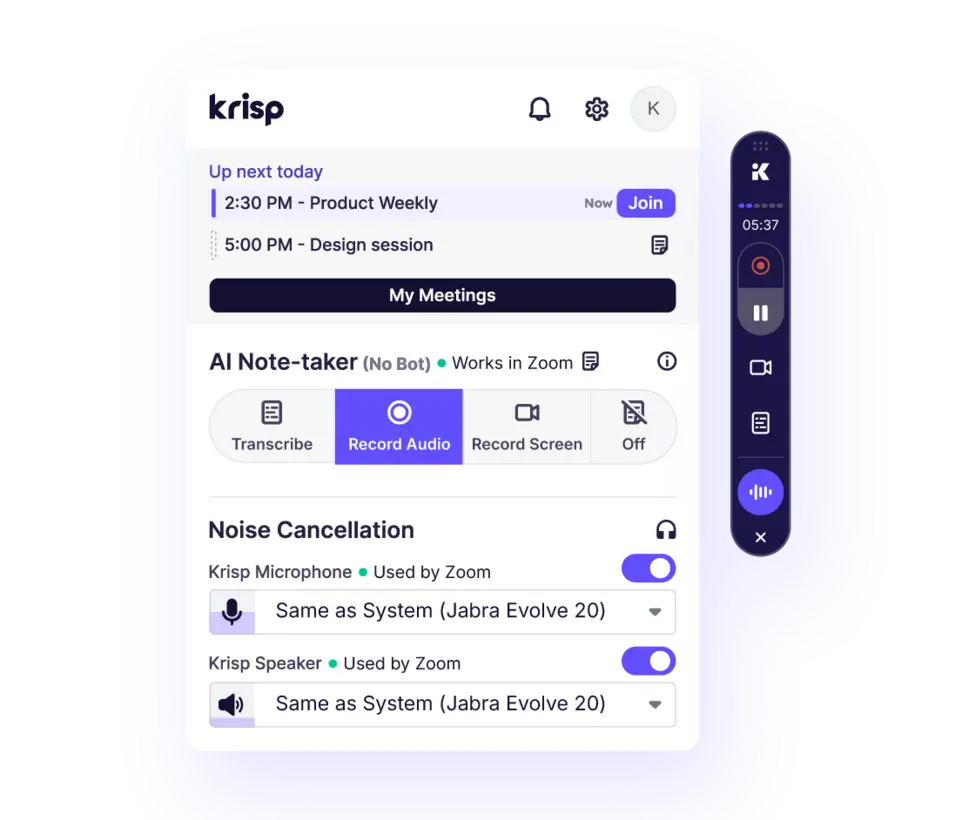
Want a quick start? Here’s how you can get Krisp up and running in under five minutes:
- Download and install Krisp (desktop app or browser extension—your pick—always from the official website).
- Set up your workspace by selecting the Krisp Virtual Microphone and Speaker as your input/output in whichever meeting app you use most.
- Switch on “Remove Noise” in the Krisp interface before your call starts, and geek out watching the live noise suppression meter.
- Enjoy easy listening—whether it’s kids playing, dishes clinking, or someone revving a motorcycle outside, Krisp ensures your voice takes center stage.
“Krisp’s live noise meter gives instant feedback, so remote workers can confidently hold calls from anywhere.”
— Dr. Lila Markov, AI Audio Researcher
Consider this: you’re pitching to a client while your neighbor mows his lawn—Krisp ensures your client hears just you, not your neighbor’s landscaping ambitions.
Built for Privacy: Why Krisp Leaves Other Solutions in the Rearview
When it comes to remote work, privacy is king. Unlike some tools that rely on the cloud for processing, Krisp does everything locally. That means the AI tackles noise on your device, never sending your audio anywhere.
Here’s why that’s a big deal:
- GDPR Compliance: Essential for anyone operating in the EU.
- Zero Data Recorded or Shared: What happens in your call, stays in your call.
- Enterprise Controls: Admins get advanced dashboards for secure setups and usage reports.
This architecture isn’t just marketing talk—it’s a lifeline for industries like healthcare, law, and finance, where confidentiality is non-negotiable.
Krisp vs. Basic Noise Suppression: The Details That Matter
Maybe your favorite call app already says it “removes noise.” But does it really stand up when things get chaotic? In comparison:
- Built-in options (like Zoom or Teams default suppression) lack advanced AI models—voice clarity can suffer, and certain background noises slip through or voices become robotic.
- With Krisp, surveys and users repeatedly report up to 90% background noise reduction, compared to 60% with basic alternatives.
Real World Example:
A 2025 Forrester case study showed one global sales team slashing call interruptions by 80% within weeks of switching to Krisp. Not bad for a few clicks.
Next time the world erupts in noise, Krisp’s real-time AI proves its worth—especially as remote meetings get longer and more complex.
Krisp Realtime Transcription: Catch Every Word, Every Time
Ever left a video meeting, only to realize you forgot half of what was said? Welcome to the club. Manually scribbling notes is a productivity killer—and nobody wants to be “that person” frantically typing during every call.
Krisp’s real-time transcription flips that script. Now, every spoken word is captured, timestamped, summarized, and searchable—making those “what did we decide again?” moments a thing of the past.
How Krisp Transcription Makes Your Meetings Smarter
As soon as your call starts, Krisp’s AI-powered speech engine rolls into action. Whether your team is debating product roadmaps, reviewing client feedback, or discussing digital marketing trends, Krisp can handle it.
Features that set Krisp apart:
- Live Multi-Speaker Transcription: It picks out who’s talking, separating speakers for clarity.
- Timestamped Notes: Revisit any moment of the meeting without having to scrub through a messy recording.
- Automated Meeting Summaries: Get instant bullet-point recaps with action items and top takeaways.

Transcription in Action: Making Recaps Effortless
Imagine this workflow:
- Before the meeting, enable transcription in Krisp.
- Watch as the highlights appear live—they’re even shareable in real time via Slack or email.
- Once you wrap up, Krisp sends you an auto-generated summary with all the critical details spelled out in clear, actionable language.
“Krisp’s instant summaries cut post-meeting documentation time by 60% for our marketing team.”
— Sarah Ochoa, Remote Collaboration Manager
AI-Powered Summaries: Empowering Teams With the Essentials
Forget about 20-page meeting transcripts nobody reads. Krisp doesn’t just summarize—it distills. Here’s what’s special:
- Key Decisions and Takeaways: Bullet points highlighting what matters most.
- Sentiment Analysis: Automatic call-out of urgency or unresolved challenges (no more missing emotional cues).
- Next Steps: Your to-do list, courtesy of AI—no missed follow-ups.
Remote teams often work across time zones. Instant summaries mean everyone’s kept in the loop—even if they’re asleep when a key decision is made.
Relatable Example:
Think about a project manager juggling clients in Singapore, London, and New York. With Krisp, alternate time zone team members don’t have to watch awkwardly-long call recordings; they get succinct recaps and clear action points for their morning standups.
Krisp Transcription: Use Cases for Every Industry
- Sales: Log objection handling, track negotiation points, and document verbal agreements automatically for compliance and reference.
- Healthcare: Record secure, timestamped transcripts of telehealth consultations—perfect for patient care continuity and legal protection.
- Legal Teams: Handle confidential meetings with encrypted, private notes for safe storage.
For deeper workflow magic, explore our article on TextCortex AI Agents for Enterprise Workflow Automation, highlighting how AI is changing the way businesses operate across the board.
Always Improving: Building Toward the Future
Krisp never stands still. The AI is regularly upgraded for new accents, regional slang, and jargon from various industries—plus, multilingual support means your French, Spanish, and Mandarin calls can all be instantly captioned and summarized.
Just imagine: soon, entire global teams will have seamless, real-time translation and summary services in their digital toolkits. Now that’s next-level collaboration.
Krisp VIVA: Enterprise-Grade Voice Isolation for Mission-Critical Calls
If you think noise cancellation is only for solo workers, think again. For call centers, healthcare support lines, and financial services hotlines, the quality of a single word can make or break a relationship.
That’s where Krisp’s VIVA (Voice Isolation and Voice Accuracy) steps up. This isn’t just basic suppression—VIVA brings deep AI to the table for heavy-duty enterprise environments.
Meet VIVA: Bringing Clarity, Security, and AI Smarts
What is VIVA all about? Think of it as digital sound engineering that makes sure the right voice always wins—no matter how chaotic the environment.
Standout features:
- Pinpoint Voice Separation: Understand every agent and customer word, clearly.
- Accent Neutralization: VIVA bridges global teams, smoothing regional dialects for easier understanding.
- Data Privacy Built-In: With fully on-premise processing, conversations remain strictly confidential.
The Real-World Impact for Enterprises
- Call Centers: Customers get crystal-clear service, agents hear customers effortlessly, and compliance is rock-solid.
- Finance: Sensitive client data stays secure; voice logs are validated for audits.
- Healthcare: Providers can focus on care without worrying about HIPAA compliance breaches.
- Global Tech Support: Multilingual, real-time translation means faster resolution and happier customers.
“VIVA not only clears noise—it adjusts for accent and tone, helping agents sound professional and customers feel heard.”
— Omar Velasquez, Call Center Operations Director
Built to Scale: VIVA and Massive Teams
VIVA’s robust design lets entire enterprise teams benefit—no more background distractions or missed client details. If your business runs round-the-clock support in a dozen languages (think airline reservations, SaaS helpdesks), VIVA offers true enterprise flexibility.
Integration Hack
Got your own CRM or dashboard? VIVA slides right in, thanks to major platforms offering pre-built plugins and APIs for rapid setup. That’s less downtime, more productivity.
Security and Compliance: No Shortcuts
Unlike less secure cloud-based systems, VIVA processes everything on-device. Need data residency in a certain country? VIVA offers region-specific deployment, meeting the strictest policy requirements with customizable admin controls.
Krisp AI vs. Top Productivity Tools: 2025’s Showdown
With a wave of new AI productivity tools flooding the market, picking the right one isn’t just about flashy features—it’s about real ROI and privacy. The competition is stiff: Microsoft Copilot, Gong, Otter.ai, and even Zoom’s built-in suppression all offer overlapping features. How does Krisp stand out, and when is it the best fit for you?
At a Glance: Feature Comparison Table
| Feature | KRISP AI | Microsoft Copilot | Gong | Otter.ai | Zoom Noise Cancel |
|---|---|---|---|---|---|
| Real-Time Noise Cancel | Yes (AI model) | No | No | No | Yes (limited) |
| Local Privacy | Yes (on-device) | No (cloud) | No (cloud) | No (cloud) | No (cloud) |
| Meeting Transcription | Yes | Yes | Yes | Yes | Yes (basic) |
| AI Meeting Summaries | Yes | Yes | Yes | Yes | Yes (basic) |
| Accent Conversion/VIVA | Yes (VIVA) | No | No | No | No |
| Multilingual Support | Advanced | Medium | Medium | Advanced | Basic |
| Platform Integration | All | MS apps | CRM apps | Web apps | Zoom only |
| Enterprise Controls | Robust | Basic | Robust | Basic | None |

Krisp’s Edge in 2025: Why It Shines
- On-site Processing = unmatched privacy and security for all users.
- Advanced Voice Tech: VIVA’s accent smoothing is unique among competitors.
- Compatibility King: You’re not locked into any one ecosystem—Krisp works everywhere.
- Performance Benchmark: Third-party tests confirm up to 90% reduction in background noise (compared to 60% with some rivals).
“Krisp’s privacy and audio clarity position it as the de facto solution for regulated industries.”
— TechRadar 2025 Productivity Report
The Bottom Line
If you’re an individual freelancer, built-in tools might be “good enough.” But if you work with confidential data, run international teams, or just want to sound better than your competition, Krisp’s AI is in a league of its own.
Curious about creative productivity? Check out Vecteezy 2025 AI Editor for Creative Asset Growth for how AI powers design at scale.
FAQs & Best Practices: Get the Most Out of Krisp AI
Trying out a new AI tool always raises a few questions. Will it work on my system? Is it really secure? What if something breaks? Let’s dive into the most common FAQs, some troubleshooting ideas, and a few pro tips based on real-life user experiences.
Your Questions—Answered
Q: Is Krisp AI compatible with both Mac and Windows?
A: Absolutely. It runs smoothly on both, plus there are browser plugins for Chrome, Edge, and Firefox. No need to choose sides.
Q: How does Krisp handle privacy for transcriptions?
A: All processing (including transcription) happens locally, right on your device. Transcripts are encrypted and can only be shared/exported if you choose.
Q: Does Krisp work offline?
A: Yes. Noise cancellation and voice isolation work without an internet connection. For some transcription export features, you’ll need to be online.
Q: Will Krisp slow down my calls or computer?
A: Not with recent versions! Krisp uses less than 5% CPU during active noise canceling, optimized for both Intel and ARM chips. Unless you’re running ancient hardware, you won’t even notice.
Step-by-Step: Integrate Krisp Like a Pro
- Download and install from the official Krisp website.
- Select Krisp microphone/speaker as your default in Zoom, Teams, or whichever call tool you use.
- Tweak filters in Krisp’s dashboard for your ideal speech/noise balance.
- Do a quick test call to see the magic. Watch the stats—it’s weirdly satisfying!
Fixing Common Snags
- Sound distortion?
Lower the cancellation strength, or check if your audio drivers need an update. - Transcription not accurate?
Double-check your mic input is set to Krisp and the language model is correct for your accent. - Integration not working in Zoom/Teams?
Restart both Krisp and your meeting app; make sure Krisp Virtual Device is your selected input.
Real-World Success Story
Here’s how Krisp helped a multinational consulting firm: By automating encrypted transcripts, they saw a 40% jump in case prep speed and an 85% increase in client satisfaction ratings—without any data leaks. That’s next-level productivity meets airtight security.
Level Up: Feature Optimization Tips
- Update often for the latest AI improvements.
- For teams, use the admin dashboard to monitor usage and performance.
- Mixed geography? Turn on VIVA accent smoothing so nobody’s left guessing what was said.
Final Thoughts: Krisp AI’s Game-Changing Role in Modern Communication
As remote work cements itself as the new normal, clarity and privacy are non-negotiable. Krisp AI doesn’t just spruce up your audio—it’s actively reshaping what collaboration looks like in 2025.
With:
- Real-time, AI-powered noise cancellation
- Searchable, summarized meeting transcriptions
- Enterprise-grade voice isolation for multinational teams
…it’s hard to find another solution that ticks so many boxes for tech leaders, productivity pros, and anyone who wants remote work to feel less like a struggle and more like a superpower.
So why settle for “good enough” when you can set the standard for digital communication in your industry? Embrace Krisp AI and keep your team ahead of the curve in the rapidly-evolving world of AI-driven workflows.
Watch more about creative collaboration and AI-driven editing tools in our must-read feature:
Vecteezy 2025 AI Editor for Creative Asset Growth
Ready to revolutionize your audio and meeting experience?
👉 Open Krisp Account: https://ai-solutes.com/krisp
👉 Our YouTube Channel: http://www.youtube.com/@ai-solutes
👉 Our Facebook Fanpage: https://www.facebook.com/profile.php?id=61576606911341
👉 Our X (Twitter): https://x.com/AISolutes
Want to Dig Even Deeper?
If you’re passionate about the cutting-edge intersection of AI and productivity, there are so many directions to explore—how about learning more about how enterprises are automating everything from creative workflows to compliance with the latest AI tools? Or checking out inspiring user stories spotlighting how remote work has gone from frustrating to frictionless thanks to real-time voice clarity and smart automation?
One last challenge: next time you’re about to jump into a noisy, high-stakes meeting, try Krisp—see the difference for yourself, and maybe, just maybe, you’ll never settle for ordinary audio again!
- Does MagicLight Change Residential Lighting Dynamics? Reviewing the MagicLight Connected Innovation
- Does Alohi Strengthen Data Security? Analyzing the Alohi Cloud Communication Software
- VidIQ 2025: Dominate YouTube with Real-Time SEO and Keyword Research
- Onnit Total Human and Alpha BRAIN Reviewed: Dominate 24-Hour Wellness in 2025
- Does i10x AI Exponentially Boost Productivity? Reviewing the i10x AI Next-Gen Automation Technology