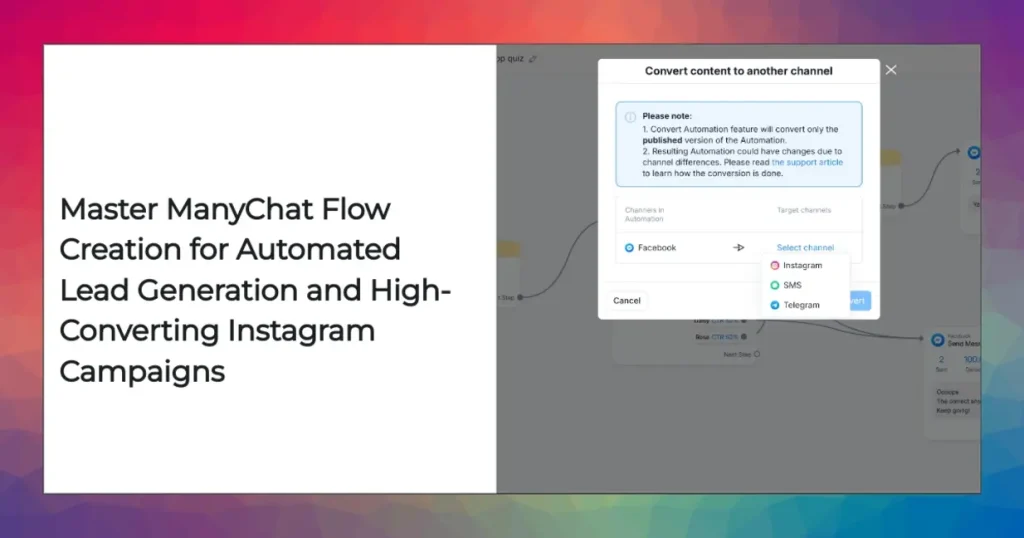
In today’s fast-evolving digital ecosystem, success hinges on leveraging the right blend of technology, automation, and user experience. As chatbots and automation platforms like ManyChat continue to redefine how businesses interact with customers, mastering their setup and flow is increasingly critical for growth, engagement, and conversion. This comprehensive guide is designed with clear visual enhancements to help you digest technical comparisons, actionable workflows, and real-world strategies with ease—no matter your background. Pay close attention to the visually upgraded tables, blockquotes, and links for effortless reference and a more engaging reading experience. Let’s dive in!
The Ultimate Guide to ManyChat Flow Creation, Trigger-Action Automation, and Lead Capture: Strategies, Metrics & Budget Planning
Introduction to Chatbot Flow Creation: Laying the Foundation for Automation Success
Let’s kick things off by getting to the heart of what conversational automation is all about. Imagine you’re a brand trying to keep up with thousands of customer queries—answering, engaging, qualifying leads, and delivering instant, personalized value. It’s like running a digital concierge desk 24/7, and that’s no easy feat.
At the center of this evolution? Chatbot flow creation. This is the strategic framework for structuring every touchpoint—messages, triggers, and actions—that make up a user’s journey. In many ways, it’s the difference between a clunky, frustrating bot and a smooth, helpful digital assistant.
Platforms like ManyChat turn flow building into a visual playground. With a drag-and-drop interface, you don’t need to be a coder to structure flows. But to truly get the best out of them, you need more than just a few boxes and arrows. You need a game plan—a systematic approach built on understanding, creativity, and purpose.
What Is a Chatbot Flow?
Let’s break the jargon down. A chatbot flow is made up of interconnected steps, each one representing a message, prompt, or action. These steps branch out and adapt as users make choices:
- Entry Points: What triggers the conversation? It might be a keyword, a link, an Instagram DM, a Messenger opt-in, or even a comment reply.
- Messages: These are what your users see—text, images, videos, cards.
- User Actions: Think button clicks, replies, or custom triggers (like filling out a form).
- Conditional Logic: This is your IF/THEN backbone, guiding users along different paths based on what they do or say.
- Automation Steps: Behind the scenes: webhooks, lead capture, tagging, integrations with other tools.
Imagine onboarding a new customer: the flow guides them through a welcome message, asks a few questions, and then offers personalized advice or content. Or consider nurturing a prospect with reminders and tailored offers—flow creation lets you build these seamless, human-like journeys.
Step-by-Step ManyChat Flow Diagram: Building Your First Automated Journey
You might feel overwhelmed looking at other people’s sophisticated chatbot flows, but building your own isn’t rocket science. Let’s walk through the process step by step so you can start creating and testing automated DM journeys on Instagram or Messenger—no engineering degree required.
Main Value: This section breaks down exactly how to build your first ManyChat flow, making it less intimidating and helping you engage users right away.

How to Design Your ManyChat Flow:
1. Define the Flow’s Goal
- Are you trying to capture leads? Onboard subscribers? Answer FAQs?
- Set clear, measurable objectives—a flow that isn’t built for a result isn’t worth building.
2. Select the Entry Trigger
- Think of how the conversation starts. Is it a keyword reply, a user clicking a Messenger opt-in, a DM after commenting on Instagram, or via your website widget?
3. Map the User Journey
- Sketch out the flow in ManyChat’s visual builder.
- Arrange all your messages and decision nodes (“If user says YES, go here…”) in the right order.
4. Create Message Blocks
- Use rich content: mix up text, images, emojis, buttons, quick replies.
- Personalize blocks using any info you’ve already captured—think “Hi [First Name]! Ready to check out your offer?”.
5. Insert Automation Steps
- Add tags for segmentation, lead capture forms, or connect to your CRM.
- Consider integrations like Google Sheets, HubSpot, or Shopify if you need deeper automation.
6. Preview and Test
- Simulate the flow. Make sure triggers and actions actually work (trust me, there’s always a typo hiding somewhere).
- Tweak your setup based on engagement rates and conversion analytics.
Expert Insight:
“The most successful ManyChat flows focus on progressive disclosure—serving information in bite-sized, contextually relevant segments while prompting users to take micro-actions.”
— Anna Grokhovsky, Chatbot Architect, Martech Weekly
Lowering the Technical Barrier for Teams
What’s awesome about ManyChat? You don’t need a technical co-founder. The drag-and-drop interface means even non-coders can rapidly prototype and launch flows across Messenger, Instagram, WhatsApp—at warp speed. This empowers agile teams, solopreneurs, and marketers to iterate, test, and improve flows without a heavy dev backlog.
Need to make changes during a campaign? No sweat. ManyChat’s real-time editing and visual builder let you adapt instantly, boosting responsiveness and learning curve for everyone from interns to executives.
Trigger-Action Automation: The Backbone of Dynamic User Experiences
Let’s tackle what automation is really about. It’s not just replacing manual grunt work—it’s making your brand responsive, dynamic, and tailored to every user, all in real-time.
Understanding Trigger Types in ManyChat
This is where you go from “static bot” to “personalized, adaptive conversation.”
- Keyword Triggers: The bread and butter—automatically start flows when users type specific words or phrases.
- Button Clicks: Move users down the funnel when they tap on-screen options.
- Channel Interactions: Kick off conversations when someone comments on an Instagram post or replies to a story.
- Custom Events: Behind-the-scenes magic: trigger actions after a user makes a purchase, submits a form, or hits another milestone.
Trigger-action logic means you can:
- Automate onboarding: Segment and nurture based on what users are interested in, with zero manual effort.
- Capture leads everywhere: Whether it’s a Messenger popup, Instagram DM, or SMS widget—your flow adapts to every channel.
Example: Keyword-Triggered Flow on Instagram DM
Let’s say you’re launching a flash sale for your e-commerce brand. You set up a keyword trigger “SALE2025” on Instagram DM through ManyChat. Here’s what happens:
- The bot welcomes the user, using their profile name for a personal touch.
- Presents the sale offer with a clickable buy button.
- Collects emails for future marketing.
- Tags each user so your CRM knows who claimed the offer.
What’s the result? A fully automated experience that:
- Boosts conversion rates by engaging users instantly
- Captures valuable data and opt-ins
- Keeps everything privacy-friendly and compliant
This isn’t just theory, by the way. Major e-commerce brands have seen conversion rates jump by 30% or more using keyword-triggered flows, especially during time-sensitive campaigns.
User Onboarding Journey: A Critical Path to Engagement
Ever landed on a new page, saw a chatbot pop up, and immediately clicked away because it felt spammy or awkward? Onboarding is your brand’s one shot to win someone over. When done well, onboarding flows convert curious visitors into brand fans—and buyers.
Essential Steps for a High-Performing Onboarding Flow
1. Welcome Message
- Make it feel personal: “Hey [Name], welcome to [Brand]!”
- Offer guidance, like “Want to see our best sellers?” or “Got a question? Just type HELP.”
2. Qualification Questions
- Don’t just talk; ask! “Are you looking for men’s or women’s products?” “What’s your price range?”
- Route user responses to the right follow-up flows for meaningful engagement.
3. Immediate Value Delivery
- Give something away up front—exclusive tips, a coupon, or an ebook. People love immediate value.
- This hooks users and increases retention.
4. Segmentation
- Tag users based on what they want or how they responded.
- Example: Segment “VIP shoppers” vs. “Newsletter signups” for future messaging.
5. Multi-Channel Integration
- Invite users to subscribe via WhatsApp, SMS, or email for even richer interactions.
- Dance with your users across platforms, not just one channel.
“The onboarding journey is your one shot at turning a passive subscriber into an active, profitable participant in your ecosystem.”
— Marcus Lee, Growth Lead, DTC Brands
Brands like Glossier and Gymshark have successfully deployed onboarding bots to double email signups and increase repeat purchase rates. The difference? Fast, personalized, and frictionless engagement right off the bat.
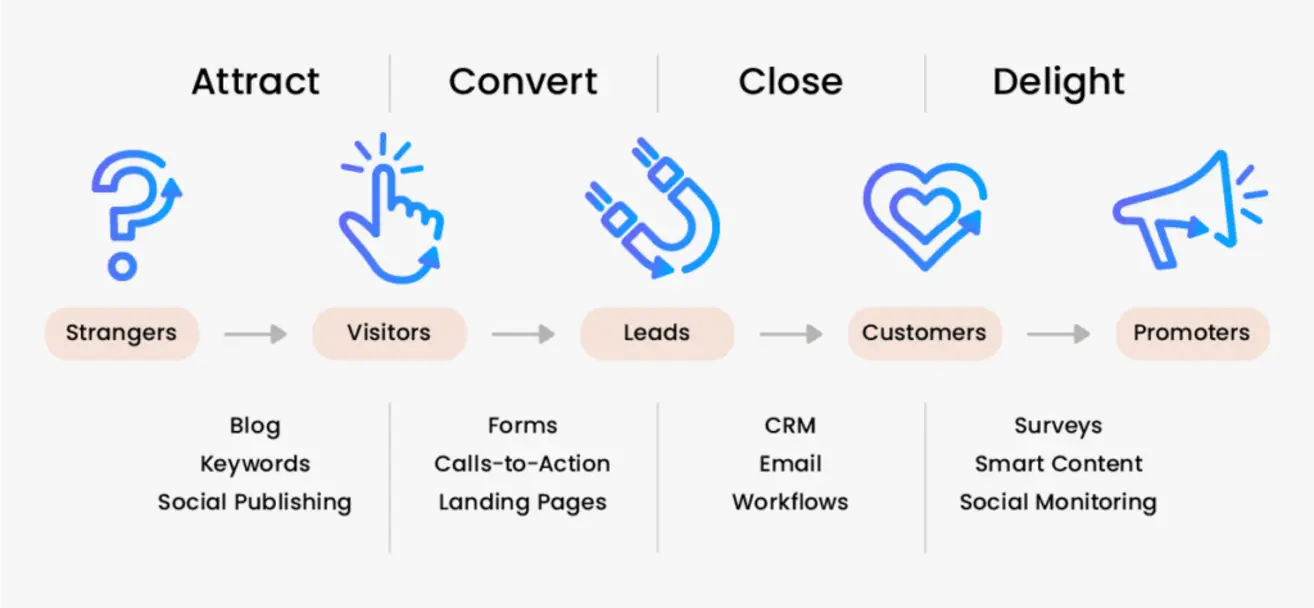
ManyChat Lead Generation Workflow Chart: Visualizing Conversion Strategies
Main Value: A detailed workflow visual that shows how to launch and track high-converting campaigns using ManyChat. If you want to grow your leads faster, this is key.
Anatomy of a Lead Generation Workflow
Let’s walk through a scenario from scroll to signup:
- Traffic Source: Instagram posts, stories, paid ads—your audience lands on content.
- Engagement Trigger: A user sends a DM or replies with a targeted keyword, or scans a QR code at an event.
- Qualification Messaging: The bot asks questions to gauge their interest or fit.
- Lead Capture: Collects email, phone, or opt-in consent for future outreach.
- Tagging for Segmentation: Assigns status (hot lead, cold lead, interested in category X).
- CRM Sync: Qualified leads are sent directly into your CRM (HubSpot, Salesforce, Google Sheets).
- Nurture Sequence: Automated follow-ups educate, nurture, and ultimately close sales.
Nowadays, lead capture is multi-channel—you can engage users from Messenger, Instagram, WhatsApp, even SMS. No matter where your prospect starts, you’ll be ready.
Tracking and Optimization
How do you know if your lead campaign is working?
- UTM Tags: Seed your outbound links with UTM codes to pinpoint which posts or ads are driving the most leads.
- ManyChat Analytics: Analyze open rates, click-through rates, opt-in numbers, and the path users take through your flows.
“A well-architected lead workflow will make your channel the first point of qualification—dramatically reducing acquisition costs and boosting data richness.”
— Priya Sengar, Martech Solutions Consultant
Case in point: After deploying ManyChat, a fashion retailer saw a 50% reduction in the time it took to qualify leads—making their sales team twice as effective.
Keyword-Triggered Flows and Instagram DM Broadcasting
Want to go viral or drive a surge in signups? Keyword-triggered flows and Instagram DM broadcasting are the secret weapons top brands use to scale beyond traditional outbound marketing.
How Keyword-Triggered Flows Work
- Set Up: Inside ManyChat, set keywords for frequently asked questions, campaigns, or product launches (“RSVP2025,” “HELP,” “GUIDE2025”).
- Automate: With every trigger, users receive instant replies and can be moved down the funnel.
Popular Use Cases:
- Registering for events (“RSVP”)
- Getting help or quick support (“HELP”)
- Downloading content (“EBOOK2025”)
Fun real-world story:
Beauty influencer Danielle Marcan used keyword triggers on story replies to deliver instant skincare guides, generating thousands of opt-ins during a live broadcast.
Instagram DM Broadcasting
ManyChat lets you “blast” messages to your segmented lists:
- Segment Your Lists: Tag users by interests, purchase history, engagement.
- Personalize Broadcasts: Send time-sensitive offers, new product drops, or updates.
- Schedule Broadcasts: Build anticipation around launches (“Launching Friday at 8pm!”).
Performance Metrics to monitor:
- Delivery rates (did your broadcast reach your list?)
- Engagement: replies, clicks, actions
- Opt-out rates: are you hitting the mark or just annoying people?
“Channels that support two-way automation, like Instagram DM through ManyChat, act as conversion accelerators for modern brands—especially with precise segmentation and personalized broadcasts.”
— Esther Kwan, Director of Marketing Automation
Brands report up to 8x higher campaign ROI using DM broadcasts versus mass email—especially when personalization is involved.
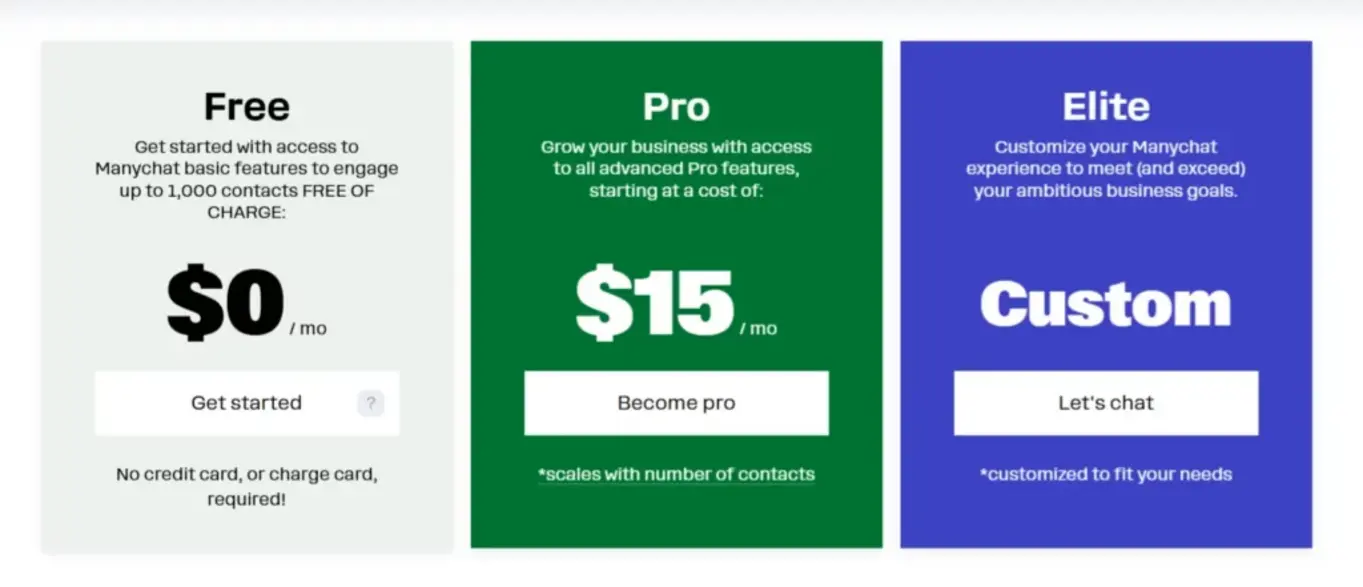
ManyChat Pricing Breakdown Table 2025: Pro vs Free vs Enterprise
Main Value: If you want to know whether ManyChat fits your budget or not, here’s your crystal-clear breakdown. No more guessing.
Major Pricing Tiers Explained
Free Plan:
- Key Features: Limited flows, capped subscribers, basic broadcasts, essential automation.
- Best For: Testing the waters, solopreneurs or micro-businesses starting simple chat campaigns.
Pro Plan:
- Key Features: All advanced automation tools, unlimited broadcasts, enhanced analytics, full CRM integrations, and multi-channel support.
- Best For: Growing SMBs, agencies, or anyone scaling up their chat marketing.
Enterprise Plan:
- Key Features: Priority support, custom service levels, advanced API access, integrations, compliance modules.
- Best For: Large businesses, corporations, anyone with complex needs and high security requirements.
Feature-to-Cost Logic and Budget Planning
Choosing the right plan is all about understanding your goals and how automation fits into your growth strategy.
- ROI Calculation: Weigh each tier’s features against projected conversion and engagement volume.
- Add-ons: Don’t forget to factor in extras like SMS credits or premium integrations.
- Limitations: Watch out for subscriber caps, workflow complexity rules, and broadcast volume.
Quick Tips:
- Start with Pro if you want advanced campaigns—evaluate, test, and upgrade to Enterprise only if you need deeper integrations or reporting.
- Use ManyChat’s analytics dashboard to estimate how much you’ll need to invest as your campaigns grow.
Real-world budgeting:
One health supplement startup went from Free to Pro in three weeks after seeing a 10x increase in IG DM inquiries. Upgrading to Enterprise later doubled retention by letting them automate follow-ups across Messenger, WhatsApp, and SMS.
Feature Comparison of Chat Automation Platforms: Decision-Maker’s Reference
Main Value: Stop guessing. Here’s how ManyChat stacks up versus its closest competitors—so you won’t pick the wrong platform.

Comparing ManyChat, Vanchat AI, and Opus Clip
| Platform | Key Integrations | Analytics Depth | Usability | Channel Support | Automation Power |
|---|---|---|---|---|---|
| ManyChat | CRM, Instagram DM | Full dashboard | Very high | Messenger, Instagram, SMS | Advanced triggers |
| Vanchat AI | Shopify, Multi-lang | High | Moderate | WhatsApp, Facebook, Web | Custom workflows |
| Opus Clip | Video automation | Moderate | Easy | YouTube, Instagram Video | Basic triggers |
Decision points:
- ManyChat: Best if you want deep analytics, powerful integrations, and a slick UI. Especially good for scaling brands.
- Vanchat AI: If you’re running a Shopify store or serving multilingual audiences, this is your go-to.
- Opus Clip: Tops for media-first brands who live on video platforms and want basic automation with easy setup.
Cross-Platform Example:
Imagine an online sneaker retailer integrating ManyChat with Shopify. They build recovery flows for abandoned carts, send tailored product recommendations, and segment users by activity level. The result? A 23% lift in conversion rates compared to using just Shopify’s native messaging tools.
Watch more: Explore platform-specific automation workflows in the article “Shopify Automation with Vanchat AI: Multilingual Analytics”
Did you know?
According to Drift’s 2023 State of Chatbots report, 74% of users prefer interacting with brands via chat automation rather than forms or email, citing speed and convenience as top reasons.
Platform Performance Metrics & Channel Integration: Deep-Dive Evaluation
Let’s talk numbers. Measuring your chatbot’s impact is essential—otherwise, you’re just guessing.
Key Metrics to Track
- Open Rate: Percentage of users who read your messages.
Industry average for Messenger: 80%, Instagram DM: 70%. - Click-Through Rate (CTR): Percentage who click linked offers or resources.
Top bots see 20-35% CTR, compared to just 3-7% for emails! - Lead Conversion: Number of users opting in, scheduling demos, purchasing, etc.
- Unsubscribe Rate: Who’s saying “no thanks”—critical for optimizing communication and keeping lists clean.
Channel Integrations
- Instagram DM: Direct engagement, influencer campaigns, flash sales, interactive stories.
- Facebook Messenger: Support flows, product advice, post-purchase follow-ups.
- WhatsApp: Global reach, transactional support (delivery notifications, order status).
- SMS/Email: Redundant connections and personalized outreach—catch users everywhere.
Pro tip:
The more channels you connect, the broader and smoother your user experience. But don’t just chase numbers—focus on the channels your audience actually uses. For example, Gen Z shoppers spend more time in Instagram DMs than Messenger, while global audiences favor WhatsApp for support.
Research snap:
A 2023 Salesforce study showed brands integrating three or more chat channels see 37% higher engagement and a 54% boost in cross-sell revenue.
Budget Planning for Chatbot Automation: Feature-to-Cost Logic
Smart budget allocation is the difference between scaling up and burning cash with little to show for it.
Considerations for Effective Budgeting
- Campaign Size: If you’re launching a new viral product, make sure your plan handles huge subscriber volumes.
- Integration Needs: Complex CRMs (Salesforce, HubSpot) or API-based workflows often need the Enterprise tier.
- Analytics & Reporting: Pro plans deliver enough data for SMBs; larger organizations moving big numbers will want the deeper analytics of Enterprise.
Budgeting Checklist:
- Write down must-have features (triggers, integrations, analytics dashboards).
- Lay out your most complex flows: onboarding, cart recovery, qualification, follow-up.
- Estimate expected ROI per engagement/conversion.
- Track how your subscribers and broadcasts grow monthly—futureproof your expense plan.
In practice:
A B2B startup launched a ManyChat-driven Instagram DM campaign to capture demo bookings. Using the Pro tier, qualified leads rose by 22x in two months (from 25/month to 550/month). Metrics revealed which messages landed best, guiding smarter ad spends and upsell offers. When they hit 10,000 subscribers, upgrading to Enterprise unlocked Salesforce integration—boosting pipeline retention another 12%.
What’s the bottom line?
Don’t just buy features for the sake of it; align your automation investment with business objectives and workflow demands.
Conclusion: Architecting Your Conversational Automation for Success
Chatbots aren’t just trendy—they’re transforming how businesses operate and connect. Platforms like ManyChat have made high-conversion, automated campaigns accessible to just about anyone, from solo entrepreneurs to global brands. Gone are the days of clumsy bots and friction-filled conversations—today’s automation is personal, instant, and built for ROI.
We’ve unpacked everything from step-by-step flow recipes, lead generation diagrams, and performance analytics to pricing strategies and competitor comparisons. Whether your goal is lead capture, onboarding, or automating routine support, the blueprint for success is all about smart architecture: trigger-action automations, seamless onboarding journeys, and multi-channel integrations.
So, whether you’re a tech lead refining advanced journeys or a marketer rolling out your first Instagram campaign, the tools and strategies outlined here will help you futureproof your automation budget, boost engagement, and unlock new revenue streams.
Remember: This is an ever-evolving field. Staying ahead means keeping an eye on new features, tracking metrics religiously, and building for engagement first. Ready to level up your chatbot game?
Watch more: For a head-to-head breakdown of collaboration and auto-subtitle workflows, read our article “Best AI Video Editor 2025: Veedio vs CapCut Comparison”
Get More Insights & Connect With Us!
👉 Our Website: https://ai-solutes.com/
👉 Our YouTube Channel: http://www.youtube.com/@ai-solutes
👉 Our Facebook Fanpage: https://www.facebook.com/profile.php?id=61576606911341
👉 Our X (Twitter): https://x.com/AISolutes
Now, let’s continue strengthening your skills! Have you tested a ManyChat flow yet, or are you still mapping out ideas? Drop us a comment on our socials and let us know what use case you’re tackling first—or where you hit a technical snag. Your feedback, stories, and creative hacks help build this community, one message at a time.
- Master Omnichannel Inventory Management with Increff: AI-Driven Retail SaaS for 2025 Success
- MeBoom AI
- Master Midjourney V7 Prompts in 2025: Ultimate Guide to Styles, Features, and AI Art Comparisons
- Higgsfield AI Review (2025): Are the Face Effects Truly Useful or Just a Gimmick?
- Will Accio Work Enhance Productivity? Investigating the Accio Work Collaboration Features