Welcome to the future of mobile photo editing! As you scroll through your social feeds in 2025, you’re likely amazed by photorealistic face transformations—aging, gender swaps, and virtual makeovers that look shockingly authentic. What once took hours in Photoshop now happens in seconds on your phone, thanks to advanced AI-driven apps like FaceApp. But with all this creativity comes new questions about privacy, digital consent, and how your images are handled. Whether you’re a curious user, social media creator, or business thinking about tapping into viral photo trends, this deep dive covers everything: FaceApp’s latest features, market influence, how it compares to the competition, and how you can stay both creative and secure in the digital selfie era.
Ever stopped mid-scroll on Instagram or TikTok, jaw dropped by a friend’s selfie that’s aged 30 years, transformed into a totally different gender, or swapped hairstyles as fast as changing filters? Welcome to 2025, where FaceApp’s photorealistic AI filters have taken mobile photo editing to mind-blowing new heights. Gone are the days when all you could do was slap a puppy filter on your face or play with brightness sliders; now, a few taps is all it takes to reimagine yourself or your friends—older, younger, bolder, or completely transformed.
But behind the scenes, there’s a lot more going on than meets the eye. FaceApp is driving a creative revolution while navigating serious questions about privacy, digital consent, and data security. Curious about how it all works, what’s really happening to your selfies, or how FaceApp stacks up to competitors in this ever-evolving marketplace? Dive in as we break down the features, safety practices, market growth, and what the future holds for face-swapping fun—plus pro tips for social-savvy editing that keeps you creative and protected.
FaceApp 2025: Advanced Photorealistic Filters and AI Editing
If you think mobile photo editing peaked with basic filters and cheesy overlays, think again. In 2025, FaceApp is redefining what’s possible using cutting-edge AI and deep learning, enabling everyone from trend-chasing teens to agencies and brands to play with (almost) limitless face transformations.
Let’s be real: today’s social feeds are bursting with before-and-after posts, aging challenges, and wild gender swaps no one would’ve believed possible just a few years ago. FaceApp is at the center of this creative storm, giving users tools to reinvent selfies and portraits in ways that feel shockingly real.
The Next Generation of FaceApp Filters
So, what exactly makes FaceApp 2025 stand out in the crowded world of mobile photo editing? Let’s take a look at the fresh suite of lifelike effects turning heads this year:
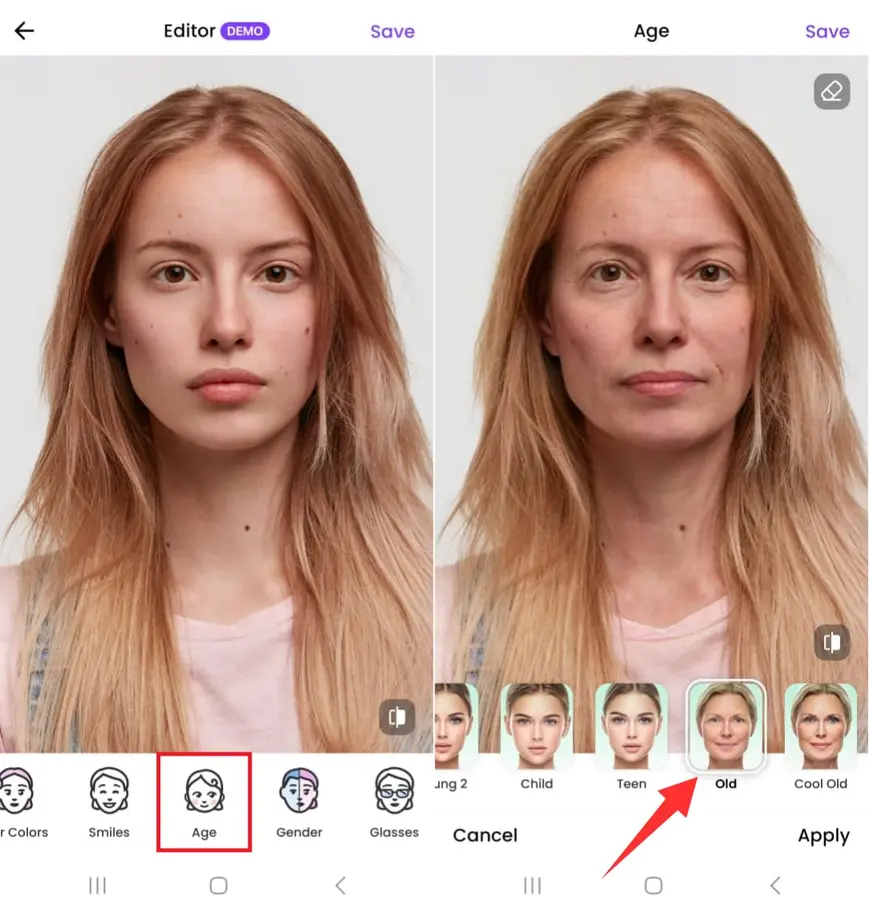
- Aging: Wonder what you’ll look like in 2070 or wish your high school photo felt a bit more vintage? FaceApp’s aging filters, trained on massive photo datasets, let you dial time forward or backward with results that could fool even your closest friends.
- Gender Swap: Ever tried picturing yourself as a different gender—just for the fun of it? With FaceApp, dramatic gender swaps happen in seconds, complete with updated facial structure and hair tweaks, thanks to the app’s advanced facial mapping algorithms.
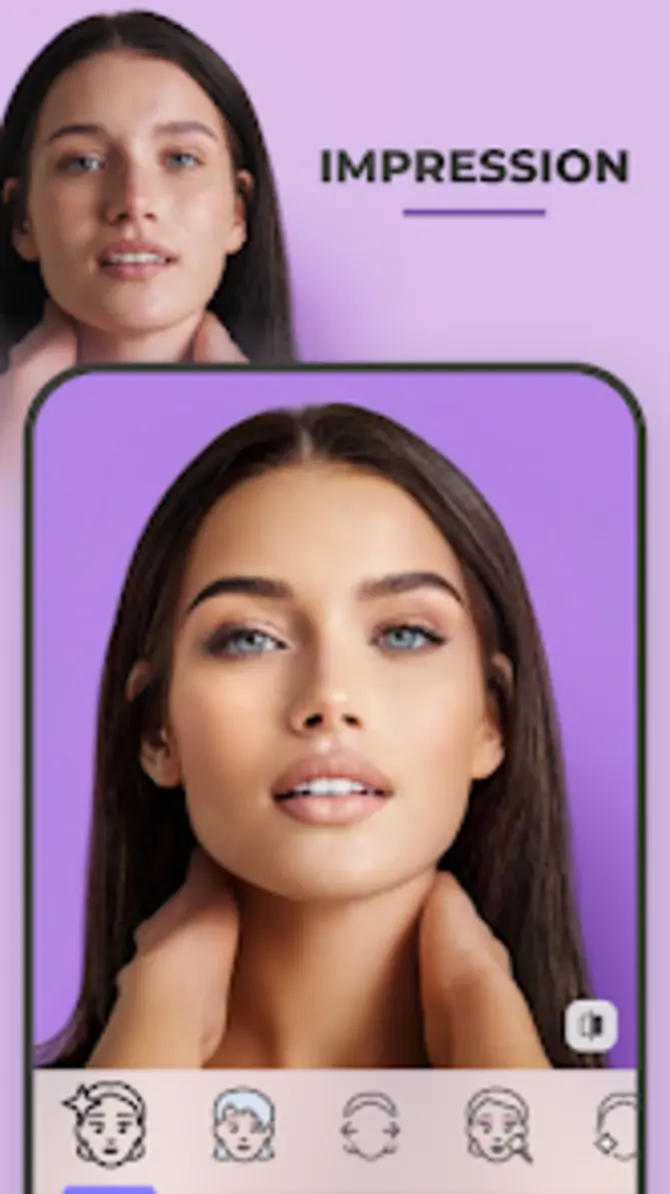
- Style Effects: Dreaming of a beard, rainbow hair, or the perfect virtual makeover? Experiment with creative looks—no painstaking manual selections or awkward overlays needed. Beards, bold makeup, or full style transformations are just a tap away.
- Background Editing: Maybe your photo’s great, but the background is meh. FaceApp lets you seamlessly blur or swap backgrounds for a professional finish or that Insta-ready pop.
The best part? The entire experience is frictionless. Open the app, pop in a photo, pick your filter, and you’re ready to stun your friends on TikTok, Instagram, Snapchat, or wherever you share your digital life. The app now deeply integrates with all major social platforms, so posting your creative transformations is simpler (and faster) than ever before.
Expert Insight: The AI-Solutes 2025 Trends Report shows that 47% of Gen Z users expect mobile photo editors to deliver hyper-realistic effects that are social-ready—within seconds.
Real-World Example
Imagine this: You’re about to drop a “10-Year Challenge” post, but instead of scrolling through old shots, you use FaceApp’s aging filter to show future you. Or maybe you’re launching a viral makeup trend on TikTok—why spend hours perfecting your look when FaceApp can create a flawless, share-ready edit in seconds?
Seriously, it’s not just for play—brands and storytellers are finding new ways to use these tools every day. Agencies use style effects to mock up fashion campaigns, and retailers let shoppers “try on” everything from glasses to hair color. If you’ve ever wondered how those wild AR try-ons got so good, now you know: FaceApp’s tools are under the hood for a lot of them.
How FaceApp’s AI Powers Realistic Transformations
Let’s peek behind the curtain for a moment. FaceApp isn’t just slapping stickers or blur layers on your selfies—it’s running advanced artificial intelligence models under the hood.
- Deep Convolutional Neural Networks: These clever algorithms actually understand facial geometry—mapping out your cheekbones, skin tone, hairlines, and subtle features so every transformation follows natural bone structure, texture, and lighting. No more uncanny valley weirdness!
- StyleGAN Integration: Remember those blurry, lifeless filters from a few years back? FaceApp uses Generative Adversarial Networks (GANs) to create smooth overlays. Whether you’re making yourself look like your grandparent or adding wild face paint for a music festival selfie, the result is always crisp and believable—goodbye to harsh lines and obvious fakes.
- Continuous Learning: Here’s the secret sauce: The more users interact with the app, share results, or opt-in to help improve the algorithm, the better FaceApp’s AI gets. It constantly learns from diverse faces, skin tones, ages, and trends, refining every effect to work for everyone—not just one “look.”
FaceApp’s tech draws inspiration from the most respected leaders in the field, including DeepMind and OpenAI, but focuses on making these breakthroughs accessible to casual users—not just computer scientists.
A Scenario to Picture
Remember that time when someone posted a face swap, and the result was more horror movie than makeover? With FaceApp’s AI, those days are pretty much over. Whether you’re experimenting with aging or channeling your ultimate “glow-up,” the transformations feel authentic, subtle, and ready for even a discerning Instagram audience.
Photorealistic Filters: User Stories and Creative Influence
Let’s get down to what matters: How are real people and brands using FaceApp’s tools to spark creativity, boost engagement, and even drive business?
- Social Media Creators: Fitness trainers are running the “Challenge Your Future Self” campaign—posting aged photos to inspire goal-setting and accountability. The best part? Followers love it, and the virality goes through the roof.
- Fashion and Beauty Brands: Agencies have cut down on expensive photoshoots by using FaceApp style effects to “test” new looks virtually before bringing them to real life. It’s a win-win for creativity and budgets.
- Retail and AR Startups: Online stores are integrating FaceApp’s API to deliver virtual try-on experiences—imagine picking out glasses, hairstyles, or makeup virtually with confidence, knowing it looks real.
FaceApp has become both the go-to playground for self-expression and a seriously powerful creative tool. The message is clear: If you want to wow your followers, boost your brand, or just have fun, these photorealistic filters are setting a new standard.
Using FaceApp Safely in 2025: Privacy and Best Practices
While FaceApp unlocks a world of creative possibilities, there’s a flip side to the fun: questions about privacy, consent, and who really owns your digital likeness. After all, when you start sharing transformed faces publicly, it pays to be smart and cautious.
Essential Strategies for Photo Editing Safety
FaceApp respects user privacy and has built strong controls into the platform. Here’s how you can use all those features without worry:
- Private Mode: Want to keep your edits yours alone? Private Mode keeps all photo processing on your device, away from cloud servers—perfect for sensitive shots or when you want total control.
- Permission Prompts: Transparency matters. FaceApp always clarifies (with bold pop-ups) when your image is about to leave your phone for intensive processing upgrades, so you’re never caught off guard.
- Consent Reminders: FaceApp lets users choose whether to share edited photos for algorithm training. Not feeling it? You can keep everything totally private with just one toggle.
User Consent Best Practices
Want to stay on top of your privacy game? Try these expert-approved tips:
- Read Permission Dialogs: Never blindly tap “accept.” Check what the app is asking for and say no to anything that feels sketchy—or just unnecessary.
- Store Edits Locally: Where possible, use FaceApp’s “Keep Offline” option, so your transformations never even hit the cloud.
- Regularly Review App Settings: Dive into settings now and then to make sure sharing options and privacy toggles are up-to-date.
- Consider Adding Watermarks: Planning to publish dramatic face swaps publicly? Watermarks can help prevent others from using your edited images without permission.
- Monitor Linked Accounts: Audit which social accounts (TikTok, Instagram, Facebook) are linked, especially if you enable “auto-share” features.
Pro Tip: Tech security consultant Sofia Zhang reminds us, “Always assume that if you upload a selfie, the server could access it. Diligently use privacy toggles, and resist sharing sensitive edits with the world—or even your entire friend list.”
Secure Sharing and Protection Tips
FaceApp makes responsible sharing a breeze—but only if you’re proactive.
- Enhanced Sharing Controls: Get ready for double confirmation prompts before any image leaves the app for a third-party platform.
- Image Encryption: All photos sent for server-based editing are encrypted in transit and on the server, so no random snooping.
- Two-Factor Authentication (2FA): Especially handy for Pro users, 2FA keeps accounts locked down and stops unwanted snoopers.
If you’re serious about protecting your photos, these tools are must-haves. As creative as the filters have become, security and privacy are core pillars of the FaceApp experience.
AI Editing Ethics in 2025
With great power comes great responsibility—or so the saying goes. FaceApp is leading the way by tackling some huge challenges around digital ethics:
- User Consent: Global regulations like GDPR, CCPA, and India’s DPDP Act are top-of-mind. FaceApp only processes data with explicit user permission and limits how long it’s stored.
- DeepFake Prevention: Face swaps get tagged with invisible, machine-readable watermarks to thwart illegal reuse or viral misinformation. So, if someone tries to pass off a FaceApp edit as reality, there’s a digital fingerprint to prove otherwise.
Takeaway: Protecting your identity and upholding digital ethics isn’t just smart—it’s essential in a world where a viral face swap could land anywhere.
Additional Perspective
Think about how fast misinformation can travel online. Just one convincing face swap could become a trending meme—or spread falsehoods. Knowing your edits are ethically tagged and protected is peace of mind you can’t afford to skip.
Comparing FaceApp to Top Competitors: Features, Pricing, and Privacy
Ever wondered who else is elbow-to-elbow with FaceApp in the mobile editing arena? 2025 is a crowded year for photo manipulation, with rivals like Remini, Oldify, and Photoshop Express chasing user attention. The question: Which app deserves your precious phone storage (and trust)?
FaceApp vs Old Face Apps vs AI Editors
Here’s a quick snapshot to help you decide which app ticks the right boxes for your selfies and privacy priorities:
| Feature | FaceApp | Remini | Oldify | Photoshop Express |
|---|---|---|---|---|
| Aging Filter Quality | ✔✔✔ Photorealistic | ✔✔ | ✔ | ✔✔ |
| Gender Swap | ✔✔✔ Advanced | – | – | ✔✔ |
| Background Effects | ✔✔✔ AI-powered | ✔ | – | ✔✔ |
| Privacy Controls | ✔✔✔ Robust | ✔ | – | ✔✔ |
| Free Version | ✔ (limited) | ✔ (limited) | ✔ (ads) | ✔ |
| Pro Subscriptions | $2.99–$4.99/mth | $4.99/mth | Ad-based | $9.99/mth |
| API Access | ✔✔✔ Full | – | – | ✔ |
| AR/VR Integrations | ✔✔✔ | – | – | ✔✔ |
Key Takeaways
- FaceApp dominates with its hyper-realistic transformations and granular privacy controls.
- Remini shines for photo restoration, but falls short on creative aging, gender swaps, and style options.
- Photoshop Express is a solid bet for sophisticated edits, albeit at a higher price point and with a steeper learning curve.
- Novelty apps like Oldify often trade privacy or robustness for quick entertainment, while FaceApp offers a balance of creativity and content protection.
Pricing and Privacy Strengths
Looking for value for your digital dollar? Here’s what FaceApp Pro delivers:
- Unlimited HD Exports: No more blurry uploads or annoying watermarks.
- Exclusive Filters: Get the first taste of new AI effects, plus batch editing—that’s a blessing for influencers and agencies.
- Ad-Free Experience: Nothing ruins the flow of editing like a pop-up ad.
- API Access: Developers or brands can work FaceApp magic directly into their own platforms or campaigns.
- Privacy: End-to-end encryption and keep-control-over-your-data architecture, so your face (and future self) stays yours.
And if you’re thinking enterprise-level (think: virtual modeling, mass campaign roll-outs, or even smart AR shopping), FaceApp’s APIs and compliance protocols make it a leading choice, rivaled only by ambitious new players like Genius AI. Curious about how this stacks up for business or integration? Watch more.
Market Growth, User Adoption, and Insights into FaceApp Pro
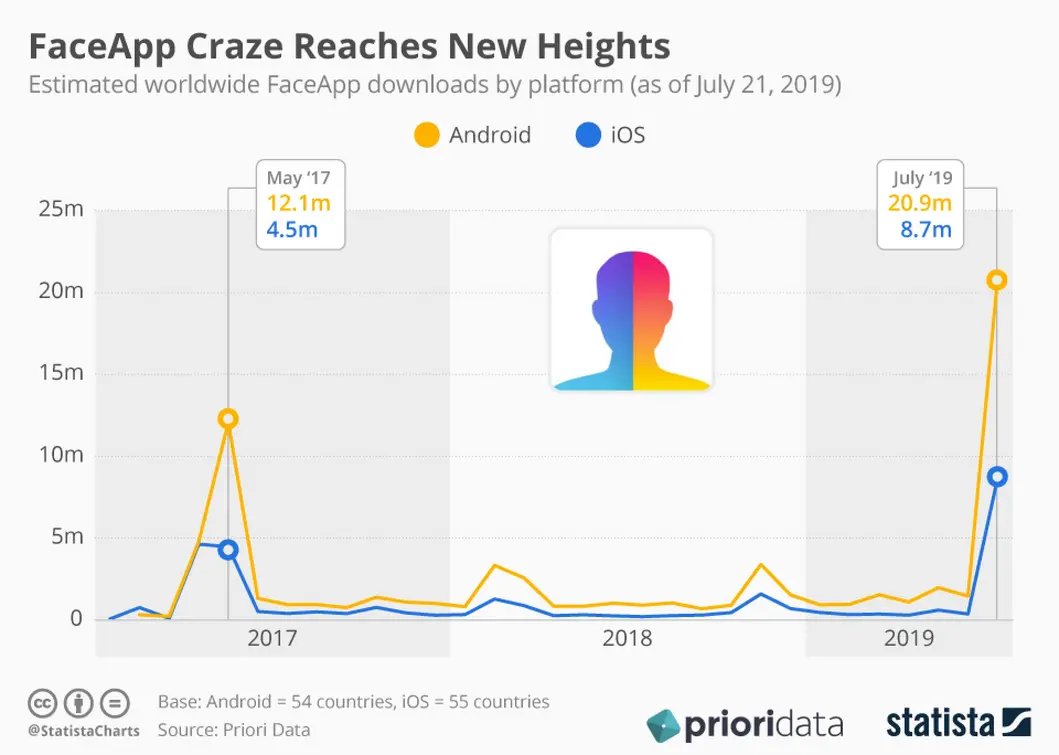
Let’s talk numbers and trends—because while AI photo editing looks cool, it’s the explosive adoption stats that really show how hot FaceApp’s become.
Explosive Adoption: Downloads & Revenue
- Total Downloads (2025): Over 410 million, per App Annie Q2, 2025.
- Monthly Active Users: 42 million logging in regularly, with about 68% sharing to social platforms weekly.
- Revenue: Annual FaceApp Pro revenue is estimated at $75 million, fueled by subscription upgrades and exclusive filter packs.
Adoption Across Demographics
- Gen Z: The biggest fans, driving half of all gender swap and aging challenges—often turning their edits into viral moments on TikTok.
- Millennials: Lean into FaceApp for sharper headshots, creative LinkedIn profiles, and Instagram stories with a professional touch.
- Brands & Media: Using the FaceApp API to create campaign-ready visuals, power virtual modeling tools, and offer interactive experiences that engage and convert.
Real-World Example
A leading sports retailer ran an AI-powered “Future Champions” campaign, using FaceApp’s API to let young athletes visualize themselves in branded gear decades down the line. The result? User engagement soared, and shares hit a new record for the brand.
FaceApp Pro: Features & Monetization
Why are so many users stepping up to Pro? Check out the main attractions:
- Unlimited Exports: Share all your creations in glorious HD—no strings, no limits.
- Batch Processing: Perfect for influencers and agencies editing dozens (or hundreds) of shots at once.
- Priority Support: Cut the wait for help or feature requests.
- In-App Purchases: Dig into style packs, exclusive AR backgrounds, and high-end filters.
Case Study: A fitness influencer collective rolled out weekly “Transformation Challenges” using FaceApp Pro, leveraging exclusive features and robust privacy settings. Their TikTok engagement spiked by 34%, driving not just likes and shares but also more sign-ups for virtual coaching.
User Ratings and Community Reviews
- App Store Rating: 4.7 out of 5, based on more than 3 million reviews. Users routinely shout out ease of use, creativity, and data privacy.
- Google Play: 4.6 out of 5. Pro features get high marks for quality transformations and secure sharing.
- User Feedback: An impressive 87% cite “fun, realism, and secure sharing” as their top reasons for upgrading to Pro.
And it’s not just numbers. Community forums and social channels are full of creative “FaceApp Challenges,” virtual meetups, and tip-sharing threads—showing that FaceApp has become a part of digital culture, not just a novelty.
Regulatory Compliance and the Future of Face Editing Apps
FaceApp might be fun and creative, but with the growing focus on biometric data protection, it’s also one of the leaders in navigating global privacy regulations and new technology integration.
Privacy Regulations and Compliance Status
- GDPR (EU): User data is anonymized, images can be deleted on demand, and edit histories are transparent.
- CCPA (California): Users have full access to their data, clear usage logs, and a built-in “delete my data” switch.
- India’s DPDP Act: Localized storage for Indian users and mandatory opt-ins before processing.
- Transparency Reports: FaceApp publishes quarterly breakdowns showing data processed, requests, and third-party involvement.
Real-World Perspective
A major lifestyle publication tested a dozen face-editing apps ahead of the new European privacy rules—and FaceApp was one of only three to clear all requirements for prompt data removal and full transparency about AI processing.
Future Trends: AR/VR and Developer APIs
Let’s look ahead. FaceApp isn’t resting on its laurels—in fact, it’s racing toward integrating even more immersive and secure features:
- Real-Time AR: Soon, you’ll be able to see face filters live as you frame a shot—instead of editing after the fact. That means instant, interactive fun for Reels, Stories, or even virtual meetups.
- API for Metaverse Platforms: Developers and brands can bring FaceApp’s filters into virtual worlds—allowing avatar customization or live effects during events from concerts to online shopping experiences.
- Advanced Biometric Protection: New tools will locally encrypt biometric data before any cloud processing—meaning your faceprint never leaves your device unless you want it to.
Expert Outlook: “In the near future, photorealistic filters will merge seamlessly with AR/VR, giving everyone the power to shape their digital identity instantly and securely—whether in selfies, on avatars, or in entire digital worlds.”
Imagine This
Picture hopping into your favorite VR hangout with friends, and with a quick FaceApp filter, everyone’s avatar joins the latest viral trend—while your personal data stays locked down and private.
Frequently Asked Questions (FAQs) & Actionable Tips
Mobile photo editing doesn’t have to be a wild west. Here’s what you need to know to stay smart, safe, and on trend.
FAQs
-
Is FaceApp safe for children and teenagers?
- FaceApp offers parental controls and age recommendations, but parents should still supervise usage, especially if public sharing is enabled.
-
Can I stop FaceApp from using my photos to train its algorithms?
- Absolutely. Disable “Share for Improvements” under privacy settings, and your edits stay private.
-
How do I access FaceApp Pro?
- Hit the “Upgrade” button in-app—choose monthly or annual plans for instant access to all pro features.
-
What’s FaceApp’s refund policy?
- Not happy with your subscription? Request a refund within 7 days, hassle-free.
More Hot Tips
- Turn on Two-Factor Authentication before you connect FaceApp to social networks. Better safe than sorry, right?
- Double-check sharing settings on every edit—sometimes one accidental click can make a private joke go wildly public.
- Download FaceApp only from the official app stores—third-party APKs and clones are rife with malware.
Craving more options? For a deeper look at the best AI photo editors of 2025, comparative stories, and expert picks, check out Watch more.
Conclusion: Shaping Digital Identity & Creativity
Let’s wrap things up. FaceApp in 2025 isn’t just about wild selfie fun (though there’s plenty of that!). It’s a powerhouse of AI-powered creativity, wrapped up in robust privacy controls and future-ready features. From fueling viral challenges to giving everyday users and brands new tools for self-expression, FaceApp leads the charge in shaping digital identity.
By making AI photo editing both powerful and safe, FaceApp proves you can have creativity without compromise—if you’re willing to stay informed, use privacy features wisely, and embrace the era of smart, ethical digital play.
As AR, VR, and digital identity become more intertwined in all our lives, FaceApp is built to adapt—helping you express yourself confidently, securely, and with freedom. Ready to show the world a new face?
👉 Our Website: https://ai-solutes.com/
👉 Our YouTube Channel: http://www.youtube.com/@ai-solutes
👉 Our Facebook Fanpage: https://www.facebook.com/profile.php?id=61576606911341
👉 Our X (Twitter): https://x.com/AISolutes
- Can Project Tracking Feel Truly Seamless? Exploring MyClaw’s Centralized Workspace
- Unlock Local SEO Success: How Pippit Automates Small Business Marketing
- Genspark Review 2026: The End of Search?
- Boost Your Passive Income With EarnApp in 2026: Real Rates by Country, Payouts, Safety, and Honeygain Comparison
- Customuse