The landscape of online video editing is rapidly evolving, fundamentally transforming the way creators, teams, and brands craft and deliver visual stories. As artificial intelligence becomes ever more integral to video workflows, modern editors are transcending the limitations of traditional software. AI-driven features now accelerate everything from collaboration to platform optimization, ensuring content stands out, reaches global audiences, and adapts seamlessly to ever-changing digital trends. Below, you’ll discover a visually enhanced deep-dive into these cutting-edge tools—showcasing tables, blockquotes, and resource links, all refined for clarity and style—so you can confidently navigate the future of creative video production.
The Evolution of Online Video Editors – How AI Is Rebuilding the Creative Workflow
Remember the days of wrestling with clunky software—waiting ages for files to export, and dreading every “unknown error” pop-up? It feels like a lifetime ago. Fast forward to 2025—things have shifted massively. Online video editors are no longer basic cut-and-trim utilities. They’ve become sleek, cloud-powered hubs built around AI-driven dashboards, real-time team editing, auto-formatting, and frictionless workflows. No matter your title—YouTuber, brand manager, digital activist, TikTok star—these platforms can now boost your flow and help you capture attention in a landscape that’s crowded, fast, and hungry for creativity.
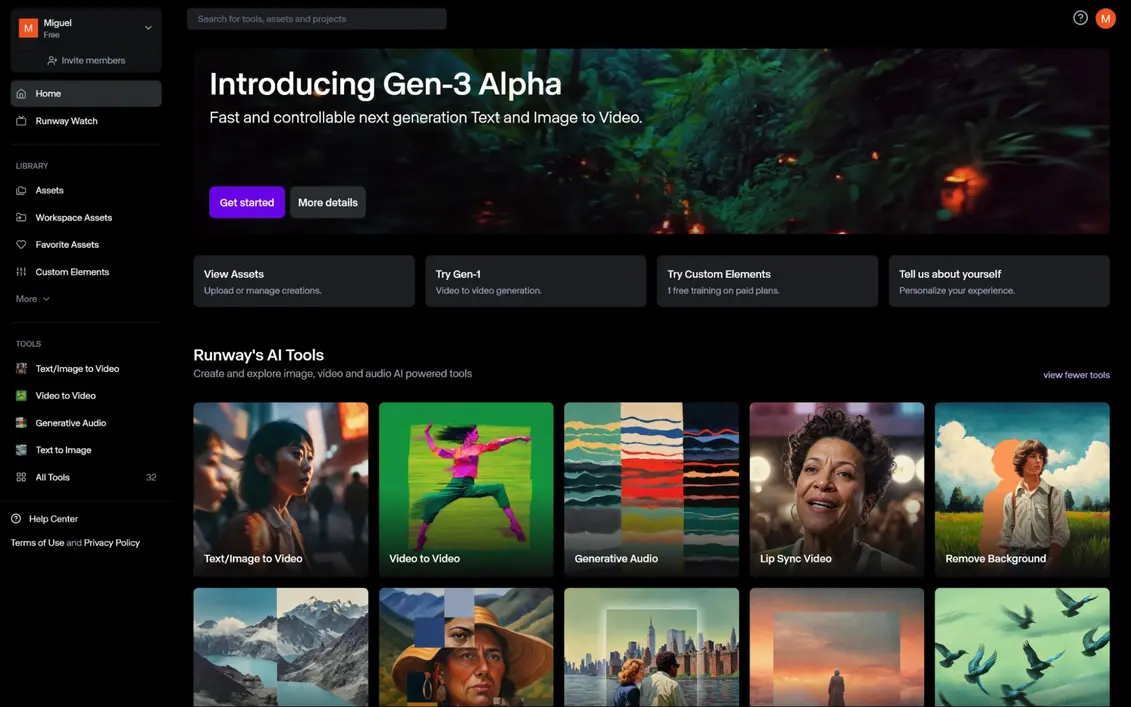
AI-Powered Online Video Editor Dashboard
Today’s best online video editors don’t just give you tools—they become your co-pilot. The AI-powered dashboard is both your creative playground and your command post. It’s where groundbreaking tech meets the intuitive simplicity you wish every app had.
Next-Gen Usability That Actually Understands You
Let’s face it: Nobody has time for a steep learning curve anymore. Here’s how these dashboards make things effortless:
- Intuitive Drag-and-Drop: Whether you’re a pro with years of Adobe experience or a beginner making your first Instagram promo, organized timelines and simple gestures mean you’re never lost.
- AI Workflow Automation: Say goodbye to repetitive tasks. Tools like auto-cut, scene detection, and smart enhancements analyze your footage and perform routine edits for you—think less time snipping, more time storytelling.
- Vast Content Libraries: Click once for stock music, trendy transitions, punchy motion graphics, or even AI-recommended background clips. You’ll never run out of inspiration.
- Personalized Recommendations: The dashboard’s AI looks at your content—and the latest internet trends—and spits out suggestions for edits, thumbnails, catchy headlines, and publishing tips tailored to your target audience.
Real-Time Collaborative Editing (Because Teamwork Shouldn’t Mean Endless Emails)
Today’s digital world is driven by teamwork, often across cities or even continents:
- Multiuser Access: Invite colleagues, clients, or brand partners to collaborate live on your project. Features like real-time chat and simultaneous editing help everyone stay in sync.
- Role-Based Workflow: Give people the right job—editor, reviewer, or viewer—so project security and accountability are automatic.
- Cloud-Based Version Control: End the nightmare of “ProjectFinalFINALv7.mp4.” Now, you can track every change, see who did what, and revert or branch projects with zero stress.
The Ultimate Workflow Overview
No more getting lost in emails or messy drives:
- Unified Project Dashboards: See all your projects at a glance—drafts, routines, campaigns—along with AI-generated summaries, progress bars, and real deadlines.
- Automated Tasklists: As collaborators finish tasks, your checklist updates in real time. Think Trello, but built right into your editor.
Why This Matters: It’s About Letting Creativity Flow
All these features aren’t just time-savers. They’re creativity amplifiers. By cutting out the tedious stuff, AI-powered dashboards help you channel your creative energy into what matters: powerful ideas, visual impact, and content that actually connects with people.
Social Media Video Optimization Table
So you’ve crafted your epic video—now what? Getting it seen means conquering a jungle of platform-specific rules. From TikTok’s snappy feeds to YouTube’s long-form marathons, each site has its own format preferences, file size caps, and algorithmic quirks. If you’ve ever uploaded a perfect Instagram Reel, only to watch it get chopped on TikTok, you know the pain.
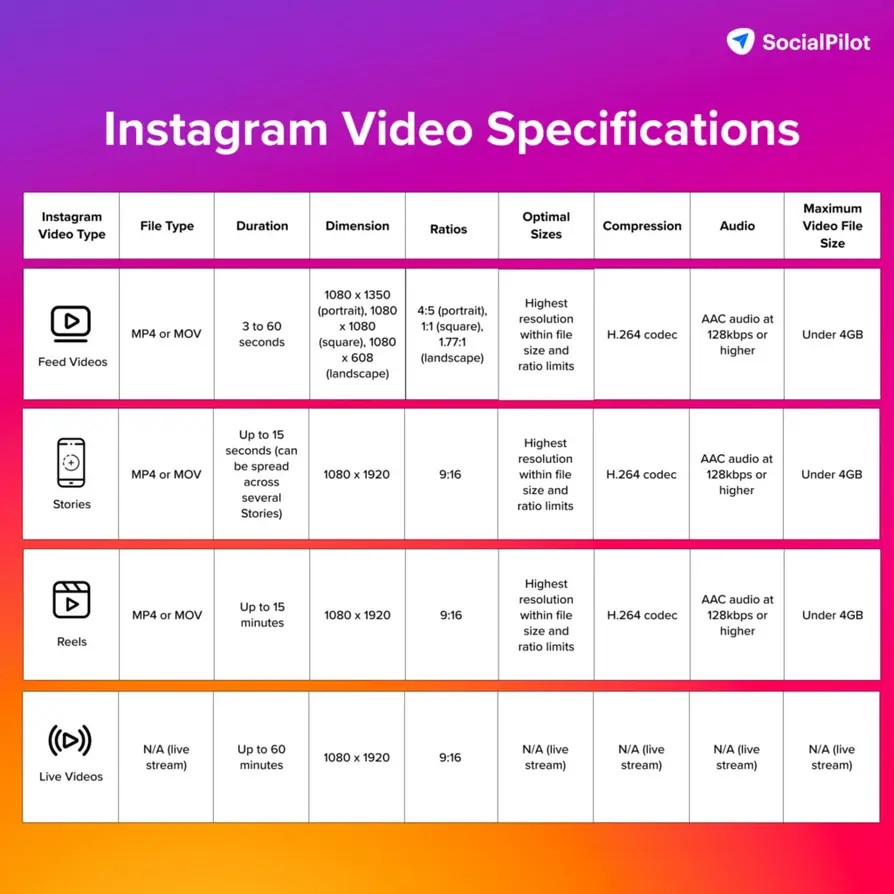
Platform-Specific Video Specs at a Glance
| Platform | Preferred Length | Aspect Ratio | Max File Size | Caption Support |
|---|---|---|---|---|
| TikTok | 9–60 seconds | 9:16 | 287.6 MB | Yes |
| 3–60 seconds | 1:1 / 9:16 | 650 MB | Yes | |
| YouTube | Up to 15 min (Std) | 16:9 | 128GB | Yes (Auto/Manual) |
| Up to 240 minutes | 1:1 / 16:9 | 10GB | Yes |
Killer Optimization Tools That Save Your Bacon
No more juggling dozens of exports or googling “TikTok aspect ratio” in a panic:
- AI Bulk Formatting: Select your platforms, and watch your video become Insta-square, TikTok-vertical, or YouTube-widescreen—all at once.
- Automated Thumbnail Generation: AI sifts through your footage for the best frame (you know, the one where you’re not blinking) and builds scroll-stopping thumbnails.
- Social Publishing Checklist: Never worry if you’ve missed a hashtag, violated a music copyright, or gone one second over the max. AI-powered checklists flag every must-do before you hit publish.
Workflow for Cross-Platform Domination
Let’s get practical—here’s how the best creators do it:
- One Upload, Many Exports: Make your masterpiece, then let AI instantly tailor it to every platform’s needs.
- Batch Scheduling: Coordinate rollouts across all your socials—boom, your audience sees you everywhere at just the right moment.
- Performance Tracking: See where you’re winning—engagement rates, click-throughs, and shares—then double down on what works, all from inside your editor.
“The days of manually tweaking every video for social media are over; AI editors now make cross-platform consistency a breeze.”
— Sarah Kim, Social Strategy Lead, ViralSpark Media
The Real Benefit: Reach More People with No Extra Stress
By using an AI-powered spec table, creators are freeing up serious time (and lowering the chance of embarrassing upload fails). This means more creativity and less “Oh no, why does my video look weird on Facebook?” Want proof? According to a 2024 survey by Sprout Social, creators who leverage AI optimization tools report saving an average of 9 hours per week on content repurposing.
AI Auto Subtitling and Voice Cloning Feature
Accessibility is no longer a “nice-to-have”—it’s essential. With millions watching videos with the sound off (hello, office scrollers and night-owl commuters), and billions across the globe wanting content in their language, AI-driven inclusivity tools have stepped into the spotlight. The latest editors build automated subtitling, hyper-accurate translation, and jaw-dropping voice cloning into the workflow—no extra apps needed.

Game-Changing Subtitle Generation
- Speech-to-Text Accuracy: Today’s AI engines are spooky good—transcribing voices (even strong accents or technical lingo) with over 95% accuracy, factoring in background noise and multiple speakers.
- Style Customization: You pick the subtitle fonts, colors, size, and screen position—or let AI choose the best for readability and engagement.
- Live Editing: Need to fix a name, jargon, or product term? Edits update instantly, and AI even flags suspicious sections for a quick check.
Multilingual Translation Opens New Worlds
- AI-Powered Translation: Instantly turn English subtitles into Mandarin, Spanish, French, or dozens of other languages—capturing idioms, emotional tone, and audience context.
- Compliant by Design: Meet ADA and international accessibility rules, opening your content to everyone (and avoiding those awkward “no subtitles” complaints).
AI Voiceover Cloning: Hollywood-Grade, No Studio Required
- Voiceover Cloning: Feed the system a brief sample of your voice—or that of your brand spokesperson—and the AI generates natural, realistic voice tracks, in any language or emotion you want.
- Automatic Lip Sync: The best editors match dubbed audio to on-screen lip movement, so localized content looks natural worldwide.
The Real-World Upside: Bigger Audiences, Faster
Did you know? According to a 2024 Nielsen report, videos with subtitles are watched 12% longer and see engagement spike by up to 80% for non-native audiences. Meanwhile, indie creators using AI voiceover tools report reaching audiences in 6+ languages, with localization taking hours, not weeks.
“With AI subtitling and voice cloning, even indie creators can reach global audiences once reserved for major brands.”
— Anjali Rao, Accessibility Advocate, Global Video Corp.
Keen for more on what AI means for the future of digital creation? Don’t miss our long-form deep dive: Anthropic Claude AI: Innovation for Enterprise 2025.
Top Online Video Editors Comparison Chart
With so many platforms claiming to be “the most powerful,” “the easiest,” or “the smartest,” picking a video editor can get overwhelming fast. What’s actually worth your money, and which bells and whistles genuinely matter? Here’s a feature-by-feature breakdown (updated for 2025) to help you filter hype from reality.
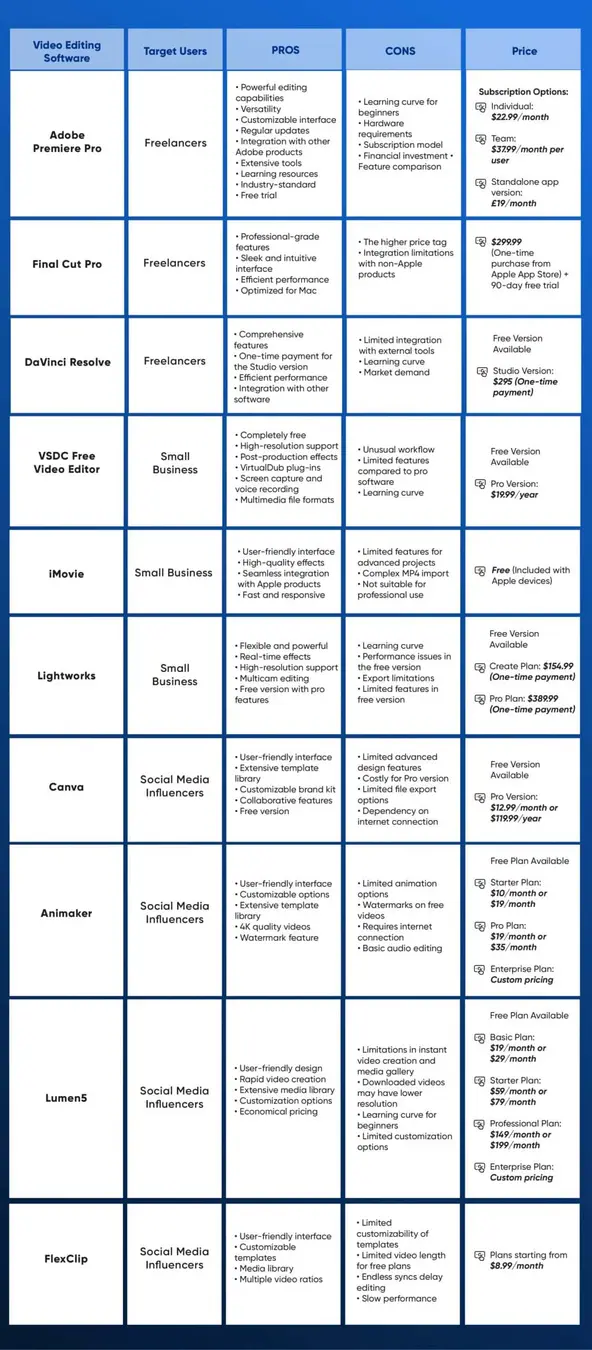
Comparing the Heavyweights: What Really Matters
| Editor | AI Dashboard | Real-Time Collaboration | Platform Optimization | Auto Subtitles | Voice Cloning | Supported Formats | Export Options | Price Range |
|---|---|---|---|---|---|---|---|---|
| EditorX AI | Yes | Yes (Teams/Clients) | All Major + Custom | Yes | Yes | 25+ Video/Audio | 4K, Bitrate Select | $15–$50/mo |
| Clipmagic Pro | Yes | Yes (Async) | Main Socials | Yes | No | 8 Video/Audio | HD Only | $12–$35/mo |
| Flowcut Studio | No | Basic | Limited | Partial | No | 5 Video | HD Only | $8–$20/mo |
| SyncVideo.net | In Beta | Yes (Live/Async) | All Major | Yes | Yes (Premium) | 12 Video/Audio | 4K + Fast Drafts | $20–$55/mo |
Notable Trends (And Why They Matter)
- AI-Powered Dashboards: These are now standard among serious platforms. If you’re using a tool without them, you’re probably working too hard.
- Voice Cloning Capabilities: While just gaining ground, this is the killer differentiator for brands aiming for global reach or multi-language campaigns.
- Real-Time Collaboration: Critical for teams working remotely, agencies managing clients, or even creators co-producing across time zones.
Bonus: Collaboration & Export Features
- Batch Multi-Format Export: Instead of waiting for several rendering rounds (and multiple “final” files), output every required format in one click.
- Client Review Links: Send clients—securely—a preview version they can watch and annotate before you publish anything live.
Price Versus Value: What Do You Actually Need?
While top-shelf AI editing may come at a premium, most leading tools let you get started for free. If you’re just growing your audience or testing new styles, free versions are often perfect. But if you want speed, advanced AI, or full-team collaboration, budget for a monthly subscription—it’s worth every penny for the hours, headaches, and missed deadlines you’ll avoid.
Expert Tip
Match your editor to your workflow. If you’re pumping out TikToks daily, fast batching and influencer-friendly features are priorities. Building long-form YouTube series for international audiences? Lean into auto-translation, voice cloning, and 4K export options compatible with your analytics stack.
For a broader take on how AI is shaking up SaaS (Software as a Service) across creative industries, check out our next big research piece: Fiverr Growth 2025: AI Freelance Opportunity.
Beyond the Basics: Real-World Scenarios, Data, and Strategies
Let’s zoom out. How are these AI-powered tools actually being used right now, and what’s on the horizon?
Real-World Example #1: Influencer Launching a Global Campaign
Take Jenna, a beauty influencer with followers from the US to Brazil. Using an AI video editor, she:
- Films content on her phone, uploads to her browser-based editor.
- Adds captions and generates instant translations for Portuguese, Spanish, and French—making each video accessible to 1.2x more of her audience overnight.
- Uses AI thumbnail recommendations based on viral makeup reels from the last 7 days.
- Schedules cross-platform releases for 10am EST, catching both American and European followers at peak time.
Her engagement rate? Jumps by 36% in just two weeks.
Real-World Example #2: Startup Marketing Team
A SaaS startup’s remote marketing team spans three time zones. The AI-powered editor lets them:
- Review and comment simultaneously on explainer videos, no matter where they’re working.
- Instantly export versions for LinkedIn, Twitter, and YouTube—each with platform-best thumbnails and lengths.
- Share password-secured links with sales leadership for pre-launch feedback—avoiding long email threads and version mix-ups.
- Analyze which platform puts up the best engagement numbers and adapt the next campaign strategy accordingly.
The result: They roll out 3x more campaigns per month without burning out.
Data and Trends Everyone Should Know
- According to Wyzowl’s 2024 Video Marketing Report, 89% of marketers say video gives them a good ROI, and 74% feel that AI tools improved both video quality and production speed.
- Hootsuite’s 2025 Social Trends Survey found creators using AI-powered editors saw a 40% reduction in workflow bottlenecks, mainly due to better collaboration and instant reformatting.
How It’s Changing Creators’ Lives
Let’s be real. Not every creator or marketer is a studio pro with high-end gear and unlimited hours. AI video editors are the great equalizer:
- College students can launch TikTok channels from their dorms, making pro-looking content without learning Final Cut Pro.
- Nonprofits can mobilize support with emotional videos subtitled in five languages—no extra cost.
- Small businesses can reach local and international shoppers, customizing product videos for Facebook, Instagram, YouTube, and even X (Twitter).
So if you’ve ever dreamed of viral reach, but felt overwhelmed by the tech and time commitment, this shift is tailor-made for you.
Conclusion: Empowering the Next Wave of Video Creators
Here’s the bottom line: AI-powered online video editors aren’t just the future, they’re the now. Whether you’re filming on your phone or managing a high-stakes digital campaign, these platforms give you legendary power—intuitive dashboards, cloud collaboration, one-click accessibility for global audiences, and speed that was unthinkable five years ago. Forget being boxed in by technical skills or old-school software headaches; you can now shape compelling, professional stories that reach, inspire, and convert at scale.
It’s not about working harder, but smarter. As AI gets even better (expect predictive edits, smarter analytics, and effortless integration with everything from Shopify to TikTok), your creativity—and your ability to connect—will only grow. Stay curious, update your toolkit, and lean into new workflows.
The next viral video could be yours.
👉 Our Website: https://ai-solutes.com/
👉 Our YouTube Channel: http://www.youtube.com/@ai-solutes
👉 Our Facebook Fanpage: https://www.facebook.com/profile.php?id=61576606911341
👉 Our X (Twitter): https://x.com/AISolutes
- Unlock Top 10 Zendesk Customer Experience Trends for 2025 to Transform CX with AI and Analytics
- GT Omega Prime vs ART: 2025 USA Comparison to Build Your Best Sim Racing Setup
- FaceApp AI Face Editing: Features, Competitor Comparison, Revenue, Viral Trends & Demographics
- Master Omnichannel Inventory Management with Increff: AI-Driven Retail SaaS for 2025 Success
- Does Stardock Fences Maximize Daily Workspace Organization? A Closer Look at Stardock’s Desktop Partitioning Framework