In this comprehensive guide, we take an in-depth look at why CapCut 2025 is redefining smart video editing for creators of all levels. Whether you’re aiming to go viral, streamline your workflow, or tap into the latest AI-powered features, CapCut’s innovative suite is designed to give you an edge in digital content creation. This article delivers actionable strategies, expert insights, real user wins, and visual comparisons that help you make informed decisions—Free or Pro, trending templates, automation, and beyond. Get ready to unlock new levels of efficiency and engagement as CapCut transforms the way you create, edit, and scale your content for TikTok, YouTube, Instagram, and more!
CapCut 2025: Interface Innovation, Feature Comparison & Viral Template Strategies for Next-Level AI Video Editing
Introduction: The Rise of CapCut’s AI-Powered Editing Revolution
It’s wild to think about how much digital video creation has changed in just a few years. Back in the day, editing a viral clip meant bouncing between confusing desktop apps and wrestling with convoluted timelines. Skip ahead to 2025, and CapCut has rewritten the rules—mixing mobile convenience with professional-grade AI that works like magic behind the scenes.
Millions of creators around the world—TikTokers, Instagram pros, YouTube entrepreneurs—count on CapCut for smart workflows, a crazy-good template library, and editing automation that basically thinks for you. Platforms are hungry for higher quality, faster turnaround, and content that pops. CapCut delivers with new tools that make it easier than ever for absolute beginners and experienced editors alike to crank out eye-catching videos.
Ready for the inside scoop? This guide breaks down real examples, walks you through the interface step-by-step, lays out the Free vs Pro decision, and dishes out tips for viral success using CapCut’s AI. You won’t just read about trends—you’ll get practical advice to level up your content game.
CapCut 2025 Editing Interface Screenshot
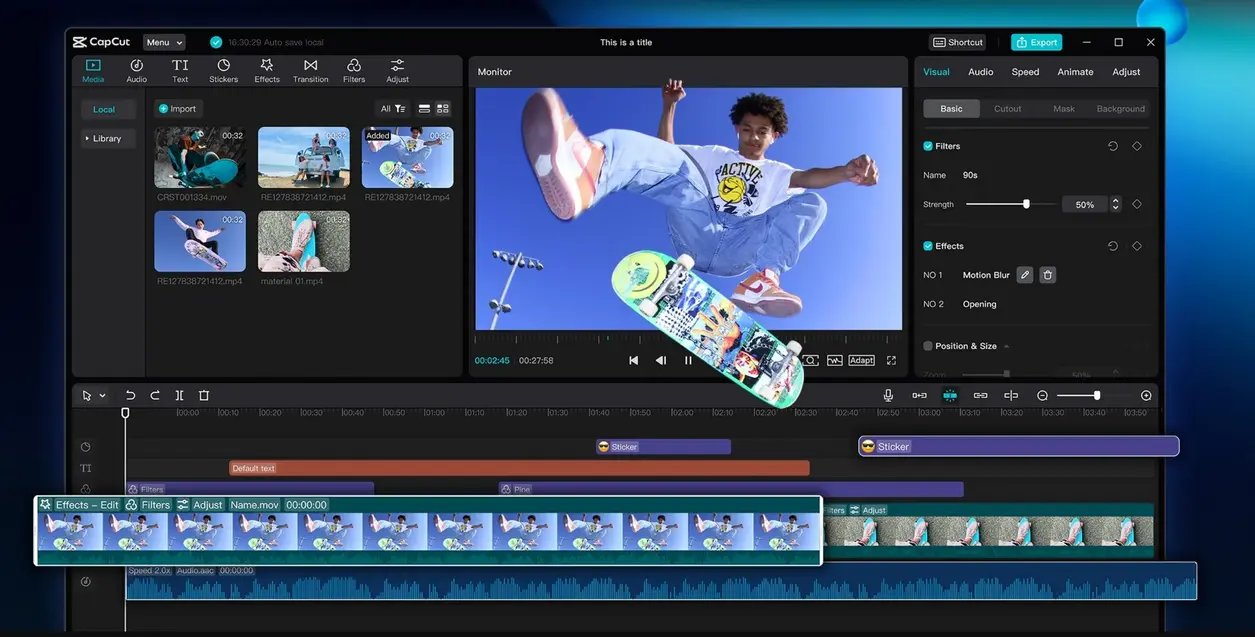
Open up CapCut in 2025 and you’ll instantly notice something different—not just a visual facelift, but a workspace built for creators who want power, speed, and serious style. This isn’t just another app update—it’s a complete rethink of how you interact with your video tools.
What Makes the CapCut 2025 Interface Stand Out?
- Centralized Timeline:
If you’re tired of squinting at tiny, messy timelines, CapCut’s new timeline control is a breath of fresh air. It gives you a crystal-clear view of your edits, multi-layer compositions, and lets you drag-and-drop like a pro—on mobile or desktop. - AI Automation Panel:
Editing doesn’t have to mean hours of manual tweaks. The AI automation panel sits conveniently on the right, ready to perform instant edits, zap away backgrounds, auto-sync your music, and even suggest fresh styles—all with a single tap. - Smart Asset Manager:
Ever tried to find that perfect clip in a mountain of footage? CapCut’s media browser now auto-categorizes assets by scene, mood, and even which social platform fits best. You’re never lost searching. - Platform-Specific Workflow Presets:
Planning a TikTok challenge or Instagram Reel? Just select the relevant preset, and CapCut magically sets up your canvas size, clip duration, and export options. It even recommends features for maximum reach. - Real-Time Preview & AI Feedback:
Before you hit export, CapCut analyzes your project—offering instant tips on pacing, transitions, and thumbnail design. Think of it as a digital editor-in-chief watching your back.
Expert POV:
Jin Park, a top digital entrepreneur, summed it up best: “CapCut’s new workspace blurs the line between mobile convenience and desktop-level power. You can switch between fast edits and complex productions without ever missing a beat.”
The takeaway? Whether you’re brand new or a seasoned editor, CapCut’s 2025 layout gives you speed and confidence. No more guessing where that crucial tool is hiding or how to automate those repetitive tasks.
Navigating CapCut’s Feature-Powered Platform: Your Guide to Smart Orientation
Ask any creator—the hardest part of learning new software isn’t the advanced stuff, it’s figuring out where everything is. CapCut gets it. That’s why its 2025 feature list focuses first on user empowerment, making sure you’re productive from the moment you launch.
CapCut’s Core Orientation Features
- Intuitive Tool Navigation:
CapCut organizes tools logically, placing the most-used features front and center. Even first-timers find their way in minutes—no YouTube tutorials required. - Onboarding Wizard:
The welcome module isn’t just a splash screen. It walks you through video cuts, overlays, and all those new AI goodies, shrinking the learning curve fast. - Contextual Tutorials:
Ever get stuck on a new feature? CapCut pops up micro-lessons exactly when you need them (“Try AI Voiceover,” “Enhance with Trending Template”), guiding you without breaking your editing flow. - Personalized Workspace:
CapCut learns with you. The settings intelligently adapt to how often you create, which platforms you prefer, and even suggest export options based on your past projects. - Globalized Multi-Language Support:
CapCut’s interface speaks your language—literally. From keyboard shortcuts to export settings, it helps creators all over the world localize content for maximum impact.
Why This Matters:
CapCut’s orientation system means you spend less time hunting for tools, and more time actually creating. That boost in productivity doesn’t just feel good—it translates to better videos, faster growth, and more chances to go viral.
CapCut Free vs Pro: The Ultimate Comparison Chart
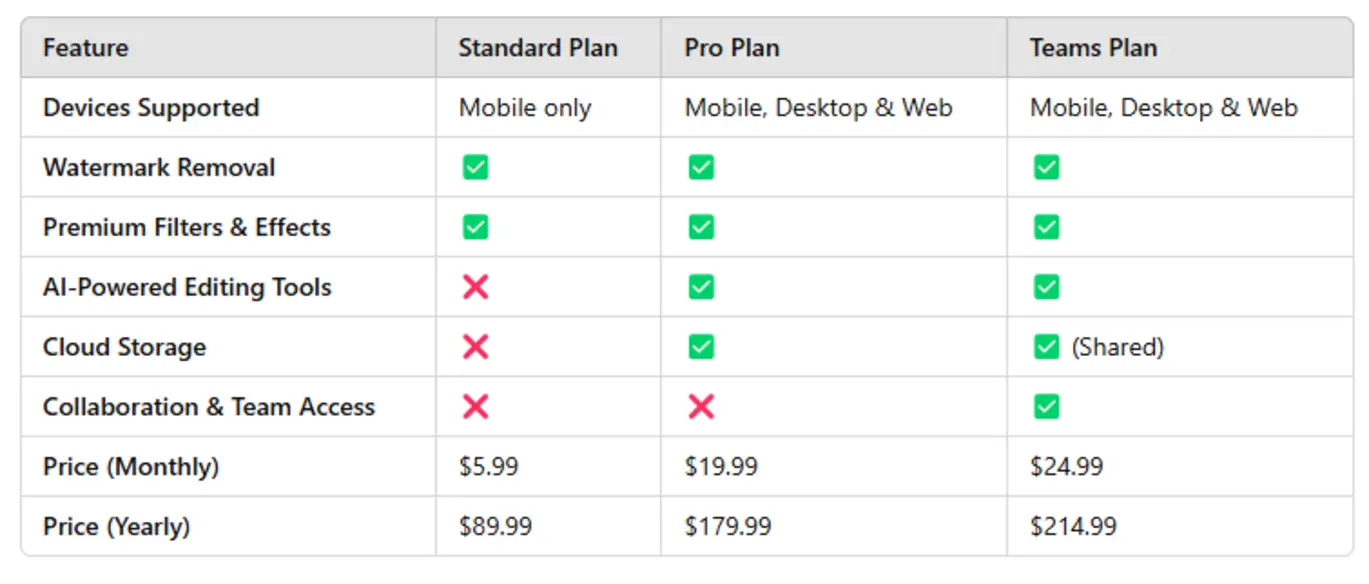
Here’s the million-dollar question for 2025: Do you need CapCut Pro, or is Free enough for your style and goals? The answer depends on what you’re aiming for—but we’ve made it easy with this head-to-head chart.
| Feature | CapCut Free | CapCut Pro |
|---|---|---|
| Export Quality | Up to 1080p, basic | 4K UHD, advanced codecs |
| AI Editing Tools | Limited | Full suite (script, voiceover, auto-color, background removal) |
| Template Access | Popular templates | Premium, trending, pro-only |
| Stock Assets | Basic library | Enhanced (footage, music, SFX) |
| Branding/Watermark | CapCut watermark | Removable, customizable |
| Batch Processing | Manual | Automated workflow queues |
| Pricing | Free forever | Monthly/annual, trial available |
What’s the Bottom Line?
Go Pro if you need:
- High-res exports or advanced codecs (for YouTube, brand promos, etc.)
- Full access to the latest AI features, like script generators and auto voiceovers
- A larger, commercial-grade template and stock library
- Brand-customized outputs (no CapCut watermark)
- Automated batch editing (think agencies, busy YouTubers)
Stick with Free if you:
- Make casual content, like quick TikToks or family videos
- Don’t need 4K or advanced editing tools
- Are still testing the waters or working on a tight budget
Pro Tip from Maria Koh (Content Strategist):
“Don’t just look at price—look at the hidden time-savings and engagement boosts. If your goals are ambitious, upgrading is a smart move, not a cost.”
Free or Pro? Deciding Your CapCut Game Plan
Choosing the right CapCut subscription is about matching your ambitions to your workflow. Let’s map a few scenarios—so you can see yourself in the mix:
Stick With Free If…
- You post less than three videos a week, mostly for fun or casual sharing.
- You don’t care about ultra-high-resolution exports or watermark-free branding.
- You’re exploring video editing and want to build confidence before upgrading.
Go Pro When…
- You run branded channels, edit for clients, or monetize your social presence.
- You want hands-free batch editing, instant platform exports, and more detailed analytics.
- Professional touches matter—custom watermarks, premium assets, and slick transitions.
Action Item:
Draw up your video calendar for the next month. Where is your time going? How much content do you plan to create, and on which platforms? Let your real goals steer your subscription choice—CapCut’s free plan is honestly impressive, but Pro opens up new levels of speed, polish, and creative freedom.
CapCut’s Trending Templates: Top 10 Picks for Viral Success
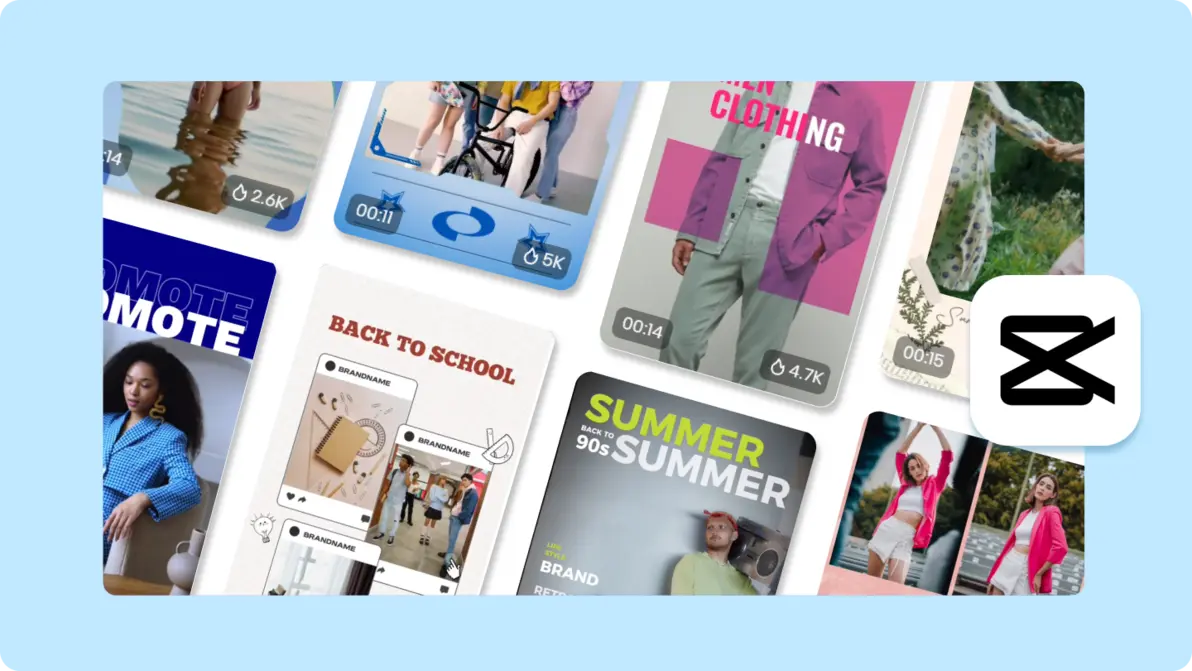
Ever have creator’s block? CapCut’s template library is your personal brainstorming engine—especially in 2025, when viral formats change almost weekly. Here’s a countdown of the top templates blowing up social media, complete with scenarios:
The Best CapCut Templates of 2025
- “Quick Cut Montage”
Perfect for TikTok challenges or IG Reels. Rapid-fire transitions, high-energy effects. This is how you ride the latest meme wave. - “Viral Carousel”
Built for Instagram—turn your travel pics or product shots into the smoothest story-style swipe animations. - “Product Showcase Pro”
Crush e-commerce goals on YouTube Shorts. Includes dynamic overlays, sales popups, and AI voiceover for instant branding. - “Day in My Life”
Make vlogs that feel personal—mood filters, timestamp overlays, journal-style cuts. - “News Flash”
Great for info edits or class updates. Bold graphics, lower thirds, voice-to-script to keep viewers hooked. - “AI Slideshow”
Blend photos and clips, group by story, add background narration. Super easy, SEO-friendly. - “Travel Reveal”
Tag your location, drop in a map overlay, animate transitions—your next trip goes viral. - “Beauty Filter Sync”
Auto-enhance with trending effects, color grades, and music. Ideal for lifestyle and fashion creators. - “Funny Reaction Cut”
Create meme moments—split-screen reactions, auto-captions, and sound bites that are pure TikTok gold. - “Business Pitch”
Presentations get a glow-up—clean graphics, AI narration, real-time CTA popups. LinkedIn loves this.
Why This Matters:
Don’t just use templates; study what’s working! CapCut shows real stats on template performance, so you know which formats are blowing up. Drag, drop, tweak—instant viral vibes.
Want to go deeper on AI-powered effects and filters? Check this guide: CapCut AI filters: Viral Video Editor 2025 Guide
Viral Content Strategy: Engineering Success with CapCut
Sure, some content goes viral by accident—but the best creators engineer their hits. CapCut in 2025 is built to help you do just that, combining data-driven hints, AI-powered shortcuts, and platform intelligence.
How to Maximize Viral Reach Using CapCut
- AI Trends Dashboard:
Want to know which song, topic, or video style is spiking? CapCut analyzes social media in real time and suggests exactly what’s hot. - Auto-Caption and Subtitle Sync:
Accessibility is a growth hack—instant captions that dance to the beat make your videos sharable in every region and get you featured. - Smart Hashtag Suggester:
CapCut recommends hashtags based on your video’s mood, style, and audience stats. Higher discovery rates, more views. - Thumbnail & Opening Hooks:
Test out multiple thumbnails—see which drives more clicks before you even publish. It’s like A/B testing for viral content. - Cross-Platform Export:
Edit once, export everywhere—TikTok, YouTube, IG, Facebook—with auto-adjusted aspect ratios and optimized metadata.
Real Success Story
Evelyn Zhao scaled from 2,000 TikTok followers to 250,000 in just three months. Her secret? Using CapCut’s “Quick Cut Montage” template, AI-endorsed trending sounds, and meticulously optimizing export settings for each platform. Her churn rate dropped; her reach exploded.
Inspiration: Real World Wins From CapCut Users
Stats are cool, but nothing beats a real-life “before and after.” Here are three creators who leveraged CapCut for insane growth:
- Lucien Ho, Fitness Coach:
By using the “Day in My Life” template with CapCut’s auto voiceover, Lucien ramped up his emotional connection on YouTube Shorts—tripling his membership signups. - Nia Torres, Jewelry Designer:
Nia’s viral jump came from batch exporting with “Product Showcase Pro”—launching across TikTok, IG, and Pinterest on the same day. Result: five times as many orders in a week. - Teacher’s Creative Update:
A group of educators started using “News Flash” templates for fun, digestible class bulletins. Student retention soared, parent engagement improved, and CapCut became the go-to school tool.
See the pattern? The right template + AI features + platform-specific strategy = explosive growth.
CapCut’s AI Editing Power: Ushering in the Future of Content Automation
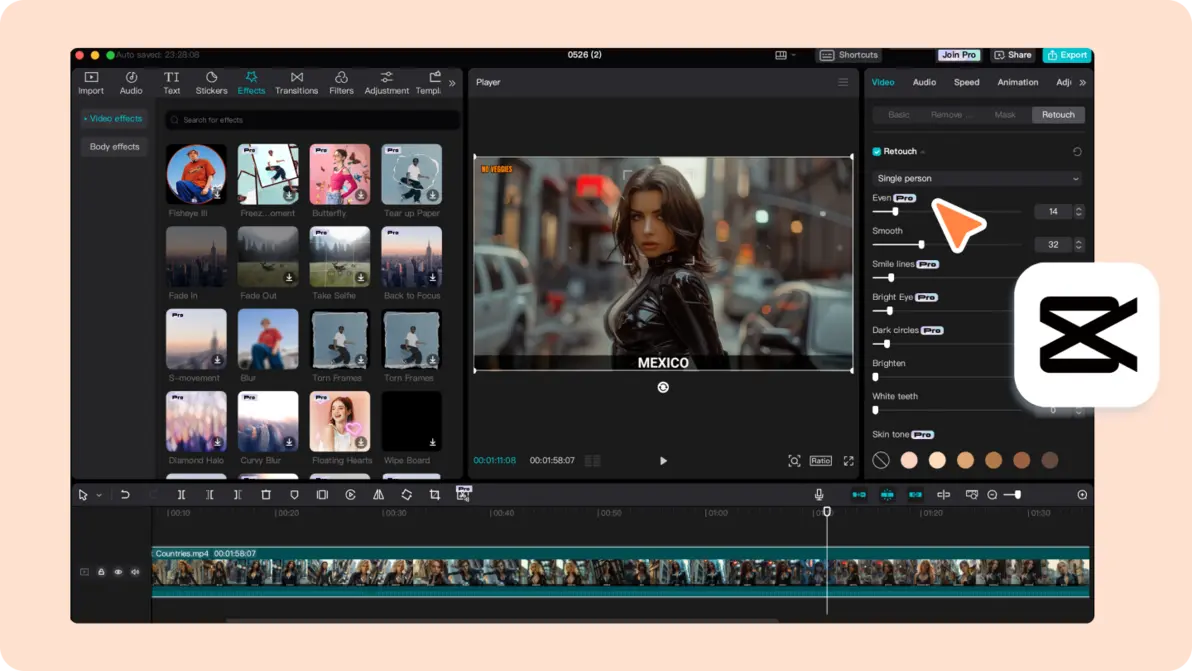
If you ever wished editing could be as simple as uploading footage and clicking ‘magic’—CapCut’s AI engine in 2025 comes pretty close. From color corrections to automated scriptwriting, this is next-level tech.
The CapCut AI Toolbox
- Auto-Edit:
Upload your raw footage. CapCut’s AI slices, color grades, and optimizes clips in seconds—matching the latest platform trends. - AI Script Generator:
Don’t know what to say? Punch in your topic and CapCut writes engaging scripts and CTAs (calls-to-action) fit for any platform. - Voiceover Synthesis:
Nervous about recording your voice? CapCut spins up natural, lively narrations that sync to your video points. - Background Remover:
Say goodbye to clutter. CapCut uses deep learning to clean up backgrounds for a pro look—no green screen needed. - Smart Music Sync:
The AI pairs your visuals with trending or copyright-safe sounds, matching emotional highs for greater impact. - Batch Automation:
Need to edit 10, 20, or 50 videos for an agency or campaign? CapCut will process and export them all in one go.
Expert Take:
As AI researcher Brent Yao says, “CapCut’s AI pipeline blends deep learning smarts with unmatched usability. Creators get speed and quality—no production crew necessary.”
But what does this mean in real terms? High-volume creators save hours per week, agencies boost turnaround, and solo creators compete at the level of massive teams.
Workflow Automation: Turning Ideas Into Viral Videos—Fast
How do you go from brainstorm to viral hit in under an hour? Here’s a sample workflow powered by CapCut automation:
- Pick Your Platform Preset:
Choose TikTok, IG, or YouTube and let CapCut load the perfect settings. - Import Footage & Let AI Sort:
CapCut automatically analyzes your clips—grouping by emotion, scene type, or even likely audience reaction. - Template + AI Editing:
Choose a trending template, apply AI for transitions, captions, beauty filters, and more. - Script & Voiceover Generation:
Let AI write your video intro or narration. Perfect for adding personality—especially if you’re camera-shy! - Thumbnail & Hashtag Optimization:
The AI picks the most clickable thumbnail and relevant hashtags for you. - Batch Export & Schedule:
Don’t wait for uploads—CapCut exports and even schedules releases to different platforms.
Why Does Automation Matter?
Recent agency studies show a 70% drop in editing time after switching to CapCut AI workflows. Engagement tripled—meaning more likes, more followers, and more opportunities.
Scaling Your Content: Smart Creation in the Age of CapCut
One viral video is cool—but building consistent momentum takes strategy. CapCut’s ecosystem is all about repeatable engagement and collaboration.
Growth Features for Scaling Creators
- Template Customization:
Don’t get stuck with generic. Tweak template colors, fonts, hashtags, and links to match your brand or product. - Performance Analytics:
Built-in metrics show how your content performs—track view rates, watch-time, and even drop-off points to keep refining. - Team Collaboration:
Editing isn’t always solo. CapCut’s cloud-based tools support team-based edits, threaded comments, and approval workflows—great for influencer squads or agency teams.
Need more insights? Dig into brand reach strategies here: CapCut viral AI features: Demographics & Social Video Trends 2025
Wrap-Up: Mastering CapCut for Maximum Viral Success
CapCut 2025 isn’t just an editing app—it’s your digital studio, content manager, and growth hacker all in one. Ready to crank up your creative output?
Your CapCut Action Checklist
- Get to know the new interface.
Take advantage of that AI workflow panel—it’s where speed lives. - Set big goals, and pick your plan accordingly.
Don’t settle for less than you need—commit to Free or Pro based on real objectives. - Update and experiment with trending templates.
Viral formats change fast—refresh your library regularly. - Automate your workflow for scale.
Batch, schedule, analyze between platforms—work smart, not just hard. - Lean into AI-powered editing.
Fast scripts, voiceovers, filters—every minute saved adds up to more content and reach.
Stick to this checklist, and you won’t just keep up—you’ll stand out. CapCut puts viral video creation, smart automation, and trend-hunting in your hands.
Watch More & Continue Your CapCut Journey
Want more hands-on tricks or deep-dive inspiration? Check these out:
- Watch more CapCut AI filters: Viral Video Editor 2025 Guide
- Watch more CapCut viral AI features: Demographics & Social Video Trends 2025
Stay Connected: Discover, Share, Learn
👉 Open CapCut Account: https://ai-solutes.com/capcut
👉 Our Website: https://ai-solutes.com/
👉 Our YouTube Channel: http://www.youtube.com/@ai-solutes
👉 Our Facebook Fanpage : https://www.facebook.com/profile.php?id=61576606911341
👉 Our X ( Twitter ) : https://x.com/AISolutes
Visual Gallery
- CapCut 2025 Editing Interface Screenshot: The pro workspace, showing off AI automation and new design cues.
- Free vs CapCut Pro Comparison Chart: Quickly compare what each version unlocks, helping you decide fast.
- CapCut Template Library Top 10 List: Visual rundown of the best viral and niche templates.
- CapCut AI Video Maker Features: See how AI takes raw footage to polished video—fast.
Jump into CapCut 2025 and let innovation, AI-driven workflows, and trending template magic redefine your content creation game. Ready for your next viral moment? The possibilities start now.