


Your best thinking rarely arrives in a neat list. It comes as a tangle — half-formed ideas, scattered notes, links between things that a flat document just can’t show. And now there’s a new flavor of the same problem: you ask an AI assistant for a plan and it hands back a wall of text you still have to make sense of. MindManager exists to fix exactly this. It’s a visual-thinking platform that turns scattered ideas, data, and information into structured mind maps, flowcharts, Gantt charts, org charts, and concept maps — so you can finally see how the pieces of a project, strategy, or brainstorm actually fit together. Originally launched by Mindjet back in 1998 and now part of the Corel (formerly Alludo) family, it’s been refined over more than 25 years into a serious business tool used by over 2 million people worldwide, with deep Microsoft integration and a 30-day free trial that needs no credit card.
For consultants, project managers, marketers, content creators, entrepreneurs, and anyone who plans complex work, that promise of visual clarity is genuinely valuable — especially as a complement to the AI tools now in everyone’s workflow. This 2026 review walks through everything that matters: what MindManager actually is, its standout features, how it works alongside AI, the full plan-by-plan pricing breakdown, how it compares to Miro, XMind, and free options, the honest limitations worth knowing, and exactly who should — and shouldn’t — invest in it.
MindManager Review 2026: The Veteran Visual-Thinking Platform That Turns Ideas (and AI Output) Into Action
Overview and Background
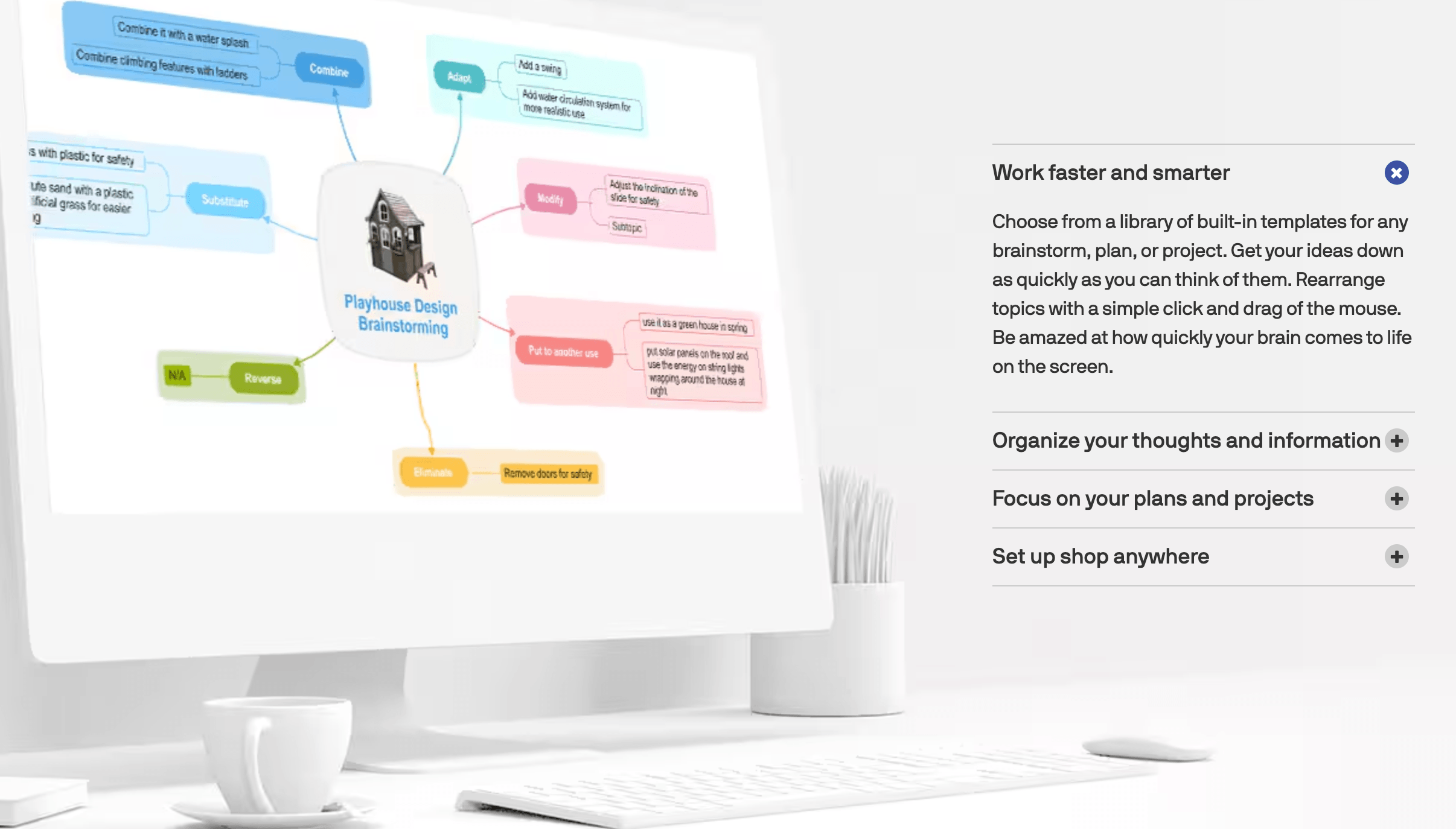
MindManager is information-visualization and mind-mapping software. At its heart, it does what mind maps have always done — start with a central idea and branch outward, connecting related concepts in a radial structure that mirrors how the brain actually works. But over the years it has grown well beyond simple mind maps into a full visual-planning platform, capable of producing flowcharts, concept maps, org charts, Gantt-style timelines, matrices, and process diagrams, all inside one application.
The software was created by Mindjet in 1998, acquired by Corel in 2016, and has since lived under Corel’s rebranded identity, Alludo. The current release is MindManager 25, which shipped in September 2025 for both Windows and Mac. It’s available as desktop software for Windows and macOS, a web app, and companion mobile apps for iOS and Android, with all your work manageable from a single account.
MindManager’s biggest practical strength is its tight integration with the tools businesses already use. It connects deeply with Microsoft Office, Outlook, Teams, SharePoint, and Project, plus Jira, so you can pull tasks, data, and files straight into a map and push your maps back out as Word documents, PowerPoint slides, PDFs, or interactive HTML5 files. For knowledge workers living inside the Microsoft ecosystem, that connectivity is a large part of the appeal.

Why MindManager Stands Out in 2026
It’s an all-in-one visualization tool, not just a mind mapper: This is the core differentiator. Where most rivals do one thing, MindManager lets you build mind maps, flowcharts, concept maps, org charts, timelines, and matrices in a single place. You can start a brainstorm as a radial map and then restructure the same information as a project timeline or a process flow — the versatility means one tool covers brainstorming, planning, and documentation rather than three separate apps.
Deep Microsoft and Jira integration: Few visual tools plug into the business stack as thoroughly as MindManager. It links with Word, Excel, PowerPoint, Outlook, Teams, SharePoint, Project, and Jira, letting you import tasks and data, sync project information, and export polished deliverables. For teams whose work already flows through Microsoft 365, that integration removes friction and keeps your maps connected to the real work.
It’s the visual layer for your AI output: This is where MindManager intersects with the AI tools that now power modern work. Rather than burying AI inside a single chatbot, MindManager positions itself as the place to organize what your AI gives you — generate ideas, outlines, or research with Microsoft Copilot, ChatGPT, Gemini, or Perplexity, then transfer and visualize those results as a structured map you can actually act on. For anyone drowning in AI-generated text, that turns a wall of words into a clear plan.
Genuine depth and maturity: Twenty-five-plus years of development show. MindManager offers power-user features that lighter apps lack — conditional automation with SmartRules, advanced filtering, tags and icons, topic properties and formulas, and rich formatting — letting you build sophisticated, data-driven maps rather than just pretty diagrams. It’s a tool that rewards depth of use.
Customizable with Apps and add-ons: Recent versions introduced an Apps system and App Studio, letting you extend MindManager’s functionality with custom tools and integrations — and a growing add-on shop offers extras built by the community and partners. You can shape the software around your organization’s specific workflow instead of bending your process to fit the tool.
A true offline desktop application: Unlike browser-only competitors, MindManager’s Windows and Mac apps run locally, so you can work on large, complex maps quickly and without an internet connection — on a plane, in a client’s office, or anywhere the Wi-Fi is unreliable. Your files are yours, stored where you choose.
Easy sharing, even with non-users: Co-editing and sharing let teams collaborate on maps, and you can export to interactive HTML5 so colleagues and clients can view and navigate a map without owning a MindManager license — a small detail that users consistently praise for keeping everyone on the same page.
Key Features and Technology
MindManager’s strength is how cleanly its capabilities map to real planning work. Here’s how the most important pieces break down.
Beyond Mind Maps: Flowcharts, Gantt, and Diagrams
The headline capability is breadth. Beyond classic radial mind maps, you can build flowcharts and process maps to document workflows, concept maps to show relationships between ideas, org charts for team structures, timeline and Gantt-style views for project scheduling, and matrices for prioritization. Because it’s all in one application, you can move fluidly between formats — capturing a messy brainstorm and then reshaping it into a structured project plan without ever leaving the tool or re-entering your information.
Microsoft Integration and Data Visualization
This is MindManager’s standout practical feature. You can attach or link files, URLs, and images to any topic, pull in Outlook tasks and emails, bring Excel data into a map, and sync with Microsoft Project and Jira for project work. When it’s time to deliver, MindManager exports cleanly to Word, PowerPoint, PDF, image formats, and interactive HTML5. The result is that a map isn’t an island — it sits at the center of your real documents and project data, acting as a visual command center for a piece of work.
Working with AI: Visualize Your Copilot and ChatGPT Output
MindManager’s AI strategy is integration-led rather than a single built-in chatbot. Its official guidance and add-ons focus on using leading AI assistants — Microsoft Copilot, OpenAI ChatGPT, Google Gemini, and Perplexity — alongside MindManager, then quickly transferring and visualizing those AI results as branches in a map. In practice, this means you can prompt an AI to generate a project outline, a list of risks, or a content plan, and then drop that output into MindManager to structure, prioritize, and turn it into an actionable visual. It’s a pragmatic approach: let the best AI tools do the generating, and let MindManager do the organizing.
Power Tools: SmartRules, Filters, and Apps
For serious users, MindManager goes well beyond drawing boxes. SmartRules let you automate map behavior — automatically changing a topic’s color, icon, or properties when conditions are met, so a task can turn red when it’s overdue, for example. Powerful filtering lets you hide or surface parts of a large map based on tags, priorities, or properties, and the Apps system plus add-on shop let you bolt on extra capabilities. These are the features that separate MindManager from casual diagramming tools and make it viable for managing genuinely complex information.
Pricing, Plans, and Package Structure
MindManager is primarily sold as an annual subscription, with a one-time perpetual license also available for those who prefer to buy outright. There’s no permanent free plan — just a full-featured 30-day free trial. The prices below are approximate and can shift with promotions and the product’s recent ownership changes, so treat them as guidance and confirm the live price on the official MindManager store before buying. Note that a perpetual license covers only the version you buy and doesn’t include future major upgrades.
| Plan | Approx. Price | What You Get | Best For |
|---|---|---|---|
| Essentials | ~$99/year | Web-based core mind mapping and essential diagramming | Light users who only need browser-based mapping |
| Professional | ~$179/year per user | Full Windows + Mac desktop and web, all diagram types, integrations, SmartRules, Apps | Most serious individual users — the recommended pick |
| Enterprise | Custom quote | Volume licensing, admin controls, security/compliance, MindManager for Teams | Larger teams and organizations |
| Perpetual License | ~$349–369 one-time | Buy one version outright; no future major upgrades included | Buyers who dislike subscriptions and update rarely |
| Students / Educators | Discounted (varies) | Dedicated academic pricing; special programs for government and nonprofits too | Verified students, educators, and eligible organizations |
How MindManager Compares to Alternatives
| Factor | MindManager | Miro | XMind | Microsoft Whiteboard |
|---|---|---|---|---|
| Core focus | Structured maps + business diagrams | Collaborative whiteboard | Mind mapping | Freeform whiteboard |
| Microsoft integration | Deep (Office, Teams, Project, Jira) | Good | Limited | Native (Microsoft 365) |
| Offline desktop app | Yes (Windows & Mac) | Mainly browser | Yes | Limited |
| Real-time team collaboration | Good (co-editing) | Excellent (its specialty) | Basic | Good |
| Price | From ~$99/year (no free tier) | Free tier + paid plans | Low-cost, free option | Free with Microsoft 365 |
vs. Miro: Miro is the darling of real-time team collaboration — an infinite, browser-based whiteboard that excels when a distributed team is brainstorming together live, and it offers a free tier to start. Its strength is open-ended visual collaboration; its weakness, relative to MindManager, is structured depth. MindManager produces cleaner, more rigorous maps, Gantt views, and business diagrams, runs offline as a desktop app, and integrates more tightly with Microsoft project tools. If your priority is a shared canvas for group workshops, Miro wins; if it’s structured planning and documentation tied into your Microsoft stack, MindManager is the better fit.
vs. XMind: XMind is the budget-friendly, cross-platform mind mapper — clean, fast, affordable, with a capable free option, and ideal if pure mind mapping is all you need. What it doesn’t match is MindManager’s business depth: the broad diagram types, SmartRules automation, deep Office and Jira integration, and enterprise features. For a student or solo user who simply wants to map ideas cheaply, XMind is excellent value; for business-grade planning and integration, MindManager is the more capable (if pricier) platform.
vs. free Microsoft Whiteboard and DIY tools: If you already have Microsoft 365, Microsoft Whiteboard is free and fine for loose, freeform sketching, and plenty of people get by with a physical whiteboard or a generic drawing app. But these are unstructured — they don’t give you proper mind-map logic, linked topics, filtering, Gantt timelines, or export to polished documents. For quick, throwaway ideation they’re enough; for serious, reusable, structured planning that feeds into your real work, that’s exactly the gap MindManager fills.
Pros and Cons
What Users Love
Remarkable versatility: One tool covers mind maps, flowcharts, Gantt charts, org charts, and more, so it handles brainstorming, planning, and documentation without juggling multiple apps.
Genuine depth and power: SmartRules, filtering, tags, properties, and rich formatting let you build sophisticated, data-aware maps that lighter tools simply can’t.
Excellent Microsoft integration: Tight links with Office, Outlook, Teams, Project, and Jira keep maps connected to real tasks, data, and deliverables.
Fast, reliable offline desktop app: Working locally on Windows or Mac means large maps stay snappy and you’re never blocked by a flaky connection.
Easy to start, easy to share: The visual interface is intuitive for newcomers, and HTML5 export lets you share interactive maps with people who don’t own a license.
Limitations Worth Knowing
It’s a premium-priced tool: Compared with low-cost or free rivals like XMind and Miro, MindManager is an investment — verified users sometimes describe it as a “luxury item,” which is hard to justify for purely casual use.
The Mac version trails Windows: The Windows app is the flagship; macOS, web, and mobile versions cover the basics but lag on some advanced features — a real consideration if you’re a Mac-first user.
No permanent free plan: You get a 30-day trial, but unlike Miro or XMind there’s no free tier to fall back on long-term once it ends.
AI is integration-based, not a deep built-in co-pilot: MindManager works alongside external AI tools rather than offering a fully native, one-click AI map generator, so the AI experience depends partly on the assistants you already use.
A learning curve for advanced features: Basic mapping is easy, but mastering SmartRules, filtering, and the deeper power tools takes time and intention.
Ownership and roadmap uncertainty: With MindManager’s parent company changing hands, it’s reasonable to watch how actively the product is developed and supported going forward before making a long-term commitment.
Who Should Use MindManager
Consultants, strategists, and project managers: If you plan complex projects and need to move between brainstorms, process maps, and timelines while staying connected to Microsoft project tools, MindManager is built for you. The Professional plan on Windows gives you the full toolkit.
Marketers and content creators: For mapping campaigns, content calendars, funnels, and ideas — and for turning AI-generated outlines into structured plans — MindManager’s visual clarity is a real asset. Professional is the sensible choice; Essentials works if you only need the web app.
Small business owners and entrepreneurs: Business planning, strategy, and documentation all benefit from seeing the whole picture in one map. Professional covers a solo founder or a small team’s individual needs well.
Teams in the Microsoft ecosystem: Organizations standardizing on Microsoft 365 should look at Enterprise and MindManager for Microsoft Teams, which add centralized licensing, admin controls, and collaborative co-editing inside Teams.
Casual or budget-conscious users: In fairness, if you only need to sketch the occasional mind map and cost matters, a free or low-cost option like XMind or Miro may serve you better — try MindManager’s 30-day trial first and only commit if its depth genuinely fits how you work.
Getting Started: Step by Step
- Start the free 30-day trial. Download MindManager from the official site and begin the full-featured trial — no credit card required — so you can evaluate it risk-free.
- Pick your platform. Install the Windows or Mac desktop app for the deepest experience, or use the web app; if you’re on a Mac, confirm the specific features you need are supported.
- Create your first map. Start from a blank central topic or choose one of the built-in templates for project plans, meeting agendas, SWOT analyses, and more, then branch out your ideas.
- Bring in your content. Pull in Office files, Outlook tasks, and project data — or paste in an outline generated by Copilot, ChatGPT, or Gemini — and turn it into structured branches.
- Use the power features. Add tags, icons, and properties, set up SmartRules to automate formatting, and use filters to focus on what matters as your map grows.
- Export, share, and choose your plan. Share via co-editing or export to HTML5, Word, PowerPoint, or PDF for colleagues and clients, then pick the subscription or perpetual option that fits before your trial ends.

Tips for Getting Maximum Value
Make full use of the 30-day trial before paying, and if you’re a Mac user, specifically test the advanced features you care about, since the Mac version trails Windows. Choose Professional rather than Essentials unless web-only mapping genuinely covers your needs, and lean on the built-in templates to get productive fast instead of starting every map from scratch. Pair MindManager with your AI assistant deliberately — generate ideas, outlines, and research in Copilot, ChatGPT, Gemini, or Perplexity, then bring that output into a map to structure and act on it, which is where MindManager earns its keep in an AI-heavy workflow. Use HTML5 export to share interactive maps with clients and teammates who don’t have a license, check for student, educator, government, or nonprofit pricing if you’re eligible, and weigh the subscription against the perpetual license based on how often you actually upgrade. Finally, given the recent ownership changes, confirm the current price and terms on the official store before committing.
Future Outlook and Final Assessment
There’s a real tailwind behind tools like MindManager. As AI assistants pour out more ideas, outlines, and research than ever, the bottleneck shifts from generating information to organizing and acting on it — and a structured visual workspace is exactly the antidote to AI-driven information overload. MindManager’s quarter-century of depth, its broad set of diagram types, and its tight Microsoft integration are durable strengths that lighter, newer tools struggle to match, positioning it well as the place where messy thinking and AI output become clear, actionable plans.
The honest caveats remain: it’s a premium-priced product with no permanent free tier, the Mac version lags Windows, its AI capabilities are integration-led rather than a deep native co-pilot, and the recent change in ownership makes the roadmap worth watching. But within those boundaries, MindManager is one of the most capable and mature visual-thinking platforms available in 2026 — and for people whose work depends on seeing the whole picture, that capability is worth the investment.
Conclusion
MindManager has spent more than 25 years perfecting one valuable idea: that the right map can turn chaos into clarity. It’s versatile, powerful, deeply integrated with the Microsoft tools businesses rely on, and increasingly useful as the visual home for the ideas your AI assistants generate. It asks for a real investment and rewards those who use its depth — so confirm it fits your platform and workflow with the free trial, pick the plan that matches how you work, and let MindManager bring order to your most complex projects, making everything easy from the first idea to the finished plan.
Ready to turn scattered ideas into clear plans?
Explore more honest reviews, tutorials and tool comparisons to find the right tech for the way you work and live — at AI Solutes, where we make everything easy.
👉 Start Your Free Trial: https://ai-solutes.com/mindmanager
👉 Our YouTube Channel: youtube.com/@ai-solutes
👉 Our Facebook Fanpage: Facebook
👉 Our X (Twitter): @AISolutes
- Does Popl Elevate Sales Follow-Up Workflows? Investigating the Popl Analytics Infrastructure
- Unlock Retail Success in 2025 with Increff SaaS: Omnichannel Inventory, Automation, and Industry Leadership
- Transform Your Support Teams with Hiver: The Ultimate Omnichannel AI Inbox Compared to Zendesk
- 3D AI Studio
- Homestyle















