Choosing the best tax software in 2026 can be overwhelming as tax laws change and new tech like 1099 auto-imports or OBBBA deductions enter the scene. FreeTaxUSA has emerged as a top contender for free federal tax filing, offering robust support for diverse tax situations, transparent state pricing, and seamless crypto/document import features. Whether you’re a freelancer, retirement-age, a crypto enthusiast, or value maximum refund with no hidden fees, this comprehensive guide will help you navigate FreeTaxUSA’s offerings, compare it against market leaders like TurboTax, and answer the most pressing FAQs for a stress-free tax season.
FreeTaxUSA: The Ultimate Guide to Free Federal Tax Filing in 2026
What is FreeTaxUSA? Overview and Brand Positioning
FreeTaxUSA has established itself as a front-runner in the world of free federal tax filing software. Founded by dedicated tax professionals, it serves millions of American filers each year with a mission: democratize tax preparation by offering IRS-accepted returns at zero federal cost.
About FreeTaxUSA as an IRS Free File Partner
FreeTaxUSA is one of a select group of providers participating in the IRS Free File program. This special partnership means users can rely on a platform that aligns strictly with IRS guidelines, ensuring legitimacy and security.
- IRS partnership ensures no hidden federal filing fees
- Extensive support for IRS forms, including advanced schedules (C, D, and E)
- Over 90 million returns processed since inception
Eligibility and Accessibility for Taxpayers
Anyone with a Social Security Number, green card, or valid residency status can use FreeTaxUSA for their federal return. The platform’s accessibility shines for:
- Salaried and hourly employees (W-2)
- Gig workers and freelancers (1099)
- Retirees, students, investors, and crypto traders
FreeTaxUSA’s web app is mobile-friendly and optimized for accessibility, making tax preparation simple for disabled filers and those with limited digital skills.

How FreeTaxUSA’s Free Federal Tax Filing Works
FreeTaxUSA’s core appeal is 100% free federal tax filing—even for complex returns. Unlike most competitors, there is:
- No upselling for additional federal forms
- Transparent, upfront pricing for state returns
- Advanced support for deductions/credits
Supported Tax Forms and Complexity Range
FreeTaxUSA supports virtually all IRS forms:
- Simple returns: W-2, standard deduction, dependents
- Self-employed and gig workers: Schedule C (business), 1099-NEC, 1099-MISC
- Investors: Schedule D (stocks, ETFs), crypto reporting
- Homeowners: Schedule A, mortgage deductions
- Retirees: Social Security, IRA distributions
- Specialty: 1099-DA (digital assets), K-1s, rental income
This breadth makes FreeTaxUSA stand out compared to “limited free” competitors.
Step-by-Step Free Federal Filing Process
- Create your account: Email, password, security questions
- Answer initial eligibility questions: Residency, income sources
- Input personal info: SSN, address, dependents
- Enter income data: Wages, 1099s, business receipts
- Claim credits/deductions: Child tax credit, EITC, OBBBA updates
- Review and e-file: Double-check for audit flags, errors
- Track refund status: Direct deposit or paper check
Checklist: Step-by-Step to Start and File with FreeTaxUSA
- Gather W-2, 1099, crypto statements
- Review OBBBA deduction changes
- Confirm dependents and filing status
- Enter income, deductions, credits accurately
- Review “Refund Maximizer” suggestions
- E-file and track IRS status
State Tax Return Filing and Pricing in FreeTaxUSA
Federal tax filing is free—but what about state returns? FreeTaxUSA’s pricing is uniquely transparent.
State Tax Pricing Structure and Transparency
- Flat fee per state return: Typically $14.99–$19.99 (no hidden charges)
- Discounts for early filers: January/February promotions
- No upselling based on complexity: Price does not vary if you have self-employment, crypto, or rental income
Table: FreeTaxUSA Federal vs State Pricing Comparison
| Platform | Federal Filing | State Filing | Complex Support (1099, Crypto, Rental) |
|---|---|---|---|
| FreeTaxUSA | Free | $14.99–$19.99 | Included |
| TurboTax Free | Free (Simple) | $39–$69+ | Limited, upgrades required |
| H&R Block Free | Free (Simple) | $39+ | Limited, upgrades required |
| TaxAct | Free (Simple) | $39.99+ | Limited, upgrades required |
| Credit Karma Tax | Free | Free | Included (but limited support) |
Who Qualifies for Free State Filing via IRS Link?
In 2026, FreeTaxUSA partners with IRS Free File to offer free state filing for select users. Eligibility includes:
- AGI beneath designated threshold (usually <$79,000)
- State residency in participating states
- Linked directly from IRS Free File portal
State filing upgrades can sometimes be waived for qualifying low-income taxpayers—check your eligibility during the onboarding process.
Key 2026 Updates: 1099 Imports, OBBBA Compliance, and New Features
The 2026 tax year ushers in substantial changes, and FreeTaxUSA has updated its platform to keep filers ahead of the curve.
How to Import 1099 Forms: Supported Types & Direct Integrations
FreeTaxUSA now supports direct import for a wide array of 1099 forms, a huge boost for gig workers, investors, and crypto traders.
- Supported 1099 types:
- 1099-NEC (nonemployee compensation)
- 1099-MISC (miscellaneous income)
- 1099-DA (digital assets, crypto)
- 1099-K (third-party payments)
- 1099-INT, 1099-DIV (interest, dividends)
- 1099-R (retirement)
- CSV Upload: Enables fast import from PayPal, Coinbase, Robinhood, Uber, and more.
- Automated error-checking: Flags mismatches, duplicates, and missing fields.
List: Supported 1099 Types for Direct Import via FreeTaxUSA
- 1099-NEC
- 1099-MISC
- 1099-DA
- 1099-K
- 1099-INT
- 1099-DIV
- 1099-R

Technical Analysis: How 1099 CSV Import Works
FreeTaxUSA’s import interface auto-maps fields, detects crypto and gig income, ensures regulatory compliance, and generates audit-safe logs. For details on 1099 CSV import technology, check out “FreeTaxUSA Free Federal Tax Filing 2026 Guide”
Watchmore: FreeTaxUSA Free Federal Tax Filing 2026 Guide
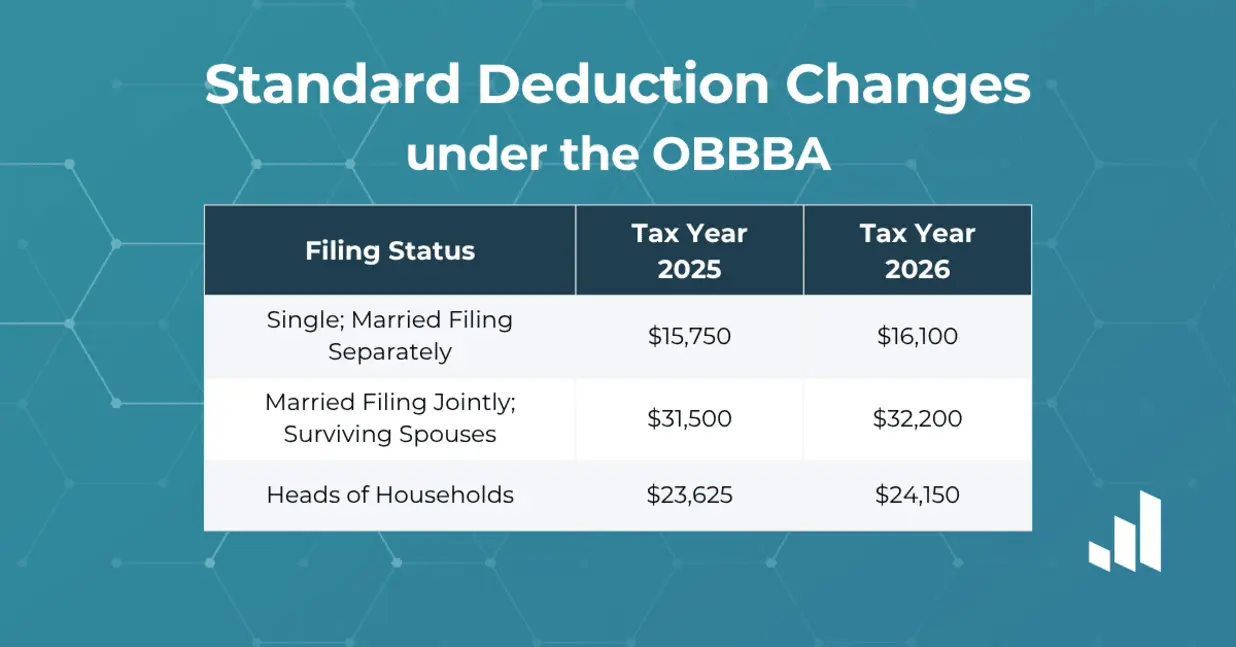
Explaining OBBBA Tax Law Changes for 2026: Deductions and Credits
The OBBBA (Omnibus Budget and Benefits Bill Amendments) brings significant changes this year:
- Expanded standard deduction: +$400 for single filers, +$800 for married/joint
- New credits for gig workers, tips, and overtime pay
- Enhanced child tax credit (CTC) and EITC eligibility
- Special deductions for seniors and retirees
FreeTaxUSA instantly incorporates new OBBBA tables, guiding filers through maximizing these benefits.

Chart: OBBBA Law Updates and 2026 Deductions
| Deduction Type | 2026 Update | Impact per Filer |
|---|---|---|
| Standard | +$400 single | Higher refund/lower tax |
| Overtime/Tips | New credit | Gig/tip workers |
| Seniors | Extra deduction | 65+ benefit |
| Dependent Child | Enhanced credit | Parents, caregivers |
New Deductions for Seniors, Overtime, and Tips
FreeTaxUSA now highlights eligibility for:
- Seniors age 65+: Automatic deduction bump (no extra paperwork needed)
- Tip earners: New credits based on actual reported tips
- Overtime workers: Credit calculated from employer 1099/W-2 reporting
Tips for Maximizing Deductions on FreeTaxUSA
- Use guided “Deductions Checker” for new OBBBA benefits
- Report all gig/tip/crypto income for maximum eligibility
- Review IRS guidance on senior credits
FreeTaxUSA vs TurboTax and Other Competitors (2026 Review)
FreeTaxUSA’s real advantage is full-featured federal filing without paywalls, while competitors restrict “free” returns to ultra-simple forms. Let’s break down the differences:
Comparing FreeTaxUSA vs TurboTax: Cost, Features, and User Experience
Table: FreeTaxUSA vs TurboTax (2026 Features)
| Feature | FreeTaxUSA | TurboTax Free | Notes |
|---|---|---|---|
| Federal Filing | Free | Free (simple) | TurboTax limits free |
| State Filing | $14.99–$19.99 | $39+ | TurboTax upsells |
| Supported Complexity | High | Low | Schedules, crypto |
| 1099/crypto imports | Yes | Limited | Robust CSV/upload |
| Audit Protection Option | Yes ($6.99) | Yes (upgrade) | Extra fee sometimes |
| Live Support | Yes ($7.99+) | Paid only | Chat/phone options |
| OBBBA Compliance | Yes | Yes | Automatic updates |
| UI Dashboard | Intuitive | Polished | Both easy to use |

Bullet Points: FreeTaxUSA’s Standout Features
- All IRS forms included for free federal filing
- Automatic OBBBA law compliance
- Direct 1099/crypto import
- No hidden “upgrade required” surprises
- Flat state pricing
Switching from Paid Tax Software to FreeTaxUSA
Making the switch is easy—FreeTaxUSA offers:
- Data import from TurboTax, H&R Block via PDF or CSV
- Guided transfer for prior-year AGI and carryover credits
- Refund enhancer tool for accurate comparison
If you’re transitioning from paid competitors, review “FreeTaxUSA: Free Federal Tax Filing – Maximize Refund 2026”
Watchmore: FreeTaxUSA: Free Federal Tax Filing – Maximize Refund 2026
FAQs and Troubleshooting with FreeTaxUSA Support
Addressing Common User Issues (Login, Import Errors, Returns)
If you encounter a snag:
- Login problems: Use email reset, security questions, live chat
- 1099/crypto import errors: Check file format, re-upload, or get support
- Return not accepted by IRS: Review flagged errors, use audit check tool
Frequently Asked Questions (FAQs)
Quick FAQ Callout Box
- Who qualifies for free federal filing? Anyone, regardless of income
- Is crypto income supported? Yes, 1099-DA import now fully integrated
- How do I maximize refunds? Use “Refund Maximizer,” claim all OBBBA deductions
- Can I file an extension for free? Yes, federal extension at zero cost
- What forms are supported? All major IRS forms, including specialty 1099s
How to Use the FreeTaxUSA Help Center
The FreeTaxUSA FAQ and help center provides:
- Step-by-step guides for import, form entry, filing issues
- Live chat and email support 7 days/week
- User community forum for peer-to-peer answers
- Automated troubleshooting for error messages and IRS rejections
Troubleshooting 1099 Imports and Crypto Reporting
- Reformat CSV if fields do not match
- Double-check crypto wallet addresses
- Use help center’s dedicated “Crypto Filing” section
Statistics: Customer Satisfaction and Reviews
Recent Satisfaction Metrics
- Over 2 million taxpayers used FreeTaxUSA in 2026 season
- 4.7/5 average rating on TrustPilot
- 95% report saving $40+ compared to competitors
- 87% cite “no surprise fees” as primary reason for loyalty
Conclusion: Why FreeTaxUSA Is the Smart Choice in 2026
As the IRS rolls out new federal benefits, crypto reporting, and OBBBA compliance, FreeTaxUSA remains the #1 tool for maximizing refunds at zero federal cost. Tech experts, digital entrepreneurs, and casual filers alike benefit from guided deductions, full-featured imports, and transparent state pricing. Ditch the paywalls and surprise fees—FreeTaxUSA puts control and savings back in your hands.
Suggested Next Read
If you want to dig deeper into free tax software, state filing, or maximizing deductions in 2026, check out “FreeTaxUSA Free Federal Tax Filing 2026 Guide – OBBBA Deductions”
Watchmore: FreeTaxUSA Free Federal Tax Filing 2026 Guide – OBBBA Deductions
Connect With Us
👉 Our Website: Watch more
👉 Our YouTube Channel: Watch more
👉 Our Facebook Fanpage: Watch more
👉 Our X (Twitter): Watch more
- I Lost Everything on My Hard Drive — EaseUS Gave It All Back
- Will Accio Work Enhance Productivity? Investigating the Accio Work Collaboration Features
- Unlock the Top Impact Trends Redefining Tech, Sustainability, and Global Growth in 2025
- Master Miracle Mastery in 2026: Activate Psychic Abilities, Align Energy, and Manifest Faster
- Spokeo Free vs Premium 2025: Unlock the Best Plan for Deep Background Checks