If you create video or images for a living, or even just for a growing social channel, you already know the new problem: there is no longer one AI model that does everything. One engine nails cinematic motion, another is better with faces, a third handles product shots, and each one wants its own subscription, its own credit system, and its own learning curve. Higgsfield AI was built to collapse that sprawl. It is an AI-native creative suite that puts leading video and image models such as Seedance, Kling, Veo, Nano Banana and GPT Image under a single login, wraps them in cinematic camera controls, character tools and marketing workflows, and lets you start with a $3 one-time access pass. Founded in 2023, Higgsfield reported an annualized revenue run rate of roughly $700 million in August 2026, raised a $400 million Series B at a $5.4 billion valuation, and describes a community of 30 to 40 million creators, which makes it one of the fastest-growing AI creative platforms of the past two years.
For marketers, short-form creators, freelancers, small business owners, and anyone producing ads or visual stories without a production crew, the pitch is immediate: more model choice, more control, and less tab-switching. The honest counterweight is the credit system, where “unlimited” comes with fine print and unused credits do not roll over. This 2026 review walks through what Higgsfield is, its models and tools, current pricing, how it compares with Runway and Kling, the real strengths and limitations, and exactly who should (and shouldn’t) subscribe.
Higgsfield AI Review 2026: The All-in-One AI Video & Image Studio That Puts the Top Models Under One Roof
Overview and Background
Higgsfield AI describes itself as an AI-native creative suite for generating and editing images, video and voice. The company was founded in October 2023 by Alex Mashrabov, who previously led generative AI at Snap, together with co-founder and chief technology officer Yerzat Dulat. Its browser-based product launched in March 2025, and the platform has since grown from a single video generator into a sprawling studio that covers cinematic video, character-consistent images, lipsync, ads, comics, storyboards, AI influencers, and agent-driven workflows.
The traction numbers are unusually large. Higgsfield announced a $400 million Series B led by DST Global on August 17, 2026, valuing the company at about $5.4 billion, up from roughly $1.3 billion in January. Coverage puts annualized revenue at about $700 million, which is a run rate rather than booked revenue, and the company has reportedly set a $1 billion target for the end of 2026. User counts vary by source and are self-reported: about 25 million on the company website at one point, more than 30 million in press coverage, and 40 million creators on the current pricing page. Treat those figures as directional, but they do suggest Higgsfield is unlikely to vanish next quarter, which matters when you are building a workflow around a platform.
It also helps to understand what Higgsfield is not. It is primarily an aggregator and workflow layer. Many of the headline video engines, including Kling, Veo, Seedance and WAN, are built by other companies and offered inside Higgsfield alongside its own Soul image models and DoP video models. Your subscription buys credits that are spent across all of them, plus access to Higgsfield’s studios, presets and tools. That structure is the source of both its biggest strength, which is choice, and its biggest complaint, which is credit math.
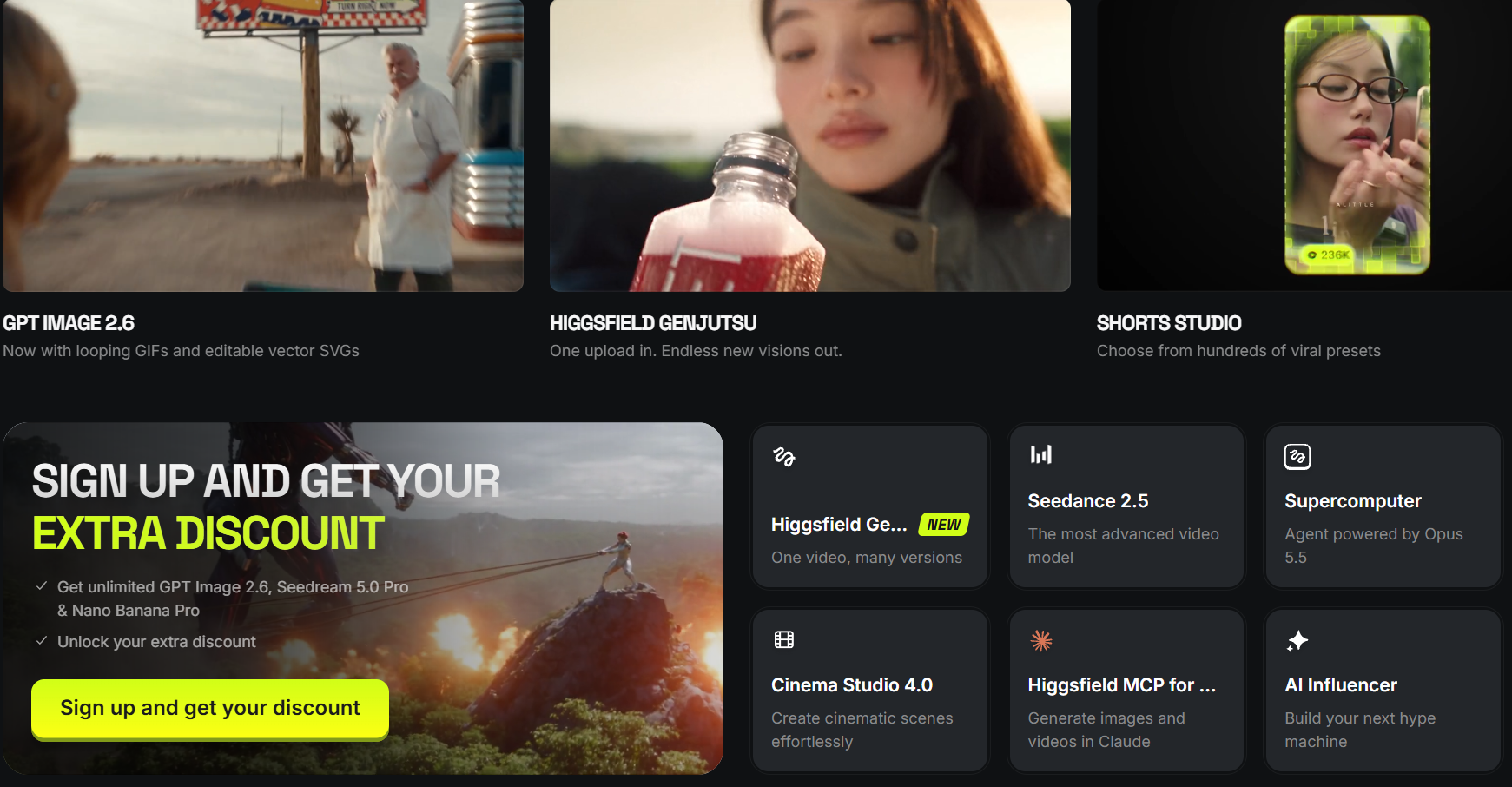
Why Higgsfield Stands Out in 2026
Every major model, one subscription: Instead of juggling separate accounts, Higgsfield lists current video engines such as Seedance 2.5 and 2.0, Kling 3.0 and 4.0, Veo 3.1, WAN 2.6, Grok Imagine 1.5 and MiniMax, alongside image models including GPT Image 2.6, Nano Banana, Flux 2, Seedream 5 and Ideogram 4.5. One third-party review counted more than 120 image, video and voice models in total. New releases tend to land quickly, although the company notes that some features roll out gradually and may not reach every user at launch.
Camera control that behaves like a camera: Cinema Studio, now promoted at version 4.0, lets you choose virtual camera bodies, lenses and a library of 70+ motion presets such as dolly, orbit and push-in, instead of hoping a text prompt interprets “slow cinematic move” the way you imagined. Independent testers repeatedly single out this layer as Higgsfield’s signature advantage.
Character consistency through Soul ID: Keeping the same face, outfit and vibe across dozens of shots is the hardest problem in AI storytelling. Soul ID and the Soul 2.0 image model are designed to lock a character in once and reuse it across images and video, which is the foundation for AI influencers, brand mascots and episodic content.
Workflows built for marketing and short-form: Marketing Studio, Ads Studio, Shorts Studio, Lipsync Studio, AI Influencer and a storyboard generator turn the raw models into repeatable production paths. Shorts Studio, for example, recreates trending short-form formats with your own character, voice and style, which is exactly the kind of shortcut busy creators want.
An agent and developer layer: Higgsfield’s Supercomputer agent can plan multi-step creative jobs for you, while an API console, an MCP/CLI option, an After Effects plugin, a ChatGPT plugin and a Chrome reference extension connect it to the tools professionals already use.
A low-risk way to try it: Many AI platforms push you straight into a monthly plan. Higgsfield currently offers a $3 one-time access pass with 40 credits and two days of unlimited Soul 2.0, which is a cheap way to test the interface before committing.
Momentum and free education: A $400 million raise and a fast shipping cadence reduce platform risk, and the free Higgsfield Academy, which the company says has drawn more than 400,000 course visitors, helps new users get good results faster.
Key Features and Technology
Higgsfield’s catalog is big, so it helps to group it by what you are actually trying to make. Here is how the ecosystem breaks down.
Cinema Studio and the Camera Toolkit
Cinema Studio is the flagship for filmmakers and ad creators. It combines image-to-video generation with reference images, selectable camera and lens looks, and motion presets that control how the virtual camera moves. Reviewers who tested it found short, single-shot scenes the strongest: shallow depth of field, emotional close-ups, convincing subject separation and natural push-ins. Structured prompts let you adjust camera movement, realism, style and duration, and shorter prompts generally stayed more coherent than very long ones in side-by-side tests. Expect a render to take roughly two to four minutes, depending on the model and queue.
The Multi-Model Library: Video and Image
This is the engine room. On the video side you can pick between engines with very different personalities: Seedance for prompt-faithful cinematic motion, Kling for fast, affordable drafts, Veo 3.1 for native audio, plus WAN, Grok Imagine and others. On the image side, Nano Banana, GPT Image, Flux 2, Seedream 5 and Ideogram cover everything from photorealism to typography and editable vector-style output. Because one balance of credits works across them all, you can sketch an idea cheaply with a lightweight model and then re-render the winner on a premium one.
Soul, Characters and AI Influencers
Soul 2.0 is Higgsfield’s own image model family, with Soul ID for reusable characters and Soul Cinema for film-style stills. Paired with Lipsync Studio and the AI Influencer mode, which ships with built-in motion templates, it lets you build a recurring on-screen persona for a brand or channel. If you plan to use real faces, review Higgsfield’s privacy terms and obtain consent from anyone you depict.
Marketing, Shorts and Creative Formats
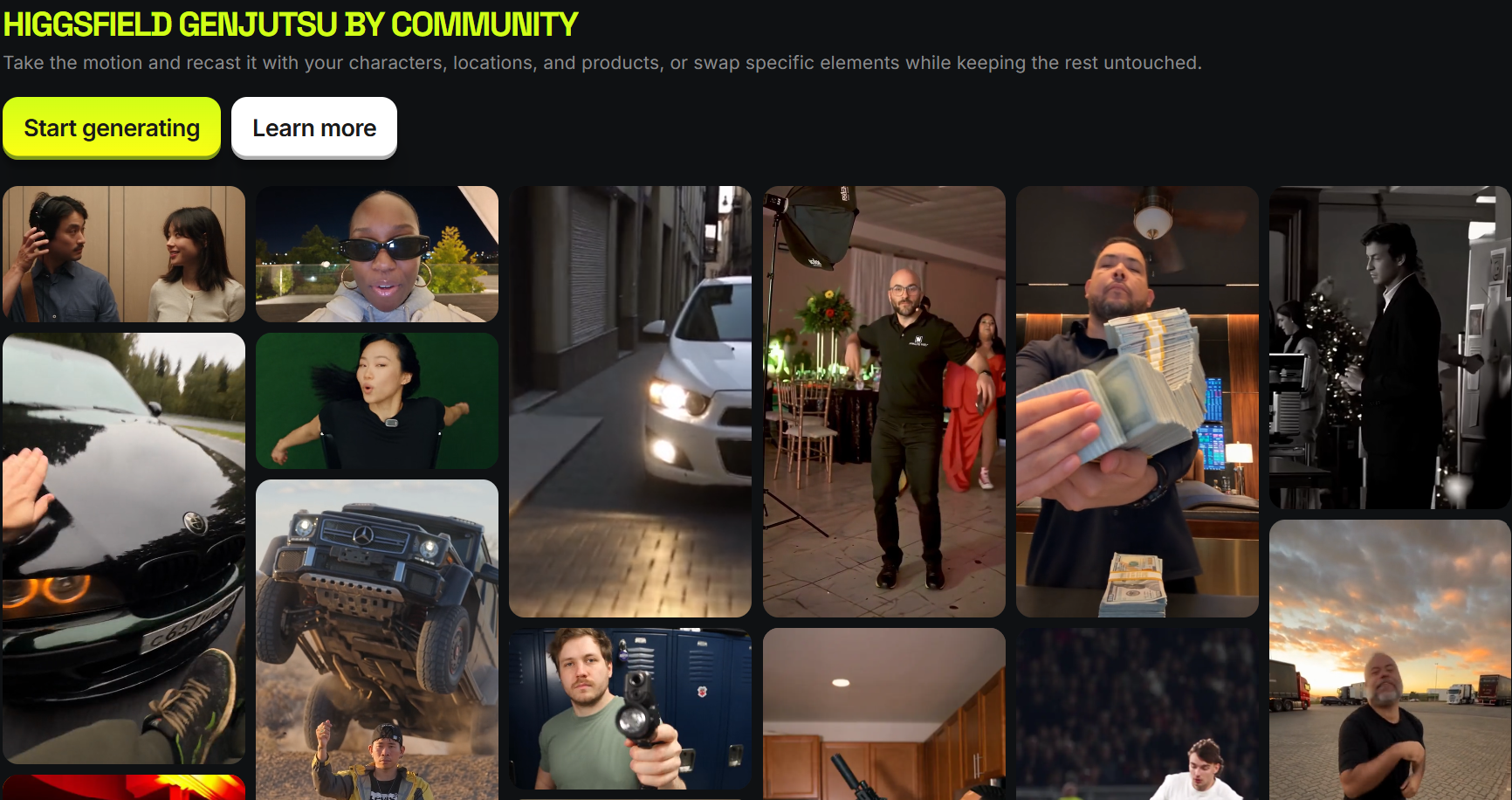
Marketing Studio and Ads Studio target product videos and ad creative, Shorts Studio and Content Factory speed up repeatable social content, and Popcorn generates storyboards before you spend credits on final shots. Newer experiments include Mangaka for comics and webtoons, Genjutsu for recasting existing motion with your own characters or products, and Playable for prompt-built mobile games. Face swap, inpainting, upscaling and an AI video upscaler round out the editing side.
Agents, Plugins and Developer Access
The Supercomputer agent aims to turn a goal into a finished sequence of steps, while MCP/CLI access and the API console are aimed at teams automating production. One detail matters here: the unlimited models and free-generation allowances included in plans work on higgsfield.ai itself and are not available through MCP/CLI, Canvas or Supercomputer, so those routes always spend credits.
Pricing, Plans, and Package Structure
Higgsfield uses a subscription plus credit model, and it changes its plan names, prices and credit amounts often. At the time of writing, the official pricing page shows a Starter plan at $15 per month billed monthly, and a Plus plan at $49 per month billed monthly or about $39 per month billed annually (a 20% discount). Other trackers recorded higher figures in recent weeks, with Starter near $19 and Plus near $59, and a higher Ultra tier historically sitting around $99 to $129 per month, so the ranges below are guidance rather than guarantees. Prices exclude VAT and local taxes and can differ by country.
Credits are spent per generation, and the cost varies widely by model. As a rough guide from recent price trackers, a Nano Banana Pro image costs about 2 credits, a 5-second 720p Kling 3.0 clip about 7 credits, a 5-second 720p Seedance 2.0 clip about 22 credits (and around 60 at 1080p), and a Veo 3.1 clip somewhere between roughly 11 and 40 credits depending on length, speed and settings. One analysis estimated that a Plus plan yields about 170 raw Kling 3.0 generations, or roughly 34 to 57 usable clips once you allow three to five attempts per keeper. Subscription credits expire each cycle, annual plans refresh credits every 30 days rather than all at once, and extra credit packs expire after 90 days.
| Plan | Approx. Price | What You Get | Best For |
|---|---|---|---|
| $3 One-Time Access | $3 once | 40 credits, 2 days of unlimited Soul 2.0, fast generations, access to top models | Testing the interface before committing |
| Starter | ~$15 to $19 per month | ~200 to 270 credits, up to 2 videos and 4 images in parallel, 3 unlimited models, 300 Soul V2 & Cinema free generations | First-time AI creators on a tight budget |
| Plus | ~$39 (annual) to $59 per month | ~1,000 to 1,200 credits, up to 6 videos and 8 images in parallel, Seedance 2.0 access, 8 to 10 unlimited models, 3,000 to 5,000 Soul V2 & Cinema free generations | Regular creators, freelancers and small marketing teams |
| Ultra | ~$99 to $129 per month | ~3,000 credits (scalable higher), up to 8 videos and 8 images in parallel, extra unlimited image models | Heavy producers and agencies |
| Team / Business | ~$50 to $80 per seat per month | Pooled credits per seat, minimum of 2 seats, shared workspace | Agencies and in-house content teams |
| Enterprise | Custom | Custom credit volumes and support | Large organizations |
How Higgsfield Compares to Alternatives
| Factor | Higgsfield | Runway | Kling AI (Direct) | Separate Model Subscriptions |
|---|---|---|---|---|
| Model variety | 15+ headline engines in one account | Own Gen-4.5 and Aleph models plus selected third-party models | Kling models only | Only what you pay for, each on its own bill |
| Camera and cinematic control | Cinema Studio with 70+ camera presets | Strong creator and editing tools | Prompt-based camera control inside Kling | Varies by vendor |
| Characters and influencers | Soul ID, AI Influencer, Lipsync Studio | Reference and consistency tools | Reference features inside Kling | Varies by vendor |
| Ads and marketing workflows | Marketing Studio, Ads Studio, Shorts Studio | General creative suite | Limited | None |
| Entry paid price | ~$15 to $19 per month | ~$12 to $15 per month | From ~$7 per month | Adds up quickly across tools |
| Best for | Multi-model experimenting and cinematic ads | Editing-centred video workflows | Budget users committed to Kling | Specialists loyal to a single model |
vs. Runway: Runway is the most direct rival among all-purpose AI video platforms. It pairs its own Gen-4.5 and Aleph models with a mature editing toolkit and also offers some third-party engines, with paid plans listed from roughly $12 per month on annual billing ($15 monthly). Higgsfield wins on sheer model choice, camera presets and ready-made marketing workflows. Runway is the stronger pick if editing and in-house models matter more to you than variety.
vs. Kling AI direct: Kling is one of the best engines available, and going straight to the source starts at around $7 per month. Inside Higgsfield, a 5-second 720p Kling 3.0 clip costs roughly 7 credits, so you get the same engine plus every other model in one place. If Kling is the only engine you will ever use, subscribing directly can be cheaper. If you like comparing models, Higgsfield pulls ahead.
vs. paying for each model separately: Subscribing to every major model individually gives you the most direct access but the messiest billing and the highest total cost. Multi-model platforms like Higgsfield (and Krea, whose paid plans start around $5 to $9 per month for image-first work) trade a small convenience premium for one login, one credit pool and one interface. For specialists who use a single model heavily, direct access can win on cost. For everyone else, consolidation is a real time-saver.
Pros and Cons
What Creators Love
Unmatched model choice in one place: Being able to test Seedance, Kling, Veo and image models on the same idea, without leaving the platform, is the headline reason people subscribe.
Cinematic control that feels intentional: Camera bodies, lenses and 70+ motion presets give outputs a film-like quality and make shots easier to direct, especially for short, single-subject scenes.
Character consistency tools that work: Soul ID and the AI Influencer mode make recurring characters practical, which is a major unlock for brands and channels.
Fast onboarding and a supportive community: Reviewers report getting a usable first video within about 15 minutes, and many praise the support team, the Discord community and the free Academy lessons.
A cheap, low-commitment entry point: The $3 access pass and sub-$20 Starter plan let you evaluate the platform without a big upfront bet.
Limitations Worth Knowing
Credits expire and premium models are expensive: Subscription credits do not roll over, and heavyweight options such as Veo 3.1 can burn through a plan quickly. Weak prompts and heavy regeneration waste credits fast, especially on Starter.
“Unlimited” has fine print: Unlimited access covers specific models, sometimes only for 7-day windows, excludes MCP/CLI, Canvas and Supercomputer, and can be slowed at peak times. Trustpilot reviews, which average roughly 4 out of 5 across several thousand ratings, include a visible minority of complaints about exactly this.
Narrow refund policy: Refunds are generally limited to the first 7 days (14 days in the EU) and only if no credits were used. Renewals are not refundable, and a service fee of up to 6% may apply. Do not buy an annual plan before you have tested the platform.
Pricing and plan names keep changing: Tiers have been renamed and repriced several times in 2026, so older reviews and screenshots may not match what you see today.
Physics, continuity and queues: Independent testing found weak results on collisions, falls and complex physical interaction, character continuity slips between shots, and occasional slow queues even on paid tiers.
No permanent free plan and no built-in editor: Higgsfield does not advertise an ongoing free tier on its pricing page, and you will need separate software to edit and publish finished videos.
Who Should Use Higgsfield
Social media marketers and ad creatives: If you produce product videos, UGC-style ads and short-form content on a weekly cadence, Marketing Studio, Ads Studio and Cinema Studio can compress days of production into hours. A Plus plan is the realistic starting point.
Solo creators, YouTubers and short-form channels: Shorts Studio, AI Influencer and Soul ID make a recurring character or format sustainable without a crew. Begin with the $3 pass, then choose Starter or Plus depending on how much video you generate.
Freelancers and small agencies: Access to many models under one bill is a genuine competitive advantage when clients ask for different looks. Plus or Ultra, or a Team plan for multiple seats, fits best.
AI filmmakers and storytellers: Cinema Studio, storyboard tools and character consistency suit narrative work, though you will still stitch scenes together in an editor. Plus annual is usually the best value if you render regularly.
E-commerce and small business owners: Product placement, lifestyle imagery and promo clips are easier to produce when you do not need a studio. Start with Starter or the $3 pass and upgrade only if you keep using it.
Who should look elsewhere: If you need credits to roll over, want guaranteed refunds after use, or need finished videos with captions, voiceover and one-click publishing, a dedicated editor or a single-model direct subscription may serve you better.
Getting Started: Step by Step
- Define what you want to make. Decide whether you need a cinematic short, a product ad, a character-led series or simple images. That choice tells you which models and studios to open first.
- Start with the $3 access pass or Starter. Create your account on Higgsfield and use the low-cost pass to explore the interface, templates and models before committing to a monthly plan.
- Open Cinema Studio and pick a model. Choose a camera look and motion preset, then select an engine. Use a cheaper model such as Kling 3.0 for drafts and keep premium models for final renders.
- Write a short, structured prompt. Describe the subject, action, camera move and mood in plain language, and add a reference image or Soul ID character if consistency matters. Shorter prompts often stay more coherent.
- Iterate at low cost, then upscale. Test a few variations at 720p, pick the winner, and only then render at higher resolution or run an upscale. This single habit saves the most credits.
- Review your credit usage and decide on a plan. After a week or two, check which models you actually used, upgrade to Plus if you consistently run out, and cancel before renewal if you do not need it.
Tips for Getting Maximum Value
Use unlimited and low-cost models for ideation, then spend premium credits only on finals, since drafting on Kling 3.0 at roughly 7 credits a clip stretches a plan much further than drafting on Veo 3.1. Check which models are currently in an unlimited window on your plan, because those 7-day promotions can make Seedance or image models effectively free for a short period. Keep prompts concise, generate at 720p first, and avoid scenes with complex physical interaction, which tend to waste credits. If you are confident you will keep using the platform, the annual option on Plus saves about 20%, but wait until after your first test month because refunds are narrow. Remember that extra credit packs expire after 90 days and are used after your subscription credits, so buy them only when you need them. Finally, treat Higgsfield as the generation stage of your workflow and plan a separate tool for editing, captions and publishing.
Future Outlook and Final Assessment
The tailwinds are strong. Demand for AI-generated video and imagery is rising across advertising, e-commerce and social media, and Higgsfield has the funding, the user base and the shipping speed to stay in the conversation. Its bet on being the neutral workflow layer on top of every leading model is smart, because creators care more about results than about which lab built the engine. Agents, plugins and API access also point toward a future where Higgsfield is as much production infrastructure as a website you visit.
The honest caveats remain. As an aggregator, Higgsfield depends on other companies’ models and their terms, which can change. Credits expire, premium generations are costly, “unlimited” is conditional, plan names and prices shift often, and the refund window is short. Within those boundaries, though, it is one of the most complete and fastest-evolving multi-model creative platforms available in 2026.
Conclusion
Higgsfield AI has built something rare in the creator-tools world: a single place where the best AI video and image models, cinematic camera control, reusable characters and marketing workflows all live together. It is fast to learn, genuinely powerful for short cinematic and ad-style content, and cheap to try. It is also a credit-driven platform with real fine print, so success depends on choosing the right plan and using your credits wisely. Marketers, creators, freelancers and small businesses who want professional-looking AI video without stitching together a dozen subscriptions will find a lot to like. That is the kind of simplification we care about at AI Solutes, where the goal is to make everything easy for professionals and digital-native users.
Ready to create cinematic AI video from one platform?
Explore more honest reviews, tutorials and tool comparisons to find the right tech for the way you work and live — at AI Solutes, where we make everything easy.
👉 Get Started: https://ai-solutes.com/higgsfield
👉 Our YouTube Channel: youtube.com/@ai-solutes
👉 Our Facebook Fanpage: Facebook
👉 Our X (Twitter): @AISolutes
- Discover How Grok AI Disrupts Real-Time Video Creation and Social Integration in 2025
- Does Medo AI Revolutionize Software Development? Evaluating the Medo AI Next-Gen Coding Framework
- The Keto Box Subscription Review 2026: Compare Snacks, Pricing, and Keto Krate Alternatives
- DeepFiction AI
- GPTforSlides