

If your car was built somewhere between 2016 and 2024, there’s a strong chance it came with factory wired CarPlay or Android Auto — and an equally strong chance you’re still digging a cable out of the center console every single time you climb in. That tiny, daily irritation is exactly what Ottocast set out to erase. Ottocast is a global in-car connectivity brand that turns your existing wired CarPlay or Android Auto into a fast, stable, cable-free experience, and — at the top of its range — into a full standalone Android computer with its own app store, AI voice assistant, split-screen multitasking, and HDMI output. With a product ladder that runs from a $49.99 thumbnail-sized dongle to Android 13 flagship AI boxes, compatibility across hundreds of vehicle models, and a wireless-adapter market that analysts expect to grow several-fold this decade, Ottocast has become one of the most complete answers to a question almost every modern driver eventually asks: why isn’t my car as smart and connected as my phone?
For commuters, mobile professionals, rideshare and delivery drivers, families sharing one vehicle, and anyone who treats the car as a second workspace, the appeal is immediate. This 2026 review walks through Ottocast’s entire ecosystem — every major product tier, the OttoDrive operating system, the latest AI features, real-world performance, current pricing, honest head-to-head comparisons, the genuine limitations, and exactly who should (and shouldn’t) buy in.
Ottocast Review 2026: The Wireless CarPlay & AI Box Ecosystem That Turns Any Wired Car Into a Smart, Cable-Free Cockpit
Overview and Background
Ottocast is a specialist maker of wireless CarPlay and Android Auto adapters, in-car AI boxes, and multimedia accessories. The brand isn’t a newcomer riding a trend: it traces its roots back to 2009, when it began life as Cartizan in Hong Kong, and it has spent well over a decade in the automotive-electronics industry. That experience shows in its guiding idea — everyone deserves to enjoy driving to the fullest, even if their vehicle isn’t the newest model on the lot. Rather than asking you to replace your head unit or buy a new car, Ottocast retrofits modern wireless convenience onto the hardware you already own.
There’s one crucial thing to grasp before going further, and it’s the single most common point of confusion for buyers. Ottocast’s simple adapters do not add CarPlay to a car that never had it. Your vehicle must already support factory wired CarPlay or Android Auto through a USB data port. If it does, Ottocast converts that wired connection into a wireless one. If your car has no CarPlay at all, a plug-in dongle won’t conjure it from nothing — though, as we’ll see, Ottocast’s display screens and AI boxes offer other routes for older vehicles.
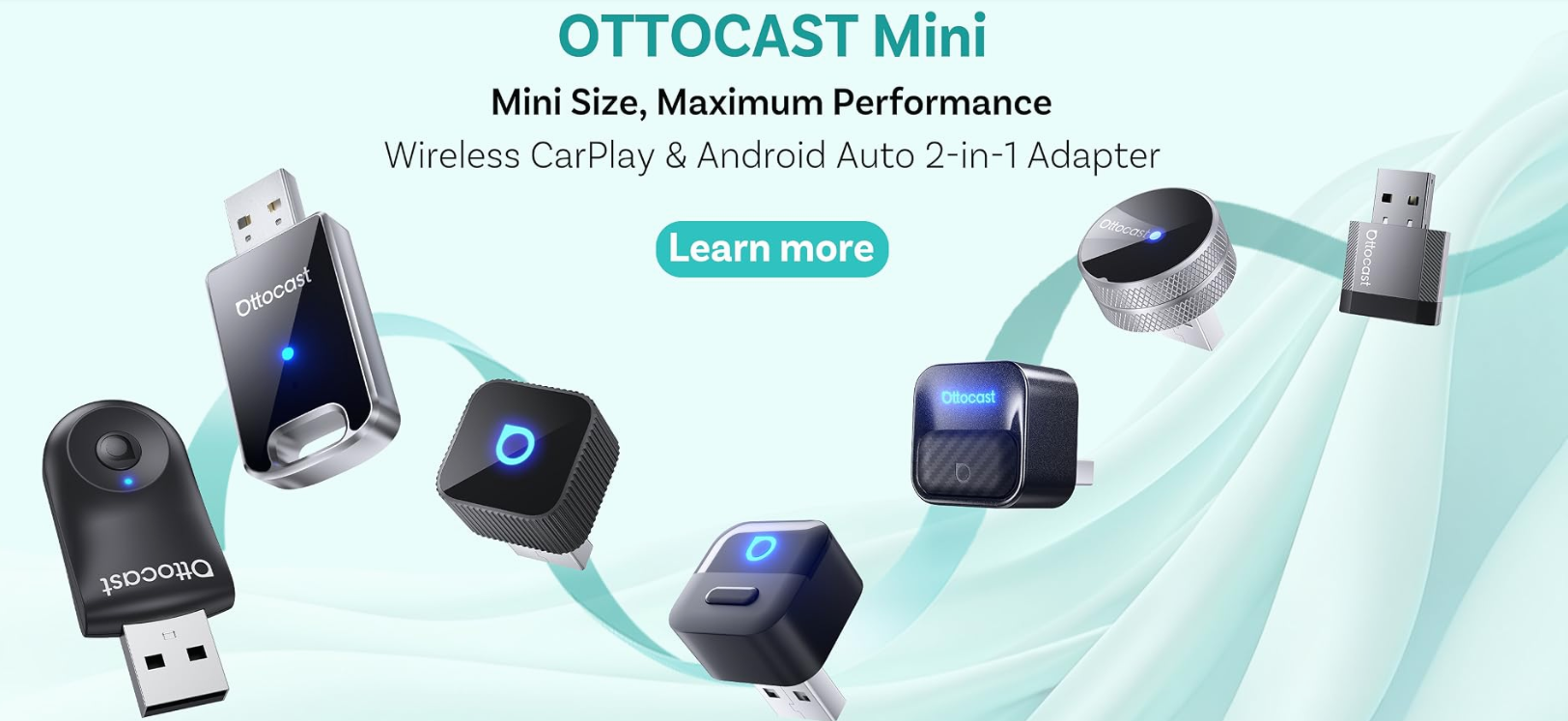
Ottocast has iterated quickly through several hardware generations, and its 2026 catalog is broad. The wireless-adapter line spans the Mini Cube 3.0, Mini Tube, and the Mini Pico/Core/Slim family, alongside protocol-specific U2 Air Pro (CarPlay) and A2 Air Pro (Android Auto) models. Above them sit media products and the OttoAiBox line running Ottocast’s proprietary OttoDrive operating system — headlined this year by the new flagship OttoAiBox P3 Pro on Android 13, plus the standard P3, the compact NanoAI, the streaming-focused E2 (including a World Cup 2026 edition), and the i3 built specifically for certain BMW models with factory wireless CarPlay. The company also sells worldwide through its own stores and major marketplaces like Amazon, where its flagship adapters carry thousands of reviews.
Why Ottocast Stands Out in 2026
Genuinely fast, plug-and-play wireless conversion: The core promise is a setup measured in seconds, not an afternoon. You plug the adapter into your car’s USB port, pair your phone once over Bluetooth, and from then on CarPlay or Android Auto launches automatically every time you start the car. Independent testing of the Mini Cube 3.0 in a Cupra Born EV had the Ottocast interface appearing in about 7 seconds and full wireless CarPlay shortly after — comfortably competitive with the best adapters in the category.
A complete product ladder, not a single gadget: Few rivals span the full range Ottocast does. At the entry level are tiny plug-in dongles that simply make CarPlay wireless. A step up sit media converters that add streaming apps. At the top are full AI boxes — standalone Android computers that run YouTube, Netflix, Spotify and more directly on your dashboard. That ladder means a $50 buyer and a $350 buyer are both served by one brand and one ecosystem.
OttoDrive — a real car-first operating system: Ottocast’s higher-end boxes run OttoDrive, now in a 3.0 release built on Android 13. Unlike a tablet awkwardly bolted onto your dash, OttoDrive is designed around driving: large, touch-friendly widgets, a customizable sidebar that keeps Maps, Spotify and Waze where your fingers expect them, and automatic day/night modes that switch as the light changes.
AI voice and assistant integration: This is where Ottocast intersects with the wider AI-tools landscape. Its newer adapters advertise built-in AI assistance, while the flagship P3 Pro ships with a dedicated AI Voice Assistant that controls navigation, music, calls and app launches hands-free — letting you keep your eyes on the road and simply ask the car to handle the small stuff.
FOTA/OTA updates for genuine future-proofing: Ottocast devices receive firmware-over-the-air updates, so as phone operating systems and car infotainment evolve, the adapter keeps pace with bug fixes and compatibility improvements instead of going obsolete a year after purchase.
Multi-device and family sharing: Models like the Mini Pico and Mini Core include a one-button switch between two paired phones — ideal for households sharing a car, couples on a road trip, or anyone juggling a work and personal phone. The adapter remembers both devices and reconnects within seconds.
Built to last, hidden by design: The latest Mini adapters are around 50% smaller than older units — some no bigger than a thumbnail — so they disappear into the USB port without cluttering the dash. Ottocast rates them for 50,000+ plug cycles, bundles both USB-A and USB-C connectors for wide compatibility, and even offers eye-catching finishes like a new Cosmic Orange for buyers who want a little personality.
Key Features and Technology
Ottocast’s strength lies in how cleanly its catalog maps to different needs and budgets. Here’s how the ecosystem breaks down.
The Wireless Adapter Line — Make Existing CarPlay Wireless
These are pure plug-and-play dongles that convert factory wired CarPlay and Android Auto to wireless — no apps, no Netflix, no operating system. That focus is a feature: reliability matters more than novelty here, and most drivers want to forget the adapter exists after the first setup. The standout is the Mini Cube 3.0 ($49.99), an ultra-compact dual-band (2.4GHz + 5GHz) adapter with a 90-degree connector, a vented body for heat dissipation, and a glass top whose logo glows to signal connection status; it comes in both USB-A and USB-C versions and several colors. Around it sit the premium aluminum Mini Tube (Wi-Fi 6, Bluetooth 5.4, ultra-fast reconnect), the Mini Pico and Mini Core (Wi-Fi 6 + Bluetooth 5.4 with one-tap switching between two phones), the tapered Mini 3.0 (Pot) for a firmer fit on rough roads, and the protocol-specific U2 Air Pro (CarPlay) and A2 Air Pro (Android Auto).
The OttoAiBox Line — Turn Your Dashboard Into a Computer
This is where Ottocast separates from simple adapters. AI boxes run their own Android operating system, so you can download and run apps — YouTube, Netflix, Disney+, TikTok, Spotify — directly on your car screen, independent of your phone. The standard OttoAiBox P3 is the media-hub workhorse: Android 12, a Qualcomm Snapdragon 665, 8GB RAM and 128GB storage, mini-HDMI output, SIM and SD slots, built-in CloudSIM so it stays online without your phone’s hotspot, GPS, dual-band Wi-Fi, and customizable ambient lighting. The 2026 flagship OttoAiBox P3 Pro steps up to Android 13, an 8-core chipset, OttoDrive 3.0, Bluetooth 6, 5G Wi-Fi, CloudSIM, HDMI out, and the dedicated AI Voice Assistant. Rounding out the line are the voice-first NanoAI with an integrated display, the streaming-focused E2 (offered in a World Cup 2026 edition), and the BMW-specific i3.

Ottocast Media & Display — Entertainment, Cameras, and Screens
Between the adapters and the full AI boxes, Ottocast offers focused multimedia products. The Play2Video Pro / Ultra converts wired CarPlay to wireless and adds a curated set of built-in streaming apps without the full computer overhead of a P3. The Car TV Mate Pro / Max family lets you plug an HDMI device — a Fire TV Stick, a games console — into your car screen, making a budget entertainment hub and an easy gift. Mirror Touch mirrors and controls your phone screen, while the Cabin Care bundle pairs wireless CarPlay with a rear-seat monitor so parents can keep an eye on the back seat without turning around. For vehicles (and even motorcycles) lacking a usable factory display, the newer Ottoscreen AI and ScreenFlow add standalone touchscreens with cameras and GPS.
Performance, Connectivity & Hardware
In real-world use, Ottocast’s CarPlay performance is strong: quick boot times on the better adapters (the Mini Cube surfaced its interface in about 7 seconds in independent testing), near-instant call return, and modest thermals for such small devices. Connectivity leans on 5GHz Wi-Fi — and Wi-Fi 6 on the newest units — for low-latency data transfer, with Bluetooth 5.4 for pairing, plus CloudSIM, GPS and HDMI on the AI boxes. Audio is a quiet highlight too: Ottocast advertises CD-quality wireless sound it rates as meaningfully better than a standard Bluetooth connection for music and calls.
Pricing, Plans, and Package Structure
Ottocast sells hardware outright — there’s no mandatory subscription to use a device. Pricing scales with capability, from sub-$50 adapters to premium AI boxes. The one recurring cost to be aware of is the P3 Pro’s optional AI Voice plan, which includes a free allowance and then moves to paid query packs if you keep using it heavily. Everything else is a one-time purchase, and Ottocast frequently runs discount codes that push the listed prices below — so the ranges here are guidance, not gospel.
| Product | Approx. Price | What You Get | Best For |
|---|---|---|---|
| Mini Cube 3.0 | $49.99 | Ultra-compact 2-in-1 wireless adapter, dual-band, auto-reconnect, USB-A/C | Best value for most buyers; clean, discreet upgrade |
| Mini Tube | ~$69.99 | Premium aluminum body, Wi-Fi 6, BT 5.4, ultra-fast reconnect | Daily drivers wanting a sturdier, more premium adapter |
| Mini Pico / Core | ~$55–80 | Wi-Fi 6 + BT 5.4, one-tap switching between two phones | Families / two-phone households sharing a vehicle |
| U2 Air Pro / A2 Air Pro | ~$50–70 | Protocol-specific adapters (CarPlay-only / Android Auto-only) | Drivers who need just one platform, cleanly |
| Play2Video Pro / Car TV Mate | ~$80–130 | Wireless conversion + built-in streaming apps / HDMI input | Entertainment on a budget; easy gift; passenger video |
| OttoAiBox P3 | ~$250–320 | Android 12, Snapdragon 665, 8GB+128GB, HDMI, CloudSIM, GPS | A full in-car media hub for passengers and road trips |
| OttoAiBox P3 Pro (2026 flagship) | ~$330–400 | Android 13, 8-core, OttoDrive 3.0, AI Voice, BT 6, 5G Wi-Fi | Power users who want the fastest, smartest in-car system |
How Ottocast Compares to Alternatives
| Factor | Ottocast | Carlinkit | AAWireless | OEM Dealer Upgrade |
|---|---|---|---|---|
| Product range | Adapters → media → AI boxes → screens | Adapters + AI boxes | Adapters (focused) | Single fixed solution |
| Standalone OS & apps | Yes (OttoDrive / Android 12–13) | Yes (on AI box models) | No | No |
| AI voice assistant | Yes (P3 Pro, newer adapters) | Limited | No | Via phone only |
| CarPlay boot speed | ~7–12 sec (competitive) | Comparable | Comparable | Instant (native) |
| Entry price | $49.99 | ~$40–60 | ~$70+ | Often $300–1,000+ |
| Best for | Range, entertainment, AI-forward buyers | Budget all-rounder | Android Auto purists | Drivers wanting factory integration |
vs. Carlinkit: Carlinkit is Ottocast’s most direct rival and often a touch cheaper at the entry point, with a comparable AI-box line. Ottocast’s edge is the breadth of its catalog and its more polished OttoDrive interface and AI-voice integration. For a basic budget dongle, the two are close; for a refined ecosystem you can grow into, Ottocast pulls ahead.
vs. AAWireless: AAWireless is well-regarded among Android Auto enthusiasts for its tuning and reliability, but it’s narrowly focused on adapters and lacks Ottocast’s media boxes, displays and AI features. If you only want the cleanest possible Android Auto bridge and nothing more, it’s worth a look; if you want options to expand into later, Ottocast is the more versatile platform.
vs. an OEM dealer upgrade or a new head unit: A factory wireless upgrade (where it’s even offered) or an aftermarket head-unit swap delivers the most seamless, native experience — but typically runs from hundreds to over a thousand dollars and may require professional installation. Ottocast achieves the large majority of the day-to-day benefit for a fraction of the price and a five-minute, no-tools install. For most drivers, that trade is a clear win.
Pros and Cons
What Drivers Love
Effortless daily use: Once paired, it just works — start the car and CarPlay or Android Auto appears on its own within seconds. The friction of plugging in a cable every trip disappears entirely, which is the whole point and the feature owners praise most.
Fast CarPlay and clean audio: Real-world boot times sit in the competitive 7–12 second range, calls return almost instantly, and the CD-quality audio is a noticeable step up from standard Bluetooth for music lovers.
Something for every budget: Whether you want a $50 invisible dongle or a $350+ Android computer for the dashboard, one brand covers the whole spectrum — and the upgrade path is clear as your needs grow.
Discreet, durable hardware: The newest Mini adapters are tiny enough to vanish into the port, rated for tens of thousands of plug cycles, and shipped with both USB-A and USB-C connectors so they fit almost any car.
A forward-looking AI angle: Built-in AI voice control on the flagship boxes puts Ottocast ahead of plain adapters and aligns the car with the way people increasingly use AI tools everywhere else in their day.
Limitations Worth Knowing
Your car must already have wired CarPlay/Android Auto: This is the number-one source of disappointed buyers. The simple adapters do not add CarPlay to a car that lacks it — confirm your vehicle supports factory wired CarPlay or Android Auto before ordering.
Android Auto boot times can lag CarPlay: While CarPlay launches in 7–12 seconds, Android Auto can take longer on some phone-and-car combinations — noticeably slower, and worth weighing if you’re an Android-first driver doing lots of short trips.
Not for BMW or Tesla (with the basic adapters): Standard Mini dongles aren’t compatible with BMW or Tesla. BMW owners with factory wireless CarPlay need the dedicated i3 box instead.
AI Voice has paid tiers: The P3 Pro’s AI Voice Assistant is free for an initial allowance, then moves to paid query packs. It’s optional, but factor it in if hands-free voice control is central to why you’re buying.
AI boxes ask a little more of you: Running a full Android system means occasional app-store quirks and the need to sideload if Google Play stumbles. The Mini adapters are foolproof; the AI boxes reward slightly more tech comfort.
Wireless carries small trade-offs vs. a cable: As with any wireless adapter, you may see rare reconnection hiccups or marginally higher latency than a hardwired connection. For the vast majority of daily driving it’s a non-issue — but it’s honest to name it.
Who Should Use Ottocast
Daily commuters and mobile professionals: If you spend real hours in the car each week, removing the plug-in ritual and gaining hands-free navigation, calls and voice control is a meaningful quality-of-life upgrade. A Mini Cube 3.0 or Mini Tube is the obvious starting point.
Families sharing one vehicle: The dual-device Mini Pico or Mini Core, or the rear-seat Cabin Care bundle, are built for households where two phones and a back seat full of kids are the daily reality.
Rideshare, delivery and gig drivers: Constant in-and-out makes auto-reconnect and reliable navigation especially valuable, and a cleaner cabin with no dangling cable presents better to passengers.
Road-trippers and entertainment seekers: If long drives, camping or keeping passengers happy with Netflix and YouTube matter to you, step up to a P3, P3 Pro or Play2Video for a genuine in-car media center.
Owners of capable-but-older cars: The sweet spot is any 2016–2024 vehicle with wired CarPlay that never got the wireless update — Ottocast brings it up to current standards without a dealer visit or a new car.

Getting Started: Step by Step
- Confirm compatibility first. Make sure your car supports factory wired CarPlay or Android Auto. Ottocast’s site has a vehicle checker, and you can verify in your owner’s manual or by plugging your phone in with a cable to see if CarPlay launches.
- Pick the right tier. Choose a Mini adapter to simply go wireless, a Play2Video or Car TV Mate for streaming, or an OttoAiBox if you want a full Android system. Match the USB port type (A or C) to your car.
- Plug it in. Insert the adapter into your car’s USB CarPlay port. It draws power from the port — no battery, no separate cable.
- Pair once. Enable Bluetooth and Wi-Fi on your phone, select the Ottocast device when it appears, and accept the connection. Android users should confirm their phone supports 5GHz Wi-Fi.
- Drive. From now on, CarPlay or Android Auto connects automatically each time you start the car — typically within 5–12 seconds.
- Keep it updated. Allow FOTA/OTA firmware updates so your adapter stays compatible with new phone and car software over time.
Tips for Getting Maximum Value
Always check for an active discount code before checkout — Ottocast runs frequent promotions, and the listed price is rarely the lowest available. Buy the right port version (USB-A vs USB-C) the first time to avoid leaning on the bundled converter, which adds a little bulk. If you’re an Android user sensitive to boot speed, prioritize a newer Wi-Fi 6 model and verify your phone’s 5GHz support. Take advantage of the 30-day return window to confirm your specific car-and-phone combination behaves the way you expect. And resist over-buying: most drivers are perfectly served by a sub-$70 Mini adapter — only step up to an AI box if in-car streaming and a smart OS are features you’ll genuinely use, not just nice-to-haves on paper.
Future Outlook and Final Assessment
The tailwinds favor Ottocast. The wireless-adapter market is projected to grow strongly through the early 2030s, CarPlay compatibility now sways a large share of new-car purchases, and the millions of vehicles already on the road with wired-only CarPlay represent a vast, ready-made upgrade audience. Ottocast’s bet on bringing a real operating system and AI voice control into the car — rather than just bridging a cable — positions it well for a future where drivers expect their vehicle to be as connected and intelligent as every other screen in their life.
The honest caveats remain: confirm your car has wired CarPlay before buying, expect Android Auto boots to sometimes trail CarPlay, and budget for the optional AI Voice plan if that’s a priority. But within those boundaries, Ottocast delivers one of the broadest, most polished, and most genuinely useful in-car connectivity lineups available in 2026 — and it does so at prices that make the upgrade an easy yes for the vast majority of drivers.
Conclusion
Ottocast has built something rare in the accessory world: a single, coherent ecosystem that meets drivers exactly where they are — from a five-second wireless fix for one small annoyance to a complete Android-powered, AI-assisted in-car computer. It’s fast where it counts, broadly compatible, sensibly priced, and forward-looking in its embrace of voice and AI, backed by a company that has been in automotive electronics since 2009. Confirm your vehicle’s compatibility, choose the tier that matches how you actually drive, and Ottocast makes one of the most-used spaces in your daily life feel modern again — making everything easy, on every drive.
Ready to cut the cable and upgrade your drive?
Explore more honest reviews, tutorials and tool comparisons to find the right tech for the way you work and live — at AI Solutes, where we make everything easy.
👉 Shop Ottocast: Check the Latest Price on Amazon
👉 Our YouTube Channel: youtube.com/@ai-solutes
👉 Our Facebook Fanpage: Facebook
👉 Our X (Twitter): @AISolutes
- Does HelpDesk Streamline Customer Support? Evaluating the HelpDesk Ticket Management Suite
- Unlock 2026 Luxury Fashion Trends and Responsible Shopping with NetaPorter’s Ultimate Guide
- Should Devs AI Optimize Workflow? Analyzing the Devs AI Development Platform
- Codemia
- Niche Scraper 2025: Dominate Dropshipping with Data-Driven Product Research, Validation and Competitor Analysis















